
ആമുഖം
The Heil Sound CC-1-XLR-Y is a high-quality microphone cable designed to connect Heil microphones with a standard 3-pin XLR output to Yaesu, Kenwood, or Icom transceivers featuring an 8-pin round microphone input. This cable also includes a 1/4 inch (6.35mm) jack for an external Push-To-Talk (PTT) switch, providing versatile control for your amateur radio setup. Constructed with commercial audio 'Heilwire', it ensures reliable and clear audio transmission.
പ്രധാന സവിശേഷതകൾ
- Designed for Yaesu, Kenwood, and Icom transceivers with 8-pin round microphone inputs.
- Connects to Heil microphones with industry-standard 3-pin balanced XLR output connectors.
- Integrated 1/4 inch (6.35mm) jack for external Push-To-Talk (PTT) switch.
- Constructed with durable commercial audio 'Heilwire' for optimal performance and longevity.
- Cable length of 8 feet (approximately 2.4 meters).
സജ്ജീകരണ നിർദ്ദേശങ്ങൾ
Follow these steps to properly connect your Heil microphone to your transceiver using the CC-1-XLR-Y cable.

ചിത്രം 1: ഓവർview of the Heil Sound CC-1-XLR-Y microphone cable, showing the coiled cable and both connector ends.
- കണക്ടറുകൾ തിരിച്ചറിയുക:
- ദി 8-pin round female connector is for your Yaesu, Kenwood, or Icom transceiver's microphone input.
- ദി 3-pin XLR female connector is for your Heil microphone's XLR output.
- ദി 1/4 inch (6.35mm) jack is for an optional external PTT switch.
- Connect to Microphone: Insert the 3-pin XLR female connector of the CC-1-XLR-Y cable into the male XLR output of your Heil microphone. Ensure it clicks securely into place.
- Connect to Transceiver: Plug the 8-pin round female connector into the corresponding 8-pin round microphone input on your Yaesu, Kenwood, or Icom transceiver. Gently twist and push until it is fully seated.
- Connect PTT (Optional): If using an external PTT switch, plug its 1/4 inch (6.35mm) male connector into the 1/4 inch jack on the CC-1-XLR-Y cable.
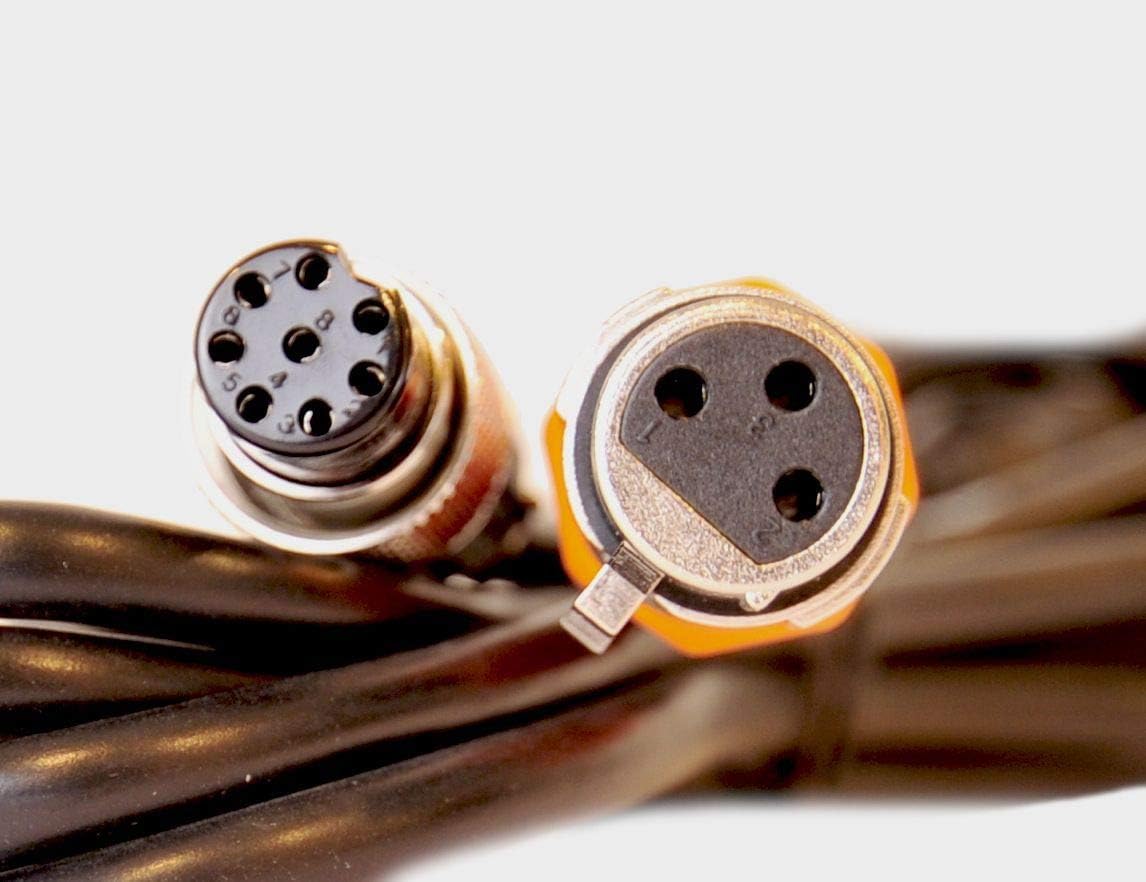
ചിത്രം 2: ക്ലോസപ്പ് view of the 8-pin round female connector and the 3-pin XLR female connector, highlighting their distinct designs.
പ്രവർത്തന നിർദ്ദേശങ്ങൾ
Once the cable is correctly connected, operate your microphone and transceiver as usual. The CC-1-XLR-Y cable facilitates the audio signal transmission and PTT control between your Heil microphone and compatible transceiver.
- Ensure your transceiver's microphone input settings are configured correctly for an external microphone.
- If using an external PTT switch, activate it to transmit. If your microphone has an integrated PTT, the external PTT jack on the cable will typically override it or function in parallel, depending on your transceiver's configuration.
- Adjust microphone gain levels on your transceiver for optimal audio quality and to prevent over-modulation.
മെയിൻ്റനൻസ്
Proper care will extend the life and performance of your CC-1-XLR-Y cable.
- സംഭരണം: When not in use, coil the cable loosely. Avoid tight coiling or sharp bends, which can damage the internal wiring.
- വൃത്തിയാക്കൽ: Keep connectors clean and free of dust and debris. Use a dry, lint-free cloth to wipe down the cable and connectors. Avoid using liquid cleaners directly on the connectors.
- കൈകാര്യം ചെയ്യൽ: Always grasp the connector housing when plugging or unplugging the cable, not the cable itself. This prevents strain on the cable-to-connector joint.
- പരിസ്ഥിതി: Avoid exposing the cable to extreme temperatures, direct sunlight for prolonged periods, or moisture.
ട്രബിൾഷൂട്ടിംഗ്
If you encounter issues, review ഇനിപ്പറയുന്ന പൊതുവായ ട്രബിൾഷൂട്ടിംഗ് ഘട്ടങ്ങൾ.
- ഓഡിയോ ട്രാൻസ്മിഷൻ ഇല്ല:
- Ensure all cable connections (microphone to cable, cable to transceiver) are secure.
- Verify the microphone is powered on (if applicable) and functioning correctly.
- Check your transceiver's microphone input settings and gain levels.
- If using an external PTT, ensure it is connected and functioning.
- Intermittent Audio or Poor Quality:
- Inspect the cable for any visible damage, kinks, or frayed sections.
- Ensure connectors are clean and free of corrosion or debris.
- Test with another known-good cable if available to isolate the issue.
- PTT Not Functioning:
- Confirm the external PTT switch is correctly plugged into the 1/4 inch jack.
- Test the PTT switch independently if possible.
- Check transceiver settings related to external PTT control.
സ്പെസിഫിക്കേഷനുകൾ
| ബ്രാൻഡ് | HeiL |
| മോഡലിൻ്റെ പേര് | Heil Sound CC-1-XLR-YB |
| ഇനം മോഡൽ നമ്പർ | CC-1-XLR-YB |
| Connector Type (Microphone End) | XLR 3-പിൻ സ്ത്രീ |
| Connector Type (Transceiver End) | 8-Pin Round Female |
| PTT Jack | 1/4 ഇഞ്ച് (6.35 മിമി) |
| കേബിൾ നീളം | 8 അടി (ഏകദേശം 2.4 മീറ്റർ) |
| കേബിൾ തരം | Microphone Cable (Heilwire) |
| നിറം | കറുപ്പ് |
| ഇനത്തിൻ്റെ ഭാരം | 9.6 ഔൺസ് (ഏകദേശം 272 ഗ്രാം) |
| അനുയോജ്യമായ ഉപകരണങ്ങൾ | Heil Microphones, Yaesu/Kenwood/Icom Transceivers |
| ഇൻഡോർ/ഔട്ട്ഡോർ ഉപയോഗം | ഇൻഡോർ, ഔട്ട്ഡോർ |
| യു.പി.സി | 701630971455 |
വാറൻ്റി വിവരങ്ങൾ
Heil Sound products are manufactured to high standards. For specific warranty details, please refer to the documentation included with your purchase or visit the official Heil Sound webസൈറ്റ്. ഏതെങ്കിലും വാറന്റി ക്ലെയിമുകൾക്ക് നിങ്ങളുടെ വാങ്ങലിന്റെ തെളിവ് സൂക്ഷിക്കുക.
ഉപഭോക്തൃ പിന്തുണ
If you require further assistance or have questions not covered in this manual, please contact Heil Sound customer support through their official website or authorized dealers. Provide your product model number (CC-1-XLR-YB) and a detailed description of your inquiry for efficient service.