
1. ആമുഖം
This manual provides instructions for the OEM RMT-B119A remote control, designed as a replacement or secondary remote for various Sony Blu-ray player models. This remote offers full functionality for controlling your Blu-ray player's features.
Compatible Sony Blu-ray Player Models:
- BDP-BX59
- BDP-S390
- BDP-S590
- BDP-BX110
- BDP-S1100
- BDP-S3100
- BDP-BX310
2. സജ്ജീകരണം
2.1 ബാറ്ററി ഇൻസ്റ്റാളേഷൻ
റിമോട്ട് കൺട്രോളിന് രണ്ട് (2) AAA ബാറ്ററികൾ ആവശ്യമാണ് (ഉൾപ്പെടുത്തിയിട്ടില്ല). ബാറ്ററികൾ ഇൻസ്റ്റാൾ ചെയ്യാൻ ഈ ഘട്ടങ്ങൾ പാലിക്കുക:
- റിമോട്ട് കൺട്രോളിൻ്റെ പിൻഭാഗത്ത് ബാറ്ററി കമ്പാർട്ട്മെൻ്റ് കവർ കണ്ടെത്തുക.
- കമ്പാർട്ട്മെന്റ് തുറക്കാൻ ടാബിൽ അമർത്തി കവർ താഴേക്ക് സ്ലൈഡ് ചെയ്യുക.
- കമ്പാർട്ടുമെന്റിനുള്ളിലെ അടയാളപ്പെടുത്തലുകളുമായി പോസിറ്റീവ് (+), നെഗറ്റീവ് (-) ടെർമിനലുകൾ ശരിയായി വിന്യസിക്കുന്നുണ്ടെന്ന് ഉറപ്പാക്കാൻ രണ്ട് AAA ബാറ്ററികൾ ഇടുക.
- സുരക്ഷിതമായി ക്ലിക്ക് ചെയ്യുന്നതുവരെ ബാറ്ററി കമ്പാർട്ട്മെന്റ് കവർ തിരികെ സ്ഥലത്തേക്ക് സ്ലൈഡ് ചെയ്യുക.
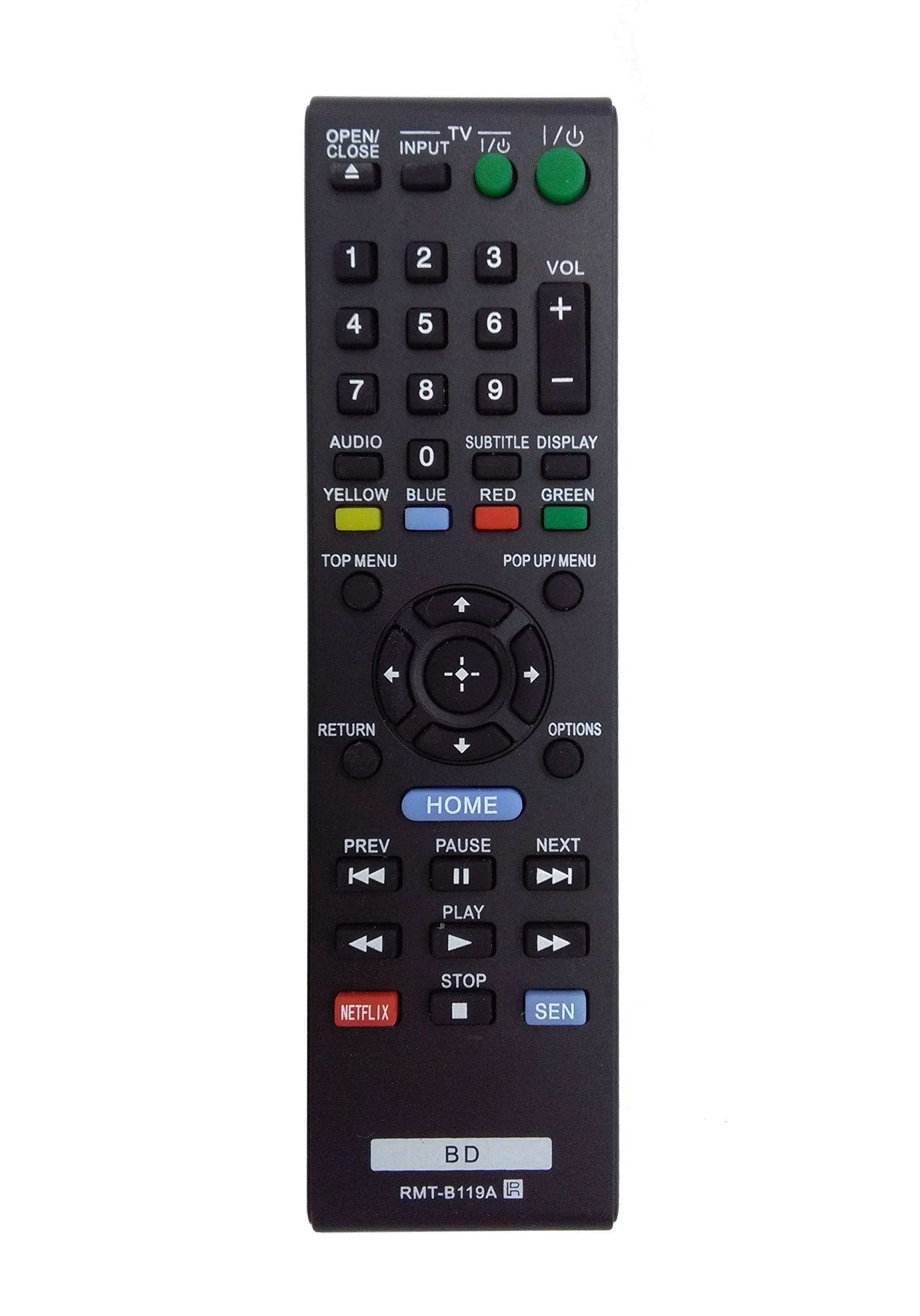
Image: The OEM RMT-B119A remote control, showing the full button layout on the front and a partial view of the open battery compartment on the back, revealing the battery terminals.
3. പ്രവർത്തന നിർദ്ദേശങ്ങൾ
3.1 Remote Control Layout and Button Functions
Familiarize yourself with the buttons on your RMT-B119A remote control. Below is a description of each button's primary function.
Image: The OEM RMT-B119A remote control, displaying all buttons and their labels.
- Power (I/O): Turns the Blu-ray player on or off.
- OPEN/CLOSE (▲): ഡിസ്ക് ട്രേ തുറക്കുകയോ അടയ്ക്കുകയോ ചെയ്യുന്നു.
- ഇൻപുട്ട്: Switches the input source on the connected TV (if programmed).
- ടിവി: Switches the remote to TV control mode (if programmed).
- നമ്പർ പാഡ് (0-9): Used for direct track selection, chapter selection, or entering numerical data.
- VOL (+/-): Adjusts the volume level (typically for the connected TV, if programmed).
- ഓഡിയോ: Changes the audio track or language during playback.
- SUBTITLE DISPLAY: Toggles subtitle display on or off, or cycles through available subtitle languages.
- YELLOW, BLUE, RED, GREEN: Color-coded function buttons, typically used for specific features within menus or interactive content. Their function varies depending on the disc or menu.
- മുകളിലെ മെനു: Accesses the main menu of the Blu-ray disc.
- POP UP/MENU: Displays the pop-up menu during disc playback.
- Directional Pad (↑↓←→): മെനുകളിലൂടെയും ഓപ്ഷനുകളിലൂടെയും നാവിഗേറ്റ് ചെയ്യുന്നു.
- Center Button (Enter/Select): ഒരു തിരഞ്ഞെടുപ്പ് സ്ഥിരീകരിക്കുന്നു അല്ലെങ്കിൽ ഒരു മെനു ഇനം നൽകുന്നു.
- മടക്കം: മുമ്പത്തെ സ്ക്രീനിലേക്കോ മെനുവിലേക്കോ തിരികെ പോകുന്നു.
- ഓപ്ഷനുകൾ: Displays context-sensitive options or settings.
- വീട്: Accesses the Blu-ray player's home menu.
- PREV (◀◀): Skips to the beginning of the current track/chapter or the previous track/chapter.
- PAUSE (▌▌): പ്ലേബാക്ക് താൽക്കാലികമായി നിർത്തുന്നു.
- NEXT (▶▶): Skips to the next track or chapter.
- PLAY (▶): പ്ലേബാക്ക് ആരംഭിക്കുന്നു അല്ലെങ്കിൽ പുനരാരംഭിക്കുന്നു.
- നിർത്തുക (■): പ്ലേബാക്ക് നിർത്തുന്നു.
- നെറ്റ്ഫ്ലിക്സ്: Direct access button for the Netflix streaming service.
- സെൻ: Direct access button for the Sony Entertainment Network (now PlayStation Video/Music).
- BD: Likely a dedicated button for Blu-ray Disc functions or to switch to Blu-ray mode.
4. പരിപാലനം
നിങ്ങളുടെ റിമോട്ട് കൺട്രോളിന്റെ ദീർഘായുസ്സും ശരിയായ പ്രവർത്തനവും ഉറപ്പാക്കാൻ, ഈ അറ്റകുറ്റപ്പണി മാർഗ്ഗനിർദ്ദേശങ്ങൾ പാലിക്കുക:
- വൃത്തിയാക്കൽ: മൃദുവായതും ഉണങ്ങിയതുമായ തുണി ഉപയോഗിച്ച് റിമോട്ട് കൺട്രോൾ തുടയ്ക്കുക. കഠിനമായ അഴുക്കിന്, ചെറുതായി dampen the cloth with water or a mild, non-abrasive cleaner. Avoid using harsh chemicals or solvents.
- ബാറ്ററി മാറ്റിസ്ഥാപിക്കൽ: Replace batteries when the remote's response becomes sluggish or it stops functioning. Always replace both batteries at the same time with new ones of the same type.
- സംഭരണം: Store the remote in a cool, dry place away from direct sunlight, extreme temperatures, and high humidity. If the remote will not be used for an extended period, remove the batteries to prevent leakage.
- തുള്ളികൾ ഒഴിവാക്കുക: തുള്ളികൾ ആന്തരിക ഘടകങ്ങളെ നശിപ്പിക്കുമെന്നതിനാൽ, ശാരീരിക ആഘാതത്തിൽ നിന്ന് റിമോട്ടിനെ സംരക്ഷിക്കുക.
5. പ്രശ്നപരിഹാരം
If you experience issues with your remote control, refer to the following table for common problems and solutions:
| പ്രശ്നം | സാധ്യമായ കാരണം | പരിഹാരം |
|---|---|---|
| റിമോട്ട് പ്രവർത്തിക്കുന്നില്ല. | ഡെഡ് അല്ലെങ്കിൽ തെറ്റായി ചേർത്ത ബാറ്ററികൾ. | ബാറ്ററികൾ പുതിയവ ഉപയോഗിച്ച് മാറ്റിസ്ഥാപിക്കുക, ശരിയായ പോളാരിറ്റി ഉറപ്പാക്കുക (+/-). |
| റിമോട്ട് ഇടയ്ക്കിടെ പ്രവർത്തിക്കുന്നു. | കുറഞ്ഞ ബാറ്ററി പവർ അല്ലെങ്കിൽ തടസ്സം. | Replace batteries. Ensure no objects are blocking the remote's signal path to the Blu-ray player. |
| ടിവിയെ റിമോട്ട് നിയന്ത്രിക്കുന്നില്ല. | Remote not programmed for TV or TV mode not selected. | This remote is primarily for Blu-ray players. TV control functionality may require specific programming not covered by this manual, or may not be supported by this OEM model. |
| ബട്ടണുകൾ പ്രതികരിക്കുന്നില്ല അല്ലെങ്കിൽ ഒട്ടിപ്പിടിക്കുന്നു. | ബട്ടണുകൾക്ക് താഴെയുള്ള അഴുക്ക് അല്ലെങ്കിൽ അവശിഷ്ടങ്ങൾ. | Clean the remote control surface. Avoid spilling liquids on the remote. |
6 സ്പെസിഫിക്കേഷനുകൾ
- ബ്രാൻഡ്: OEM
- മോഡൽ നമ്പർ: RMT-B119A
- കണക്റ്റിവിറ്റി ടെക്നോളജി: ഇൻഫ്രാറെഡ് (IR)
- അനുയോജ്യമായ ഉപകരണങ്ങൾ: Sony Blu-ray Players (specific models listed in Introduction)
- ഊർജ്ജ സ്രോതസ്സ്: 2 x AAA ബാറ്ററികൾ (ഉൾപ്പെടുത്തിയിട്ടില്ല)
- പരമാവധി ശ്രേണി: ഏകദേശം 10 മീറ്റർ (33 അടി)
- പ്രത്യേക സവിശേഷത: എർഗണോമിക് ഡിസൈൻ
7. വാറൻ്റിയും പിന്തുണയും
This OEM RMT-B119A remote control comes with a 30 ദിവസത്തെ വാറൻ്റി വാങ്ങിയ തീയതി മുതൽ, നിർമ്മാണ വൈകല്യങ്ങൾ ഉൾക്കൊള്ളുന്നു. വാറന്റി ക്ലെയിമുകൾക്കായി നിങ്ങളുടെ വാങ്ങിയതിന്റെ തെളിവ് സൂക്ഷിക്കുക.
For technical support or warranty inquiries, please contact the retailer or manufacturer directly. Refer to your purchase documentation for specific contact information.