
1. ഉൽപ്പന്നം കഴിഞ്ഞുview
The KJB DD1206 iProtect Digital RF Detector is a sophisticated handheld device designed for detecting various wireless protocols. Unlike typical searching devices, it can detect modern hidden bugs that use protocols such as Bluetooth and Wi-Fi at a long distance. The DD1206 utilizes a separate channel with a high (2.4/5 GHz) frequency pre-selector to detect and locate Bluetooth and Wi-Fi with significantly higher sensitivity. Additionally, the unit can detect all classical bugs and analyze them for correlation by sending sound impulses, as well as other digital transmissions (GSM, LTE, 3G, 4G, 5 GHz, DECT, etc.). This device incorporates the ability to detect nearly any type of wireless protocol, including digital frequencies like Wi-Fi and analog frequencies, reaching up to 12 GHz in range.
പ്രധാന സവിശേഷതകൾ:
- Wide-band antenna for comprehensive signal detection.
- Micro-Pointer microwave antenna for enhanced sensitivity to signals above 2 GHz, including Bluetooth, Wi-Fi 2.4 GHz, Wi-Fi 5GHz, and wireless video cameras.
- 16-segment bargraph indicator for clear signal strength visualization.
- Three alert modes: sound, vibration, and mixed, for discreet or audible alerts.
- Correlation function to identify FM transmitters by analyzing probing sound.
- Two levels of sensitivity (attenuator) for precise signal location.

ചിത്രം 1: The KJB DD1206 iProtect Digital RF Detector highlighting its capabilities for detecting RF, GSM, Bluetooth, Wi-Fi, and Wi-Max signals.
2. സജ്ജീകരണവും അസംബ്ലിയും
Before operating the DD1206, ensure proper battery installation and antenna attachment.
2.1 ബാറ്ററി ഇൻസ്റ്റാളേഷൻ
- ഉപകരണത്തിന്റെ പിൻഭാഗത്ത് ബാറ്ററി കമ്പാർട്ട്മെന്റ് കണ്ടെത്തുക.
- കമ്പാർട്ട്മെന്റ് കവർ തുറക്കുക.
- Insert two AAA batteries (2xLR 03), ensuring correct polarity.
- ബാറ്ററി കമ്പാർട്ട്മെൻ്റ് കവർ സുരക്ഷിതമായി അടയ്ക്കുക.
2.2 ആന്റിന അറ്റാച്ച്മെന്റ്
The DD1206 comes with two types of antennas:
- Wide-band antenna: Connects to the ANT1 socket for general frequency detection (50-12000 MHz).
- Micro-Pointer microwave antenna: Connects to either ANT1 or ANT2 socket for enhanced detection of higher frequencies (2.4-2.48 GHz, 4.9-5.875 GHz). This antenna is particularly effective for Bluetooth and Wi-Fi signals.
- Gently screw the desired antenna into the appropriate socket (ANT1 or ANT2) until finger-tight. Do not overtighten.

ചിത്രം 2: The DD1206 device and its components, including the wide-band antenna and the Micro-Pointer microwave antenna.
3. പ്രവർത്തന നിർദ്ദേശങ്ങൾ
This section details how to operate your DD1206 detector for effective signal detection.
3.1 പവർ ഓൺ/ഓഫ്
- പവർ ഓണാക്കാൻ, അമർത്തിപ്പിടിക്കുക പവർ ഡിസ്പ്ലേ പ്രകാശിക്കുന്നത് വരെ ബട്ടൺ അമർത്തുക.
- പവർ ഓഫ് ചെയ്യുന്നതിന്, അമർത്തിപ്പിടിക്കുക പവർ ഡിസ്പ്ലേ ഓഫാകുന്നതുവരെ വീണ്ടും ബട്ടൺ അമർത്തുക.
3.2 ആന്റിന തിരഞ്ഞെടുക്കൽ
The device allows switching between antennas for different detection scenarios.
- ഉപയോഗിക്കുക ANT1 button to select the wide-band antenna.
- ഉപയോഗിക്കുക ANT2 button to select the Micro-Pointer microwave antenna.
- The active antenna will be indicated on the display.
3.3 Sensitivity Adjustment (Attenuator)
The attenuator provides two levels of sensitivity to help pinpoint signal sources more quickly.
- അമർത്തുക ATT+ സംവേദനക്ഷമത വർദ്ധിപ്പിക്കുന്നതിനുള്ള ബട്ടൺ.
- അമർത്തുക ATT- സെൻസിറ്റിവിറ്റി കുറയ്ക്കുന്നതിനുള്ള ബട്ടൺ.
- Adjust sensitivity to avoid saturation in areas with strong background RF noise, or to detect weaker signals.
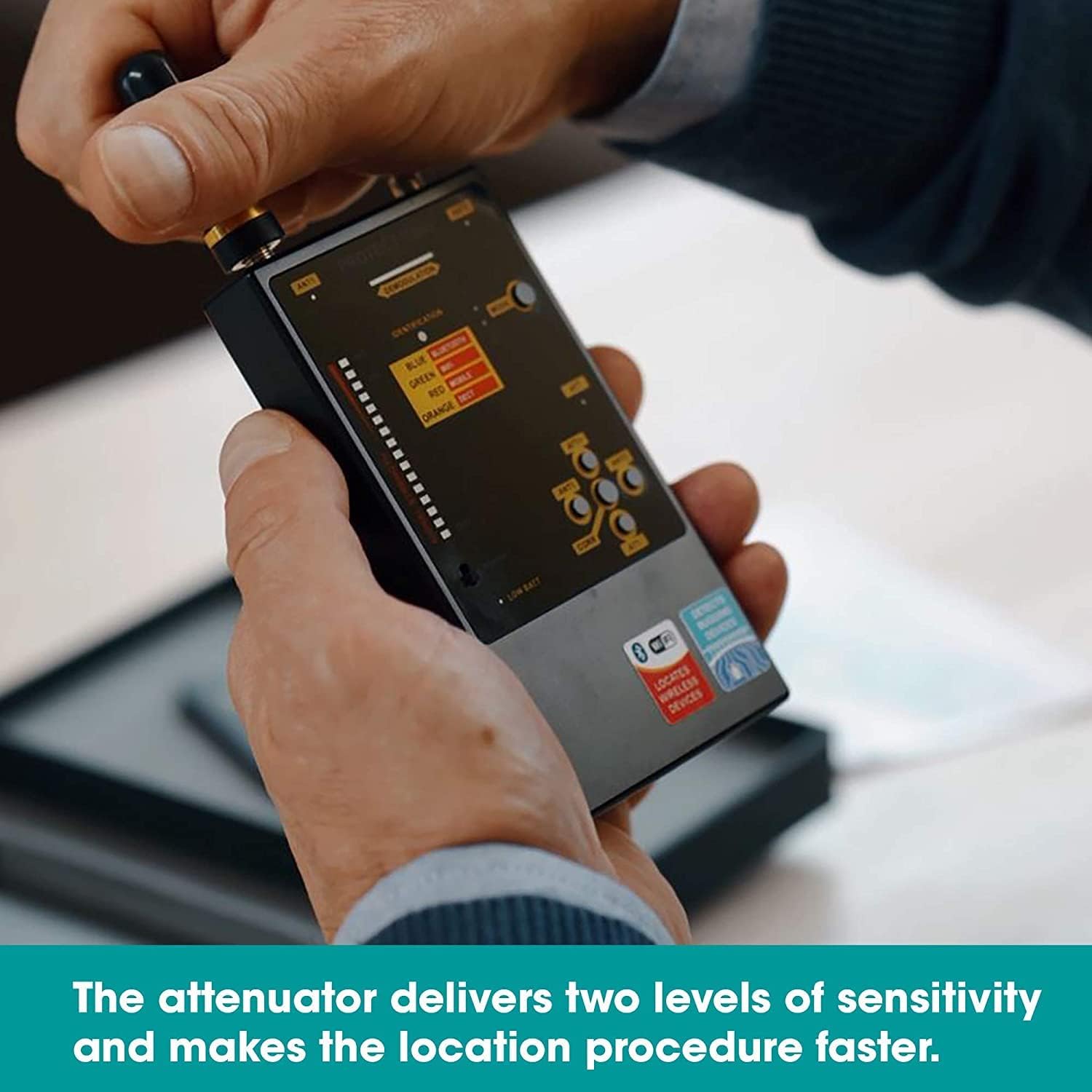
ചിത്രം 3: Adjusting the attenuator for optimal sensitivity during detection.
3.4 അലേർട്ട് മോഡുകൾ
The DD1206 offers three distinct alert modes:
- ശബ്ദ മോഡ്: Audible alerts indicate signal detection and strength.
- വൈബ്രേഷൻ മോഡ്: Discreet vibration alerts for silent operation.
- മിക്സഡ് മോഡ്: Combines sound and vibration alerts.
അമർത്തുക മോഡ് ഈ ഓപ്ഷനുകളിലൂടെ സൈക്കിൾ ചെയ്യാൻ ബട്ടൺ.

ചിത്രം 4: Switching between sound, vibration, and mixed alert modes.
3.5 Interpreting the Bargraph and Identification
- The 16-segment bargraph displays the detected signal strength. More illuminated segments indicate a stronger signal.
- ദി ഐഡൻ്റിഫിക്കേഷൻ section on the display provides an indication of the detected signal type (e.g., Bluetooth, Wi-Fi, Mobile, DECT).
- Move the device slowly around the area of interest. A rising bargraph and specific identification suggest proximity to a signal source.

ചിത്രം 5: The DD1206 display showing signal strength on the bargraph and identified signal types.
3.6 Using the Micro-Pointer Antenna
The Micro-Pointer antenna is designed for directional detection of higher frequency signals.
- Attach the Micro-Pointer antenna to either ANT1 or ANT2.
- Point the antenna in different directions to locate the strongest signal, indicated by the bargraph. The arrow on the antenna indicates the direction of maximum sensitivity.
- This antenna is particularly useful for pinpointing Wi-Fi and Bluetooth devices.

ചിത്രം 6: The Micro-Pointer antenna enhances detection of signals above 2 GHz, aiding in precise location.
3.7 Correlation Function
The correlation function helps identify FM transmitters by analyzing the presence of a probing sound.
- Activate the correlation function by pressing the CORR ബട്ടൺ.
- Listen for changes in the audio output or observe the display for indications of correlation, which suggests an FM transmitter is present.
4. പരിപാലനം
Proper maintenance ensures the longevity and optimal performance of your DD1206 detector.
4.1 വൃത്തിയാക്കൽ
- മൃദുവായ, ഉണങ്ങിയ തുണി ഉപയോഗിച്ച് ഉപകരണം തുടയ്ക്കുക.
- Do not use liquid cleaners or solvents, as these may damage the device.
4.2 ബാറ്ററി മാറ്റിസ്ഥാപിക്കൽ
- When the "Low battery" indicator appears, replace both AAA batteries promptly.
- Refer to Section 2.1 for battery installation instructions.
4.3 സംഭരണം
- നേരിട്ടുള്ള സൂര്യപ്രകാശത്തിൽ നിന്നും കടുത്ത താപനിലയിൽ നിന്നും മാറി തണുത്തതും വരണ്ടതുമായ സ്ഥലത്ത് ഉപകരണം സൂക്ഷിക്കുക.
- ബാറ്ററികൾ കൂടുതൽ നേരം സൂക്ഷിച്ചു വച്ചാൽ ചോർച്ച തടയാൻ നീക്കം ചെയ്യുക.
5. പ്രശ്നപരിഹാരം
If you encounter issues with your DD1206, refer to the following common problems and solutions.
| പ്രശ്നം | സാധ്യമായ കാരണം | പരിഹാരം |
|---|---|---|
| ഉപകരണം പവർ ഓണാക്കുന്നില്ല. | ഡെഡ് അല്ലെങ്കിൽ തെറ്റായി ഇൻസ്റ്റാൾ ചെയ്ത ബാറ്ററികൾ. | ബാറ്ററി പോളാരിറ്റി പരിശോധിക്കുക. പുതിയ AAA ബാറ്ററികൾ ഉപയോഗിച്ച് മാറ്റിസ്ഥാപിക്കുക. |
| No signal detected or weak signal. | Incorrect antenna selected; sensitivity too low; signal source too far. | Ensure the correct antenna is attached and selected (ANT1 for wide-band, ANT2 for Micro-Pointer). Increase sensitivity using ATT+. Move closer to the suspected source. |
| Device overheats or loses signal. | Prolonged use in high temperatures; internal malfunction. | Allow the device to cool down. If the problem persists, contact customer support. |
| False alarms or constant high signal. | High background RF noise; sensitivity too high. | Decrease sensitivity using ATT-. Move to an area with less ambient RF interference. |
6 സ്പെസിഫിക്കേഷനുകൾ
Detailed technical specifications for the KJB DD1206 iProtect Digital RF Detector.
| ബ്രാൻഡ് | കെ.ജെ.ബി |
| മോഡൽ നമ്പർ | DD1206 |
| Frequency Range (Antenna 1) | 50 - 12000 മെഗാഹെട്സ് |
| Frequency Range (Antenna 2) | 2.4 - 2.48 GHz, 4.9 - 5.875 GHz |
| പവർ ഉറവിടം | 2 x AAA batteries (LR 03) |
| നിലവിലെ ഉപഭോഗം | 30mA വരെ |
| പ്രവർത്തന ദൈർഘ്യം | 20 മണിക്കൂർ വരെ |
| സൂചനകൾ | Active antenna, Low battery, Mode, Identification, Attenuator, Secondary demodulation |
| Dimensions (W/o antennas) | 120 x 70 x 16 മിമി |
| Dimensions (W/ antennas) | 210 x 70 x 16 മിമി |
| മെറ്റീരിയൽ | ലോഹം |
| ഇനത്തിൻ്റെ ഭാരം | 6 ഔൺസ് (ഏകദേശം 170 ഗ്രാം) |
| അന്താരാഷ്ട്ര സംരക്ഷണ റേറ്റിംഗ് | IP66 |

ചിത്രം 7: Sensitivity graph illustrating the detection capabilities of the wide-band (rod) antenna and the Micro-Pointer antenna across different frequency ranges.
7. വാറൻ്റിയും പിന്തുണയും
Information regarding product warranty and customer support was not provided in the available product data. For warranty details, technical assistance, or service inquiries, please contact KJB Security directly or refer to the documentation included with your purchase.
You may also visit the official KJB Security webഏറ്റവും കാലികമായ പിന്തുണാ വിവരങ്ങൾക്കായി സൈറ്റ്.