
1. ആമുഖം
This manual provides essential information for the proper installation, operation, and maintenance of your Maxcom KXT480 landline telephone. Please read these instructions carefully before using the device to ensure optimal performance and longevity. The Maxcom KXT480 is a corded landline telephone designed for reliable communication in a home or office environment.
2. പാക്കേജ് ഉള്ളടക്കം
പാക്കേജിൽ എല്ലാ ഇനങ്ങളും ഉണ്ടെന്ന് ഉറപ്പാക്കുക:
- Maxcom KXT480 Telephone Unit
- ഹാൻഡ്സെറ്റ്
- കോയിൽഡ് ഹാൻഡ്സെറ്റ് കോർഡ്
- ടെലിഫോൺ ലൈൻ കോർഡ്
- ഉപയോക്തൃ മാനുവൽ (ഈ പ്രമാണം)
3. ഉൽപ്പന്നം കഴിഞ്ഞുview
The Maxcom KXT480 is a corded telephone featuring a clear keypad, a comfortable handset, and essential functions for daily communication. It is designed for ease of use and durability.
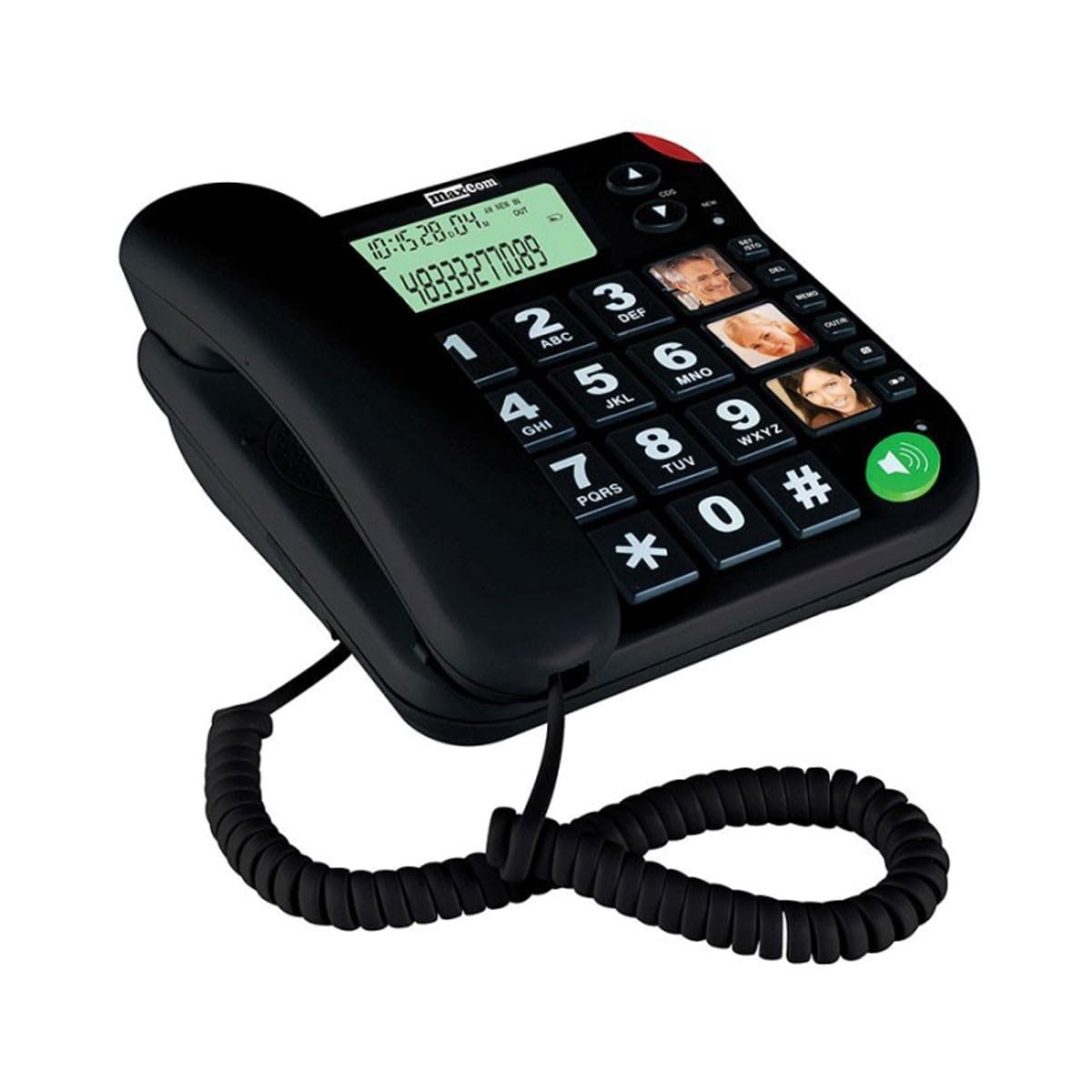
Image of the Maxcom KXT480 landline telephone, showing its black color, keypad, and handset.
പ്രധാന സവിശേഷതകളിൽ ഇവ ഉൾപ്പെടുന്നു:
- Corded telephone for reliable connection
- Caller ID functionality
- Speakerphone function (requires batteries for full functionality)
- Basic conference call capability
- Memory storage for frequently dialed numbers
4. സജ്ജീകരണം
4.1 Connecting the Telephone
- Connect one end of the coiled handset cord to the handset and the other end to the handset jack on the side of the telephone base.
- ടെലിഫോൺ ലൈൻ കോഡിന്റെ ഒരറ്റം ടെലിഫോൺ ബേസിന്റെ പിൻഭാഗത്തുള്ള LINE ജാക്കുമായി ബന്ധിപ്പിക്കുക.
- Connect the other end of the telephone line cord to your wall telephone socket.
4.2 Battery Installation (Optional but Recommended)
The Maxcom KXT480 requires 1 Lithium-Ion battery (included) for certain advanced features such as the display and speakerphone functionality. While the basic telephone functions work without batteries, installing them is recommended for full feature access.
- ടെലിഫോൺ ബേസിന്റെ അടിഭാഗത്ത് ബാറ്ററി കമ്പാർട്ട്മെന്റ് കണ്ടെത്തുക.
- ബാറ്ററി കമ്പാർട്ട്മെൻ്റ് കവർ തുറക്കുക.
- Insert the Lithium-Ion battery, ensuring correct polarity (+ and -).
- ബാറ്ററി കമ്പാർട്ട്മെൻ്റ് കവർ സുരക്ഷിതമായി അടയ്ക്കുക.
5. പ്രവർത്തന നിർദ്ദേശങ്ങൾ
5.1 ഒരു കോൾ ചെയ്യുന്നു
- ഹാൻഡ്സെറ്റ് ഉയർത്തുക അല്ലെങ്കിൽ അമർത്തുക സ്പീക്കർഫോൺ button (if batteries are installed).
- കീപാഡ് ഉപയോഗിച്ച് ആവശ്യമുള്ള ടെലിഫോൺ നമ്പർ ഡയൽ ചെയ്യുക.
- കോൾ കണക്റ്റുചെയ്യുന്നതിനായി കാത്തിരിക്കുക.
- കോൾ അവസാനിപ്പിക്കാൻ, ഹാൻഡ്സെറ്റ് മാറ്റിസ്ഥാപിക്കുക അല്ലെങ്കിൽ അമർത്തുക സ്പീക്കർഫോൺ വീണ്ടും ബട്ടൺ.
5.2 ഒരു കോൾ സ്വീകരിക്കുന്നു
- When the telephone rings, lift the handset or press the സ്പീക്കർഫോൺ ഉത്തരം നൽകാനുള്ള ബട്ടൺ.
- കോൾ അവസാനിപ്പിക്കാൻ, ഹാൻഡ്സെറ്റ് മാറ്റിസ്ഥാപിക്കുക അല്ലെങ്കിൽ അമർത്തുക സ്പീക്കർഫോൺ വീണ്ടും ബട്ടൺ.
5.3 കോളർ ഐഡി
The telephone supports Caller ID functionality. When an incoming call is received, the caller's number will be displayed on the screen (if batteries are installed and Caller ID service is subscribed through your telephone provider).
5.4 സ്പീക്കർഫോൺ പ്രവർത്തനം
To use the speakerphone function, press the dedicated സ്പീക്കർഫോൺ button. This allows hands-free communication. Ensure batteries are installed for this feature to work correctly.
5.5 Memory Dialing
The Maxcom KXT480 allows you to store frequently used numbers for quick dialing. Refer to the on-screen prompts or specific buttons on your device for programming memory slots. Typically, this involves pressing a 'Store' or 'Memory' button, entering the number, and then selecting a memory location.
5.6 Conference Calling
The telephone supports basic conference call functionality. Consult your telephone service provider for details on how to initiate a three-way call, as this often depends on network services.
6. പരിപാലനം
6.1 വൃത്തിയാക്കൽ
To clean the telephone, use a soft, damp cloth. Do not use abrasive cleaners or solvents, as these can damage the surface. Ensure the telephone is disconnected from the wall socket before cleaning.
6.2 സംഭരണം
If storing the telephone for an extended period, disconnect it from the telephone line and remove any installed batteries. Store in a cool, dry place away from direct sunlight.
7. പ്രശ്നപരിഹാരം
If you encounter issues with your Maxcom KXT480 telephone, please refer to the following common problems and solutions:
| പ്രശ്നം | സാധ്യമായ കാരണം | പരിഹാരം |
|---|---|---|
| ഡയൽ ടോൺ ഇല്ല | ടെലിഫോൺ ലൈൻ കോഡ് വിച്ഛേദിക്കപ്പെട്ടിരിക്കുന്നു അല്ലെങ്കിൽ തകരാറിലാണ്. | Check all cable connections. Try connecting another phone to the wall socket to verify line functionality. |
| ടെലിഫോൺ റിംഗ് ചെയ്യുന്നില്ല | Ringer volume is set to off or too low. | Adjust the ringer volume. Ensure the telephone line is active. |
| No display or speakerphone not working | ബാറ്ററികൾ ഇൻസ്റ്റാൾ ചെയ്തിട്ടില്ല അല്ലെങ്കിൽ തീർന്നിരിക്കുന്നു. | Install fresh batteries or check battery polarity. |
| Cannot hear caller or caller cannot hear me | Handset or speakerphone volume too low; faulty connection. | Adjust volume. Check handset cord connection. If using speakerphone, ensure you are close to the microphone. |
8 സ്പെസിഫിക്കേഷനുകൾ
Detailed technical specifications for the Maxcom KXT480 telephone:
| ഫീച്ചർ | സ്പെസിഫിക്കേഷൻ |
|---|---|
| ബ്രാൻഡ് | മാക്സ്കോം |
| മോഡൽ നമ്പർ | KXT480 |
| നിറം | കറുപ്പ് |
| ടെലിഫോൺ തരം | കോർഡഡ് |
| മെറ്റീരിയൽ | പ്ലാസ്റ്റിക് |
| പവർ ഉറവിടം | AC/DC (Line Powered) |
| ബാറ്ററി ആവശ്യകത | 1 Lithium-Ion battery (included) for display/speakerphone |
| ഇനത്തിന്റെ അളവുകൾ (LxWxH) | 20.6 x 16.4 x 9.1 സെ.മീ |
| അനുയോജ്യമായ ഉപകരണങ്ങൾ | Fixed networks |
| ഡയലർ തരം | ഒറ്റ കീപാഡ് |
| മൾട്ടി-ലൈൻ പ്രവർത്തനം | ഒറ്റ വരി |
| വിളിക്കുന്നയാളുടെ തിരിച്ചറിയൽ | അതെ |
| Conference Call Functionality | അടിസ്ഥാനം |
| GTIN | 05908235972039 |
| മാതൃരാജ്യം | പോർച്ചുഗൽ |
9. വാറൻ്റിയും പിന്തുണയും
Maxcom products are designed for reliability and performance. For warranty information, please refer to the warranty card included with your purchase or contact your retailer. For technical support or further assistance, please visit the official Maxcom webസൈറ്റിൽ ബന്ധപ്പെടുകയോ അവരുടെ ഉപഭോക്തൃ സേവന വിഭാഗവുമായി ബന്ധപ്പെടുകയോ ചെയ്യുക. വാറന്റി ക്ലെയിമുകൾക്കുള്ള വാങ്ങലിന്റെ തെളിവായി നിങ്ങളുടെ വാങ്ങൽ രസീത് സൂക്ഷിക്കുക.