
1. ആമുഖം
Thank you for choosing the Fonestar AS-24U Hi-Fi USB/SD/MP3 Amplifier. This manual provides essential information for the safe and efficient operation of your device. Please read it thoroughly before use and retain it for future reference.
2. സുരക്ഷാ നിർദ്ദേശങ്ങൾ
- വൈദ്യുതി വിതരണം: ഉറപ്പാക്കുക amplifier is connected to a power source matching the specified voltagഇ (230V).
- വെൻ്റിലേഷൻ: വെന്റിലേഷൻ തുറസ്സുകൾ തടയരുത്. അമിതമായി ചൂടാകുന്നത് തടയാൻ യൂണിറ്റിന് ചുറ്റും ശരിയായ വായുസഞ്ചാരത്തിന് മതിയായ ഇടം നൽകുക.
- ഈർപ്പം: സൂക്ഷിക്കുക amplifier away from water, moisture, and high humidity environments. Do not expose it to dripping or splashing.
- താപ സ്രോതസ്സുകൾ: റേഡിയേറ്ററുകൾ, ഹീറ്റ് രജിസ്റ്ററുകൾ, സ്റ്റൗകൾ അല്ലെങ്കിൽ മറ്റ് ചൂട് ഉൽപ്പാദിപ്പിക്കുന്ന ഉപകരണങ്ങൾ പോലുള്ള താപ സ്രോതസ്സുകൾക്ക് സമീപം യൂണിറ്റ് സ്ഥാപിക്കുന്നത് ഒഴിവാക്കുക.
- വൃത്തിയാക്കൽ: Disconnect the power cord before cleaning. Use a dry, soft cloth. Do not use liquid cleaners or aerosol cleaners.
- സേവനം: ഈ ഉൽപ്പന്നം സ്വയം സേവിക്കാൻ ശ്രമിക്കരുത്. യോഗ്യതയുള്ള സേവന ഉദ്യോഗസ്ഥർക്ക് എല്ലാ സേവനങ്ങളും റഫർ ചെയ്യുക.
- ഒബ്ജക്റ്റ്/ലിക്വിഡ് എൻട്രി: അപകടകരമായ വോളിയം സ്പർശിച്ചേക്കാവുന്നതിനാൽ, തുറസ്സുകളിലൂടെ ഈ ഉൽപ്പന്നത്തിലേക്ക് ഏതെങ്കിലും തരത്തിലുള്ള വസ്തുക്കളെ ഒരിക്കലും തള്ളരുത്tagതീയോ വൈദ്യുതാഘാതമോ ഉണ്ടാക്കിയേക്കാവുന്ന ഇ പോയിൻ്റുകൾ അല്ലെങ്കിൽ ഷോർട്ട്-ഔട്ട് ഭാഗങ്ങൾ.
3. ഉൽപ്പന്നം കഴിഞ്ഞുview
3.1 ഫ്രണ്ട് പാനൽ
The front panel features controls for power, input selection, volume adjustment, and USB/SD media playback. It also includes a display for media information.
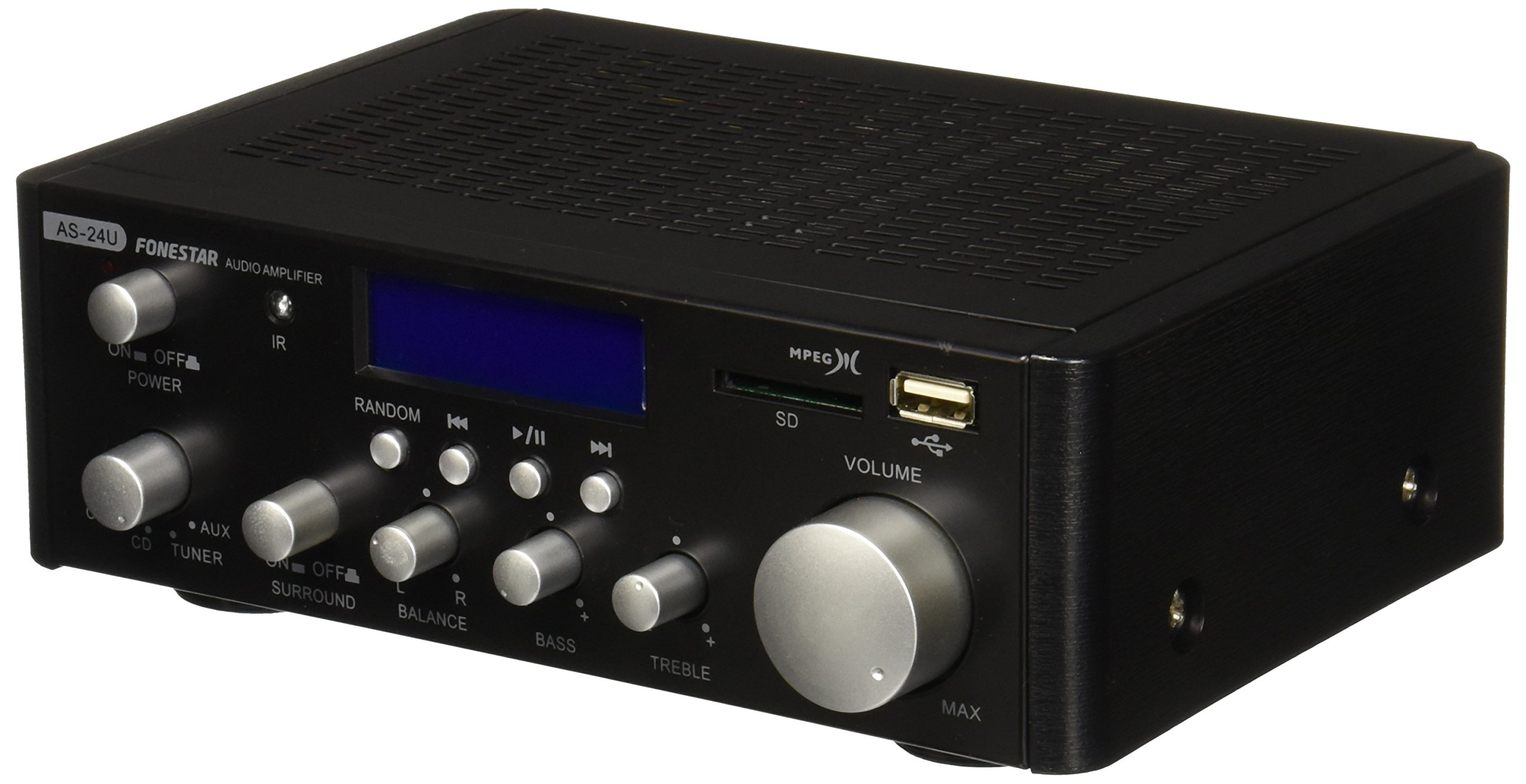
ചിത്രം 1: മുൻഭാഗം view of the Fonestar AS-24U amplifier, showing the main controls and display.
3.2 പിൻ പാനൽ
The rear panel provides all necessary connections for audio input sources, speaker outputs, and power.

ചിത്രം 2: പിൻഭാഗം view of the Fonestar AS-24U amplifier, detailing input/output ports and power connection.
- INPUT (AUX, TUNER, CD): RCA stereo inputs for connecting external audio sources.
- SPEAKER OUT (STEREO): Spring clip terminals for connecting passive speakers (4-8 Ω).
- SPEAKER OUT (SURROUND): Additional spring clip terminals for surround speakers (8 Ω).
- പവർ ഇൻ: AC power input for the main power cable.
- VOLTAGഇ സെലക്ടർ: Switch for selecting between 115V and 230V power input. Ensure this is set correctly for your region.
3.3 വിദൂര നിയന്ത്രണം
ഉൾപ്പെടുത്തിയിരിക്കുന്ന റിമോട്ട് കൺട്രോൾ സൗകര്യപ്രദമായ പ്രവർത്തനം അനുവദിക്കുന്നു amplifier's media playback functions.
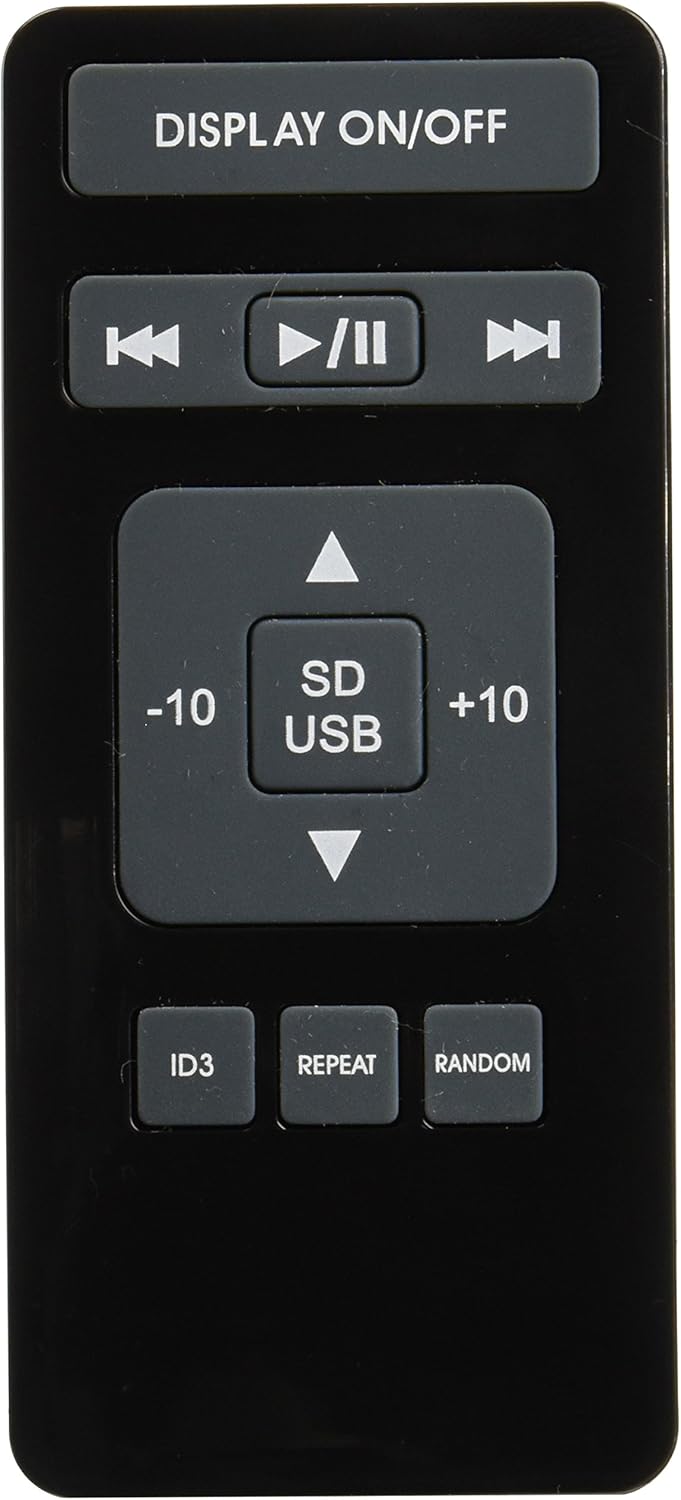
Image 3: Remote control for the Fonestar AS-24U amplifier, showing buttons for media playback and display control.
- ഡിസ്പ്ലേ ഓൺ/ഓഫ്: Toggles the front panel display.
- PLAY/PAUSE, PREVIOUS/NEXT: Controls for media playback.
- SD/USB: Selects between SD card and USB drive as the media source.
- -10/+10: Skips tracks by 10.
- ഐഡി3: ID3 പ്രദർശിപ്പിക്കുന്നു tag MP3-നുള്ള വിവരങ്ങൾ files.
- ആവർത്തിക്കുക: Toggles repeat modes (e.g., repeat one, repeat all).
- ക്രമരഹിതം: Toggles random playback.
4. സജ്ജീകരണം
4.1 സ്പീക്കറുകൾ ബന്ധിപ്പിക്കുന്നു
- ഉറപ്പാക്കുക ampലൈഫയർ ഓഫ് ചെയ്ത് അൺപ്ലഗ് ചെയ്തിരിക്കുന്നു.
- Connect your passive speakers to the SPEAKER OUT terminals on the rear panel.
- Match the positive (+) terminal on the amplifier to the positive (+) terminal on your speaker, and the negative (-) to the negative (-).
- For stereo speakers, use the 4-8 Ω terminals. For surround speakers, use the 8 Ω terminals. Ensure your speakers' impedance matches the ampലൈഫയറിൻ്റെ സവിശേഷതകൾ.
4.2 ഓഡിയോ ഉറവിടങ്ങൾ ബന്ധിപ്പിക്കുന്നു
- Connect your audio devices (e.g., CD player, tuner, auxiliary device) to the corresponding RCA INPUT jacks (CD, TUNER, AUX) on the rear panel.
- Ensure left and right channels are correctly matched (red for right, white for left).
4.3 പവർ കണക്ഷൻ
- VOL പരിശോധിക്കുകTAGE SELECTOR switch on the rear panel is set to the correct voltage for your region (e.g., 230V).
- Connect the power cable to the POWER IN socket on the rear panel and then to a suitable wall outlet.
5. പ്രവർത്തന നിർദ്ദേശങ്ങൾ
5.1 പവർ ഓൺ/ഓഫ്
Press the power button on the front panel to turn the amplifier on or off. A soft start protection circuit is integrated.
5.2 ഇൻപുട്ട് ഉറവിടം തിരഞ്ഞെടുക്കൽ
Use the input selector knob or buttons on the front panel to choose between CD, TUNER, AUX, USB, or SD inputs.
5.3 വോളിയം ക്രമീകരിക്കൽ
Rotate the main volume knob on the front panel to adjust the overall sound level. Start with a low volume and gradually increase it to a comfortable listening level.
5.4 യുഎസ്ബി/എസ്ഡി പ്ലേബാക്ക്
- MP3 ഓഡിയോ അടങ്ങിയ ഒരു USB ഫ്ലാഷ് ഡ്രൈവ് അല്ലെങ്കിൽ SD കാർഡ് ഇടുക. files into the respective slot on the front panel.
- Select the USB or SD input using the input selector.
- Use the playback controls (Play/Pause, Previous/Next) on the front panel or remote control to manage your music.
- The remote control allows for additional functions like skipping 10 tracks (+10/-10), displaying ID3 tags, repeating tracks, and random playback.
6. പരിപാലനം
6.1 വൃത്തിയാക്കൽ
വൃത്തിയാക്കാൻ amplifier, first unplug it from the power outlet. Use a soft, dry cloth to wipe down the exterior surfaces. Do not use abrasive cleaners, waxes, or solvents as they may damage the finish.
6.2 സംഭരണം
സംഭരിച്ചാൽ amplifier for an extended period, ensure it is unplugged, clean, and stored in a cool, dry place away from direct sunlight and extreme temperatures.
7. പ്രശ്നപരിഹാരം
- ശക്തിയില്ല:
- പവർ കേബിൾ രണ്ടും സുരക്ഷിതമായി ബന്ധിപ്പിച്ചിട്ടുണ്ടോയെന്ന് പരിശോധിക്കുക ampലിഫയറും വാൾ ഔട്ട്ലെറ്റും.
- ചുമരിലെ ഔട്ട്ലെറ്റ് പ്രവർത്തനക്ഷമമാണെന്ന് ഉറപ്പാക്കുക.
- VOL പരിശോധിക്കുകTAGE SELECTOR switch is set correctly.
- ശബ്ദമില്ല:
- ശരിയായ ഇൻപുട്ട് ഉറവിടം തിരഞ്ഞെടുത്തിട്ടുണ്ടെന്ന് സ്ഥിരീകരിക്കുക.
- Check all speaker connections for proper polarity and secure fit.
- വോളിയം കൂട്ടിയിട്ടുണ്ടെന്നും നിശബ്ദമാക്കിയിട്ടില്ലെന്നും ഉറപ്പാക്കുക.
- മറ്റൊരു ഓഡിയോ ഉറവിടം ഉപയോഗിച്ച് പരീക്ഷിക്കുക.
- വികലമായ ശബ്ദം:
- വോളിയം കുറയ്ക്കുക.
- സ്പീക്കർ ഇംപെഡൻസ് അനുയോജ്യത പരിശോധിക്കുക.
- ഓഡിയോ കേബിളുകൾക്ക് കേടുപാടുകൾ സംഭവിച്ചിട്ടില്ലെന്നും സുരക്ഷിതമായി ബന്ധിപ്പിച്ചിട്ടുണ്ടെന്നും ഉറപ്പാക്കുക.
- USB/SD Playback Issues:
- Ensure the USB drive or SD card is formatted to a compatible file system (e.g., FAT32).
- ഓഡിയോ പരിശോധിച്ചുറപ്പിക്കുക files MP3 ഫോർമാറ്റിലാണ്.
- മറ്റൊരു USB ഡ്രൈവ് അല്ലെങ്കിൽ SD കാർഡ് പരീക്ഷിക്കുക.
8 സ്പെസിഫിക്കേഷനുകൾ
| ബ്രാൻഡ് | ഫോൺസ്റ്റാർ |
| മോഡൽ | AS-24U |
| Stereo Power Output | 25 + 25 W max, 15 + 15 W RMS (4 Ω), 12 + 12 W RMS (8 Ω) |
| Surround Power Output | 10 + 10 W max, 6 + 6 W RMS (8 Ω) |
| ഇൻപുട്ടുകൾ | 3 stereo (CD, Tuner, AUX), 2 x RCA 400 mV |
| സംരക്ഷണങ്ങൾ | Soft start, short circuit, overload |
| വാല്യംtage | 230 വോൾട്ട് |
| അളവുകൾ (L x W x H) | 5 x 5 x 10 സെ.മീ (ഏകദേശം 50 x 50 x 100 മിമി) |
| ഭാരം | 1.9 കി.ഗ്രാം |
| സ്പീക്കർ കണക്റ്റിവിറ്റി | വയർഡ് |
9. വാറൻ്റിയും പിന്തുണയും
This Fonestar AS-24U amplifier comes with a standard manufacturer's warranty. Please refer to the warranty card included with your purchase for specific terms and conditions. For technical support, service, or warranty claims, please contact your retailer or the official Fonestar customer service.