
ആമുഖം
This manual provides detailed instructions for the installation, setup, operation, and maintenance of your LockState LS-L500-SN Electronic Keypad Lever Door Lock. Please read this manual thoroughly before installation and use to ensure proper function and longevity of your lock.
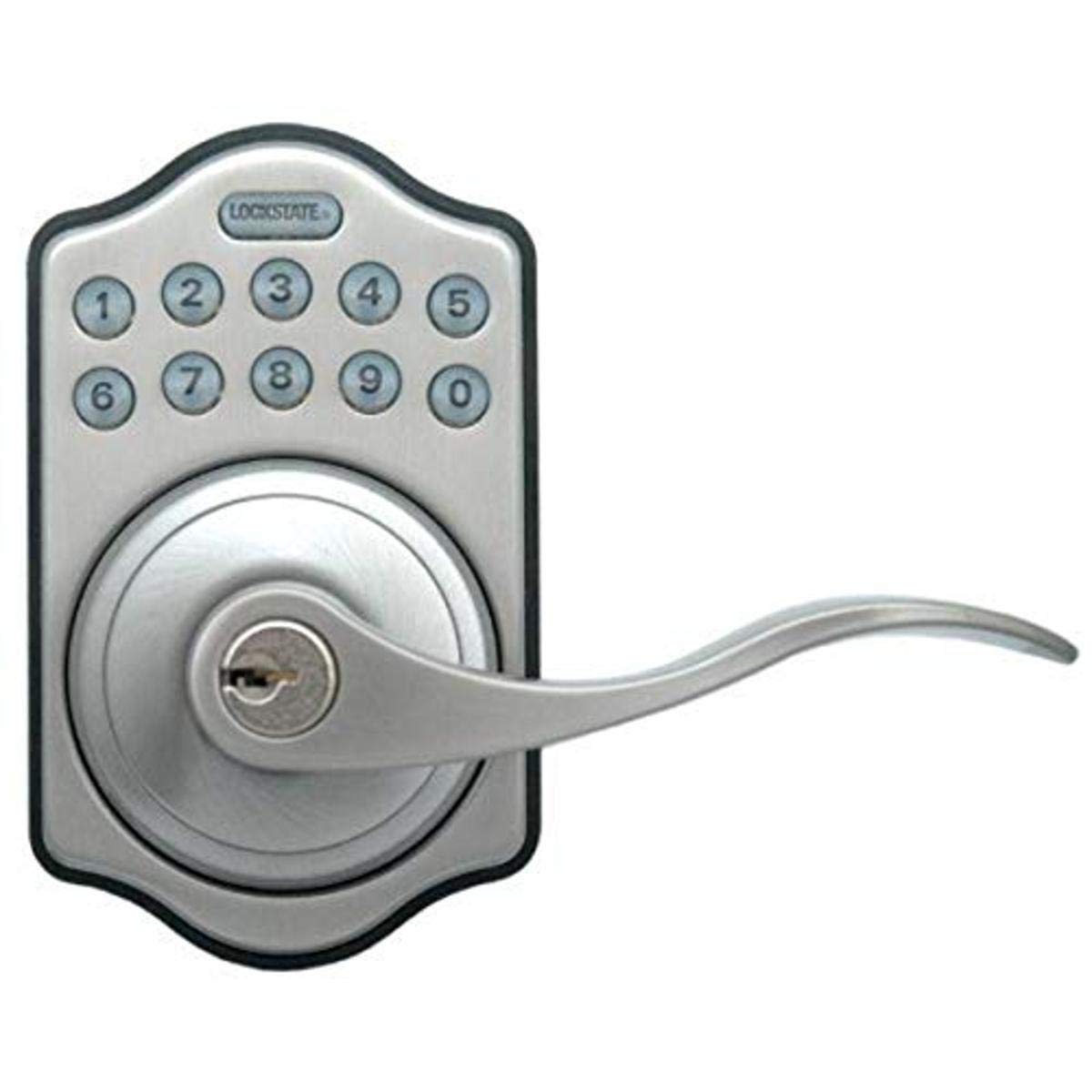
ചിത്രം: മുൻഭാഗം view of the LockState LS-L500-SN Electronic Keypad Lever Door Lock. This image displays the satin nickel finish, the keypad, and the lever handle.
ഉൽപ്പന്ന സവിശേഷതകൾ
- കീലെസ്സ് എൻട്രി: Electronic keypad for convenient access without traditional keys.
- ഉപയോക്തൃ കോഡുകൾ: Supports up to 6 unique user codes, each 4-10 digits in length.
- പ്രകാശിത കീപാഡ്: Backlit keypad for visibility in low-light conditions.
- Auto-Locking Function: Optional feature to automatically relock the door after opening.
- റിവേഴ്സിബിൾ ഡിസൈൻ: Compatible with both right-handed and left-handed doors.
- Emergency Override: Includes 2 physical keys for manual override in emergencies.
- കുറഞ്ഞ ബാറ്ററി സൂചകം: ബാറ്ററി പവർ കുറയുമ്പോൾ അലേർട്ടുകൾ.
പാക്കേജ് ഉള്ളടക്കം
ഇൻസ്റ്റാളേഷൻ ആരംഭിക്കുന്നതിന് മുമ്പ് എല്ലാ ഘടകങ്ങളും നിലവിലുണ്ടെന്ന് ഉറപ്പാക്കുക:
- LockState LS-L500-SN Electronic Keypad Lever Door Lock (Interior and Exterior Assemblies)
- Installation Hardware (screws, latch, strike plate)
- 2 എമർജൻസി ഓവർറൈഡ് കീകൾ
- ഉപയോക്തൃ മാനുവൽ (ഈ പ്രമാണം)
ഇൻസ്റ്റലേഷൻ
Proper installation is crucial for the lock's functionality and security. If you are unsure about any steps, consult a professional locksmith or installer.
- വാതിൽ തയ്യാറാക്കുക: Ensure your door has the standard bore holes for a lever lock. The lock is designed to fit most standard door preparations.
- ലാച്ച് ഇൻസ്റ്റാൾ ചെയ്യുക: Insert the latch into the edge of the door and secure it with screws. Ensure the latch bolt faces the correct direction for your door swing.
- ബാഹ്യ അസംബ്ലി ഇൻസ്റ്റാൾ ചെയ്യുക: പുറം കീപാഡ് അസംബ്ലി വാതിലിൽ വയ്ക്കുക, ക്രോസ് ബോർ ദ്വാരത്തിലൂടെ കേബിൾ ഫീഡ് ചെയ്യുക.
- ഇന്റീരിയർ അസംബ്ലി ഇൻസ്റ്റാൾ ചെയ്യുക: Connect the cable from the exterior assembly to the interior assembly. Position the interior assembly over the mounting plate and secure it with screws.
- Check Lever Orientation: The lock is reversible. Ensure the levers are oriented correctly for your door's handing (right or left). Adjust if necessary according to the specific instructions provided with the physical product.
- ബാറ്ററികൾ ഇൻസ്റ്റാൾ ചെയ്യുക: Open the battery cover on the interior assembly and insert 4 AA alkaline batteries (not included), observing polarity.
- ടെസ്റ്റ് ഓപ്പറേഷൻ: Before closing the door, test the mechanical operation of the latch and levers.
Note: Detailed diagrams and specific screw types are typically included in the physical installation guide. Refer to those for precise steps.
സജ്ജീകരണവും പ്രോഗ്രാമിംഗും
This section outlines how to program user codes and configure the auto-locking feature.
ഉപയോക്തൃ കോഡുകൾ പ്രോഗ്രാമിംഗ് ചെയ്യുന്നു
The lock supports up to 6 unique user codes, each between 4 and 10 digits long.
- പ്രോഗ്രാമിംഗ് മോഡ് നൽകുക: Locate the programming button on the interior side of the lock (often under the battery cover). Press and hold this button until the keypad illuminates and you hear a beep.
- മാസ്റ്റർ കോഡ് നൽകുക: Input the default master code (refer to your product's specific documentation, often 1234 or 0000) followed by the '#' key.
- പുതിയ ഉപയോക്തൃ കോഡ് ചേർക്കുക: Press '1' (or the designated key for adding a user code) followed by '#'. Then, enter your desired 4-10 digit user code, followed by '#'. Repeat the user code and '#' to confirm.
- പ്രോഗ്രാമിംഗ് മോഡിൽ നിന്ന് പുറത്തുകടക്കുക: Press the programming button again or wait for 10 seconds for the lock to exit programming mode automatically.
Enabling/Disabling Auto-Locking
The auto-locking feature automatically relocks the door a few seconds after it has been opened.
- പ്രോഗ്രാമിംഗ് മോഡ് നൽകുക: പ്രോഗ്രാമിംഗ് ബട്ടൺ അമർത്തിപ്പിടിക്കുക.
- മാസ്റ്റർ കോഡ് നൽകുക: Input the master code followed by '#'.
- Toggle Auto-Lock: Press '3' (or the designated key for auto-lock settings) followed by '#'. The lock will indicate whether auto-locking is enabled or disabled.
- പ്രോഗ്രാമിംഗ് മോഡിൽ നിന്ന് പുറത്തുകടക്കുക: Press the programming button again or wait for 10 seconds.
Always test new codes and settings before relying on them for security.
പ്രവർത്തന നിർദ്ദേശങ്ങൾ
വാതിൽ അൺലോക്ക് ചെയ്യുന്നു
- ഒരു ഉപയോക്തൃ കോഡ് ഉപയോഗിക്കുന്നു: Enter your programmed 4-10 digit user code on the keypad. The keypad will illuminate, and the lock will unlock. Turn the lever to open the door.
- അടിയന്തര കീ ഉപയോഗിക്കുന്നു: Insert one of the provided emergency override keys into the keyhole, turn it to unlock, and then turn the lever.
വാതിൽ പൂട്ടുന്നു
- സ്വമേധയാലുള്ള ലോക്കിംഗ്: From the exterior, press any key on the keypad. The lock will engage. From the interior, simply turn the thumb-turn or press the button (depending on model) to lock.
- യാന്ത്രിക ലോക്കിംഗ്: If the auto-locking feature is enabled, the lock will automatically engage after a short delay once the door is closed.
മെയിൻ്റനൻസ്
ബാറ്ററി മാറ്റിസ്ഥാപിക്കൽ
The lock requires 4 AA alkaline batteries. When the low battery indicator activates, replace the batteries promptly to avoid loss of function.
- Locate the battery cover on the interior assembly of the lock.
- കവർ നീക്കം ചെയ്യുക.
- പഴയ AA ബാറ്ററികൾ നീക്കം ചെയ്യുക.
- ശരിയായ പോളാരിറ്റി (+/-) ഉറപ്പാക്കിക്കൊണ്ട് 4 പുതിയ AA ആൽക്കലൈൻ ബാറ്ററികൾ ഇടുക.
- ബാറ്ററി കവർ മാറ്റിസ്ഥാപിക്കുക.
Note: Using non-alkaline batteries may reduce battery life and affect performance.
വൃത്തിയാക്കൽ
ലോക്കിന്റെ പുറംഭാഗം മൃദുവായ, ഡി ക്ലീനർ ഉപയോഗിച്ച് വൃത്തിയാക്കുക.amp തുണി. അബ്രാസീവ് ക്ലീനറുകളോ ലായകങ്ങളോ ഒഴിവാക്കുക, കാരണം ഇവ ഫിനിഷിനും ഇലക്ട്രോണിക് ഘടകങ്ങൾക്കും കേടുവരുത്തും.
ട്രബിൾഷൂട്ടിംഗ്
- Lock does not respond to keypad:
- Check batteries. Replace if low or dead.
- Ensure the correct user code is being entered.
- Try using the emergency override key.
- ലോക്ക് ശരിയായി ഇടപഴകുന്നില്ല/വിച്ഛേദിക്കുന്നില്ല:
- Check for obstructions in the door frame or strike plate.
- Verify that the lock is properly aligned with the strike plate.
- Ensure all installation screws are tightened.
- Low battery indicator is on:
- 4 AA ബാറ്ററികളും ഉടൻ മാറ്റിസ്ഥാപിക്കുക.
- Forgotten user code:
- Use the master code to reprogram user codes. If the master code is forgotten, you may need to reset the lock to factory defaults (refer to specific product instructions for reset procedure, which often involves removing batteries and holding a button).
For further assistance, contact LockState customer support.
സ്പെസിഫിക്കേഷനുകൾ
| ബ്രാൻഡ് | ലോക്ക്സ്റ്റേറ്റ് |
| മോഡൽ നമ്പർ | LS-L500-SN |
| ലോക്ക് തരം | കീപാഡ് ലിവർ ലോക്ക് |
| പ്രത്യേക ഫീച്ചർ | Keyless Entry, Illuminated Keypad |
| ഉപയോക്തൃ കോഡുകൾ | 6 വരെ (4-10 അക്കങ്ങൾ) |
| അളവുകൾ (L x W x H) | 2.25 x 3 x 5 ഇഞ്ച് |
| ഇനത്തിൻ്റെ ഭാരം | 3 പൗണ്ട് |
| നിറം | സാറ്റിൻ നിക്കൽ |
| ബാറ്ററികൾ ആവശ്യമാണ് | 4 AA ആൽക്കലൈൻ ബാറ്ററികൾ (ഉൾപ്പെടുത്തിയിട്ടില്ല) |
| യു.പി.സി | 892721002896 |
വാറൻ്റിയും പിന്തുണയും
വാറൻ്റി വിവരങ്ങൾ
This LockState LS-L500-SN Electronic Keypad Lever Door Lock comes with a 1 വർഷത്തെ വാറൻ്റി against manufacturer defects from the date of purchase. This warranty covers defects in materials and workmanship under normal use. It does not cover damage resulting from misuse, accident, alteration, or unauthorized repair.
ഉപഭോക്തൃ പിന്തുണ
For technical assistance, warranty claims, or further inquiries, please contact LockState customer support. Refer to the contact information provided with your product packaging or visit the official LockState website for current support details.
Please have your model number (LS-L500-SN) and proof of purchase ready when contacting support.