
1. ഉൽപ്പന്നം കഴിഞ്ഞുview
The Beetel M90N is a corded landline phone designed for reliable communication. It features a 16-digit LCD display, FSK/DTMF compatible caller ID, and various memory functions for convenience.

Image 1.1: Beetel M90N Corded Landline Phone. This image shows the black corded phone from an elevated angle, highlighting the handset, keypad, and LCD display.
പ്രധാന സവിശേഷതകൾ:
- FSK/DTMF compatible caller ID for identifying incoming calls.
- 16-digit LCD display for clear information viewing.
- 8 direct one-touch memory and 12 two-touch memory for frequently dialed numbers.
- Phonebook storage for up to 25 numbers with names.
- 140 incoming call memory and 16 outgoing call memory.
- 3-level ringer volume switch.
- Digital volume control for speakerphone mode.
- Do Not Disturb (DND) function and incoming call reject function.
- Music on hold and pre-dialing function.
- Alarm clock and local area code setting.
- Visual indication for ringer and speaker.
2. പാക്കേജ് ഉള്ളടക്കം
പാക്കേജ് തുറക്കുമ്പോൾ, താഴെ പറയുന്ന എല്ലാ ഇനങ്ങളും ഉണ്ടെന്ന് ഉറപ്പാക്കുക:
- Beetel M90N Corded Landline Phone Unit
- ഹാൻഡ്സെറ്റ്
- കോയിൽഡ് ഹാൻഡ്സെറ്റ് കോർഡ്
- ലൈൻ കോർഡ്
- ഉപയോക്തൃ മാനുവൽ (ഈ പ്രമാണം)
3. സജ്ജീകരണ നിർദ്ദേശങ്ങൾ
3.1 ഫോൺ ബന്ധിപ്പിക്കുന്നു
- ഹാൻഡ്സെറ്റ് ബന്ധിപ്പിക്കുക: കോയിൽ ചെയ്ത ഹാൻഡ്സെറ്റ് കോഡിന്റെ ഒരു അറ്റം ഹാൻഡ്സെറ്റിലേക്കും മറ്റേ അറ്റം ലേബൽ ചെയ്തിരിക്കുന്ന ജാക്കിലേക്കും പ്ലഗ് ചെയ്യുക. "HANDSET" ഫോൺ ബേസിന്റെ വശത്ത്.
- ലൈൻ കോർഡ് ബന്ധിപ്പിക്കുക: Plug one end of the line cord into the jack labeled "LINE" on the back of the phone base. Plug the other end into your telephone wall jack.
- ബാറ്ററികൾ ഇൻസ്റ്റാൾ ചെയ്യുക (ബാധകമെങ്കിൽ): While the phone can function without batteries for basic calls, some features like LCD display backlight, caller ID, and memory retention may require batteries. Open the battery compartment (usually at the bottom) and insert the required batteries (e.g., AAA or AA, refer to the compartment for type and polarity).
3.2 പ്രാരംഭ ക്രമീകരണങ്ങൾ
- തീയതിയും സമയവും: Follow the on-screen prompts or refer to the "Operating Instructions" section to set the current date and time. This is crucial for accurate caller ID records.
- Local Area Code: Set your local area code (up to 6 digits) for proper caller ID display and dialing.
- എൽസിഡി കോൺട്രാസ്റ്റ്: Adjust the 5-step LCD contrast for optimal viewing.
4. പ്രവർത്തന നിർദ്ദേശങ്ങൾ
4.1 കോളുകൾ ചെയ്യലും സ്വീകരിക്കലും
- ഒരു കോൾ ചെയ്യാൻ: ഹാൻഡ്സെറ്റ് ഉയർത്തുക അല്ലെങ്കിൽ അമർത്തുക സ്പീക്കർ button. Dial the desired number.
- ഒരു കോൾ സ്വീകരിക്കുന്നതിന്: ഹാൻഡ്സെറ്റ് ഉയർത്തുക അല്ലെങ്കിൽ അമർത്തുക സ്പീക്കർ ഫോൺ റിംഗ് ചെയ്യുമ്പോൾ ബട്ടൺ അമർത്തുക.
- വീണ്ടും ഡയൽ ചെയ്യുക: അമർത്തുക റിഡിയൽ അവസാനം ഡയൽ ചെയ്ത നമ്പറിലേക്ക് വിളിക്കാനുള്ള ബട്ടൺ.
- ഫ്ലാഷ് പ്രവർത്തനം: ഉപയോഗിക്കുക ഫ്ലാഷ് button for call waiting or transferring calls (if supported by your service provider).
- പ്രവർത്തനം താൽക്കാലികമായി നിർത്തുക: ഉപയോഗിക്കുക താൽക്കാലികമായി നിർത്തുക button when dialing numbers that require a pause (e.g., for PABX systems).
4.2 Caller ID Functionality
The phone supports FSK/DTMF compatible caller ID, displaying the incoming caller's number and name (if available and subscribed to the service).

Image 4.1: Beetel M90N Caller ID Display. This image highlights the phone's LCD screen showing a caller ID number and "CUSTOMER CARE", indicating its FSK/DTMF compatibility.
- Incoming Call Memory: The phone stores up to 140 incoming call records. Use the മുകളിലേക്ക് / താഴേക്ക് buttons to scroll through the call history.
- Outgoing Call Memory: Stores up to 16 outgoing call records.
- തിരിച്ചുവിളിക്കുക: From the call history, you can directly call back a number.
- Erase Records: Individual or all call records can be erased from memory.

Image 4.2: Beetel M90N Incoming Calls Memory. This image emphasizes the phone's capability to store up to 140 incoming call records, visible on the LCD screen.
4.3 മെമ്മറി പ്രവർത്തനങ്ങൾ
The M90N offers various memory storage options:

Image 4.3: Beetel M90N One-Touch and Two-Touch Memory. This image highlights the phone's dedicated buttons for 8 one-touch and 12 two-touch memory functions.
- Direct One-Touch Memory (8 numbers): Store frequently called numbers for quick dialing. Refer to the phone's on-screen menu or specific buttons for programming.
- Two-Touch Memory (12 numbers): Store additional numbers that can be dialed with two button presses.
- Phonebook (25 numbers with name): Store contacts with both number and name for easy retrieval.
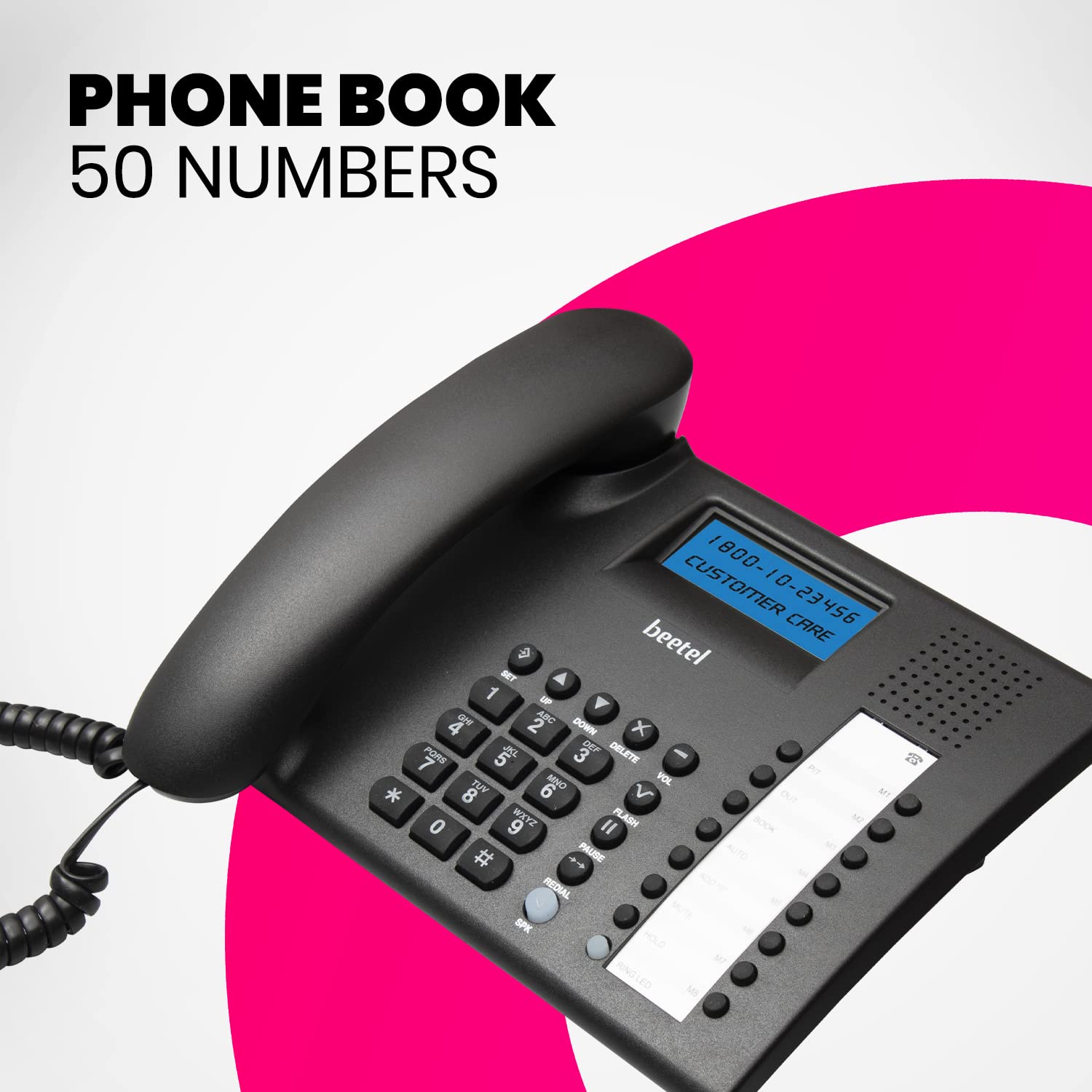
Image 4.4: Beetel M90N Phonebook Feature. This image shows the phone's keypad and LCD, indicating its capacity to store up to 25 numbers in the phonebook.
4.4 Speakerphone and Volume Control
- സ്പീക്കർഫോൺ: അമർത്തുക സ്പീക്കർ button to activate hands-free calling.
- Digital Volume Control: Adjust the speakerphone volume using the dedicated volume buttons during a call.
- റിംഗർ വോളിയം: Use the 3-level ringer volume switch (usually located on the side or back of the phone) to adjust the incoming call volume.
4.5 അധിക സവിശേഷതകൾ
- ശല്യപ്പെടുത്തരുത് (DND): Activate DND to temporarily silence incoming calls. Refer to the menu for activation/deactivation.
- Incoming Call Reject: Configure the phone to reject specific incoming calls.
- Music on Hold: When a call is placed on hold, music may play for the caller (if enabled).
- അലാറം ക്ലോക്ക്: Set an alarm using the phone's menu.
- Baby Call: A feature that automatically dials a pre-programmed number when any key is pressed (useful for young children).
5. പരിപാലനം
- വൃത്തിയാക്കൽ: ഒരു സോഫ്റ്റ്, ഡി ക്ലീനർ ഉപയോഗിച്ച് ഫോൺ തുടയ്ക്കുക.amp തുണി. കഠിനമായ രാസവസ്തുക്കളോ ഉരച്ചിലുകളുള്ള ക്ലീനറുകളോ ഉപയോഗിക്കരുത്.
- ദ്രാവകങ്ങൾ ഒഴിവാക്കുക: Keep the phone away from water and other liquids to prevent damage.
- താപനില: Do not expose the phone to extreme temperatures or direct sunlight.
- ബാറ്ററി മാറ്റിസ്ഥാപിക്കൽ: If the display fades or memory functions become unreliable, replace the batteries. Ensure correct battery type and polarity.
6. പ്രശ്നപരിഹാരം
| പ്രശ്നം | സാധ്യമായ കാരണം | പരിഹാരം |
|---|---|---|
| ഡയൽ ടോൺ ഇല്ല | Line cord not connected properly or service issue. | Ensure the line cord is securely plugged into both the phone and the wall jack. Test with another phone if possible. Contact your service provider if the issue persists. |
| LCD display is dim or blank | Low or depleted batteries. LCD contrast setting is too low. | Replace the batteries with new ones, ensuring correct polarity. Adjust the LCD contrast setting (refer to section 3.2). |
| കോളർ ഐഡി പ്രദർശിപ്പിക്കുന്നില്ല | Caller ID service not subscribed. Batteries are low. | Contact your telephone service provider to ensure Caller ID service is active. Replace batteries if they are low. |
| Cannot hear caller on speakerphone / Echo during speakerphone call | Speakerphone volume too low. Environmental factors causing echo. | Increase speakerphone volume using the digital volume control. Try moving the phone to a different location or reducing background noise. |
| Phone cuts off during calls | Loose connections. Battery issue affecting phone stability. | Check all cable connections. If batteries are installed, ensure they are fresh and correctly inserted. Replace if necessary, as old batteries can cause unexpected behavior. |
7 സ്പെസിഫിക്കേഷനുകൾ
| ഫീച്ചർ | വിശദാംശങ്ങൾ |
|---|---|
| മോഡൽ | M90N |
| ബ്രാൻഡ് | ബീറ്റൽ |
| ടെലിഫോൺ തരം | കോർഡഡ് |
| പ്രദർശിപ്പിക്കുക | 16 Digit LCD Display |
| കോളർ ഐഡി അനുയോജ്യത | FSK/DTMF |
| Incoming Call Memory | 140 അക്കങ്ങൾ |
| Outgoing Call Memory | 16 അക്കങ്ങൾ |
| One-Touch Memory | 8 അക്കങ്ങൾ |
| Two-Touch Memory | 12 അക്കങ്ങൾ |
| ഫോൺബുക്ക് ശേഷി | 25 numbers with name |
| റിംഗർ വോളിയം | 3 ലെവലുകൾ |
| എൽസിഡി കോൺട്രാസ്റ്റ് | ക്രമീകരിക്കാവുന്ന 5 ഘട്ടങ്ങൾ |
| അളവുകൾ (LxWxH) | 22.3 x 20.9 x 6.5 സെ.മീ |
| ഭാരം | 720 ഗ്രാം |
| നിറം | കറുപ്പ് |
| മെറ്റീരിയൽ | പ്ലാസ്റ്റിക് |
| നിർമ്മാതാവ് | ബീറ്റൽ ടെലിടെക് ലിമിറ്റഡ് |
| മാതൃരാജ്യം | ചൈന |
8. വാറൻ്റിയും പിന്തുണയും
The Beetel M90N Corded Landline Phone comes with a 12-month warranty provided by Beetel.
- വാറൻ്റി കാലയളവ്: വാങ്ങിയ തീയതി മുതൽ 12 മാസം.
- നിർമ്മാതാവ്: ബീറ്റൽ ടെലിടെക് ലിമിറ്റഡ്
- For support or warranty claims, please contact Beetel customer service. Refer to the official Beetel webബന്ധപ്പെടാനുള്ള വിശദാംശങ്ങൾക്കായി സൈറ്റ് അല്ലെങ്കിൽ ഉൽപ്പന്ന പാക്കേജിംഗ്.