
ആമുഖം
The Adesso AKB-132UB Multimedia Desktop Keyboard is designed to enhance your computing experience with its 104-key layout and integrated multimedia and internet hotkeys. This keyboard features quiet membrane key switches for a comfortable and responsive typing experience. It connects to your computer via a USB interface.
പാക്കേജ് ഉള്ളടക്കം
നിങ്ങളുടെ പാക്കേജിൽ എല്ലാ ഇനങ്ങളും ഉണ്ടെന്ന് ദയവായി പരിശോധിക്കുക:
- Adesso AKB-132UB Multimedia Desktop Keyboard
- ദ്രുത ആരംഭ ഗൈഡ്
സജ്ജമാക്കുക
- നിങ്ങളുടെ കമ്പ്യൂട്ടർ ഓഫാക്കുക: For optimal installation, it is recommended to power off your computer before connecting the keyboard.
- USB കേബിൾ ബന്ധിപ്പിക്കുക: Locate an available USB port on your computer. Plug the USB connector of the Adesso AKB-132UB keyboard firmly into the USB port. Note: Some USB keyboards may be sensitive to the specific port used. If the keyboard does not function, try a different USB port, preferably one directly on the computer's motherboard (e.g., at the back of a desktop PC) rather than a USB hub.
- നിങ്ങളുടെ കമ്പ്യൂട്ടർ ഓൺ ചെയ്യുക: Turn on your computer. The operating system should automatically detect and install the necessary drivers for the keyboard.
- പ്രവർത്തനക്ഷമത പരിശോധിക്കുക: Once the drivers are installed, test the keyboard by typing in a text editor or navigating your system. The Num Lock, Caps Lock, and Scroll Lock indicator lights should function correctly.
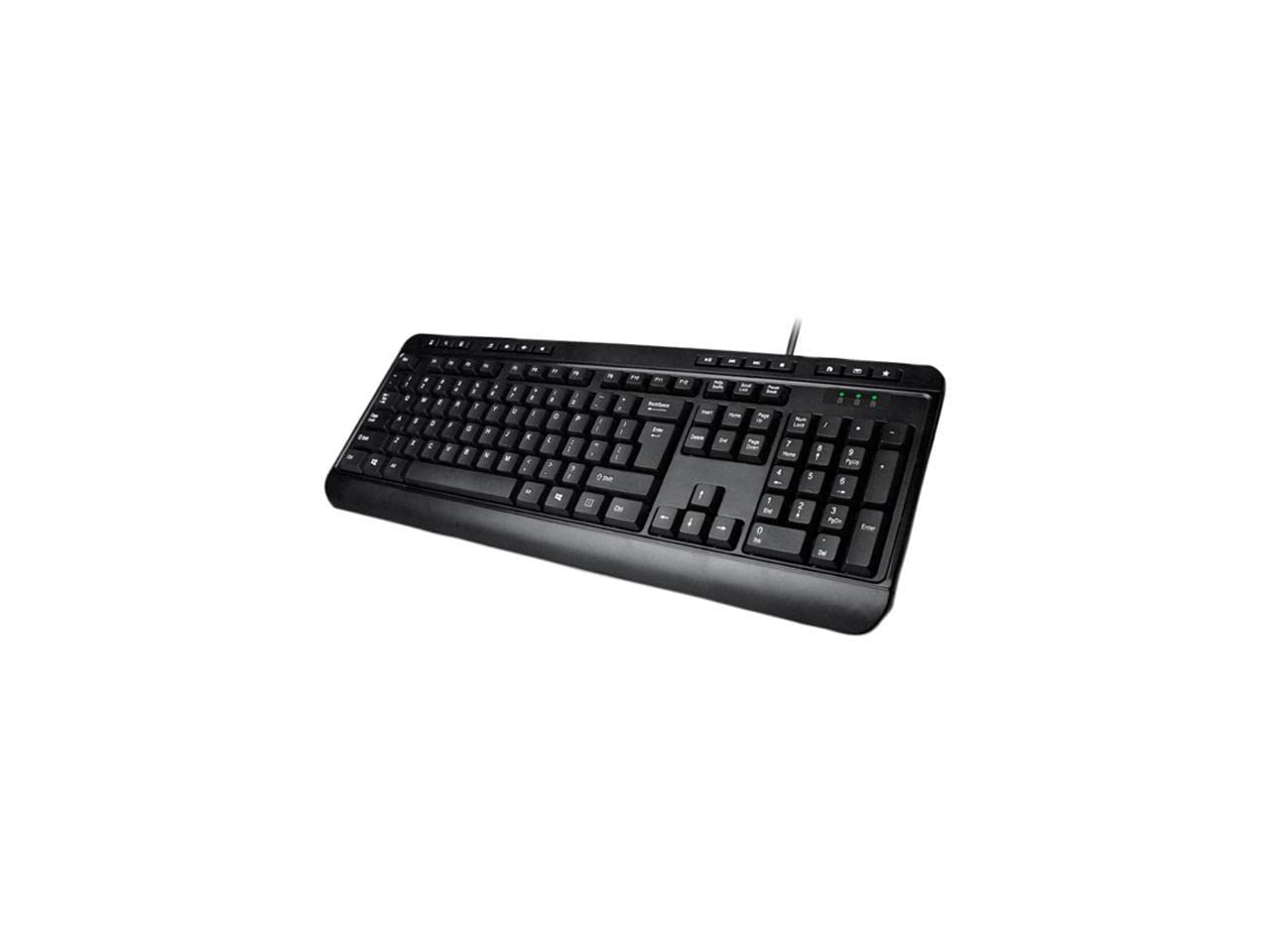
Image: Adesso AKB-132UB Multimedia Desktop Keyboard. This image shows the full keyboard with its standard 104-key layout and the attached USB cable for connection.
പ്രവർത്തന നിർദ്ദേശങ്ങൾ
Standard Keyboard Functions
The Adesso AKB-132UB features a standard 104-key US layout. Keys operate as labeled. The keyboard utilizes membrane switches, providing a quiet and tactile typing experience.
- ഇൻഡിക്കേറ്റർ ലൈറ്റുകൾ: Located above the numeric keypad, these lights indicate the status of Num Lock, Caps Lock, and Scroll Lock.
- ക്രമീകരിക്കാവുന്ന ടിൽറ്റ്: The keyboard includes foldable feet on the underside to adjust the typing angle for comfort.
മൾട്ടിമീഡിയ ഹോട്ട്കീകൾ
The keyboard includes 8 dedicated multimedia hotkeys for quick access to media player controls:
- മീഡിയ പ്ലെയർ: Opens your default media player application.
- വോളിയം താഴേക്ക്: Decreases the system volume.
- വോളിയം കൂട്ടുക: Increases the system volume.
- നിശബ്ദമാക്കുക: Toggles the system sound on or off.
- പ്ലേ/താൽക്കാലികമായി നിർത്തുക: മീഡിയ പ്ലേബാക്ക് പ്ലേ ചെയ്യുകയോ താൽക്കാലികമായി നിർത്തുകയോ ചെയ്യുന്നു.
- മുമ്പത്തെ ട്രാക്ക്: Skips to the previous track in your media player.
- അടുത്ത ട്രാക്ക്: Skips to the next track in your media player.
- നിർത്തുക: മീഡിയ പ്ലേബാക്ക് നിർത്തുന്നു.
Windows & Internet Hotkeys
The keyboard also features 6 hotkeys for common Windows and Internet functions:
- എന്റെ കമ്പ്യൂട്ടർ: Opens the "This PC" or "My Computer" window.
- തിരയുക: Opens the system search utility.
- കാൽക്കുലേറ്റർ: Launches the Windows Calculator application.
- മെയിൽ: Opens your default email client.
- വീട്: നിങ്ങളുടെ ഡിഫോൾട്ട് തുറക്കുന്നു web browser to its home page.
- പ്രിയപ്പെട്ടവ: നിങ്ങളുടെ തുറക്കുന്നു web browser's favorites/bookmarks.
സ്പെസിഫിക്കേഷനുകൾ
| ഫീച്ചർ | വിശദാംശങ്ങൾ |
|---|---|
| ബ്രാൻഡ് | അഡെസോ |
| മോഡൽ നമ്പർ | AKB-132UB |
| കണക്റ്റിവിറ്റി ടെക്നോളജി | വയർഡ് (യുഎസ്ബി) |
| കീബോർഡ് ലേഔട്ട് | 104-Key US Layout (QWERTY) |
| കീ തരം | മെംബ്രൻ സ്വിച്ചുകൾ |
| മൾട്ടിമീഡിയ ഹോട്ട്കീകൾ | 8 (മീഡിയ പ്ലെയർ, വോളിയം കുറയ്ക്കുക, വോളിയം കൂട്ടുക, മ്യൂട്ട് ചെയ്യുക, പ്ലേ ചെയ്യുക/താൽക്കാലികമായി നിർത്തുക, മുമ്പത്തെ ട്രാക്ക്, അടുത്ത ട്രാക്ക്, നിർത്തുക) |
| Windows & Internet Hotkeys | 6 (എന്റെ കമ്പ്യൂട്ടർ, തിരയൽ, കാൽക്കുലേറ്റർ, മെയിൽ, ഹോം, പ്രിയപ്പെട്ടവ) |
| സൂചകങ്ങൾ | നം ലോക്ക്, ക്യാപ്സ് ലോക്ക്, സ്ക്രോൾ ലോക്ക് |
| ജീവിത ചക്രം | 5 ദശലക്ഷം കീസ്ട്രോക്കുകൾ |
| നിറം | കറുപ്പ് |
| മെറ്റീരിയൽ | പ്ലാസ്റ്റിക് |
| ഇനത്തിൻ്റെ ഭാരം | 1.5 പൗണ്ട് |
ട്രബിൾഷൂട്ടിംഗ്
- കീബോർഡ് പ്രതികരിക്കുന്നില്ല:
- നിങ്ങളുടെ കമ്പ്യൂട്ടറിലെ പ്രവർത്തിക്കുന്ന ഒരു USB പോർട്ടിലേക്ക് USB കേബിൾ സുരക്ഷിതമായി ബന്ധിപ്പിച്ചിട്ടുണ്ടെന്ന് ഉറപ്പാക്കുക.
- Try plugging the keyboard into a different USB port, especially a direct port on the computer's rear, bypassing any USB hubs.
- Restart your computer to allow the operating system to re-detect the device.
- പ്രശ്നം കീബോർഡിലാണോ അതോ നിങ്ങളുടെ കമ്പ്യൂട്ടറിന്റെ സജ്ജീകരണത്തിലാണോ എന്ന് നിർണ്ണയിക്കാൻ മറ്റൊരു കമ്പ്യൂട്ടറിൽ കീബോർഡ് പരിശോധിക്കുക.
- Keys Not Functioning Correctly or Unexpected Characters:
- Verify that the correct keyboard layout is selected in your operating system settings.
- താക്കോലുകൾക്കടിയിൽ വിദേശ വസ്തുക്കൾ ഒന്നും തന്നെ കുടുങ്ങിക്കിടക്കുന്നില്ലെന്ന് ഉറപ്പാക്കുക.
- For specific keys like the 'Enter' key, be aware that some keyboard layouts may place the backslash key adjacent to it. Familiarization with the physical layout is key.
- Wobbly Keyboard:
- Ensure the keyboard is placed on a flat, stable surface.
- Check if the adjustable tilt feet are fully extended or retracted evenly.
മെയിൻ്റനൻസ്
To maintain the performance and longevity of your Adesso AKB-132UB keyboard:
- വൃത്തിയാക്കൽ: മൃദുവായ, ചെറുതായി ഡി ഉപയോഗിക്കുകamp cloth to wipe the surface of the keyboard. Avoid using harsh chemicals or abrasive cleaners. For cleaning between keys, use compressed air to remove dust and debris.
- ചോർച്ച ഒഴിവാക്കുക: ആന്തരിക ഘടകങ്ങൾക്ക് കേടുപാടുകൾ സംഭവിക്കാതിരിക്കാൻ കീബോർഡിൽ നിന്ന് ദ്രാവകങ്ങൾ അകറ്റി നിർത്തുക.
- സംഭരണം: ദീർഘനേരം ഉപയോഗിക്കാത്തപ്പോൾ, കീബോർഡ് വൃത്തിയുള്ളതും വരണ്ടതുമായ അന്തരീക്ഷത്തിൽ സൂക്ഷിക്കുക.
വാറൻ്റിയും പിന്തുണയും
The Adesso AKB-132UB Multimedia Desktop Keyboard comes with a 1 വർഷത്തെ പരിമിത വാറൻ്റി വാങ്ങിയ തീയതി മുതൽ. സാധാരണ ഉപയോഗത്തിലുള്ള മെറ്റീരിയലുകളിലെയും വർക്ക്മാൻഷിപ്പുകളിലെയും വൈകല്യങ്ങൾ ഈ വാറന്റി ഉൾക്കൊള്ളുന്നു.
For technical support, warranty claims, or further assistance, please contact Adesso customer service. Refer to the official Adesso webഏറ്റവും പുതിയ ബന്ധപ്പെടാനുള്ള വിവരങ്ങൾക്കായി സൈറ്റ്.
കുറിപ്പ്: ഈ ഉൽപ്പന്നത്തിൽ ക്യാൻസറിനും ജനന വൈകല്യങ്ങൾക്കും അല്ലെങ്കിൽ മറ്റ് പ്രത്യുൽപാദന വൈകല്യങ്ങൾക്കും കാരണമാകുമെന്ന് കാലിഫോർണിയ സംസ്ഥാനത്തിന് അറിയാവുന്ന രാസവസ്തുക്കൾ അടങ്ങിയിരിക്കുന്നു.