
1. ആമുഖം
This manual provides detailed instructions for the setup, operation, and maintenance of your Craig CHT914C Stereo Home Theater/Tower Speaker System. Please read this manual thoroughly before using the product to ensure proper functionality and to maximize your listening experience. The CHT914C offers versatile audio playback options, including Bluetooth wireless connectivity and FM stereo radio, and can be configured as a single tower or two separate stereo speakers.
2. പാക്കേജ് ഉള്ളടക്കം
താഴെ ലിസ്റ്റ് ചെയ്തിരിക്കുന്ന എല്ലാ ഇനങ്ങളും നിങ്ങളുടെ പാക്കേജിൽ ഉൾപ്പെടുത്തിയിട്ടുണ്ടെന്ന് ഉറപ്പാക്കുക:
- Craig CHT914C Speaker System (main unit and detachable base/speaker)
- Hardware for conversion (screws, connecting cables if applicable)
- Remote Control (if included, typically for digital volume and source)
- എസി പവർ അഡാപ്റ്റർ
- ഉപയോക്തൃ മാനുവൽ (ഈ പ്രമാണം)
3 പ്രധാനപ്പെട്ട സുരക്ഷാ വിവരങ്ങൾ
വൈദ്യുതാഘാതം, തീപിടുത്തം അല്ലെങ്കിൽ യൂണിറ്റിന് കേടുപാടുകൾ എന്നിവ കുറയ്ക്കുന്നതിന്, ദയവായി ഇനിപ്പറയുന്ന സുരക്ഷാ മുൻകരുതലുകൾ പാലിക്കുക:
- ഈ ഉപകരണം മഴയിലോ ഈർപ്പത്തിലോ തുറന്നുകാട്ടരുത്.
- പാത്രങ്ങൾ പോലുള്ള ദ്രാവകങ്ങൾ നിറച്ച വസ്തുക്കൾ ഉപകരണത്തിൽ വയ്ക്കരുത്.
- വെന്റിലേഷൻ തുറസ്സുകളൊന്നും തടയരുത്. നിർമ്മാതാവിന്റെ നിർദ്ദേശങ്ങൾക്കനുസൃതമായി ഇൻസ്റ്റാൾ ചെയ്യുക.
- റേഡിയറുകൾ, ഹീറ്റ് രജിസ്റ്ററുകൾ, സ്റ്റൗകൾ, അല്ലെങ്കിൽ മറ്റ് ഉപകരണങ്ങൾ (ഉൾപ്പെടെ) പോലെയുള്ള താപ സ്രോതസ്സുകൾക്ക് സമീപം ഇൻസ്റ്റാൾ ചെയ്യരുത്. ampലൈഫയറുകൾ) ചൂട് ഉത്പാദിപ്പിക്കുന്നത്.
- പവർ കോർഡ് നടക്കാനോ നുള്ളിയെടുക്കാനോ സംരക്ഷിക്കുക, പ്രത്യേകിച്ചും പ്ലഗുകൾ, സ re കര്യപ്രദമായ റെസപ്റ്റാക്കലുകൾ, അവർ ഉപകരണത്തിൽ നിന്ന് പുറത്തുകടക്കുന്ന സ്ഥലം.
- നിർമ്മാതാവ് വ്യക്തമാക്കിയ അറ്റാച്ച്മെൻ്റുകൾ/ആക്സസറികൾ മാത്രം ഉപയോഗിക്കുക.
- മിന്നൽ കൊടുങ്കാറ്റുകളുടെ സമയത്തോ ദീർഘനേരം ഉപയോഗിക്കാത്ത സമയത്തോ ഈ ഉപകരണം അൺപ്ലഗ് ചെയ്യുക.
- എല്ലാ സേവനങ്ങളും യോഗ്യതയുള്ള സേവന ഉദ്യോഗസ്ഥർക്ക് റഫർ ചെയ്യുക. പവർ സപ്ലൈ കോർഡ് അല്ലെങ്കിൽ പ്ലഗ് കേടാകുക, ദ്രാവകം ഒഴുകുകയോ ഉപകരണങ്ങൾ ഉപകരണത്തിലേക്ക് വീഴുകയോ ചെയ്യുക, ഉപകരണം മഴയോ ഈർപ്പമോ സമ്പർക്കം പുലർത്തുക, സാധാരണയായി പ്രവർത്തിക്കാത്തത് എന്നിങ്ങനെയുള്ള ഏതെങ്കിലും വിധത്തിൽ ഉപകരണത്തിന് കേടുപാടുകൾ സംഭവിക്കുമ്പോൾ സേവനം ആവശ്യമാണ്. , അല്ലെങ്കിൽ ഉപേക്ഷിച്ചു.
4. സജ്ജീകരണവും അസംബ്ലിയും
The Craig CHT914C speaker system offers two primary configurations: a single tower speaker or two separate stereo speakers. Hardware for conversion is included.
4.1. Tower Speaker Assembly
To assemble the unit as a single tower speaker:
- Carefully align the top speaker unit with the bottom speaker unit.
- Connect the internal wiring or external cable (if provided) that links the two sections.
- Secure the two sections together using the provided screws or locking mechanism.
- Attach the base to the bottom of the assembled tower speaker, ensuring it is stable.
- Connect the AC power adapter to the power input on the main unit and then to a wall outlet.
4.2. Stereo Speaker Configuration
To convert the system into two separate stereo speakers:
- Separate the top and bottom speaker units by disengaging the locking mechanism or removing the screws.
- Attach the provided individual bases to each speaker unit. Ensure each base is securely fastened for stability.
- Connect the AC power adapter to the main speaker unit (typically the one with controls).
- Use the provided speaker cable to connect the main speaker unit to the secondary speaker unit.
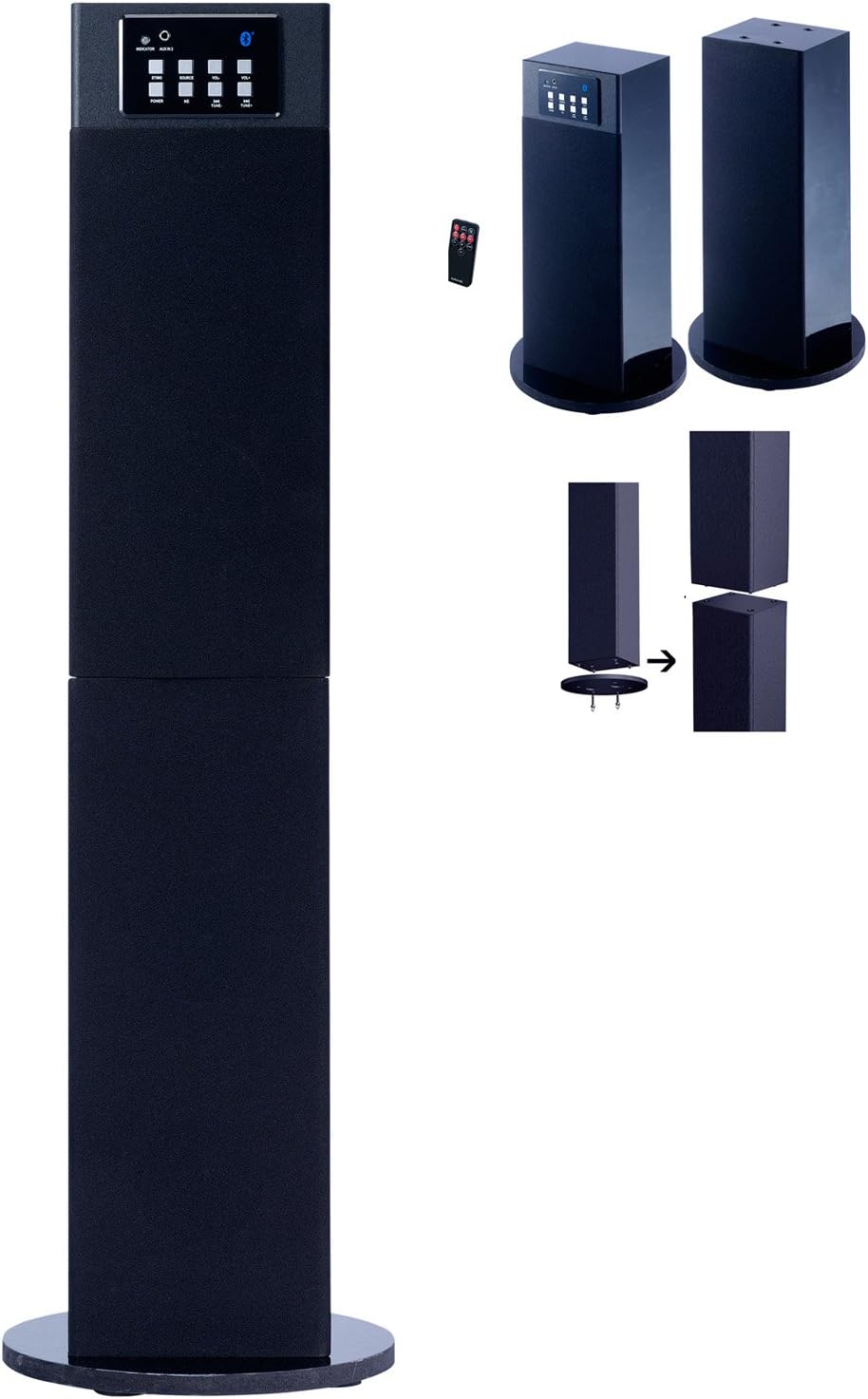
ചിത്രം 1: The Craig CHT914C speaker system. The image displays the unit in its full tower configuration on the left. On the right, it illustrates how the tower can be separated into two individual stereo speakers, each with its own base. A close-up of the control panel with buttons for power, source, volume, and Bluetooth indicator is visible, along with a small remote control.
5. പ്രവർത്തന നിർദ്ദേശങ്ങൾ
5.1. പവർ ഓൺ/ഓഫ്
അമർത്തുക പവർ button on the control panel or remote control to turn the unit on or off. An indicator light will illuminate when the unit is powered on.
5.2. ഉറവിടം തിരഞ്ഞെടുക്കൽ
അമർത്തുക ഉറവിടം button repeatedly on the control panel or remote control to cycle through available input modes: Bluetooth, AUX (Audio In), and FM Radio. The current source will be indicated by an LED on the control panel.
5.3. വോളിയം നിയന്ത്രണം
ഉപയോഗിച്ച് വോളിയം ക്രമീകരിക്കുക VOL+ ഒപ്പം വോൾ- buttons on the control panel or the volume buttons on the remote control. The system features digital volume control for precise adjustments.
5.4. ബ്ലൂടൂത്ത് ജോടിയാക്കൽ
To connect a Bluetooth-enabled device:
- Select the Bluetooth source mode using the ഉറവിടം button. The Bluetooth indicator will flash, indicating it is in pairing mode.
- നിങ്ങളുടെ സ്മാർട്ട്ഫോണിലോ മറ്റ് ബ്ലൂടൂത്ത് ഉപകരണത്തിലോ, ബ്ലൂടൂത്ത് പ്രവർത്തനക്ഷമമാക്കി ലഭ്യമായ ഉപകരണങ്ങൾക്കായി തിരയുക.
- Select "CHT914C" (or similar name) from the list of devices.
- Once paired, the Bluetooth indicator will stop flashing and remain solid. You can now play audio wirelessly from your device.
5.5. എഫ്എം റേഡിയോ പ്രവർത്തനം
To use the built-in FM stereo radio:
- Select the FM radio source mode using the ഉറവിടം ബട്ടൺ.
- ഉപയോഗിക്കുക ട്യൂൺ+ ഒപ്പം ട്യൂൺ- buttons (or equivalent on remote) to manually tune to desired radio stations.
- For automatic scanning and saving of stations, refer to the specific instructions for your remote control, as functionality may vary.
6. പരിപാലനം
Proper care and maintenance will ensure the longevity of your speaker system:
- വൃത്തിയാക്കൽ: Use a soft, dry cloth to clean the exterior surfaces of the speakers. Do not use liquid cleaners or aerosol sprays, as they may damage the finish or internal components.
- പ്ലേസ്മെൻ്റ്: Place the speakers on a stable, flat surface to prevent accidental falls. Avoid placing them in direct sunlight or near heat sources.
- വെൻ്റിലേഷൻ: അമിതമായി ചൂടാകുന്നത് തടയാൻ വെന്റിലേഷൻ ദ്വാരങ്ങൾ തടസ്സപ്പെടുന്നില്ലെന്ന് ഉറപ്പാക്കുക.
- പവർ കോർഡ്: Regularly inspect the power cord for any signs of damage. If damaged, discontinue use and seek professional repair.
7. പ്രശ്നപരിഹാരം
If you encounter issues with your CHT914C speaker system, refer to the following common problems and solutions:
| പ്രശ്നം | സാധ്യമായ കാരണം | പരിഹാരം |
|---|---|---|
| പവർ ഇല്ല | Power cord not connected; Wall outlet not active; Unit is off. | Ensure power cord is securely plugged into the unit and a working wall outlet. Press the POWER button. |
| ശബ്ദമില്ല | Volume too low; Incorrect source selected; Audio cable not connected (for AUX); Bluetooth not paired. | Increase volume. Select the correct source. Ensure audio cables are connected. Re-pair Bluetooth device. |
| ബ്ലൂടൂത്ത് കണക്റ്റുചെയ്യുന്നില്ല | Speaker not in pairing mode; Device too far; Device already connected to another speaker. | Ensure speaker is in Bluetooth pairing mode (flashing indicator). Move device closer. Disconnect device from other Bluetooth speakers. |
| മോശം എഫ്എം റിസപ്ഷൻ | Weak signal; Antenna not extended/positioned correctly. | Adjust the position of the unit or its antenna for better reception. Try tuning to a stronger station. |
8 സ്പെസിഫിക്കേഷനുകൾ
- മോഡൽ: CHT914C
- ബ്രാൻഡ്: ക്രെയ്ഗ്
- സ്പീക്കർ തരം: Tower (convertible to Stereo)
- കണക്റ്റിവിറ്റി: Bluetooth, AUX (Audio In)
- പ്രത്യേക സവിശേഷതകൾ: FM Stereo Radio, Digital Volume Control
- സ്പീക്കർ ഔട്ട്പുട്ട് പവർ: 6 വാട്ട്സ് (പരമാവധി)
- പ്രതിരോധം: 4 ഓം
- ഊർജ്ജ സ്രോതസ്സ്: കോർഡഡ് ഇലക്ട്രിക്
- ഉൽപ്പന്ന അളവുകൾ: 9.06 x 9.06 x 15.75 inches (assembled tower)
- ഇനത്തിൻ്റെ ഭാരം: 11.2 പൗണ്ട്
- UPC: 731398549146, 799472266549
9. വാറൻ്റിയും പിന്തുണയും
This product is manufactured by Craig Electronics. For specific warranty information and support, please refer to the documentation included with your purchase or visit the official Craig Electronics website. Please note that the seller's legal disclaimer states: "Please do your own research. Ask questions, etc before ordering. No return. All checked before shipment." This implies that direct returns or post-purchase support from the seller may be limited. For technical issues or warranty claims, contacting the manufacturer directly is recommended.