
This manual provides detailed instructions for the assembly, operation, maintenance, and troubleshooting of your Lenovo Horizon Multi-mode Table HT600. Please read this manual thoroughly before using the product to ensure proper setup and functionality.
1. ഉൽപ്പന്നം കഴിഞ്ഞുview
The Lenovo Horizon Multi-mode Table HT600 is designed to complement and enhance the use of compatible Lenovo Horizon All-in-One PCs. It allows for various modes of interaction with your Horizon PC, transforming it into a large-format tablet or a traditional desktop setup.
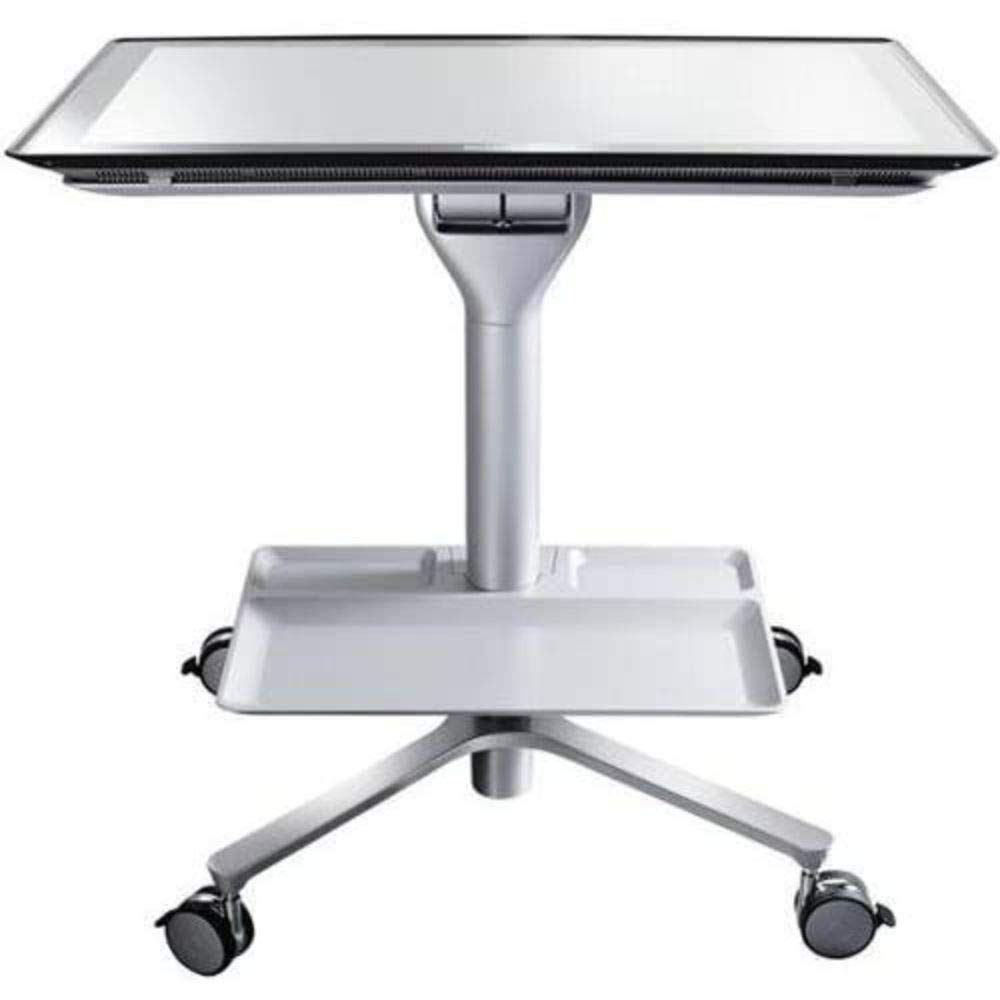
ചിത്രം 1: Lenovo Horizon Multi-mode Table HT600. This image shows the table in its assembled form, ready to support a Lenovo Horizon All-in-One PC.
2. സജ്ജീകരണവും അസംബ്ലിയും
Assembly is required for the Lenovo Horizon Multi-mode Table HT600. Please follow these steps carefully.
2.1 അൺപാക്കിംഗ്
പാക്കേജിംഗിൽ നിന്ന് എല്ലാ ഘടകങ്ങളും ശ്രദ്ധാപൂർവ്വം നീക്കം ചെയ്യുക. എല്ലാ ഭാഗങ്ങളും ഉണ്ടെന്ന് ഉറപ്പാക്കുക:
- Tabletop section
- കാലുകൾ (സാധാരണയായി 4)
- Mounting hardware (screws, washers, Allen wrench if needed)
- Instruction sheet (this manual)
2.2 അസംബ്ലി നിർദ്ദേശങ്ങൾ
- Place the tabletop section upside down on a soft, clean surface to prevent scratches.
- Attach each leg to the designated mounting points on the underside of the tabletop using the provided screws and hardware. Ensure screws are tightened securely but do not overtighten.
- Once all legs are attached, carefully turn the table upright.
- Ensure the table is stable before placing any equipment on it.
കുറിപ്പ്: If you encounter any difficulties during assembly, refer to the troubleshooting section or contact Lenovo support.
3. Operating the Multi-mode Table
The HT600 table is designed to be used with compatible Lenovo Horizon All-in-One PCs. Its multi-mode functionality allows for flexible interaction.
3.1 Placing the Lenovo Horizon PC
- Carefully place your Lenovo Horizon All-in-One PC onto the center of the table.
- Ensure the PC is securely seated and stable on the table surface.
3.2 Multi-mode Functionality
The table supports various orientations for your Horizon PC, allowing it to function as a large horizontal tabletop device or an upright display. Refer to your Lenovo Horizon PC's manual for specific instructions on how to utilize its multi-mode features in conjunction with this table.
4. പരിപാലനം
Proper maintenance ensures the longevity and appearance of your Lenovo Horizon Multi-mode Table HT600.
4.1 വൃത്തിയാക്കൽ
- ഒരു സോഫ്റ്റ് ഉപയോഗിക്കുക, ഡിamp cloth to wipe down the table surfaces.
- അബ്രാസീവ് ക്ലീനറുകൾ, ലായകങ്ങൾ, അല്ലെങ്കിൽ കഠിനമായ രാസവസ്തുക്കൾ എന്നിവ ഒഴിവാക്കുക, കാരണം ഇവ ഫിനിഷിന് കേടുവരുത്തും.
- കഠിനമായ കറകൾക്ക്, ഒരു നേരിയ സോപ്പ് ലായനി ഉപയോഗിക്കാം, തുടർന്ന് വൃത്തിയുള്ള ഒരു ഡിഷ്വാഷർ ഉപയോഗിച്ച് തുടയ്ക്കാം.amp തുണി.
4.2 സംഭരണം
When not in use, store the table in a dry, cool environment away from direct sunlight and extreme temperatures.
5. പ്രശ്നപരിഹാരം
This section addresses common issues you might encounter with your Lenovo Horizon Multi-mode Table HT600.
| പ്രശ്നം | സാധ്യമായ കാരണം | പരിഹാരം |
|---|---|---|
| Table is unstable or wobbly. | Loose leg connections; uneven floor surface. | Check and tighten all leg screws. Move the table to a level surface. |
| Lenovo Horizon PC does not fit on the table. | Incompatible PC model. | This table is specifically designed for certain Lenovo Horizon All-in-One PC models (e.g., original Horizon). It may not be compatible with newer models like the Horizon 2 or other Lenovo AIO PCs. Verify your PC model's compatibility with the HT600 table. |
| Scratches on table surface. | Abrasive cleaning materials; sharp objects. | Use only soft cloths for cleaning. Avoid placing sharp objects directly on the surface. |
If the issue persists, please contact Lenovo customer support for further assistance.
6 സ്പെസിഫിക്കേഷനുകൾ
| ഫീച്ചർ | വിശദാംശങ്ങൾ |
|---|---|
| ബ്രാൻഡ് | ലെനോവോ |
| മോഡൽ | HT600 |
| യു.പി.സി | 887770827385 |
| ഇനത്തിൻ്റെ ഭാരം | 32 പൗണ്ട് (ഏകദേശം 14.5 കി.ഗ്രാം) |
| അസംബ്ലി ആവശ്യമാണ് | അതെ |
| ശൈലി | ആധുനികം |
7. വാറൻ്റിയും പിന്തുണയും
വാറന്റി വിവരങ്ങൾ, സാങ്കേതിക പിന്തുണ, അല്ലെങ്കിൽ മാറ്റിസ്ഥാപിക്കാനുള്ള ഭാഗങ്ങൾ വാങ്ങുന്നതിന്, ദയവായി ഔദ്യോഗിക ലെനോവോ പിന്തുണ സന്ദർശിക്കുക. webസൈറ്റിൽ ബന്ധപ്പെടുകയോ അവരുടെ ഉപഭോക്തൃ സേവനവുമായി നേരിട്ട് ബന്ധപ്പെടുകയോ ചെയ്യുക. വാറന്റി ക്ലെയിമുകൾക്കുള്ള വാങ്ങലിന്റെ തെളിവായി നിങ്ങളുടെ വാങ്ങൽ രസീത് സൂക്ഷിക്കുക.
ലെനോവോ ഔദ്യോഗിക പിന്തുണ: https://support.lenovo.com