
Edifier R1600TIII
Edifier R1600TIII Active Bookshelf Speakers User Manual
Model: R1600TIII
ആമുഖം
വാങ്ങിയതിന് നന്ദി.asing the Edifier R1600TIII Active Bookshelf Speakers. This manual provides detailed instructions for setting up, operating, and maintaining your speakers to ensure optimal performance and longevity. Please read this manual thoroughly before use and retain it for future reference.
പ്രധാനപ്പെട്ട സുരക്ഷാ നിർദ്ദേശങ്ങൾ
- ഈ നിർദ്ദേശങ്ങൾ ശ്രദ്ധാപൂർവ്വം വായിക്കുക.
- ഭാവി റഫറൻസിനായി ഈ നിർദ്ദേശങ്ങൾ സൂക്ഷിക്കുക.
- എല്ലാ മുന്നറിയിപ്പുകളും ശ്രദ്ധിക്കുക.
- എല്ലാ നിർദ്ദേശങ്ങളും പാലിക്കുക.
- വെള്ളത്തിനടുത്ത് ഈ ഉപകരണം ഉപയോഗിക്കരുത്.
- ഉണങ്ങിയ തുണി ഉപയോഗിച്ച് മാത്രം വൃത്തിയാക്കുക.
- വെന്റിലേഷൻ തുറസ്സുകളൊന്നും തടയരുത്. നിർമ്മാതാവിന്റെ നിർദ്ദേശങ്ങൾക്കനുസൃതമായി ഇൻസ്റ്റാൾ ചെയ്യുക.
- റേഡിയറുകൾ, ഹീറ്റ് രജിസ്റ്ററുകൾ, സ്റ്റൗകൾ, അല്ലെങ്കിൽ മറ്റ് ഉപകരണങ്ങൾ (ഉൾപ്പെടെ) പോലെയുള്ള താപ സ്രോതസ്സുകൾക്ക് സമീപം ഇൻസ്റ്റാൾ ചെയ്യരുത്. ampലൈഫയറുകൾ) ചൂട് ഉത്പാദിപ്പിക്കുന്നത്.
- പ്രത്യേകിച്ച് പ്ലഗുകൾ, കൺവീനിയൻസ് റെസെപ്റ്റക്കിളുകൾ, ഉപകരണത്തിൽ നിന്ന് പുറത്തുകടക്കുന്ന ഇടം എന്നിവയിൽ നടക്കുകയോ നുള്ളുകയോ ചെയ്യുന്നതിൽ നിന്ന് പവർ കോർഡ് സംരക്ഷിക്കുക.
- നിർമ്മാതാവ് വ്യക്തമാക്കിയ അറ്റാച്ച്മെൻ്റുകൾ/ആക്സസറികൾ മാത്രം ഉപയോഗിക്കുക.
- മിന്നൽ കൊടുങ്കാറ്റുകളുടെ സമയത്തോ ദീർഘനേരം ഉപയോഗിക്കാത്ത സമയത്തോ ഈ ഉപകരണം അൺപ്ലഗ് ചെയ്യുക.
- എല്ലാ സേവനങ്ങളും യോഗ്യതയുള്ള സേവന ഉദ്യോഗസ്ഥർക്ക് റഫർ ചെയ്യുക. പവർ സപ്ലൈ കോർഡ് അല്ലെങ്കിൽ പ്ലഗ് കേടാകുക, ദ്രാവകം ഒഴുകുകയോ ഉപകരണങ്ങൾ ഉപകരണത്തിലേക്ക് വീഴുകയോ ചെയ്യുക, ഉപകരണം മഴയോ ഈർപ്പമോ സമ്പർക്കം പുലർത്തുക, സാധാരണയായി പ്രവർത്തിക്കാത്തത് എന്നിങ്ങനെയുള്ള ഏതെങ്കിലും വിധത്തിൽ ഉപകരണത്തിന് കേടുപാടുകൾ സംഭവിക്കുമ്പോൾ സേവനം ആവശ്യമാണ്. , അല്ലെങ്കിൽ ഉപേക്ഷിച്ചു.
പാക്കേജ് ഉള്ളടക്കം
നിങ്ങളുടെ പാക്കേജിലെ ഉള്ളടക്കങ്ങൾ പരിശോധിക്കുക. ഏതെങ്കിലും ഇനങ്ങൾ നഷ്ടപ്പെട്ടിട്ടുണ്ടെങ്കിലോ കേടായിട്ടുണ്ടെങ്കിലോ, നിങ്ങളുടെ റീട്ടെയിലറെ ബന്ധപ്പെടുക.
- Edifier R1600TIII Active Bookshelf Speakers (1 pair)
- വയർലെസ് റിമോട്ട് കൺട്രോൾ
- സ്പീക്കർ കണക്ഷൻ കേബിൾ
- ആർസിഎ മുതൽ ആർസിഎ ഓഡിയോ കേബിൾ വരെ
- പവർ കേബിൾ
- ഉപയോക്തൃ മാനുവൽ (ഈ പ്രമാണം)
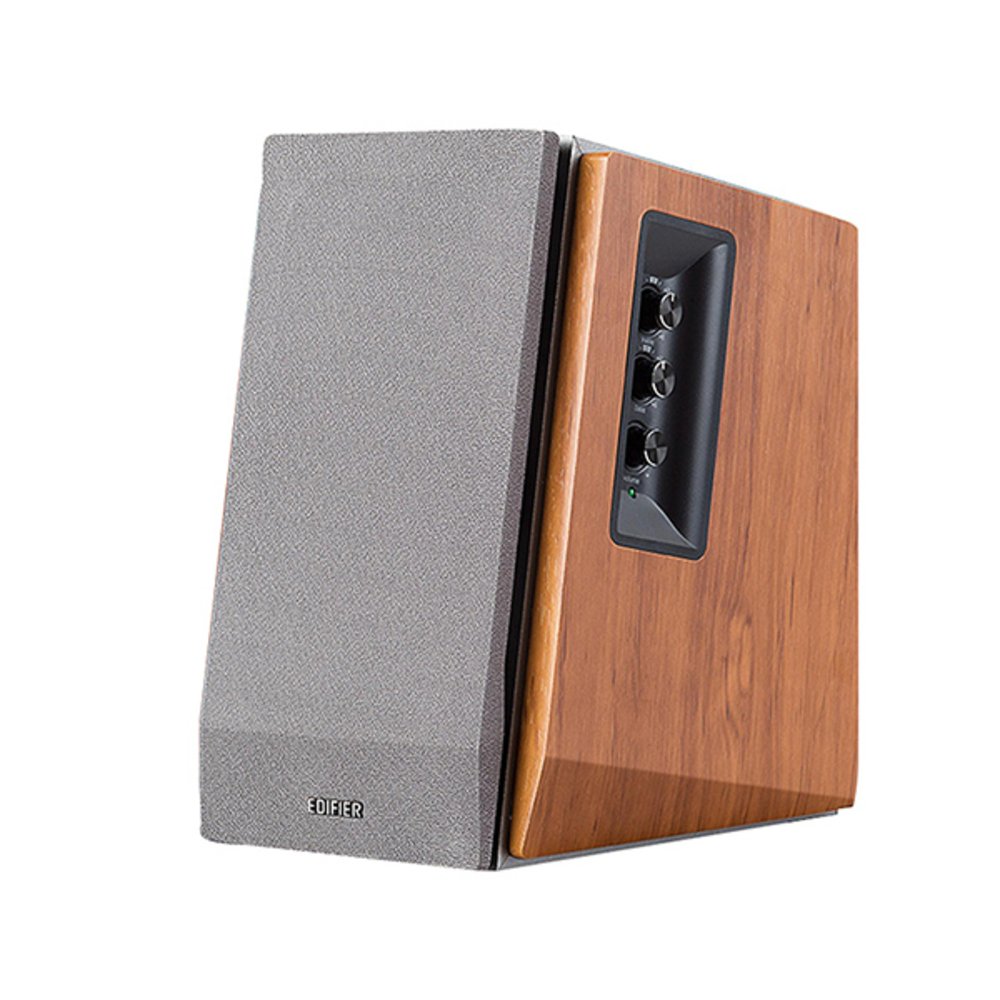
Image: Edifier R1600TIII Active Bookshelf Speakers. This image shows the two speakers, typically one active (with controls) and one passive, connected by a cable. The speakers feature a classic wooden finish and front-facing drivers.
ഉൽപ്പന്നം കഴിഞ്ഞുview
The Edifier R1600TIII is a 2.0 active bookshelf speaker system designed to deliver high-quality audio. It features a total output of 60 Watts and offers versatile connectivity options including RCA and Bluetooth.
നിയന്ത്രണങ്ങളും കണക്ഷനുകളും
- സൈഡ് പാനൽ നിയന്ത്രണങ്ങൾ: The active speaker features rotary controls for Volume, Bass, and Treble adjustments.
- വയർലെസ് റിമോട്ട് കൺട്രോൾ: Adjust volume and mute functions conveniently from a distance.
- RCA ഇൻപുട്ടുകൾ: Two sets of RCA inputs for connecting to various audio sources like PCs, TVs, or MP3 players.
- ബ്ലൂടൂത്ത് കണക്റ്റിവിറ്റി: Seamlessly connect your Bluetooth-enabled devices for wireless audio streaming.
സജ്ജമാക്കുക
1. സ്പീക്കർ പ്ലേസ്മെൻ്റ്
Place the speakers on a stable, flat surface such as a bookshelf or desk. For optimal stereo imaging, position the speakers equidistant from your listening position and angle them slightly inwards towards you.
2. സ്പീക്കറുകൾ ബന്ധിപ്പിക്കുന്നു
- Identify the active speaker (with controls and power input) and the passive speaker.
- Connect the speaker connection cable from the active speaker's output to the passive speaker's input. Ensure a secure connection.
3. ഓഡിയോ ഉറവിടങ്ങൾ ബന്ധിപ്പിക്കുന്നു
You can connect audio sources via RCA cables or Bluetooth.
RCA കണക്ഷൻ:
- Using the provided RCA to RCA cable, connect one end to the RCA input ports on the active speaker (Input 1 or Input 2).
- Connect the other end of the cable to the audio output ports of your source device (e.g., PC, TV, MP3 player).
ബ്ലൂടൂത്ത് കണക്ഷൻ:
- സ്പീക്കറുകൾ ഓണാക്കിയിട്ടുണ്ടെന്ന് ഉറപ്പാക്കുക.
- Select the Bluetooth input mode on the speakers (usually by pressing the volume knob or a dedicated input button until the indicator light shows blue).
- On your Bluetooth-enabled device, search for "Edifier R1600TIII" in the Bluetooth settings.
- Select the speaker to pair. Once paired, the indicator light will remain solid blue.
4. പവർ കണക്ഷൻ
- Connect the power cable to the active speaker's power input.
- പവർ കേബിൾ ഒരു മതിൽ ഔട്ട്ലെറ്റിലേക്ക് പ്ലഗ് ചെയ്യുക.
- Turn on the power switch, usually located on the rear panel of the active speaker.
പ്രവർത്തന നിർദ്ദേശങ്ങൾ
അടിസ്ഥാന നിയന്ത്രണങ്ങൾ
- വോളിയം നിയന്ത്രണം: Rotate the master volume knob on the side panel or use the volume buttons on the remote control to adjust the overall sound level.
- ബാസ് നിയന്ത്രണം: Rotate the bass knob on the side panel to increase or decrease the low-frequency output.
- ട്രെബിൾ നിയന്ത്രണം: Rotate the treble knob on the side panel to increase or decrease the high-frequency output.
- ഇൻപുട്ട് തിരഞ്ഞെടുക്കൽ: Press the master volume knob on the side panel or the input button on the remote to cycle through available inputs (RCA 1, RCA 2, or Bluetooth).
- നിശബ്ദമാക്കുക: Press the mute button on the remote control to silence the audio. Press again to unmute.
വയർലെസ് റിമോട്ട് കൺട്രോൾ ഉപയോഗിക്കുന്നു
The wireless remote control allows convenient adjustment of volume and mute functions. Ensure the remote has working batteries and is pointed towards the active speaker for best performance.
മെയിൻ്റനൻസ്
- വൃത്തിയാക്കൽ: Wipe the speaker cabinets with a soft, dry cloth. Do not use liquid cleaners or abrasive chemicals.
- പൊടി: സ്പീക്കർ ഗ്രില്ലുകളും പ്രതലങ്ങളും അടിഞ്ഞുകൂടുന്നത് തടയാൻ പതിവായി പൊടി തുടയ്ക്കുക.
- പരിസ്ഥിതി: Avoid exposing the speakers to extreme temperatures, humidity, or direct sunlight.
- സംഭരണം: സ്പീക്കറുകൾ ദീർഘനേരം സൂക്ഷിക്കുകയാണെങ്കിൽ, അവ വൈദ്യുതിയിൽ നിന്ന് വിച്ഛേദിച്ച് തണുത്തതും വരണ്ടതുമായ സ്ഥലത്ത് സൂക്ഷിക്കുക.
ട്രബിൾഷൂട്ടിംഗ്
| പ്രശ്നം | സാധ്യമായ കാരണം | പരിഹാരം |
|---|---|---|
| ശബ്ദമില്ല |
|
|
| മോശം ശബ്ദ നിലവാരം / വികലത |
|
|
| ബ്ലൂടൂത്ത് കണക്ഷൻ പ്രശ്നങ്ങൾ |
|
|
സ്പെസിഫിക്കേഷനുകൾ
- മോഡൽ: R1600TIII
- മൊത്തം പവർ ഔട്ട്പുട്ട്: 60 വാട്ട്സ് (RMS)
- സ്പീക്കർ തരം: Active Bookshelf
- സ്പീക്കർ വലിപ്പം: 4 ഇഞ്ച് (വൂഫർ)
- ഓഡിയോ putട്ട്പുട്ട് മോഡ്: സ്റ്റീരിയോ
- കണക്റ്റിവിറ്റി ടെക്നോളജി: RCA, ബ്ലൂടൂത്ത്
- വയർലെസ് കമ്മ്യൂണിക്കേഷൻ ടെക്നോളജി: ബ്ലൂടൂത്ത്
- നിയന്ത്രണ രീതി: Remote Control, Side Panel Knobs
- അനുയോജ്യമായ ഉപകരണങ്ങൾ: Karaoke device, Home cinema, Game console, MP3 player, Desktop computer, Projector, Television
- മെറ്റീരിയൽ: മരം
- നിറം: വെള്ള
- ഉൽപ്പന്ന അളവുകൾ (L x W x H): 290 x 39.3 x 30.8 സെ.മീ (11.4 x 15.5 x 12.1 ഇഞ്ച്)
- ഉൽപ്പന്ന ഭാരം: 7.38 കി.ഗ്രാം (16.27 പൗണ്ട്)
- ഊർജ്ജ സ്രോതസ്സ്: കോർഡഡ് ഇലക്ട്രിക്
- പ്രത്യേക സവിശേഷതകൾ: ബ്ലൂടൂത്ത് കണക്റ്റിവിറ്റി
- വാട്ടർപ്രൂഫ്: അതെ (Note: While listed as waterproof, it is generally recommended to protect electronic devices from water exposure.)
വാറൻ്റിയും പിന്തുണയും
The Edifier R1600TIII speakers come with a പരിമിത വാറൻ്റി. Please refer to the warranty card included in your package or visit the official Edifier webവിശദമായ നിബന്ധനകൾക്കും വ്യവസ്ഥകൾക്കും സൈറ്റ്.
For technical support, service, or further inquiries, please contact Edifier customer service through their official webസൈറ്റ് അല്ലെങ്കിൽ നിങ്ങളുടെ ഉൽപ്പന്ന ഡോക്യുമെന്റേഷനിൽ നൽകിയിരിക്കുന്ന ബന്ധപ്പെടാനുള്ള വിവരങ്ങൾ.
Ask a question about this manual
Ask about setup, troubleshooting, compatibility, parts, safety, or missing instructions. Manuals+ will review the question and use this page’s manual context to help answer it.