
1. ആമുഖം
Thank you for choosing the RICOO S2722 TV Wall Mount. This manual provides essential instructions for safe installation, proper operation, and maintenance of your new wall mount. Please read this manual thoroughly before installation and keep it for future reference.
The RICOO S2722 is an articulating and swivel TV wall mount designed for televisions ranging from 32 to 55 inches, supporting VESA standards up to 200x200 mm, and a maximum weight capacity of 20 kg. It offers flexible viewing angles with swivel and tilt capabilities.
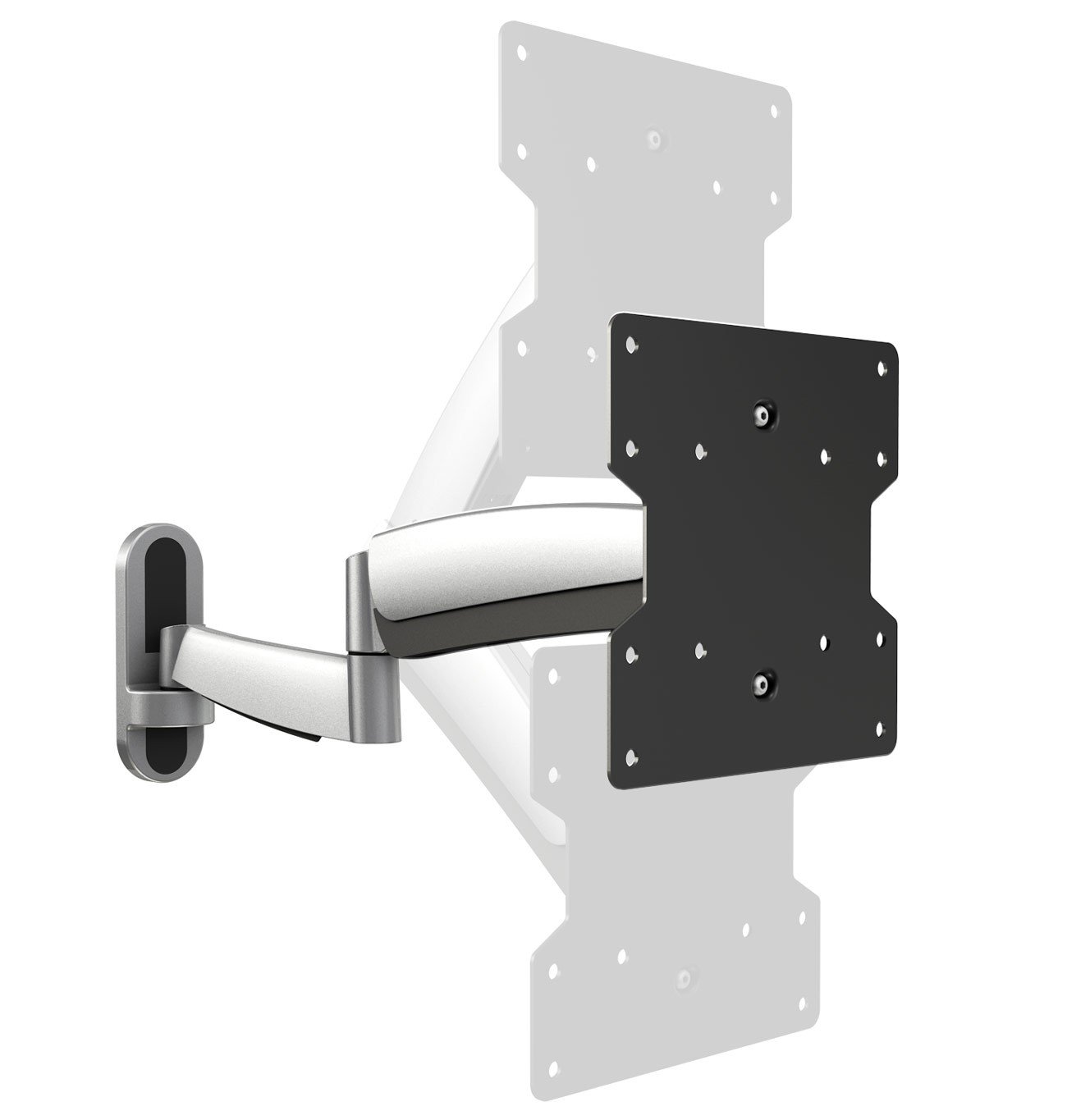
ചിത്രം 1: മുൻഭാഗം view of the RICOO S2722 TV Wall Mount.
2 സുരക്ഷാ വിവരങ്ങൾ
WARNING: Failure to read and follow all instructions may result in personal injury, property damage, or voiding of your warranty.
- ഭാരം ശേഷി: Do not exceed the maximum load capacity of 20 kg (44 lbs). This mount is intended for use only with the maximum weights indicated. Use with products heavier than the maximum weights indicated may result in instability causing possible injury.
- സ്ക്രീൻ വലിപ്പം: Compatible with TVs from 32 to 55 inches. Ensure your TV's VESA pattern and weight are within the specified limits.
- VESA അനുയോജ്യത: This mount supports VESA patterns 100x100, 100x200, 200x100, and 200x200 mm. Verify your TV's VESA pattern before installation.
- ചുമർ തരം: This mount is designed for installation on solid concrete walls, brick walls, or wood stud walls. Do not install on drywall alone.
- പ്രൊഫഷണൽ ഇൻസ്റ്റാളേഷൻ: ഇൻസ്റ്റാളേഷൻ പ്രക്രിയയെക്കുറിച്ചോ നിങ്ങളുടെ മതിലിന്റെ അനുയോജ്യതയെക്കുറിച്ചോ നിങ്ങൾക്ക് ഉറപ്പില്ലെങ്കിൽ, യോഗ്യതയുള്ള ഒരു പ്രൊഫഷണലിനെ സമീപിക്കുക.
- കുട്ടികൾ: ഇൻസ്റ്റലേഷൻ ഏരിയയിൽ നിന്ന് കുട്ടികളെ അകറ്റി നിർത്തുക. ചെറിയ ഭാഗങ്ങൾ ശ്വാസംമുട്ടലിന് കാരണമായേക്കാം.
- ഉപകരണങ്ങൾ: ഇൻസ്റ്റാളേഷനായി ഉചിതമായ ഉപകരണങ്ങൾ ഉപയോഗിക്കുക. എല്ലാ ഫാസ്റ്റനറുകളും സുരക്ഷിതമായി മുറുക്കിയിട്ടുണ്ടെന്ന് ഉറപ്പാക്കുക, പക്ഷേ അമിതമായി മുറുക്കരുത്.
3. പാക്കേജ് ഉള്ളടക്കം
Please check that all components are present and undamaged before beginning installation. If any parts are missing or defective, contact RICOO customer support.
സാധാരണയായി ഉൾപ്പെടുത്തിയിരിക്കുന്ന ഘടകങ്ങൾ:
- Wall mount assembly (articulating arm and wall plate)
- VESA TV plate
- Mounting hardware kit (various screws, washers, spacers for TV and wall)
- Hex keys for adjustments
- ഇൻസ്ട്രക്ഷൻ മാനുവൽ
4. സജ്ജീകരണവും ഇൻസ്റ്റാളേഷനും
4.1 പ്രീ-ഇൻസ്റ്റലേഷൻ പരിശോധനകൾ
Before you begin, ensure your TV and wall are compatible with the mount.
- Check TV Weight: Ensure your TV weighs no more than 20 kg (44 lbs).
- VESA പാറ്റേൺ പരിശോധിക്കുക: Measure the horizontal and vertical distance between the mounting holes on the back of your TV. This mount supports VESA 100x100, 100x200, 200x100, and 200x200 mm.
- Check TV Dimensions: Consider the overall dimensions of your TV to ensure it fits your desired viewing area and does not interfere with adjacent walls or furniture when articulated.
- ചുമർ ഘടന: Identify your wall type (wood stud, concrete, brick). Ensure the wall can safely support the combined weight of the mount and your TV.

Figure 2: Measure VESA distances (A and B) on your TV.

Figure 3: Consider overall TV dimensions (C and D).
4.2 Attaching the VESA Plate to the TV
- പോറലുകൾ ഉണ്ടാകാതിരിക്കാൻ നിങ്ങളുടെ ടിവി മുഖം മൃദുവായതും വൃത്തിയുള്ളതുമായ ഒരു പ്രതലത്തിൽ ശ്രദ്ധാപൂർവ്വം വയ്ക്കുക.
- Align the VESA TV plate with the mounting holes on the back of your TV.
- Select the appropriate screws, washers, and spacers from the hardware kit that fit your TV's mounting holes. Use spacers if the TV back is uneven or if cables need clearance.
- Securely fasten the VESA plate to the TV using a screwdriver. Do not overtighten.

Figure 4: Attaching the VESA plate to the TV.
4.3 വാൾ പ്ലേറ്റ് ഭിത്തിയിൽ ഘടിപ്പിക്കൽ
- Determine the desired height and position for your TV. Use a pencil to mark the drilling locations for the wall plate.
- Use a stud finder to locate wood studs if installing on a wood stud wall. For concrete or brick walls, use appropriate anchors (not always included, may need to be purchased separately).
- Drill pilot holes at the marked locations. Ensure the holes are level using a spirit level.
- Attach the wall plate of the mount to the wall using the provided lag bolts and washers. Tighten securely.

Figure 5: Securing the wall mount to the wall.
4.4 Attaching the TV to the Wall Mount
- With assistance, carefully lift the TV (with the VESA plate attached) and hook it onto the articulating arm of the wall mount.
- Ensure the TV is securely seated on the mount.
- Tighten any safety screws or locking mechanisms on the mount to prevent accidental dislodgement.

Figure 6: Attaching the TV to the wall mount arm.
4.5 കേബിൾ മാനേജ്മെന്റ്
Route your TV cables through the integrated cable management channels on the mount arm to maintain a tidy appearance and prevent cable damage.

Figure 7: Cable management through the mount arm.
5. പ്രവർത്തനവും ക്രമീകരണവും
The RICOO S2722 mount offers various adjustments for optimal viewആശ്വാസം:
- സ്വിവൽ: The articulating arm allows you to swivel your TV left or right to achieve the desired viewing angle. Gently push or pull the TV to adjust its horizontal position.
- ടിൽറ്റ്: The TV plate can be tilted up or down to reduce glare or optimize vertical viewing angles. Loosen the tilt adjustment knobs (if present), adjust the angle, and then re-tighten. The maximum tilt angle is 30 degrees.
- വിപുലീകരണം/പിൻവലിക്കൽ: The articulating arm allows you to extend the TV away from the wall or push it back closer to the wall.
- ലെവൽ അഡ്ജസ്റ്റ്മെന്റ്: Some mounts include a post-installation leveling feature. If your TV appears slightly unlevel, refer to the specific instructions for your model to make minor rotational adjustments.
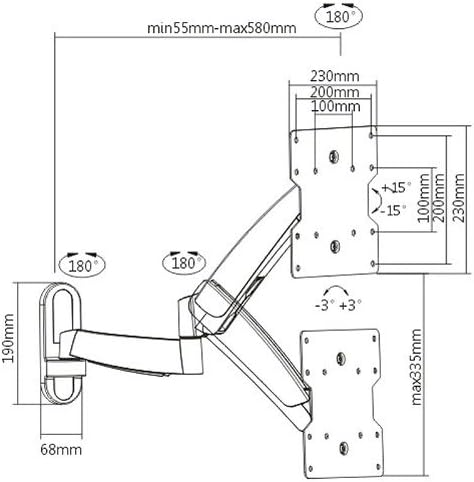
Figure 8: Dimensional drawing illustrating the mount's range of motion.
6. പരിപാലനം
- വൃത്തിയാക്കൽ: മൃദുവായതും ഉണങ്ങിയതുമായ തുണി ഉപയോഗിച്ച് മൗണ്ട് തുടയ്ക്കുക. അബ്രാസീവ് ക്ലീനറുകളോ ലായകങ്ങളോ ഉപയോഗിക്കരുത്.
- ആനുകാലിക പരിശോധനകൾ: എല്ലാ സ്ക്രൂകളും കണക്ഷനുകളും ഇറുകിയതും സുരക്ഷിതവുമാണെന്ന് ഉറപ്പാക്കാൻ ഇടയ്ക്കിടെ പരിശോധിക്കുക. ആവശ്യമെങ്കിൽ വീണ്ടും മുറുക്കുക.
- ലൂബ്രിക്കേഷൻ: Moving parts are generally maintenance-free. Do not apply lubricants unless specifically instructed by the manufacturer.
7. പ്രശ്നപരിഹാരം
- ടിവി നിലവാരമില്ലാത്തതാണ്: Check if the wall plate was installed level. Some mounts allow for minor post-installation leveling adjustments. Refer to the specific mechanism on your mount.
- മൗണ്ട് അയഞ്ഞതായി തോന്നുന്നു: Ensure all wall mounting bolts and TV attachment screws are securely tightened. Do not overtighten.
- ചലനം ക്രമീകരിക്കുന്നതിൽ ബുദ്ധിമുട്ട്: Check for any locking mechanisms that might be engaged. If the movement is too stiff or too loose, there might be tension adjustment screws (often requiring a hex key) that can be adjusted.
- Mount cannot hold TV weight: Re-verify your TV's weight against the mount's maximum capacity. If the TV is too heavy, the mount is not suitable. Ensure the wall anchors are appropriate for your wall type and correctly installed.
8 സ്പെസിഫിക്കേഷനുകൾ
| ഫീച്ചർ | സ്പെസിഫിക്കേഷൻ |
|---|---|
| മോഡൽ നമ്പർ | എസ് 2722 |
| മൌണ്ട് തരം | മതിൽ മൗണ്ട് |
| ചലന തരം | ആർട്ടിക്കുലേറ്റിംഗ്, സ്വിവൽ |
| അനുയോജ്യമായ ടിവി വലുപ്പങ്ങൾ | 32-55 ഇഞ്ച് (81-140 സെ.മീ) |
| പരമാവധി ലോഡ് കപ്പാസിറ്റി | 20 കി.ഗ്രാം (44 പൗണ്ട്) |
| Supported VESA Standards | 100x100, 100x200, 200x100, 200x200 mm |
| പരമാവധി ടിൽറ്റ് ആംഗിൾ | 30 ഡിഗ്രി |
| മെറ്റീരിയൽ | Aluminum, Iron, Steel Alloy |
| ഇനത്തിൻ്റെ ഭാരം | 3.5 കി.ഗ്രാം |
9. വാറൻ്റിയും പിന്തുണയും
9.1 ഉൽപ്പന്ന വാറന്റി
The RICOO S2722 TV Wall Mount comes with a 24 മാസ വാറൻ്റി from the date of purchase. This warranty covers manufacturing defects and material faults under normal use. It does not cover damage caused by improper installation, misuse, accidents, or unauthorized modifications.
9.2 ഉപഭോക്തൃ പിന്തുണ
For technical assistance, missing parts, or warranty claims, please contact RICOO customer support. You can typically find contact information on the product packaging or the official RICOO website. Please have your model number (S2722) and proof of purchase ready when contacting support.
For more information, you may visit the RICOO store: RICOO Store on Amazon