
1. ആമുഖം
1.1 ഉൽപ്പന്നം കഴിഞ്ഞുview
The CELLULARLINE Interphone F5MC is a advanced Bluetooth communication system designed for motorcycle helmets. It provides hands-free communication, music streaming, and GPS navigation audio, compatible with both open and closed helmets. This device features a new microchip for enhanced performance and offers robust functionality for riders.
1.2 പ്രധാന സവിശേഷതകൾ
- Bluetooth Connectivity for wireless communication.
- Integrated Microphone for clear audio transmission.
- Waterproof design for use in various weather conditions.
- Touch control method for intuitive operation.
- Compatible with smartphones, tablets, and car audio systems.
- Designed for motorcycle riding applications.
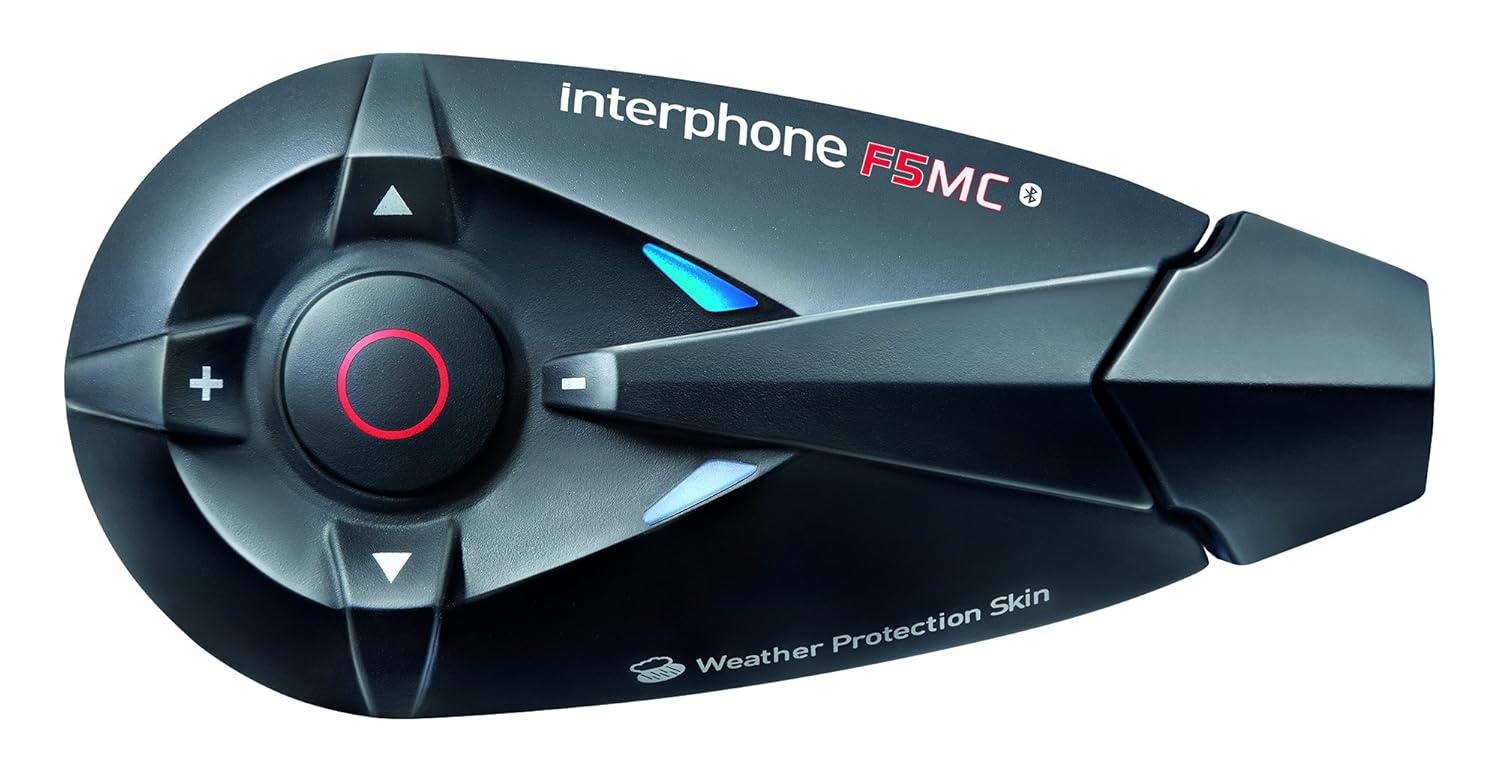
ചിത്രം 1.1: The Interphone F5MC Bluetooth Headset. This image displays the main unit of the Interphone F5MC, highlighting its ergonomic design and control buttons, including the central multifunction button and volume controls.
2. പാക്കേജ് ഉള്ളടക്കം
The Interphone F5MC package typically includes the following components:
- Interphone F5MC Main Unit(s)
- Ear Cushions / Speakers
- Microphone for full-face helmet
- Microphone for jet helmet
- DC Power Charging & Music Line In Cable
- Mounting Brackets (clip and adhesive options)
- യുഎസ്ബി ചാർജിംഗ് കേബിൾ

ചിത്രം 2.1: Interphone F5MC Product Packaging. This image shows the retail box for the Interphone F5MC, indicating it is a dual unit package suitable for two helmets, highlighting features like multi-user conference and long distance communication.

ചിത്രം 2.2: Interphone F5MC Component Diagram. This diagram illustrates the various components included with the Interphone F5MC system, such as the main unit, different microphone types (for full-face and jet helmets), speakers, and charging/audio cables, along with their connections.
3. സജ്ജീകരണം
3.1 യൂണിറ്റ് ചാർജ് ചെയ്യുന്നു
- Connect the DC power charging cable to the charging port on the Interphone F5MC unit.
- കേബിളിന്റെ മറ്റേ അറ്റം അനുയോജ്യമായ ഒരു USB പവർ സ്രോതസ്സിലേക്ക് പ്ലഗ് ചെയ്യുക (ഉദാ: കമ്പ്യൂട്ടർ USB പോർട്ട്, USB വാൾ അഡാപ്റ്റർ).
- The status LED will indicate charging status. A full charge is recommended before first use.
3.2 Mounting the Unit to a Helmet
- Choose between the clip mount or adhesive mount option based on your helmet type and preference.
- Securely attach the chosen mounting bracket to the side of your helmet. Ensure it is positioned where the unit will not obstruct vision or movement.
- Slide the Interphone F5MC main unit onto the mounted bracket until it clicks into place.
3.3 Microphone and Speaker Installation
- Select the appropriate microphone for your helmet type (full-face or jet).
- Attach the speakers inside the helmet, aligning them with your ears for optimal audio. Use the provided adhesive pads if necessary.
- Position the microphone close to your mouth, ensuring it is not directly in the path of wind noise.
- Connect the speaker and microphone cables to the corresponding ports on the Interphone F5MC main unit. Refer to Figure 2.2 for connection details.
3.4 പ്രാരംഭ ബ്ലൂടൂത്ത് ജോടിയാക്കൽ
- Ensure the Interphone F5MC unit is powered off.
- Press and hold the Multi-Function Button (MFB) until the status LED flashes rapidly, indicating pairing mode.
- നിങ്ങളുടെ സ്മാർട്ട്ഫോണിലോ മറ്റ് ബ്ലൂടൂത്ത് ഉപകരണത്തിലോ, ബ്ലൂടൂത്ത് പ്രവർത്തനക്ഷമമാക്കി ലഭ്യമായ ഉപകരണങ്ങൾക്കായി തിരയുക.
- Select "Interphone F5MC" from the list of found devices.
- ആവശ്യപ്പെടുകയാണെങ്കിൽ, പിൻ കോഡ് നൽകുക (സാധാരണയായി "0000").
- Once paired, the status LED will change to a slow flash or solid blue, depending on the unit's status.
4. പ്രവർത്തന നിർദ്ദേശങ്ങൾ
4.1 പവർ ഓൺ/ഓഫ്
- പവർ ഓണാക്കാൻ: Press and hold the MFB for approximately 3 seconds until you hear an audible tone and the LED illuminates.
- പവർ ഓഫ് ചെയ്യാൻ: Press and hold the MFB for approximately 5 seconds until you hear a descending tone and the LED turns off.
4.2 ഇന്റർകോം കമ്മ്യൂണിക്കേഷൻ
The F5MC supports multi-user intercom communication. Refer to the full manual for detailed pairing instructions for multiple units.
- ഇന്റർകോം ആരംഭിക്കുക: Briefly press the Intercom button (specific button may vary, refer to unit's markings).
- ഇന്റർകോം അവസാനിപ്പിക്കുക: Briefly press the Intercom button again.
4.3 ഫോൺ കോളുകൾ
- മറുപടി കോൾ: MFB ചുരുക്കത്തിൽ അമർത്തുക.
- കോൾ അവസാനിപ്പിക്കുക: MFB ചുരുക്കത്തിൽ അമർത്തുക.
- കോൾ നിരസിക്കുക: MFB 2 സെക്കൻഡ് അമർത്തിപ്പിടിക്കുക.
- വോയ്സ് ഡയൽ: With the unit in standby, briefly press the MFB twice to activate your phone's voice assistant (if supported).
4.4 മ്യൂസിക് പ്ലേബാക്ക്
Ensure your Interphone F5MC is paired with a music source (e.g., smartphone).
- പ്ലേ/താൽക്കാലികമായി നിർത്തുക: MFB ചുരുക്കത്തിൽ അമർത്തുക.
- അടുത്ത ട്രാക്ക്: Press the 'Volume Up' button for 2 seconds.
- മുമ്പത്തെ ട്രാക്ക്: Press the 'Volume Down' button for 2 seconds.
- വോളിയം ക്രമീകരണം: Briefly press the 'Volume Up' or 'Volume Down' buttons.
4.5 എഫ്എം റേഡിയോ
- റേഡിയോ ഓൺ/ഓഫ് ചെയ്യുക: Press a dedicated FM button or a combination of buttons (refer to specific unit markings).
- സ്കാൻ സ്റ്റേഷനുകൾ: Press and hold the 'Volume Up' or 'Volume Down' buttons to scan for the next/previous station.
5. പരിപാലനം
5.1 വൃത്തിയാക്കൽ
- മൃദുവായ, ഡി ഉപയോഗിച്ച് യൂണിറ്റ് തുടയ്ക്കുകamp തുണി. കഠിനമായ രാസവസ്തുക്കളോ ഉരച്ചിലുകളുള്ള ക്ലീനറുകളോ ഉപയോഗിക്കരുത്.
- ആക്സസറികൾ ചാർജ് ചെയ്യുന്നതിനോ ബന്ധിപ്പിക്കുന്നതിനോ മുമ്പ് എല്ലാ പോർട്ടുകളും വരണ്ടതാണെന്ന് ഉറപ്പാക്കുക.
5.2 സംഭരണം
- നേരിട്ടുള്ള സൂര്യപ്രകാശത്തിൽ നിന്നും തീവ്രമായ താപനിലയിൽ നിന്നും മാറി തണുത്തതും വരണ്ടതുമായ സ്ഥലത്ത് യൂണിറ്റ് സൂക്ഷിക്കുക.
- ദീർഘനേരം സൂക്ഷിക്കുകയാണെങ്കിൽ, ബാറ്ററി ലൈഫ് നിലനിർത്താൻ ഓരോ മാസവും ഏകദേശം 50% വരെ ബാറ്ററി ചാർജ് ചെയ്യുക.
5.3 ബാറ്ററി കെയർ
- ബാറ്ററി ഇടയ്ക്കിടെ പൂർണ്ണമായും ഡിസ്ചാർജ് ചെയ്യുന്നത് ഒഴിവാക്കുക.
- Use only the provided charging cable and compatible power sources.
6. പ്രശ്നപരിഹാരം
6.1 വൈദ്യുതിയില്ല
- യൂണിറ്റ് പൂർണ്ണമായും ചാർജ് ചെയ്തിട്ടുണ്ടെന്ന് ഉറപ്പാക്കുക. അത് ഒരു പവർ സ്രോതസ്സുമായി ബന്ധിപ്പിച്ച് ചാർജിംഗ് ഇൻഡിക്കേറ്റർ പരിശോധിക്കുക.
- Verify that the power button is being pressed and held for the correct duration (approximately 3 seconds).
6.2 ഓഡിയോ ഇല്ല
- Check that the speakers are correctly connected to the main unit and properly positioned inside the helmet.
- Ensure the volume is not set to minimum. Adjust using the volume buttons.
- Verify that the unit is successfully paired with your audio source (e.g., smartphone).
6.3 ജോടിയാക്കൽ പ്രശ്നങ്ങൾ
- Ensure both devices are in pairing mode and within close proximity.
- Turn off and restart both the Interphone F5MC and the device you are trying to pair.
- Clear previous Bluetooth pairings from both devices and attempt to pair again.
6.4 Intercom Disconnection
- Ensure units are within the specified intercom range and have a clear line of sight.
- Check for potential interference from other electronic devices.
- Attempt to re-establish the intercom connection by briefly pressing the intercom button.
7 സ്പെസിഫിക്കേഷനുകൾ
| ഫീച്ചർ | വിശദാംശങ്ങൾ |
|---|---|
| മോഡലിൻ്റെ പേര് | INTERPHONEF5MCTP |
| കണക്റ്റിവിറ്റി ടെക്നോളജി | ബ്ലൂടൂത്ത് |
| വയർലെസ് കമ്മ്യൂണിക്കേഷൻ ടെക്നോളജി | ബ്ലൂടൂത്ത് |
| ഉൾപ്പെടുത്തിയ ഘടകങ്ങൾ | Ear Cushions, Microphones |
| മെറ്റീരിയൽ | പ്ലാസ്റ്റിക് |
| ഉൽപ്പന്നത്തിൻ്റെ പ്രത്യേക ഉപയോഗങ്ങൾ | Motorcycle Riding |
| അനുയോജ്യമായ ഉപകരണങ്ങൾ | Smartphones, Tablets, Car Audio Systems |
| ജല പ്രതിരോധ നില | വാട്ടർപ്രൂഫ് |
| നിയന്ത്രണ രീതി | സ്പർശിക്കുക |
| നിർമ്മാതാവ് | CELLULARLINE |
| ഉൽപ്പന്ന അളവുകൾ | 8.99 x 4.5 x 2.01 സെ.മീ |
| ഇനത്തിൻ്റെ ഭാരം | 54.4 ഗ്രാം (0.12 പൗണ്ട്) |
| ബാറ്ററികൾ | 1 ലിഥിയം പോളിമർ ബാറ്ററി (ഉൾപ്പെടുത്തിയിരിക്കുന്നു) |
| പ്രത്യേക സവിശേഷതകൾ | മൈക്രോഫോൺ ഉൾപ്പെടുത്തിയിട്ടുണ്ട് |
| നിറം | കറുപ്പ് |
| ചെവി പ്ലേസ്മെൻ്റ് | തുറന്ന ചെവി |
| ഫോം ഫാക്ടർ | ചെവിക്ക് മുകളിൽ |
8. വാറൻ്റിയും പിന്തുണയും
For warranty information, technical support, or service inquiries, please refer to the documentation provided with your purchase or contact CELLULARLINE customer service directly. Details regarding warranty periods and support procedures are typically available on the manufacturer's official webസൈറ്റ് അല്ലെങ്കിൽ നിങ്ങളുടെ റീട്ടെയിലർ വഴി.