
Argox AS-8000URG
Argox AS-8000URG Barcode Scanner User Manual
Model: AS-8000URG
ആമുഖം
The Argox AS-8000URG is a lightweight and easy-to-handle barcode scanner designed for retail applications. It offers intuitive operation, allowing users to simply point and scan without warm-up time. This scanner is capable of reading all commonly used barcode symbologies from contact up to a distance of 125mm. Its plug-and-play installation ensures quick setup for various retail and similar environments.

Figure 1: Argox AS-8000URG Barcode Scanner, showing its ergonomic design and cable connection.
പാക്കേജ് ഉള്ളടക്കം
പാക്കേജ് തുറക്കുമ്പോൾ എല്ലാ ഇനങ്ങളും നിലവിലുണ്ടെന്നും നല്ല നിലയിലാണെന്നും ദയവായി പരിശോധിക്കുക:
- Argox AS-8000URG Barcode Scanner
- യുഎസ്ബി കണക്ഷൻ കേബിൾ
- ഉപയോക്തൃ മാനുവൽ (ഈ പ്രമാണം)
സുരക്ഷാ വിവരങ്ങൾ
To ensure safe operation and prolong the life of your scanner, please observe the following:
- സ്കാനറിനെ തീവ്രമായ താപനില, ഈർപ്പം അല്ലെങ്കിൽ നേരിട്ടുള്ള സൂര്യപ്രകാശം എന്നിവയ്ക്ക് വിധേയമാക്കരുത്.
- സ്കാനർ താഴെയിടുകയോ ശക്തമായ ആഘാതങ്ങൾക്ക് വിധേയമാക്കുകയോ ചെയ്യുന്നത് ഒഴിവാക്കുക.
- സ്കാനർ ഡിസ്അസംബ്ലിംഗ് ചെയ്യാനോ പരിഷ്ക്കരിക്കാനോ ശ്രമിക്കരുത്. ഇത് വാറന്റി അസാധുവാക്കും.
- ശക്തമായ കാന്തികക്ഷേത്രങ്ങളിൽ നിന്ന് സ്കാനർ അകറ്റി നിർത്തുക.
- കണക്ഷനു വേണ്ടി നൽകിയിരിക്കുന്ന USB കേബിൾ മാത്രം ഉപയോഗിക്കുക.
സജ്ജമാക്കുക
The Argox AS-8000URG is designed for easy plug-and-play installation. Follow these steps to set up your scanner:
- USB കേബിൾ ബന്ധിപ്പിക്കുക: Locate the USB port on the scanner and firmly insert one end of the provided USB cable.
- കമ്പ്യൂട്ടറുമായി ബന്ധിപ്പിക്കുക: Insert the other end of the USB cable into an available USB port on your computer (Laptop or Desktop).
- ഡ്രൈവർ ഇൻസ്റ്റാളേഷൻ: For most operating systems (Windows, macOS, Linux), the scanner will be automatically detected and the necessary drivers installed. No manual driver installation is typically required.
- ഉപയോഗത്തിന് തയ്യാറാണ്: Once the operating system confirms the device is ready, the scanner is prepared for operation.
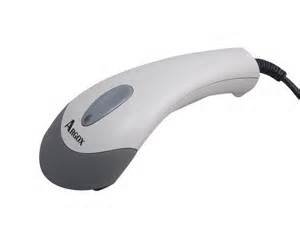
ചിത്രം 2: മുകളിൽ view of the Argox AS-8000URG Barcode Scanner, highlighting the scanning window and brand logo.
പ്രവർത്തന നിർദ്ദേശങ്ങൾ
Using the Argox AS-8000URG Barcode Scanner is straightforward:
- പവർ ഓൺ: The scanner receives power directly from the USB connection. There is no separate power button.
- സ്ഥാനനിർണ്ണയം: Hold the scanner with the scanning window facing the barcode.
- സ്കാനിംഗ്: Press the trigger button located on the top of the scanner. A red scanning line will project from the window. Aim this line across the entire barcode.
- സ്ഥിരീകരണം: Upon successful scan, the scanner will typically emit an audible beep and/or a visual indicator (e.g., LED light change). The scanned data will be transmitted to your connected computer as if typed from a keyboard.
The scanning width of the AS-8000URG is approximately 95mm wide at a distance of 55mm, and 50mm wide at a distance of 10mm. This allows for efficient scanning of various barcode sizes.
മെയിൻ്റനൻസ്
Proper maintenance ensures the longevity and optimal performance of your barcode scanner:
- സ്കാനിംഗ് വിൻഡോ വൃത്തിയാക്കൽ: നനവില്ലാത്തതും ലിനില്ലാത്തതുമായ തുണി ചെറുതായി ഉപയോഗിക്കുകampened with water or a mild, non-abrasive cleaner. Do not use harsh chemicals or abrasive materials, as they can scratch the window and impair scanning performance.
- പൊതുവായ ശുചീകരണം: Wipe the exterior of the scanner with a soft, dry cloth to remove dust and dirt.
- സംഭരണം: When not in use, store the scanner in a clean, dry environment, away from direct sunlight and extreme temperatures.
- കേബിൾ കെയർ: യുഎസ്ബി കേബിൾ അമിതമായി വളയ്ക്കുകയോ വളച്ചൊടിക്കുകയോ ചെയ്യുന്നത് ഒഴിവാക്കുക, കാരണം ഇത് ആന്തരിക വയറുകൾക്ക് കേടുവരുത്തും.
ട്രബിൾഷൂട്ടിംഗ്
If you encounter issues with your Argox AS-8000URG scanner, refer to the following common problems and solutions:
| പ്രശ്നം | സാധ്യമായ കാരണം | പരിഹാരം |
|---|---|---|
| Scanner does not power on / No light | യുഎസ്ബി കേബിൾ ശരിയായി ബന്ധിപ്പിച്ചിട്ടില്ല അല്ലെങ്കിൽ യുഎസ്ബി പോർട്ട് തകരാറിലാണ്. | Ensure the USB cable is securely connected to both the scanner and the computer. Try a different USB port on your computer. |
| Scanner does not read barcodes | Barcode damaged, scanning window dirty, incorrect aiming, or unsupported barcode symbology. | Ensure the barcode is clear and undamaged. Clean the scanning window. Aim the red line directly across the entire barcode. Verify the barcode type is supported. |
| സ്കാൻ ചെയ്ത ഡാറ്റ തെറ്റാണ് അല്ലെങ്കിൽ അപൂർണ്ണമാണ്. | Partial scan, software configuration issue. | Ensure the entire barcode is covered by the scanning line. Check your application or software settings for correct input. |
| Scanner beeps continuously | Indicates an error or configuration mode. | Disconnect and reconnect the USB cable. Refer to advanced programming guides (if available) for specific beep codes. |
സ്പെസിഫിക്കേഷനുകൾ
Key technical specifications for the Argox AS-8000URG Barcode Scanner:
| ഫീച്ചർ | വിശദാംശങ്ങൾ |
|---|---|
| ബ്രാൻഡ് | ആർഗോക്സ് |
| മോഡൽ നമ്പർ | AS8000 |
| കണക്റ്റിവിറ്റി ടെക്നോളജി | USB കേബിൾ |
| പവർ ഉറവിടം | കോർഡഡ് ഇലക്ട്രിക് |
| അനുയോജ്യമായ ഉപകരണങ്ങൾ | ലാപ്ടോപ്പ്, ഡെസ്ക്ടോപ്പ് |
| ഇനത്തിൻ്റെ ഭാരം | 310 ഗ്രാം |
| ഉൽപ്പന്ന അളവുകൾ (LxWxH) | 15 x 5 x 4 സെ.മീ |
| സ്കാനിംഗ് വീതി | 95mm wide @ 55mm distance, 50mm wide @ 10mm |
| നിറം | SHITE GREY |
വാറൻ്റിയും പിന്തുണയും
For warranty information or technical support, please contact your local Argox distributor or visit the official Argox webസൈറ്റ്. ഏതെങ്കിലും വാറന്റി ക്ലെയിമുകൾക്ക് വാങ്ങിയതിന്റെ തെളിവായി നിങ്ങളുടെ വാങ്ങൽ രസീത് സൂക്ഷിക്കുക.
കൂടുതൽ സഹായത്തിന്, നിങ്ങൾക്ക് ഇത് കൂടി റഫർ ചെയ്യാം product page on Amazon.in.
Ask a question about this manual
Ask about setup, troubleshooting, compatibility, parts, safety, or missing instructions. Manuals+ will review the question and use this page’s manual context to help answer it.