
1 സുരക്ഷാ വിവരങ്ങൾ
Please read these safety instructions carefully before operating the TROTEC TTK 122 E dehumidifier. Failure to comply with these instructions may result in electric shock, fire, or injury.
- വൈദ്യുതി വിതരണം വോള്യവുമായി പൊരുത്തപ്പെടുന്നുണ്ടെന്ന് ഉറപ്പാക്കുകtagയൂണിറ്റിന്റെ റേറ്റിംഗ് ലേബലിൽ e വ്യക്തമാക്കിയിട്ടുണ്ട്.
- കേടായ പവർ കോർഡ് അല്ലെങ്കിൽ പ്ലഗ് ഉപയോഗിച്ച് യൂണിറ്റ് പ്രവർത്തിപ്പിക്കരുത്.
- Keep the unit upright during transport and operation. If the unit has been tilted, allow it to stand upright for at least 12 hours before plugging it in to prevent compressor damage.
- എയർ ഇൻലെറ്റോ ഔട്ട്ലെറ്റോ തടയരുത്. ശരിയായ വായുസഞ്ചാരത്തിനായി യൂണിറ്റിന് ചുറ്റും മതിയായ ക്ലിയറൻസ് നിലനിർത്തുക.
- യൂണിറ്റിന്റെ തുറസ്സുകളിൽ വസ്തുക്കൾ തിരുകരുത്.
- കത്തുന്ന വാതകങ്ങളോ ദ്രാവകങ്ങളോ സൂക്ഷിച്ചിരിക്കുന്ന സ്ഥലങ്ങളിൽ യൂണിറ്റ് ഉപയോഗിക്കരുത്.
- Always unplug the unit before cleaning, maintenance, or when not in use.
- പ്രവർത്തന സമയത്ത് കുട്ടികളെയും വളർത്തുമൃഗങ്ങളെയും യൂണിറ്റിൽ നിന്ന് അകറ്റി നിർത്തുക.
- വെള്ളം നിറഞ്ഞൊഴുകുന്നത് തടയാൻ പതിവായി ടാങ്ക് ശൂന്യമാക്കുക.
2. ഉൽപ്പന്നം കഴിഞ്ഞുview
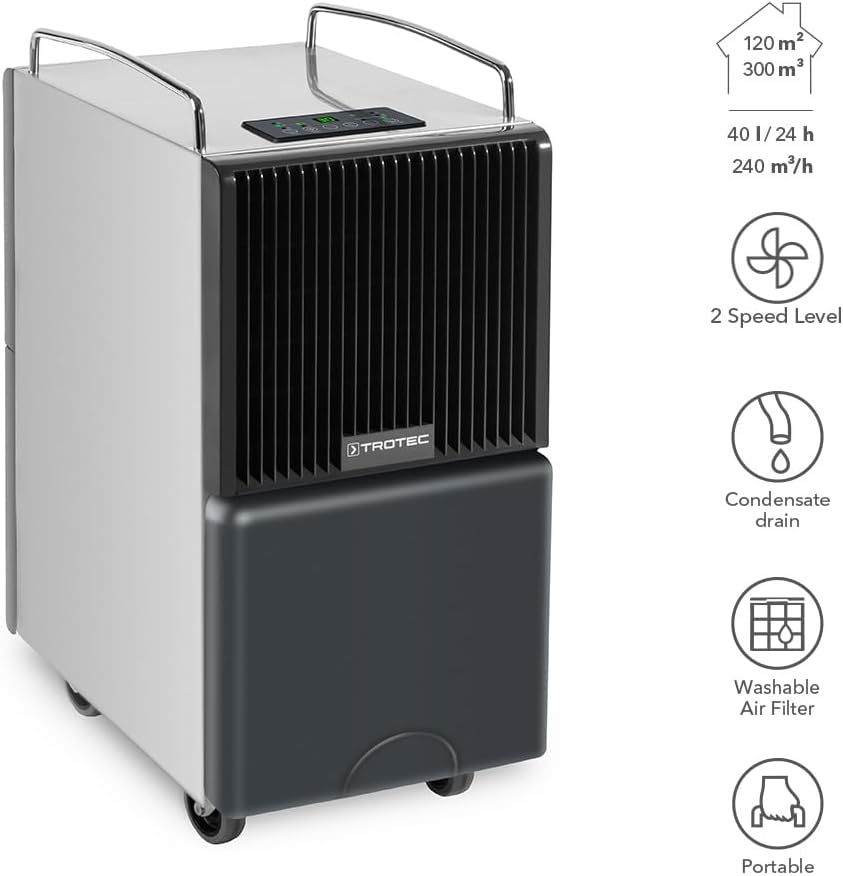
The TROTEC TTK 122 E is a high-performance dehumidifier designed for effective humidity control in various environments. It features a robust construction, a maximum dehumidification capacity of 40 liters per day, and is suitable for rooms up to 120 m² or 300 m³.
Key features include two fan speed levels, a continuous condensate drain option, a washable air filter, and a portable design with wheels and handles for easy movement.

3. സജ്ജീകരണം
3.1 അൺപാക്കിംഗ്
Carefully remove the dehumidifier from its packaging. Inspect the unit for any signs of damage. Retain the packaging for future storage or transport.
3.2 Initial Placement and Waiting Period
Place the dehumidifier on a stable, level surface. Ensure there is at least 20 cm of space around the unit for proper air circulation. പ്രധാനപ്പെട്ടത്: If the unit has been transported horizontally or tilted, allow it to stand upright for a minimum of 12 hours before plugging it into a power outlet. This allows the refrigerant to settle, preventing potential damage to the compressor.
3.3 പവർ കണക്ഷൻ
പവർ കോർഡ് ഒരു ഗ്രൗണ്ടഡ് ഇലക്ട്രിക്കൽ ഔട്ട്ലെറ്റിലേക്ക് പ്ലഗ് ചെയ്യുക. ഔട്ട്ലെറ്റ് യൂണിറ്റിന്റെ വൈദ്യുതി ആവശ്യകതകൾ നിറവേറ്റുന്നുണ്ടെന്ന് ഉറപ്പാക്കുക.
3.4 Water Tank Installation / Continuous Drainage
The water tank should be correctly inserted into the unit. For continuous operation without needing to empty the tank, connect a suitable hose (not included) to the continuous drainage outlet. Ensure the hose is routed downwards to allow gravity drainage into a floor drain or larger container.

4. പ്രവർത്തന നിർദ്ദേശങ്ങൾ
The control panel allows you to manage the dehumidifier's functions. Familiarize yourself with the buttons and indicators.

4.1 പവർ ഓൺ/ഓഫ്
- അമർത്തുക ഓൺ/ഓഫ് യൂണിറ്റ് ഓണാക്കാനോ ഓഫാക്കാനോ ഉള്ള ബട്ടൺ.
- The unit features an automatic restart function, resuming its last settings after a power interruption.
4.2 മോഡ് തിരഞ്ഞെടുക്കൽ
- അമർത്തുക മോഡ് button to cycle through available operating modes (e.g., automatic dehumidification, continuous dehumidification, laundry drying).
4.3 ഫാൻ വേഗത ക്രമീകരണം
- ഉപയോഗിക്കുക വേഗത button to select between low and high fan speeds. Higher speeds result in faster dehumidification but may produce more noise.
4.4 ലക്ഷ്യ ഈർപ്പം ക്രമീകരിക്കൽ
- ഉപയോഗിക്കുക + ഒപ്പം - buttons to set your desired relative humidity level. The unit will operate until this level is reached, then cycle on and off to maintain it.
4.5 ടൈമർ പ്രവർത്തനം
- അമർത്തുക ടൈമർ button to set an operating duration (e.g., 1-24 hours) after which the unit will automatically turn off.
5. പരിപാലനം
പതിവ് അറ്റകുറ്റപ്പണികൾ മികച്ച പ്രകടനം ഉറപ്പാക്കുകയും നിങ്ങളുടെ ഡീഹ്യുമിഡിഫയറിന്റെ ആയുസ്സ് വർദ്ധിപ്പിക്കുകയും ചെയ്യുന്നു. ഏതെങ്കിലും അറ്റകുറ്റപ്പണി നടത്തുന്നതിന് മുമ്പ് എല്ലായ്പ്പോഴും യൂണിറ്റ് അൺപ്ലഗ് ചെയ്യുക.
5.1 വാട്ടർ ടാങ്ക് ശൂന്യമാക്കൽ
When the water tank is full, the unit will automatically stop operating and an indicator light will illuminate. Carefully remove the water tank, empty it, and reinsert it securely. The unit will resume operation.
5.2 എയർ ഫിൽട്ടർ വൃത്തിയാക്കൽ
The washable air filter should be cleaned regularly (e.g., every two weeks or as needed) to prevent dust buildup and maintain efficiency.
- ഡീഹ്യൂമിഡിഫയർ ഓഫ് ചെയ്ത് അൺപ്ലഗ് ചെയ്യുക.
- Locate and remove the air filter from the unit (refer to Figure 5.1).
- ഫിൽട്ടർ ചെറുചൂടുള്ള വെള്ളവും നേരിയ ഡിറ്റർജന്റും ഉപയോഗിച്ച് കഴുകുക. നന്നായി കഴുകുക.
- യൂണിറ്റിലേക്ക് വീണ്ടും ചേർക്കുന്നതിന് മുമ്പ് ഫിൽട്ടർ പൂർണ്ണമായും വായുവിൽ ഉണങ്ങാൻ അനുവദിക്കുക. ഡ്രയർ അല്ലെങ്കിൽ നേരിട്ടുള്ള ചൂട് ഉപയോഗിക്കരുത്.

5.3 യൂണിറ്റ് എക്സ്റ്റീരിയർ വൃത്തിയാക്കൽ
ഒരു സോഫ്റ്റ്, ഡി ഉപയോഗിച്ച് യൂണിറ്റിൻ്റെ പുറംഭാഗം തുടയ്ക്കുകamp തുണി. കഠിനമായ രാസവസ്തുക്കളോ, അബ്രസീവ് ക്ലീനറുകളോ, ലായകങ്ങളോ ഉപയോഗിക്കരുത്, കാരണം ഇവ ഉപരിതലത്തിന് കേടുവരുത്തും.
5.4 സംഭരണം
If storing the unit for an extended period, ensure the water tank is empty and clean, and the air filter is clean and dry. Store the unit in an upright position in a dry, dust-free environment.
6. പ്രശ്നപരിഹാരം
നിങ്ങളുടെ ഡീഹ്യൂമിഡിഫയറിൽ പ്രശ്നങ്ങൾ നേരിടുകയാണെങ്കിൽ, ഇനിപ്പറയുന്ന പൊതുവായ പ്രശ്നങ്ങളും പരിഹാരങ്ങളും പരിശോധിക്കുക:
| പ്രശ്നം | സാധ്യമായ കാരണം | പരിഹാരം |
|---|---|---|
| യൂണിറ്റ് ഓണാക്കുന്നില്ല | വൈദ്യുതി ഇല്ല; പവർ കോർഡ് പ്ലഗ് ഇൻ ചെയ്തിട്ടില്ല; പവർ ഓtage | Check power connection; Ensure outlet is functional; Restore power |
| വെള്ളം ശേഖരിച്ചിട്ടില്ല. | Humidity level too low; Room temperature too low; Air filter clogged; Unit in fan-only mode | Adjust target humidity; Ensure room temperature is above 5°C; Clean air filter; Select dehumidification mode |
| Unit stops operating, Full Tank indicator on | Water tank is full or incorrectly inserted | Empty water tank and reinsert it correctly |
| Reduced dehumidification efficiency | Air filter clogged; Air inlet/outlet blocked; Room too large | Clean air filter; Clear obstructions; Ensure unit is suitable for room size |
| അസാധാരണമായ ശബ്ദം | Unit not on a level surface; Loose parts; Internal issue | Place on a level surface; Contact customer support if noise persists |
If the problem persists after attempting these solutions, please contact TROTEC customer support.
7 സ്പെസിഫിക്കേഷനുകൾ
Detailed technical specifications for the TROTEC TTK 122 E Dehumidifier:

| സ്പെസിഫിക്കേഷൻ | മൂല്യം |
|---|---|
| മോഡലിൻ്റെ പേര് | TTK 122 E |
| മോഡൽ നമ്പർ | 1120000123 |
| ഈർപ്പം നീക്കം ചെയ്യാനുള്ള ശേഷി | പ്രതിദിനം 40 ലിറ്റർ |
| വായുപ്രവാഹ നിരക്ക് | മണിക്കൂറിൽ 240 ക്യുബിക് മീറ്റർ |
| Recommended Room Size (Area) | 120 m² വരെ |
| ശുപാർശ ചെയ്യുന്ന മുറിയുടെ വലുപ്പം (വാല്യം) | 300 m³ വരെ |
| വാട്ടർ ടാങ്കിൻ്റെ അളവ് | 40 Liters (Note: User reviews indicate effective capacity around 9-10 Liters before auto-stop) |
| ഉൽപ്പന്ന അളവുകൾ (L x W x H) | 31P x 45.3l x 63.5H centimeters (30.99 x 43.51 x 65 cm) |
| ഇനത്തിൻ്റെ ഭാരം | 27.5 കിലോഗ്രാം |
| മെറ്റീരിയൽ | അലോയ് സ്റ്റീൽ |
| നിറം | കറുപ്പ് |
| പ്രത്യേക ഫീച്ചർ | പോർട്ടബിൾ |
| ഓപ്പറേറ്റിംഗ് മോഡ് | ആശ്വാസം |
| Upper Temperature Range | 35 ഡിഗ്രി സെൽഷ്യസ് |
| മാതൃരാജ്യം | സ്പെയിൻ |
8. വാറൻ്റിയും പിന്തുണയും
For warranty information, technical support, or service inquiries regarding your TROTEC TTK 122 E dehumidifier, please refer to the warranty card included with your purchase or visit the official TROTEC website. You can also contact TROTEC customer service directly for assistance.