
ആമുഖം
This manual provides detailed instructions for the safe and efficient operation, setup, and maintenance of your Lelit PL62T Mara PID HX Espresso Machine. Please read this manual thoroughly before using the appliance to ensure proper function and longevity.
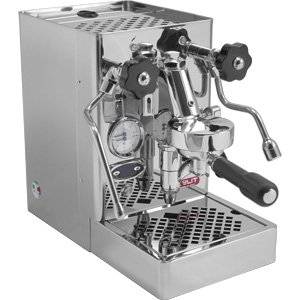
ചിത്രം 1: മുൻഭാഗം view of the Lelit PL62T Mara PID HX Espresso Machine, showcasing അതിന്റെ സ്റ്റെയിൻലെസ് സ്റ്റീൽ ഫിനിഷും നിയന്ത്രണ പാനലും.
1. സജ്ജീകരണം
1.1 അൺപാക്കിംഗ്
Carefully remove the espresso machine from its packaging. Retain all packaging materials for future transport or service. Inspect the machine for any signs of damage during transit. If damage is found, contact your retailer immediately.
1.2 പ്രാരംഭ ക്ലീനിംഗ്
Before first use, clean the water tank, drip tray, and portafilter with warm water and a mild detergent. Rinse thoroughly with clean water. Wipe the exterior of the machine with a damp തുണി.
1.3 വാട്ടർ ടാങ്ക് പൂരിപ്പിക്കൽ
- യന്ത്രത്തിന്റെ പിൻഭാഗത്ത് നിന്ന് വാട്ടർ ടാങ്ക് നീക്കം ചെയ്യുക.
- Fill the tank with fresh, filtered water up to the MAX level indicator. Avoid using distilled or demineralized water as it can affect sensor readings.
- Carefully reinsert the water tank, ensuring it is properly seated.
1.4 പവർ കണക്ഷൻ
Ensure the machine's power switch is in the OFF position. Plug the power cord into a grounded electrical outlet. The machine operates on standard household voltage.
1.5 ആദ്യ ഉപയോഗവും പ്രൈമിംഗും
- Turn the machine ON. The machine will begin to heat up.
- Once the machine reaches operating temperature (indicated by the PID display), place a cup under the hot water wand.
- Open the hot water valve to dispense approximately 200ml of water. This primes the boiler and ensures proper water flow.
- Close the hot water valve. The machine is now ready for use.
2. പ്രവർത്തന നിർദ്ദേശങ്ങൾ
2.1 ഓൺ/ഓഫ് ചെയ്യുന്നു
- To turn ON: Flip the main power switch located on the front or side of the machine. The PID display will illuminate, and the machine will begin heating.
- To turn OFF: Flip the main power switch to the OFF position.
2.2 PID Temperature Adjustment
The PID controller allows precise adjustment of the boiler temperature. Refer to the specific PID controller instructions for detailed programming. Generally, press the 'P' button to enter programming mode, then use the '+' and '-' buttons to adjust the desired temperature. Press 'P' again to save and exit.
2.3 ബ്രൂയിംഗ് എസ്പ്രെസോ
- Ensure the machine is heated to the desired temperature.
- പുതിയ കാപ്പിക്കുരു എസ്പ്രസ്സോ പോലെ നല്ല സ്ഥിരതയിലേക്ക് പൊടിക്കുക.
- Dose the portafilter with the appropriate amount of ground coffee (e.g., 14g for a double shot).
- Tamp ശക്തമായ മർദ്ദത്തിൽ കാപ്പി തുല്യമായി കലർത്തുക.
- ഗ്രൂപ്പ് ഹെഡിലേക്ക് പോർട്ടഫിൽറ്റർ തിരുകുക, അത് ലോക്ക് ചെയ്യുക.
- നിങ്ങളുടെ എസ്പ്രസ്സോ കപ്പ്(കൾ) പോർട്ടഫിൽറ്റർ സ്പൂട്ടുകൾക്ക് കീഴിൽ വയ്ക്കുക.
- Lift the brew lever to start the extraction.
- Monitor the shot for optimal flow and color. Lower the brew lever to stop the extraction when the desired volume is reached (typically 25-30 seconds for 30-60ml).
- After brewing, remove the portafilter, discard the spent coffee grounds, and rinse the portafilter.
2.4 ആവി പറക്കുന്ന പാൽ
- Ensure the machine is at steaming temperature.
- ബാഷ്പീകരിച്ച വെള്ളം നീക്കം ചെയ്യാൻ സ്റ്റീം വാൻഡ് ഡ്രിപ്പ് ട്രേയിലേക്ക് അൽപ്പനേരം ശുദ്ധീകരിക്കുക.
- Immerse the tip of the steam wand just below the surface of cold milk in a stainless steel pitcher.
- സ്റ്റീം വാൽവ് പൂർണ്ണമായും തുറക്കുക.
- Angle the pitcher to create a swirling motion, incorporating air for texture.
- Once the milk reaches the desired temperature and texture, close the steam valve.
- പരസ്യം ഉപയോഗിച്ച് സ്റ്റീം വാൻഡ് ഉടൻ തുടയ്ക്കുക.amp പാൽ അവശിഷ്ടങ്ങൾ നീക്കം ചെയ്യാൻ തുണികൊണ്ട് ചെറുതായി തുടയ്ക്കുക.
2.5 ചൂടുവെള്ളം വിതരണം
Place a cup under the hot water wand. Open the hot water valve to dispense hot water for tea or Americanos. Close the valve when finished.
3. പരിപാലനം
3.1 പ്രതിദിന ശുചീകരണം
- പോർട്ടഫിൽറ്ററും കൊട്ടകളും: After each use, remove the portafilter, discard coffee grounds, and rinse thoroughly under hot water.
- ഗ്രൂപ്പ് തലവൻ: Perform a quick backflush with the blind filter to remove coffee oils from the group head. Wipe the shower screen and group gasket with a damp തുണി.
- ആവി വടി: Always wipe the steam wand immediately after steaming milk and purge briefly.
- ഡ്രിപ്പ് ട്രേ: ദിവസവും ഡ്രിപ്പ് ട്രേ കാലിയാക്കി കഴുകുക.
3.2 പ്രതിവാര വൃത്തിയാക്കൽ
- വാട്ടർ ടാങ്ക്: Remove and clean the water tank with warm soapy water. Rinse thoroughly.
- Backflushing with Detergent: Perform a backflush with a specialized espresso machine cleaning detergent (e.g., Cafiza) according to the detergent manufacturer's instructions.
- ഷവർ സ്ക്രീൻ: Remove the shower screen and clean it thoroughly with a brush and detergent.
3.3 ഡെസ്കലിംഗ്
The frequency of descaling depends on your water hardness. For optimal performance, descale your machine every 2-3 months using a commercial descaling solution designed for espresso machines. Follow the descaling solution manufacturer's instructions carefully. Always rinse the machine thoroughly with several tanks of fresh water after descaling.
3.4 ഗാസ്കറ്റ് മാറ്റിസ്ഥാപിക്കൽ
The group head gasket (rubber seal) will harden over time and may need replacement to prevent leaks. Inspect it regularly for cracks or stiffness. Consider upgrading to a silicone gasket for improved longevity and easier installation.
4. പ്രശ്നപരിഹാരം
| പ്രശ്നം | സാധ്യമായ കാരണം | പരിഹാരം |
|---|---|---|
| ഗ്രൂപ്പ് ഹെഡിൽ നിന്ന് വെള്ളം ഒഴുകുന്നില്ല. | Water tank empty, pump not primed, clogged group head/shower screen, scale buildup. | Refill water tank. Prime the pump (see Section 1.5). Clean group head/shower screen. Descale the machine. |
| വാൻഡിൽ നിന്ന് ആവി വരുന്നില്ല | Steam boiler not heated, steam wand clogged, low water level. | Allow machine to reach steaming temperature. Clean steam wand tip with a pin. Check water level. |
| എസ്പ്രെസോ എക്സ്ട്രാക്റ്റുകൾ വളരെ വേഗത്തിൽ വേർതിരിച്ചെടുക്കുന്നു (കുറച്ച് വേർതിരിച്ചെടുക്കൽ) | കാപ്പിപ്പൊടി വളരെ പരുക്കനാണ്, കാപ്പിയുടെ അളവ് അപര്യാപ്തമാണ്, ടിampവളരെ വെളിച്ചം. | Grind finer. Increase coffee dose. Tamp കൂടുതൽ ദൃ .മായി. |
| എസ്പ്രെസോ എക്സ്ട്രാക്റ്റുകൾ വളരെ സാവധാനത്തിൽ എടുക്കുന്നു അല്ലെങ്കിൽ ഒട്ടും തന്നെ എടുക്കുന്നില്ല (അമിതമായി എക്സ്ട്രാക്റ്റ് ചെയ്യുന്നു) | കാപ്പി പൊടി വളരെ നേർത്തതാണ്, കാപ്പിയുടെ അളവ് അമിതമാണ്, ടിampവളരെ കഠിനമായി. | Grind coarser. Decrease coffee dose. Tamp ഭാരം കുറഞ്ഞ. |
| Water leaking from group head during brewing | Worn group head gasket, portafilter not properly seated. | Replace group head gasket. Ensure portafilter is locked in firmly. |
5 സ്പെസിഫിക്കേഷനുകൾ
- മോഡൽ: PL62T
- ബ്രാൻഡ്: ലെലിറ്റ്
- കോഫി മേക്കർ തരം: എസ്പ്രെസോ മെഷീൻ
- പ്രവർത്തന രീതി: പൂർണ്ണമായും ഓട്ടോമാറ്റിക്
- പ്രത്യേക സവിശേഷത: Programmable (PID)
- ശേഷി: 1.4 ലിറ്റർ (വാട്ടർ ടാങ്ക്)
- മെറ്റീരിയൽ: Copper, Stainless Steel
- ഉൽപ്പന്ന അളവുകൾ: 16 x 9 x 15 ഇഞ്ച് (നീളം x വീതി x ഉയരം)
- ഇനത്തിൻ്റെ ഭാരം: 41.4 പൗണ്ട്
- UPC: 617375286665
- ASIN: B00NMU9ZRO
6. വാറണ്ടിയും പിന്തുണയും
6.1 വാറൻ്റി വിവരങ്ങൾ
Lelit products are covered by a manufacturer's warranty against defects in materials and workmanship. The specific terms and duration of the warranty may vary by region and retailer. Please retain your proof of purchase for warranty claims. For detailed warranty information, refer to the documentation provided with your purchase or visit the official Lelit webസൈറ്റ്.
6.2 ഉപഭോക്തൃ പിന്തുണ
For technical assistance, spare parts, or service inquiries, please contact your authorized Lelit retailer or the official Lelit customer support. Contact details can typically be found on the Lelit webസൈറ്റിലോ നിങ്ങളുടെ ഉൽപ്പന്ന പാക്കേജിംഗിലോ.
Note: Always refer to the official Lelit website or your purchase documentation for the most current and accurate warranty and support information.