
1. ആമുഖം
This manual provides essential information for the proper use and maintenance of your Lexar Professional 128GB 1000x Speed SDXC UHS-II Memory Card. Designed for high-speed performance, this card is ideal for capturing and transferring high-quality photos and 1080p full-HD, 3D, and 4K video. Please read these instructions carefully to ensure optimal performance and longevity of your memory card.
2. ഉൽപ്പന്നം കഴിഞ്ഞുview
പ്രധാന സവിശേഷതകൾ
- 128GB storage capacity.
- Read and write speeds up to 150MB/s.
- Leverages UHS-II technology (UHS Speed Class 3 (U3)) for high-speed performance.
- Designed for capturing high-quality photos and 1080p full-HD, 3D, and 4K video.
- Waterproof design for enhanced durability.

Figure 1: Lexar Professional 128GB 1000x SDXC UHS-II Memory Card. This image displays the front of the memory card, highlighting its 128GB capacity, 150MB/s speed rating, SDXC, UHS-II, and Class 10 markings, along with the Lexar Professional branding.
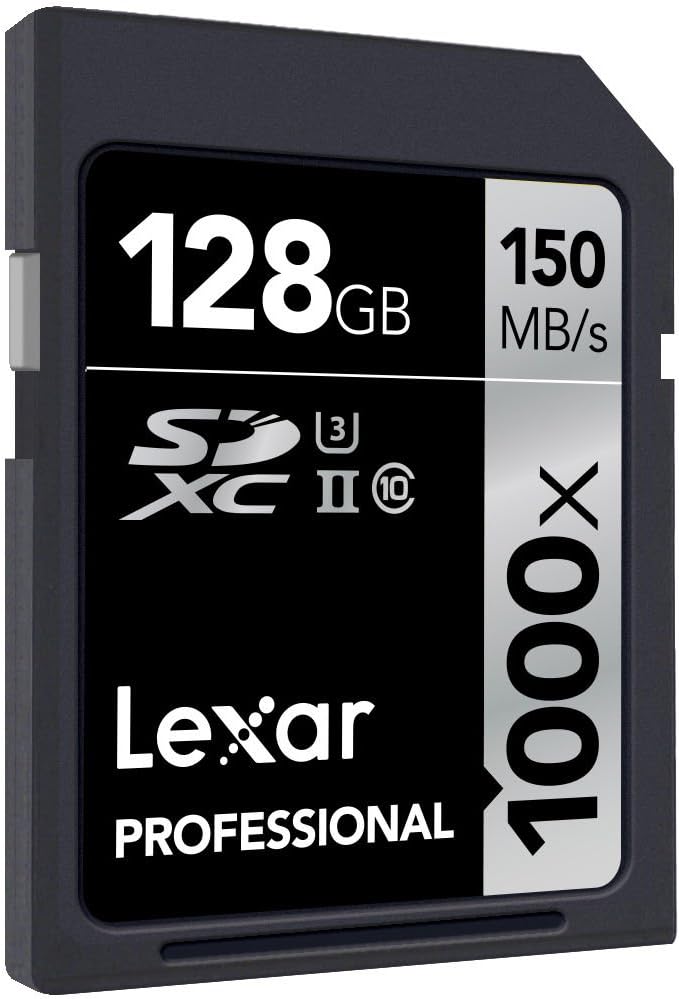
ചിത്രം 2: കോണാകൃതിയിലുള്ളത് view of the Lexar Professional 128GB 1000x SDXC UHS-II Memory Card, showing its design and labeling from a different perspective.
3. സജ്ജീകരണം
3.1 മെമ്മറി കാർഡ് ചേർക്കുന്നു
- Locate the SD card slot on your compatible device (e.g., digital camera, camcorder, laptop, card reader).
- Ensure the memory card is oriented correctly, with the gold contacts facing the correct direction as indicated by your device's manual.
- കാർഡ് സ്ലോട്ടിൽ ക്ലിക്കുചെയ്യുന്നതുവരെ സൌമ്യമായി തിരുകുക. കാർഡ് നിർബന്ധിച്ച് ഘടിപ്പിക്കരുത്.
- To remove, gently push the card inward until it clicks, then release, and it will eject slightly for removal.
3.2 അനുയോജ്യത
For optimal performance, use this Lexar Professional SDXC UHS-II card with devices that support the UHS-II standard. While the card is backward compatible with UHS-I devices, it will operate at UHS-I speeds in such devices. Always refer to your device's manual for specific memory card compatibility.
4. പ്രവർത്തന നിർദ്ദേശങ്ങൾ
4.1 ഡാറ്റ കൈമാറ്റം
To transfer data to or from the memory card:
- Insert the card into a compatible card reader connected to your computer, or directly into a device with an SD card slot.
- Your computer or device should recognize the card as a removable storage drive.
- വലിച്ചിടുക files to transfer them. For large files or high volumes of data, using a UHS-II compatible card reader will ensure the fastest transfer speeds, up to 150MB/s.
4.2 റെക്കോർഡിംഗ് മീഡിയ
When used in a compatible camera or video recorder, the Lexar Professional 1000x SDXC UHS-II card enables high-speed continuous shooting and extended recording of high-resolution video formats, including 4K. Ensure your device's settings are configured to utilize the card's full capabilities for optimal recording performance.
5. പരിപാലനവും പരിചരണവും
5.1 പൊതു പരിചരണം
- Keep the memory card clean and free from dust and debris. Avoid touching the gold contacts.
- ശാരീരിക നാശനഷ്ടങ്ങൾ ഒഴിവാക്കാൻ, ഉപയോഗത്തിലില്ലാത്തപ്പോൾ കാർഡ് അതിന്റെ സംരക്ഷണ കേസിൽ സൂക്ഷിക്കുക.
- Avoid exposing the card to extreme temperatures, humidity, or strong magnetic fields.
- Do not bend or apply excessive force to the card.
5.2 Data Recovery
In the event of accidental deletion or data corruption, Lexar Professional line memory cards often include access to Image Rescue software. This software can help recover most photo and select video files, even if they have been erased or the card has been corrupted. Refer to the product packaging or Lexar's official website for details on accessing and using this software.

Figure 3: Packaging for the Lexar Professional 128GB 1000x SDXC UHS-II Memory Card, indicating the inclusion of Image Rescue software.
6. പ്രശ്നപരിഹാരം
6.1 പൊതുവായ പ്രശ്നങ്ങൾ
- കാർഡ് തിരിച്ചറിയാൻ കഴിഞ്ഞിട്ടില്ല: Ensure the card is fully inserted into the slot. Verify that your device supports SDXC cards and the UHS-II standard. Try the card in another compatible device or card reader to rule out a device issue.
- മന്ദഗതിയിലുള്ള പ്രകടനം: Confirm that your device and card reader are UHS-II compatible to achieve maximum speeds. Older devices or card readers may limit performance to UHS-I speeds.
- ഡാറ്റ അഴിമതി അല്ലെങ്കിൽ പിശകുകൾ: If you experience frequent errors, try reformatting the card using your device's formatting function (this will erase all data). If issues persist, the card may be faulty. Use data recovery software before reformatting if data is critical.
- Card Write-Protected: Check the small lock switch on the side of the SD card. Slide it to the unlocked position if it is set to write-protect.
7 സ്പെസിഫിക്കേഷനുകൾ
| ഫീച്ചർ | വിശദാംശങ്ങൾ |
|---|---|
| മോഡൽ നമ്പർ | LSD128CRBEU1000 |
| ശേഷി | 128 ജിബി |
| ഫ്ലാഷ് മെമ്മറി തരം | SDXC |
| ഹാർഡ്വെയർ ഇന്റർഫേസ് | SDXC |
| വായന വേഗത | 150 MB/s വരെ |
| റൈറ്റ് സ്പീഡ് | 150 MB/s വരെ |
| സെക്യുർ ഡിജിറ്റൽ അസോസിയേഷൻ സ്പീഡ് ക്ലാസ് | UHS-II, U3, Class 10 |
| പ്രത്യേക ഫീച്ചർ | വാട്ടർപ്രൂഫ് |
| ഉൽപ്പന്ന അളവുകൾ (LxWxH) | 1.26 x 0.94 x 0.08 ഇഞ്ച് |
| ഇനത്തിൻ്റെ ഭാരം | 0.035 ounces (1 gram) |
| നിറം | കറുപ്പ് |
8. വാറൻ്റിയും പിന്തുണയും
8.1 വാറൻ്റി വിവരങ്ങൾ
All Lexar Professional line memory cards come with a limited lifetime warranty. This warranty covers defects in material and workmanship under normal use. Please retain your proof of purchase for warranty claims.
8.2 സാങ്കേതിക പിന്തുണ
Lexar Professional products are backed by expert technical support. For assistance with product setup, troubleshooting, or warranty inquiries, please visit the official Lexar website or contact their customer service department. You can find more information and support resources at the Lexar Store.