
1. ഉൽപ്പന്നം കഴിഞ്ഞുview
The Optex Trident TP160 is a premium heavy-duty tripod designed for stability and precise adjustments. It features a professional-style all-metal panhead and robust construction suitable for various photography and videography needs.
- All-metal professional-style panhead for smooth action.
- Two integrated bubble levels for fast and accurate adjustments.
- 4-section legs with quick-release leg locks for easy setup.
- Maximum leg diameter of 26mm for enhanced stability.
- Secure rubber feet to prevent slipping.
- Grounder feature allows a minimum height of 18.5 inches (47cm).
- Adjustable center column with friction control for precise height adjustments.
- Center column can be reversed for macro/close-up photography.
- Includes a carrying case for portability.
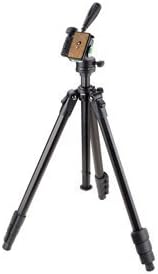
Figure 1: The Optex Trident TP160 Premium Tripod in its standard configuration.
2. സജ്ജീകരണ നിർദ്ദേശങ്ങൾ
- ട്രൈപോഡ് അൺപാക്ക് ചെയ്യുക: Carefully remove the tripod and all accessories from its carrying case.
- കാലുകൾ നീട്ടി വയ്ക്കുക: Unlock the quick-release leg locks on each of the four leg sections. Extend the legs to your desired height. Ensure all leg locks are securely fastened after adjustment.
- ലെഗ് ആംഗിളുകൾ ക്രമീകരിക്കുക: The tripod legs can be independently adjusted to different angles for stability on uneven terrain or for low-angle shots. Press the leg angle release buttons near the top of each leg to adjust.
- ട്രൈപോഡ് ലെവൽ ചെയ്യുക: Utilize the two integrated bubble levels on the panhead to ensure the tripod base is perfectly level. Adjust leg lengths as needed.
- Attach Quick Release Plate to Device: Locate the quick-release plate. Attach it to the 1/4-inch screw thread on the bottom of your camera, spotting scope, or other compatible device. Tighten the screw securely.
- Mount Device to Tripod: Slide the quick-release plate with your attached device into the panhead receiver until it clicks securely into place. Ensure the safety lock is engaged.
3. ട്രൈപോഡ് പ്രവർത്തിപ്പിക്കൽ
3.1 Panhead Adjustments
- പാനിംഗ് (തിരശ്ചീന ചലനം): Loosen the main pan lock knob on the side of the panhead. Use the pan handle to smoothly rotate your device horizontally. Tighten the knob to lock the position.
- ടിൽറ്റിംഗ് (ലംബ ചലനം): Loosen the tilt lock knob. Adjust the vertical angle of your device using the pan handle. Tighten the knob to secure the tilt.
- Portrait/Landscape Orientation: The panhead allows for quick switching between landscape and portrait orientations. Loosen the appropriate knob (often a side knob) to rotate the camera mount 90 degrees.
3.2 Center Column Adjustment
- Raising/Lowering: Turn the center column lock knob counter-clockwise to loosen. Use the crank handle to raise or lower the center column to your desired height. Turn the knob clockwise to lock.
- Reversing for Macro Photography: The center column can be inverted for extremely low-angle or macro photography. Consult the detailed manual for specific steps on reversing the center column.
3.3 Stability Hook
A hook is located at the bottom of the center column. For increased stability, especially in windy conditions or with heavy equipment, hang your camera bag or a weight from this hook.
Video 1: A brief demonstration of a compact tripod's features, including panhead and leg adjustments. Note: This video is a short preview and may not cover all specific features of the Optex Trident TP160.
4. പരിപാലനം
- വൃത്തിയാക്കൽ: ട്രൈപോഡ് ഒരു സോഫ്റ്റ്, ഡി ഉപയോഗിച്ച് തുടയ്ക്കുക.amp cloth after each use, especially if used outdoors. Avoid harsh chemicals.
- ലൂബ്രിക്കേഷൻ: Periodically check moving parts for smooth operation. Apply a small amount of silicone-based lubricant if necessary, avoiding excessive application.
- സംഭരണം: Store the tripod in its carrying case in a dry, cool place away from direct sunlight and extreme temperatures.
- പരിശോധന: Regularly inspect all screws, locks, and joints for tightness and wear. Tighten any loose components.
5. പ്രശ്നപരിഹാരം
- Tripod is Unstable: Ensure all leg locks are fully engaged. Verify that the legs are spread evenly and the bubble levels indicate a level setup. Use the stability hook with a weight if needed.
- Panhead Movement is Stiff: Check if all panhead lock knobs are fully loosened. Clean any debris from the moving parts and apply a small amount of lubricant if needed.
- Center Column Sticks: Ensure the center column lock knob is fully loosened. Clean the column and apply lubricant if necessary.
- Quick Release Plate is Loose: Ensure the screw attaching the plate to your device is tightened. Verify the plate is fully seated and locked into the panhead receiver.
6 സ്പെസിഫിക്കേഷനുകൾ
| ഫീച്ചർ | സ്പെസിഫിക്കേഷൻ |
|---|---|
| മോഡൽ നമ്പർ | TP160 |
| ബ്രാൻഡ് | ഒപ്ടെക്സ് |
| മെറ്റീരിയൽ | ലോഹം |
| ഇനത്തിൻ്റെ ഭാരം | 1.86 കി.ഗ്രാം (4.1 പൗണ്ട്) |
| പരമാവധി ഭാരം ശേഷി | 5 കി.ഗ്രാം (11 പൗണ്ട്) |
| പരമാവധി ഉയരം | 160 സെ.മീ |
| Minimum Height (Grounder Feature) | 47 സെ.മീ (18.5 ഇഞ്ച്) |
| മടക്കിയ നീളം | 61 സെ.മീ (ഏകദേശം) |
| ലെഗ് വിഭാഗങ്ങൾ | 4 |
| കാലിന്റെ വ്യാസം | 26 മി.മീ |
| ട്രൈപോഡ് ഹെഡ് തരം | 3-Way Pan Head |
7. വാറൻ്റിയും പിന്തുണയും
Warranty information for the Optex Trident TP160 Premium Tripod is typically provided with the product packaging or can be found on the official Optex website. Please refer to these resources for details regarding warranty coverage and how to obtain support.
For technical assistance, spare parts, or service inquiries, please contact Optex customer support through their official channels.