
Creative X7
ക്രിയേറ്റീവ് സൗണ്ട് ബ്ലാസ്റ്റർ X7 ഉപയോക്തൃ മാനുവൽ
മോഡൽ: എക്സ് 7
1. ആമുഖം
The Creative Sound Blaster X7 is a high-resolution audio device designed to function as an external USB Digital-to-Analog Converter (DAC) and a powerful audio amplifier. It features low-latency Bluetooth connectivity and an integrated Dolby Digital decoder, providing an enhanced audio experience for various applications.
This manual provides detailed instructions for setting up, operating, and maintaining your Sound Blaster X7 to ensure optimal performance and longevity.

ചിത്രം 1: മുൻഭാഗം view of the Creative Sound Blaster X7, showcasing its design and main volume control.
2. പാക്കേജ് ഉള്ളടക്കം
പാക്കേജിൽ എല്ലാ ഇനങ്ങളും ഉണ്ടെന്ന് ഉറപ്പാക്കുക:
- Creative Sound Blaster X7 Unit
- പവർ അഡാപ്റ്റർ
- USB കേബിൾ
- സ്റ്റീരിയോ RCA മുതൽ 3.5mm കേബിൾ വരെ
- ഒപ്റ്റിക്കൽ കേബിൾ
- ക്വിക്ക് സ്റ്റാർട്ട് ഗൈഡ് (ബാധകമെങ്കിൽ)
3. സജ്ജീകരണം
3.1 പവറുമായി ബന്ധിപ്പിക്കുന്നു
Connect the provided power adapter to the DC IN 24V port on the rear of the Sound Blaster X7, then plug it into a wall outlet.
3.2 ഓഡിയോ കണക്ഷനുകൾ
The Sound Blaster X7 offers various audio input and output options. Refer to the diagram below for connection points.
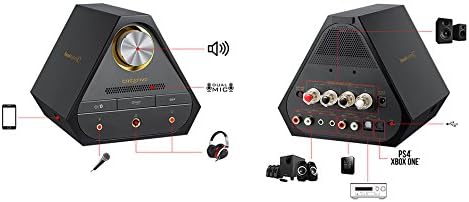
Image 2: Rear panel connections of the Sound Blaster X7, including speaker terminals, line out, optical in/out, and USB ports.
- USB Connection (PC/Mac): Use the supplied USB cable to connect the Sound Blaster X7 to your computer for high-resolution audio playback and control.
- Optical In/Out: Connect to compatible devices such as game consoles (PS4, Xbox One) or AV receivers using an optical cable for digital audio transmission.
- ലൈൻ ഔട്ട് (ആർസിഎ): ബാഹ്യ സ്പീക്കറുകളിലേക്ക് കണക്റ്റുചെയ്യുക അല്ലെങ്കിൽ ampRCA കേബിളുകൾ ഉപയോഗിക്കുന്ന ലൈഫയറുകൾ.
- സ്പീക്കർ ടെർമിനലുകൾ: For passive bookshelf speakers, connect speaker wires to the binding posts. Ensure correct polarity (+/-). The impedance switch allows selection between 4-8 ohms.
- ഹെഡ്ഫോൺ ഔട്ട്പുട്ടുകൾ: Two 3.5mm and one 6.3mm (1/4-inch) headphone jacks are available on the front panel for connecting headphones.
- മൈക്രോഫോൺ ഇൻപുട്ട്: A 3.5mm microphone input is available on the front panel.
3.3 Driver Installation (for PC/Mac)
For optimal performance and access to all features, download and install the latest drivers and software from the official Creative webസൈറ്റ്. ഇൻസ്റ്റാളേഷൻ സമയത്ത് സ്ക്രീനിലെ നിർദ്ദേശങ്ങൾ പാലിക്കുക.
4. പ്രവർത്തന നിർദ്ദേശങ്ങൾ
4.1 പവർ ഓൺ/ഓഫ്
Press the power button on the front panel to turn the unit on or off. The LED indicator will illuminate when powered on.
4.2 വോളിയം നിയന്ത്രണം
Rotate the large knob on the front panel to adjust the master volume. Press the knob to mute/unmute audio.
4.3 ഇൻപുട്ട് ഉറവിട തിരഞ്ഞെടുപ്പ്
Use the input selection buttons on the front panel or the companion software/app to switch between connected audio sources (e.g., USB, Optical, Bluetooth).
4.4 ബ്ലൂടൂത്ത് ജോടിയാക്കൽ
ബ്ലൂടൂത്ത് ഉപകരണം ജോടിയാക്കാൻ:
- Ensure the Sound Blaster X7 is powered on.
- Press and hold the Bluetooth button on the front panel until the Bluetooth indicator blinks rapidly.
- On your mobile device, search for Bluetooth devices and select "Sound Blaster X7".
- Once paired, the Bluetooth indicator will glow solid.
4.5 Software and Mobile App Control
The Sound Blaster X7 can be controlled and customized using the Creative Sound Blaster software on PC/Mac or the Sound Blaster Central mobile app (iOS/Android). These applications allow for advanced audio adjustments, sound profiles, and input/output management.
വീഡിയോ 1: ഒരു ഓവർview of the Creative Sound Blaster X7's features and connectivity options. This video demonstrates the product's versatility across different devices.
5. പരിപാലനം
- വൃത്തിയാക്കൽ: Use a soft, dry cloth to clean the exterior of the Sound Blaster X7. Avoid using liquid cleaners or abrasive materials.
- വെൻ്റിലേഷൻ: Ensure the unit has adequate ventilation to prevent overheating. Do not block the ventilation grilles.
- സംഭരണം: ദീർഘനേരം ഉപയോഗിക്കാത്തപ്പോൾ, നേരിട്ടുള്ള സൂര്യപ്രകാശത്തിൽ നിന്നും കടുത്ത താപനിലയിൽ നിന്നും മാറി തണുത്തതും വരണ്ടതുമായ സ്ഥലത്ത് ഉപകരണം സൂക്ഷിക്കുക.
6. പ്രശ്നപരിഹാരം
| പ്രശ്നം | സാധ്യമായ കാരണം | പരിഹാരം |
|---|---|---|
| ഓഡിയോ ഔട്ട്പുട്ട് ഇല്ല | Incorrect input source selected; cables not connected properly; volume too low. | Verify input source; check all cable connections; increase volume. Ensure drivers are installed for PC/Mac. |
| ബ്ലൂടൂത്ത് ജോടിയാക്കൽ പ്രശ്നങ്ങൾ | Device too far; Sound Blaster X7 not in pairing mode; interference. | Ensure devices are within range; put Sound Blaster X7 into pairing mode (blinking LED); restart both devices. |
| വികലമായ ഓഡിയോ | Volume too high; incorrect audio settings; faulty cable. | Reduce volume; check audio settings in software/app; try a different cable. |
7 സ്പെസിഫിക്കേഷനുകൾ
- മോഡൽ: X7
- ഓഡിയോ റെസല്യൂഷൻ: Up to 24-bit / 192kHz
- ഹെഡ്ഫോൺ ഇംപെഡൻസ്: Supports up to 600 ohms
- Ampലൈഫയർ ഔട്ട്പുട്ട്: 100W stereo (with appropriate speakers)
- കണക്റ്റിവിറ്റി: USB, Optical In/Out, RCA Line Out, Speaker Terminals, 3.5mm/6.3mm Headphone Out, 3.5mm Mic In, Bluetooth
- DAC: Burr-Brown PCM1794 127dB
- ഡീകോഡർ: ഡോൾബി ഡിജിറ്റൽ
- വയർലെസ് സാങ്കേതികവിദ്യ: ബ്ലൂടൂത്ത്
8. വാറൻ്റിയും പിന്തുണയും
For warranty information and technical support, please visit the official Creative webസൈറ്റിൽ ബന്ധപ്പെടുക അല്ലെങ്കിൽ അവരുടെ ഉപഭോക്തൃ സേവനവുമായി ബന്ധപ്പെടുക. വാറന്റി ക്ലെയിമുകൾക്കായി നിങ്ങളുടെ വാങ്ങിയതിന്റെ തെളിവ് സൂക്ഷിക്കുക.
Creative Support: us.creative.com/support/ എന്ന വിലാസത്തിൽ ബന്ധപ്പെടുക.
Ask a question about this manual
Ask about setup, troubleshooting, compatibility, parts, safety, or missing instructions. Manuals+ will review the question and use this page’s manual context to help answer it.