
പ്രകടന ഉപകരണം W2446
Performance Tool W2446 3D LED Firepoint Flashlight User Manual
Model: W2446 | Brand: Performance Tool
ആമുഖം
Thank you for choosing the Performance Tool W2446 3D LED Firepoint Flashlight. This manual provides essential information for the safe and effective operation, maintenance, and troubleshooting of your new flashlight. Designed for durability and versatility, this flashlight features a super bright Nichia LED, multiple output modes, and a robust aircraft-grade aluminum construction.

ചിത്രം 1: Performance Tool W2446 3D LED Firepoint Flashlight. This image shows the sleek black body of the flashlight with a textured grip section and a green ring near the LED head.
പ്രധാനപ്പെട്ട സുരക്ഷാ വിവരങ്ങൾ
- നേത്ര സുരക്ഷ: എൽഇഡി ലൈറ്റിലേക്ക് നേരിട്ട് നോക്കുകയോ ആളുകളുടെയോ മൃഗങ്ങളുടെയോ കണ്ണുകളിലേക്ക് നേരിട്ട് പ്രകാശിപ്പിക്കുകയോ ചെയ്യരുത്. തീവ്രമായ വെളിച്ചം താൽക്കാലിക കാഴ്ച വൈകല്യത്തിനോ സ്ഥിരമായ കണ്ണിന് കേടുപാടിനോ കാരണമാകും.
- ബാറ്ററി സുരക്ഷ:
- Use only the specified battery type (3-D batteries).
- പഴയതും പുതിയതുമായ ബാറ്ററികളോ വ്യത്യസ്ത തരം ബാറ്ററികളോ മിക്സ് ചെയ്യരുത്.
- ഇൻസ്റ്റാൾ ചെയ്യുമ്പോൾ ബാറ്ററി പോളാരിറ്റി (+/-) കൃത്യമായി ഉണ്ടെന്ന് ഉറപ്പാക്കുക.
- ചോർച്ച തടയാൻ ഫ്ലാഷ്ലൈറ്റ് ദീർഘനേരം ഉപയോഗിക്കുന്നില്ലെങ്കിൽ ബാറ്ററികൾ നീക്കം ചെയ്യുക.
- ഉപയോഗിച്ച ബാറ്ററികൾ പ്രാദേശിക നിയന്ത്രണങ്ങൾ അനുസരിച്ച് ഉത്തരവാദിത്തത്തോടെ നീക്കം ചെയ്യുക.
- ചൂട്: The flashlight head may become warm during prolonged use. This is normal. Avoid prolonged direct contact with hot surfaces.
- കുട്ടികൾ: കുട്ടികളിൽനിന്നും നിന്നും ദൂരെ വയ്ക്കുക. ഇതൊരു കളിപ്പാട്ടമല്ല.
- പരിസ്ഥിതി: Do not expose the flashlight to extreme temperatures, open flames, or immerse it in water unless specified as waterproof (this model is not specified as waterproof).
പാക്കേജ് ഉള്ളടക്കം
എല്ലാ ഇനങ്ങളും ഉണ്ടെന്നും നല്ല നിലയിലാണെന്നും ഉറപ്പാക്കാൻ പാക്കേജ് ഉള്ളടക്കങ്ങൾ പരിശോധിക്കുക.
- Performance Tool W2446 3D LED Firepoint Flashlight (x1)
- D-Cell Batteries (x3)
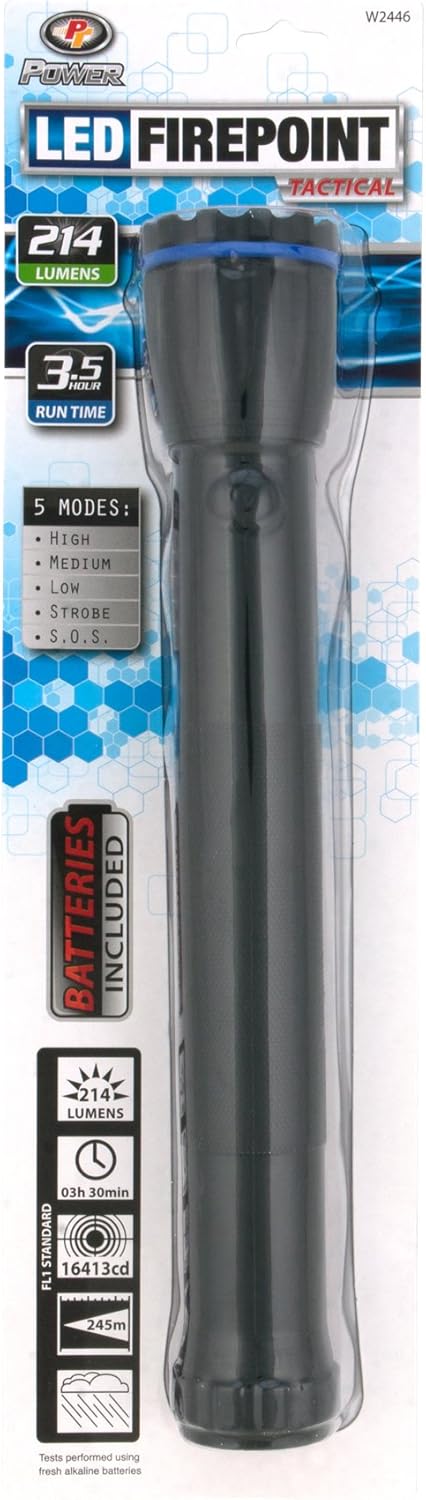
ചിത്രം 2: Packaging of the Performance Tool W2446 Flashlight. This image displays the retail packaging, highlighting features like 214 lumens, 3.5-hour run time, 5 modes, and "Batteries Included".
സജ്ജീകരണം: ബാറ്ററി ഇൻസ്റ്റാളേഷൻ
Your Performance Tool W2446 flashlight requires three (3) D-cell batteries for operation. Batteries are included in the package.
- Unscrew the Tail Cap: Hold the flashlight firmly and twist the tail cap (the end opposite the light head) counter-clockwise until it detaches.
- ബാറ്ററികൾ ചേർക്കുക: Insert three D-cell batteries into the battery compartment, ensuring the positive (+) end of each battery faces towards the flashlight head. Follow the polarity markings inside the battery tube if available.
- Replace Tail Cap: Carefully screw the tail cap back onto the flashlight body by twisting it clockwise until it is securely tightened. Do not overtighten.
- ടെസ്റ്റ്: Press the power button to ensure the flashlight turns on.
പ്രവർത്തന നിർദ്ദേശങ്ങൾ
The Performance Tool W2446 flashlight features a single power button located on the side of the body, which controls both power and mode selection.
പവർ ഓൺ/ഓഫ്
- ടോർച്ച് ലൈറ്റ് ഓണാക്കാൻ ON, പവർ ബട്ടൺ ഒരിക്കൽ അമർത്തുക.
- ടോർച്ച് ലൈറ്റ് ഓണാക്കാൻ ഓഫ്, press and hold the power button for approximately 1-2 seconds, or cycle through all modes until the light turns off.
ഔട്ട്പുട്ട് മോഡുകൾ
The flashlight offers 5 distinct output modes. To cycle through these modes, quickly press the power button repeatedly while the flashlight is on.
- ഉയർന്നത്: Provides maximum brightness (200 lumens) for powerful illumination.
- ഇടത്തരം: A balanced brightness level for general use, conserving battery life.
- താഴ്ന്നത്: Lowest brightness setting, ideal for close-up tasks or extended runtimes.
- സ്ട്രോബ്: A rapid flashing light, useful for signaling or disorienting.
- SOS: Flashes the international Morse code signal for distress (three short, three long, three short flashes).
The flashlight will typically remember the last used mode when turned off and on again, but this may vary. If not, it will default to the first mode (High).
മെയിൻ്റനൻസ്
- വൃത്തിയാക്കൽ: ഫ്ലാഷ്ലൈറ്റ് ബോഡി മൃദുവായ, ഡി ഉപയോഗിച്ച് തുടയ്ക്കുക.amp തുണി. ഉരച്ചിലുകളുള്ള ക്ലീനറുകളോ ലായകങ്ങളോ ഉപയോഗിക്കരുത്.
- ബാറ്ററി മാറ്റിസ്ഥാപിക്കൽ: Replace batteries when the light dims significantly or fails to turn on. Refer to the "Setup: Battery Installation" section for instructions.
- സംഭരണം: Store the flashlight in a cool, dry place away from direct sunlight and extreme temperatures. If storing for an extended period (more than a month), remove the batteries to prevent leakage and corrosion.
- എൽഇഡി: The Nichia LED is designed for long life and typically does not require replacement.
ട്രബിൾഷൂട്ടിംഗ്
| പ്രശ്നം | സാധ്യമായ കാരണം | പരിഹാരം |
|---|---|---|
| ടോർച്ച് ഓണാകുന്നില്ല. |
|
|
| വെളിച്ചം മങ്ങുന്നു അല്ലെങ്കിൽ മിന്നിമറയുന്നു. |
|
|
| Cannot cycle through modes. |
|
|
സ്പെസിഫിക്കേഷനുകൾ
| മോഡൽ: | W2446 |
| പ്രകാശ സ്രോതസ്സ് തരം: | Nichia LED |
| തെളിച്ചം: | 200 ല്യൂമെൻസ് (ഉയർന്ന മോഡ്) |
| ഔട്ട്പുട്ട് മോഡുകൾ: | High, Medium, Low, Strobe, S.O.S. (5 modes) |
| ഊർജ്ജ സ്രോതസ്സ്: | 3 x D-Cell Batteries (Included) |
| പ്രവർത്തനസമയം: | Up to 75 hours (on lower settings) |
| ബീം ദൂരം: | 250 മീറ്റർ വരെ |
| മെറ്റീരിയൽ: | എയർക്രാഫ്റ്റ് ഗ്രേഡ് അലുമിനിയം |
| അളവുകൾ: | 16.1 x 4.6 x 2.3 ഇഞ്ച് (ഏകദേശം) |
| ഇനത്തിൻ്റെ ഭാരം: | 1 pound (approximate, without batteries) |
| പ്രത്യേക സവിശേഷത: | പോർട്ടബിൾ |
| UPC: | 039564109164 |
വാറൻ്റിയും പിന്തുണയും
For specific warranty information regarding your Performance Tool W2446 Flashlight, please refer to the documentation included with your purchase or visit the official Performance Tool webസൈറ്റ്. വാറന്റി നിബന്ധനകളും വ്യവസ്ഥകളും വ്യത്യാസപ്പെടാം.
If you encounter any issues not covered in the troubleshooting section or require further assistance, please contact Performance Tool customer support. Contact details are typically available on the product packaging or the manufacturer's official webസൈറ്റ്.
നിങ്ങൾക്ക് സന്ദർശിക്കാനും കഴിയും Performance Tool Store on Amazon കൂടുതൽ ഉൽപ്പന്ന വിവരങ്ങൾക്കും പിന്തുണാ ഉറവിടങ്ങൾക്കും.
Ask a question about this manual
Ask about setup, troubleshooting, compatibility, parts, safety, or missing instructions. Manuals+ will review the question and use this page’s manual context to help answer it.