
ആമുഖം
വാങ്ങിയതിന് നന്ദി.asing the Soundmaster DAB500SI Portable Digital Radio. This manual provides essential information for the safe and efficient operation of your device. Please read it thoroughly before use and retain it for future reference.
ഉൽപ്പന്നം കഴിഞ്ഞുview
The Soundmaster DAB500SI is a compact and versatile digital radio, offering both DAB/DAB+ and FM reception. It features a clear display, intuitive controls, and a headphone output for personal listening. Its portable design allows for use in various locations.
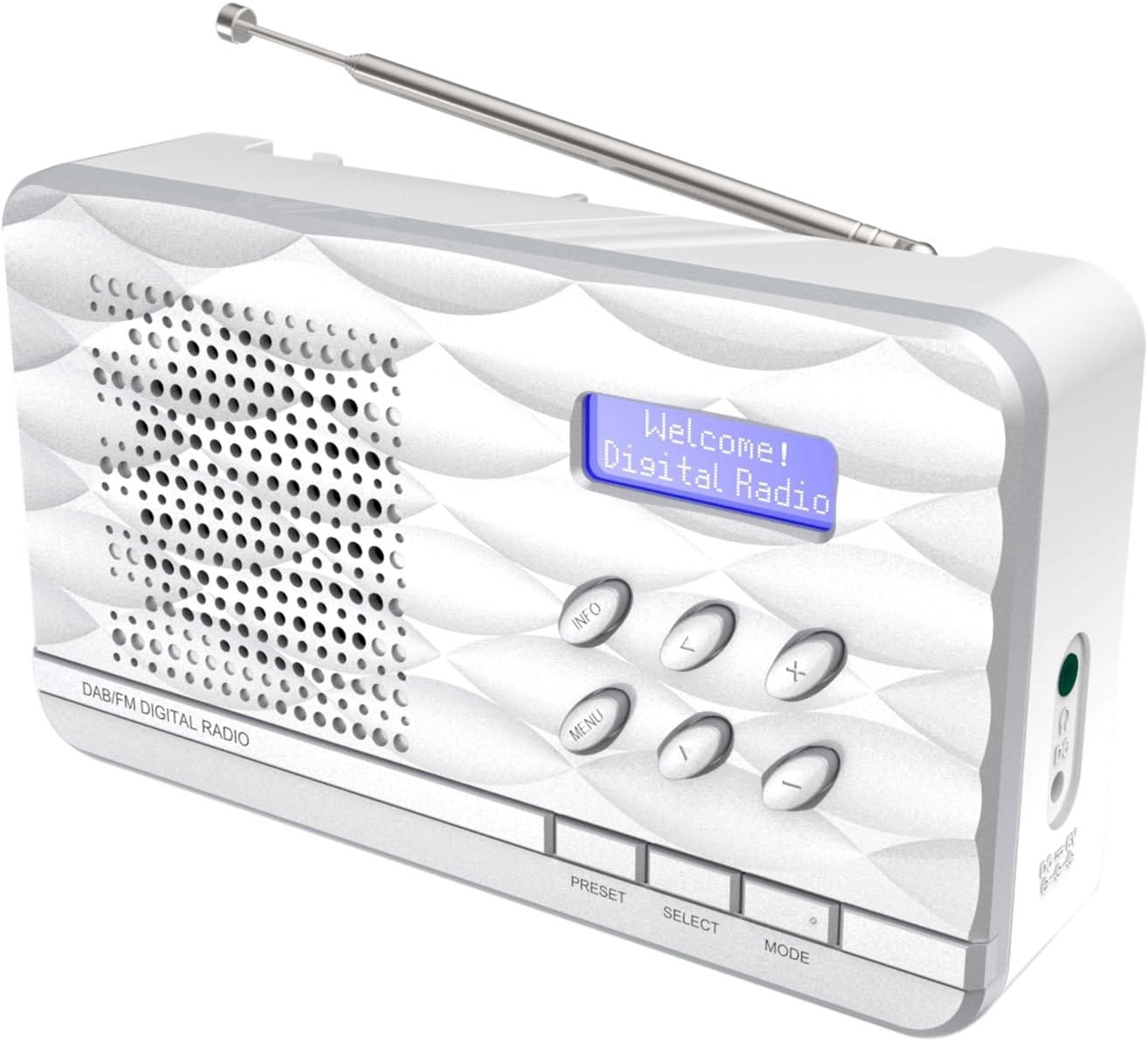
ചിത്രം 1: Soundmaster DAB500SI Portable Digital Radio. The image shows the silver radio with its extendable antenna, front speaker grille, blue backlit display showing "Welcome! Digital Radio", and control buttons labeled INFO, MENU, PRESET, SELECT, MODE, and navigation arrows. Dimensions are indicated as 19cm (width), 11cm (height), and 7cm (depth).
സജ്ജമാക്കുക
1 അൺപാക്ക് ചെയ്യുന്നു
Carefully remove the radio from its packaging. Ensure all components are present: the DAB500SI radio unit and this user manual.
2. പവർ കണക്ഷൻ
The DAB500SI is powered by mains electricity. Locate the DC IN port on the side of the unit. Connect the provided power adapter to this port and then plug it into a standard wall outlet.
Alternatively, the unit can be powered by 4x AA batteries (not included) for portable use. Open the battery compartment on the rear of the unit and insert the batteries, observing correct polarity.
3. ആന്റിന ക്രമീകരണം
Extend the telescopic antenna fully for optimal DAB/DAB+ and FM reception. Adjust its position to achieve the best signal quality.
പ്രവർത്തന നിർദ്ദേശങ്ങൾ
1. പവർ ഓൺ/ഓഫ്
അമർത്തുക പവർ button (usually combined with the MODE button or a dedicated button) to turn the radio on or off.
2. Mode Selection (DAB/FM)
അമർത്തുക മോഡ് button to switch between DAB/DAB+ and FM radio modes.
3. DAB/DAB+ റേഡിയോ പ്രവർത്തനം
- ആദ്യ തവണ സജ്ജീകരണം: When first powered on in DAB mode, the radio will automatically perform a full scan for available stations. This may take a few minutes.
- സ്റ്റേഷൻ തിരഞ്ഞെടുപ്പ്: ഉപയോഗിക്കുക ഇടത്/വലത് navigation buttons (labeled < and > on the device) to browse through the list of available DAB stations. Press തിരഞ്ഞെടുക്കുക നിങ്ങളുടെ തിരഞ്ഞെടുപ്പ് സ്ഥിരീകരിക്കാൻ.
- മാനുവൽ സ്കാൻ: If you move the radio to a new location or wish to update the station list, press മെനു, then navigate to "Full Scan" or "Auto Scan" and press തിരഞ്ഞെടുക്കുക.
- വിവര പ്രദർശനം: അമർത്തുക വിവരം button repeatedly to cycle through various information displays such as program type, signal strength, time, date, and DLS (Dynamic Label Segment) text.
4. എഫ്എം റേഡിയോ പ്രവർത്തനം
- ഓട്ടോ സ്കാൻ: FM മോഡിൽ, അമർത്തിപ്പിടിക്കുക തിരഞ്ഞെടുക്കുക button to perform an auto scan. The radio will scan and store available stations.
- സ്വമേധയാലുള്ള ട്യൂണിംഗ്: ഉപയോഗിക്കുക ഇടത്/വലത് navigation buttons (labeled < and > on the device) to manually tune the frequency in small increments.
- ആർഡിഎസ് വിവരങ്ങൾ: If available, RDS (Radio Data System) information such as station name and program type will be displayed. Press വിവരം to cycle through available RDS data.
5. പ്രീസെറ്റുകൾ
The radio supports up to 20 preset stations for both DAB and FM modes.
- Storing a Preset: ആവശ്യമുള്ള സ്റ്റേഷനിലേക്ക് ട്യൂൺ ചെയ്യുക. അമർത്തിപ്പിടിക്കുക പ്രീസെറ്റ് button until "Preset Store" appears on the display. Use the navigation buttons to select a preset number (1-20) and press തിരഞ്ഞെടുക്കുക സ്ഥിരീകരിക്കാൻ.
- ഒരു പ്രീസെറ്റ് ഓർമ്മിപ്പിക്കുന്നു: അമർത്തുക പ്രീസെറ്റ് button briefly. Use the navigation buttons to select the desired preset number and press തിരഞ്ഞെടുക്കുക അതിനോട് ട്യൂൺ ചെയ്യാൻ.
6. വോളിയം നിയന്ത്രണം
ഉപയോഗിക്കുക +/- buttons (labeled + and - on the device) to adjust the volume level.
7. ഹെഡ്ഫോൺ ഉപയോഗം
Connect standard 3.5mm headphones to the headphone jack on the side of the unit for private listening. The internal speaker will be muted automatically.
മെയിൻ്റനൻസ്
1. വൃത്തിയാക്കൽ
Wipe the radio with a soft, dry cloth. Do not use abrasive cleaners, waxes, or solvents as they may damage the finish. Ensure the unit is unplugged before cleaning.
2. സംഭരണം
If storing the radio for an extended period, remove the batteries to prevent leakage. Store in a cool, dry place away from direct sunlight and extreme temperatures.
3. ബാറ്ററി മാറ്റിസ്ഥാപിക്കൽ
When using batteries, replace all four AA batteries simultaneously when the low battery indicator appears or audio quality degrades. Ensure correct polarity when inserting new batteries.
ട്രബിൾഷൂട്ടിംഗ്
| പ്രശ്നം | സാധ്യമായ കാരണം | പരിഹാരം |
|---|---|---|
| ശക്തിയില്ല | Power adapter not connected or faulty; batteries depleted or incorrectly inserted. | Check power adapter connection and wall outlet. Replace batteries, ensuring correct polarity. |
| മോശം DAB/FM റിസപ്ഷൻ | Antenna not extended or poorly positioned; weak signal area. | Fully extend and adjust the telescopic antenna. Try repositioning the radio. Perform a full scan in DAB mode. |
| സ്പീക്കറിൽ നിന്ന് ശബ്ദമില്ല | Volume too low; headphones connected. | Increase volume. Disconnect headphones if not desired. |
| റേഡിയോ മരവിക്കുന്നു അല്ലെങ്കിൽ പ്രതികരിക്കുന്നില്ല. | താൽക്കാലിക സോഫ്റ്റ്വെയർ തകരാർ. | Disconnect power for a few seconds, then reconnect. If using batteries, remove and reinsert them. |
സ്പെസിഫിക്കേഷനുകൾ
- മോഡൽ നമ്പർ: DAB500SI
- ബ്രാൻഡ്: സൗണ്ട്മാസ്റ്റർ
- പിന്തുണയ്ക്കുന്ന റേഡിയോ ബാൻഡുകൾ: AM, DAB, DAB+, FM
- പ്രീസെറ്റ് സ്റ്റേഷനുകൾ: 20 (DAB/FM)
- പരമാവധി സ്പീക്കർ ഔട്ട്പുട്ട് പവർ: 1 വാട്ട്
- കണക്റ്റിവിറ്റി ടെക്നോളജി: Auxiliary (3.5mm headphone jack)
- ഊർജ്ജ സ്രോതസ്സ്: Mains (AC adapter) or 4x AA Batteries (not included)
- ഡിസ്പ്ലേ: ബാക്ക്ലിറ്റ് എൽസിഡി
- ഇനത്തിൻ്റെ ഭാരം: 400 ഗ്രാം
- അളവുകൾ (ഏകദേശം): 19 സെ.മീ (വീതി) x 11 സെ.മീ (ഉയരം) x 7 സെ.മീ (ആഴം)
- നിറം: വെള്ളി
- ഉൾപ്പെടുത്തിയ ഘടകങ്ങൾ: Radio unit, User Manual
വാറൻ്റിയും പിന്തുണയും
വാറൻ്റി വിവരങ്ങൾ
Please refer to the warranty card included with your product for detailed warranty terms and conditions. Keep your purchase receipt as proof of purchase for any warranty claims.
ഉപഭോക്തൃ പിന്തുണ
For technical assistance, troubleshooting, or spare parts inquiries, please contact your retailer or the Soundmaster customer service department. Contact details can typically be found on the manufacturer's official webസൈറ്റ് അല്ലെങ്കിൽ ഉൽപ്പന്ന പാക്കേജിംഗിൽ.
Note: Spare parts availability information is not provided by the manufacturer. Software updates are not guaranteed.