
ആമുഖം
This instruction manual provides comprehensive guidance for the StarTech.com M.2 SATA External SSD Enclosure. This device allows you to convert a SATA M.2 solid-state drive into a portable, high-speed USB 3.0 (5Gbps) external drive with UASP support. Please read this manual carefully before installation and operation to ensure proper use and optimal performance.
പാക്കേജ് ഉള്ളടക്കം
നിങ്ങളുടെ പാക്കേജിൽ എല്ലാ ഘടകങ്ങളും ഉണ്ടെന്ന് ഉറപ്പാക്കുക:
- 1 x M.2 NGFF SATA Enclosure
- 1 x USB 3.0 Cable (USB-A to Micro-B)
- 1 x മിനി സ്ക്രൂഡ്രൈവർ
- 1 x SSD Screw Kit
- 1 x ഇൻസ്ട്രക്ഷൻ മാനുവൽ

Image: All components included in the package, such as the enclosure, USB cable, screwdriver, and screw kit.
അനുയോജ്യത
This enclosure is designed for specific M.2 SSD types. Please ensure your SSD meets the following criteria:
- ഇൻ്റർഫേസ്: SATA M.2 SSDs only.
- കീ തരം: Supports M.2 SATA Type with B Key Interface and B+M Key Interface.
- അനുയോജ്യമല്ല: M.2 NVMe or AHCI PCIe SSDs (M Key interface).
- Drive Sizes: Supports common M.2 SSD lengths including 30mm (2230), 42mm (2242), 60mm (2260), and 80mm (2280).
- ഓപ്പറേറ്റിംഗ് സിസ്റ്റങ്ങൾ: Compatible with any operating system, including Windows, macOS, Chrome OS, and Linux, without requiring additional drivers.

Image: Visual representation of compatible M.2 SATA B Key and B+M Key interfaces, and incompatible M Key NVMe/AHCI PCIe interfaces.

Image: Illustration of the various standard M.2 SATA drive sizes (2230, 2242, 2260, 2280) that fit into the enclosure.
സജ്ജീകരണവും ഇൻസ്റ്റാളേഷനും
എൻക്ലോഷറിൽ നിങ്ങളുടെ M.2 SATA SSD ഇൻസ്റ്റാൾ ചെയ്യാൻ ഈ ഘട്ടങ്ങൾ പാലിക്കുക:
- ഫെയ്സ് പ്ലേറ്റ് നീക്കം ചെയ്യുക: Use the included screwdriver to remove the enclosure's faceplate and slide out the internal drive tray.
- Connect SSD: Carefully connect your M.2 SATA SSD to the M.2 port on the drive tray. Ensure it is seated firmly.
- സുരക്ഷിത SSD: Press the drive down toward the standoff and secure it in place with the appropriate screw from the SSD screw kit.
- Reassemble Enclosure: Slide the drive tray back into the enclosure and re-secure the faceplate with the screw.
- കമ്പ്യൂട്ടറുമായി ബന്ധിപ്പിക്കുക: Attach the USB cable to the enclosure and then connect it to an available USB 3.0 port on your computer.
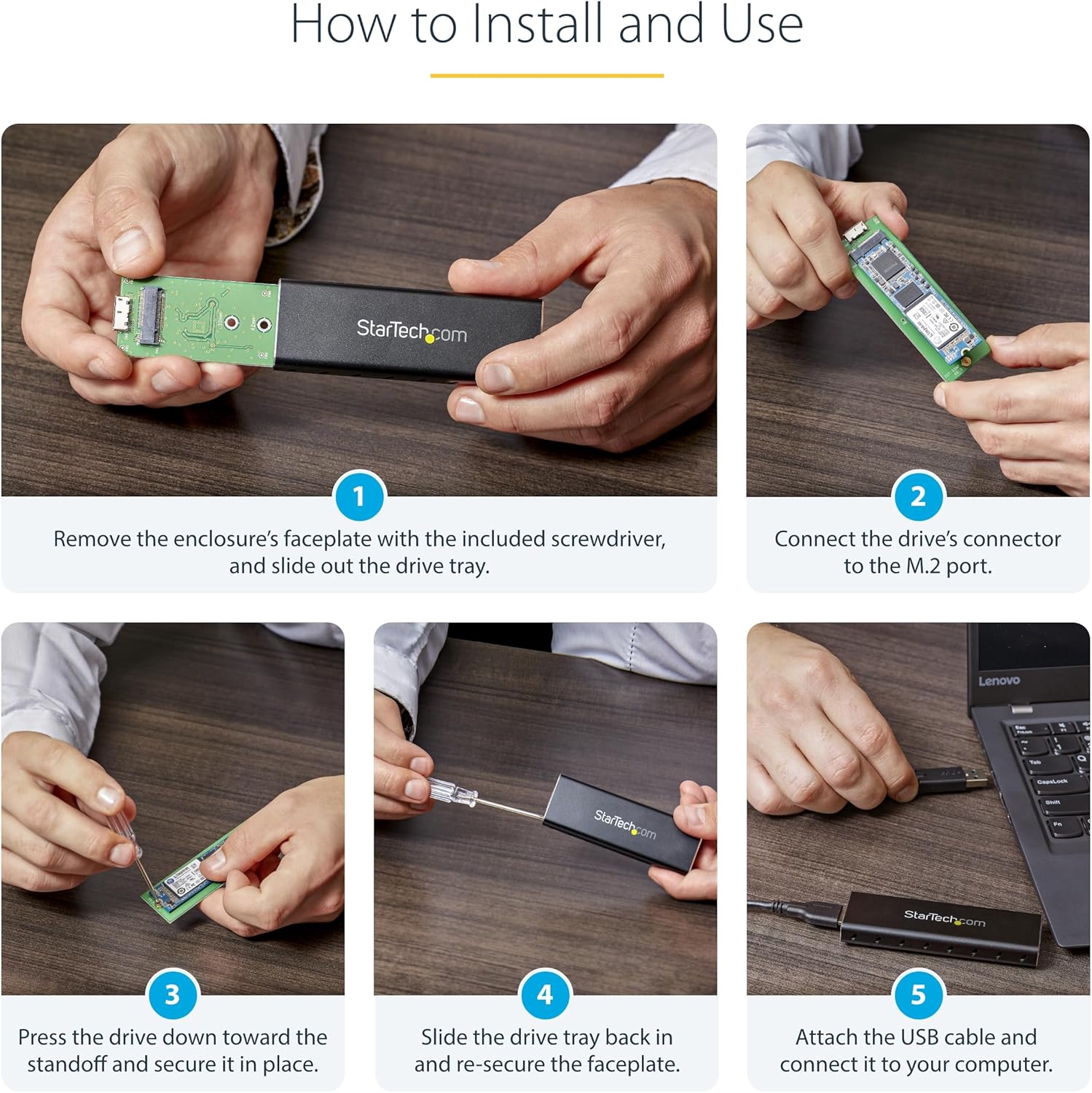
Image: A series of five images demonstrating the installation process: removing the faceplate, connecting the SSD, securing it, reassembling, and connecting to a computer.
പ്രവർത്തന നിർദ്ദേശങ്ങൾ
Once installed, the enclosure operates as a standard external USB drive.
- ഡ്രൈവറില്ലാ പ്രവർത്തനം: The enclosure supports plug-and-play functionality across various operating systems, requiring no additional software or drivers.
- UASP പിന്തുണ: When connected to a UASP-enabled host computer, the enclosure can achieve up to 70% faster transfer speeds compared to traditional USB 3.0.
- ശക്തി: The enclosure is USB-powered and does not require an external power adapter.

Image: The M.2 SSD enclosure connected to a laptop, highlighting its compatibility with multiple operating systems without requiring drivers.

Image: The portable M.2 SATA enclosure connected to a laptop, demonstrating its use as an external drive.
മെയിൻ്റനൻസ്
To ensure the longevity and optimal performance of your enclosure:
- വൃത്തിയാക്കൽ: Use a soft, dry cloth to clean the exterior of the enclosure. Avoid liquid cleaners.
- താപ വിസർജ്ജനം: The aluminum construction and ventilation holes are designed to dissipate heat. Ensure these vents are not obstructed during operation to maintain a cool environment for your SSD.
- ശാരീരിക സംരക്ഷണം: The durable aluminum construction protects your drive. Avoid dropping the enclosure or subjecting it to excessive force.

Image: The enclosure's durable aluminum body, highlighting its dimensions and ventilation holes designed for heat dissipation.
ട്രബിൾഷൂട്ടിംഗ്
If you encounter issues with your M.2 SATA External SSD Enclosure, refer to the following common problems and solutions:
- ഡ്രൈവ് തിരിച്ചറിയാൻ കഴിഞ്ഞിട്ടില്ല:
- Ensure the M.2 SSD is correctly seated and secured within the enclosure.
- Verify that your M.2 SSD is a SATA type (B Key or B+M Key) and not an NVMe/AHCI PCIe type (M Key).
- നിങ്ങളുടെ കമ്പ്യൂട്ടറിലെ മറ്റൊരു USB പോർട്ടിലേക്ക് എൻക്ലോഷർ ബന്ധിപ്പിക്കാൻ ശ്രമിക്കുക.
- ഡ്രൈവ് കണ്ടെത്തിയെങ്കിലും ഇനിഷ്യലൈസ് ചെയ്തിട്ടില്ലേ അതോ ഫോർമാറ്റ് ചെയ്തിട്ടില്ലേ എന്നറിയാൻ ഡിസ്ക് മാനേജ്മെന്റ് (വിൻഡോസ്) അല്ലെങ്കിൽ ഡിസ്ക് യൂട്ടിലിറ്റി (മാകോസ്) പരിശോധിക്കുക.
- മന്ദഗതിയിലുള്ള ട്രാൻസ്ഫർ വേഗത:
- Ensure the enclosure is connected to a USB 3.0 port on your computer. USB 2.0 ports will result in slower speeds.
- Confirm that your operating system and host controller support UASP for optimal performance.
- Check the health of your M.2 SSD.
- എൻക്ലോഷർ അമിത ചൂടാക്കൽ:
- Ensure the ventilation holes on the enclosure are not blocked.
- Avoid placing the enclosure in direct sunlight or confined spaces.
സ്പെസിഫിക്കേഷനുകൾ
| ഫീച്ചർ | സ്പെസിഫിക്കേഷൻ |
|---|---|
| ഹാർഡ്വെയർ ഇന്റർഫേസ് | USB 3.0 |
| ഡാറ്റ കൈമാറ്റ നിരക്ക് | Up to 600 Megabits Per Second (5Gbps with UASP) |
| അനുയോജ്യമായ ഉപകരണങ്ങൾ | പിസി, മാക് |
| Supported Devices Quantity | 1 |
| എൻക്ലോഷർ മെറ്റീരിയൽ | അലുമിനിയം |
| നിറം | കറുപ്പ് |
| ഉൽപ്പന്ന അളവുകൾ (L x W x H) | 3.7" x 1.1" x 0.4" (98mm x 34mm x 12mm) |
| ഇനത്തിൻ്റെ ഭാരം | 0.05 കിലോഗ്രാം |
| പിന്തുണയ്ക്കുന്ന M.2 SSD വലുപ്പങ്ങൾ | 2230, 2242, 2260, 2280 |
| M.2 Key Support | B Key, B+M Key (SATA) |
വാറൻ്റി
This StarTech.com M.2 SATA External SSD Enclosure is backed by a 2 വർഷത്തെ വാറൻ്റി.
For detailed warranty terms and conditions, please refer to the official StarTech.com webസൈറ്റ് അല്ലെങ്കിൽ നിങ്ങളുടെ ഉൽപ്പന്നത്തിൽ ഉൾപ്പെടുത്തിയിരിക്കുന്ന വാറന്റി കാർഡ്.
പിന്തുണ
For technical support, troubleshooting assistance, or to access additional resources, please visit the official StarTech.com webസൈറ്റ്:
You may also find helpful information in the FAQ section or by contacting their customer service directly.