
1. സജ്ജീകരണം
1.1 പായ്ക്ക് ചെയ്യലും ഉള്ളടക്കവും
Carefully remove the TV and all accessories from the packaging. Ensure all components are present:
- Sharp LC-40LE653U 40-Inch Smart LED TV
- റിമോട്ട് കൺട്രോൾ
- 2 AA ബാറ്ററികൾ
1.2 സ്റ്റാൻഡ് ഇൻസ്റ്റലേഷൻ
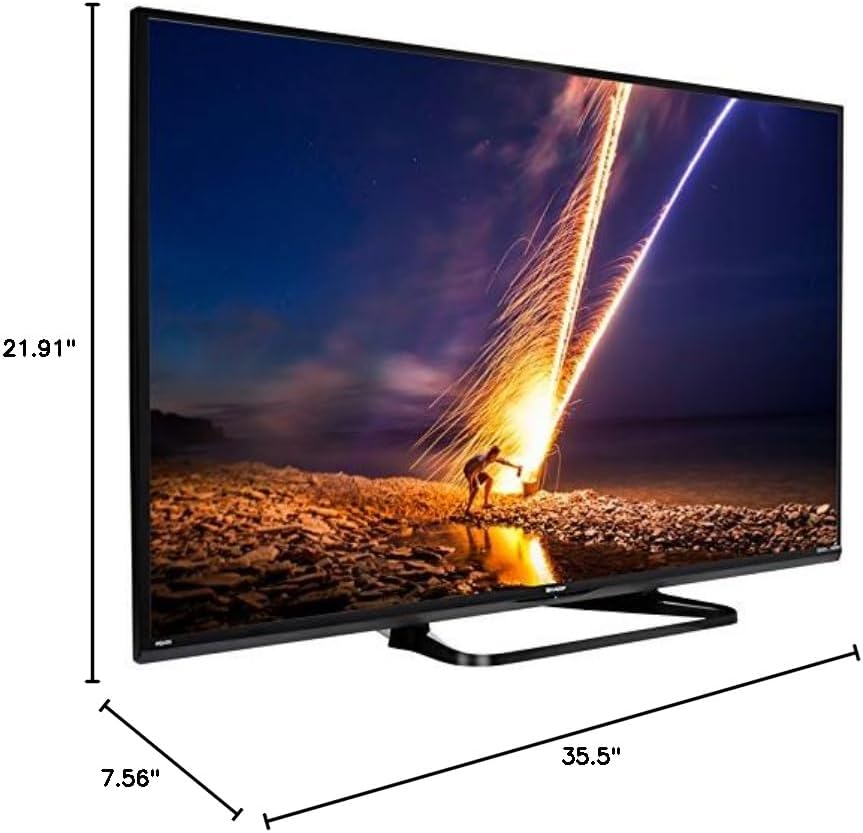
If placing the TV on a table, attach the included stand. Refer to the diagram below for proper assembly. Ensure all screws are securely fastened.
1.3 ബാഹ്യ ഉപകരണങ്ങൾ ബന്ധിപ്പിക്കുന്നു
Connect your external devices such as cable boxes, Blu-ray players, or gaming consoles to the TV's input ports. The TV features multiple connectivity options.


Available ports include:
- എച്ച്ഡിഎംഐ: 2 ports for high-definition audio and video. One HDMI port supports MHL (Mobile High-Definition Link).
- USB: 1 port for media playback or connecting a USB device.
- ഇഥർനെറ്റ്: വയർഡ് നെറ്റ്വർക്ക് കണക്ഷനായി.
- Component/Video: For older video devices.
- DTV/TV (Antenna): ഒരു ആന്റിന അല്ലെങ്കിൽ കേബിൾ ടിവി ഫീഡ് ബന്ധിപ്പിക്കുന്നതിന്.
- ഓഡിയോ Outട്ട്: Optical for digital audio, and RCA for analog audio.
1.4 പവർ കണക്ഷൻ
After connecting all necessary devices, plug the TV's power cord into a wall outlet.
1.5 പ്രാരംഭ സജ്ജീകരണം
Upon first power-on, the TV will guide you through an initial setup process. This includes language selection, time zone, and network configuration. For Wi-Fi setup, select your network and enter the password.
2. പ്രവർത്തന നിർദ്ദേശങ്ങൾ
2.1 വിദൂര നിയന്ത്രണ പ്രവർത്തനങ്ങൾ
എല്ലാ ടിവി പ്രവർത്തനങ്ങളും ആക്സസ് ചെയ്യാൻ റിമോട്ട് കൺട്രോൾ നിങ്ങളെ അനുവദിക്കുന്നു. ശരിയായ പോളാരിറ്റി ഉറപ്പാക്കിക്കൊണ്ട് രണ്ട് AA ബാറ്ററികൾ റിമോട്ട് കൺട്രോളിലേക്ക് തിരുകുക.

- പവർ (ചുവപ്പ് ബട്ടൺ): ടിവി ഓണാക്കുകയോ ഓഫാക്കുകയോ ചെയ്യുന്നു.
- ഇൻപുട്ട്: Selects the input source (HDMI, TV, USB, etc.).
- VOL +/-: വോളിയം ലെവൽ ക്രമീകരിക്കുന്നു.
- CH +/-: ടിവി ചാനലുകൾ മാറ്റുന്നു.
- Navigation Buttons (Up/Down/Left/Right/Enter): മെനുകൾ നാവിഗേറ്റ് ചെയ്യാനും ഓപ്ഷനുകൾ തിരഞ്ഞെടുക്കാനും ഉപയോഗിക്കുന്നു.
- സ്മാർട്ട്: Accesses the Smart Central Apps menu.
- മെനു: Opens the main TV menu for settings adjustments.
- നെറ്റ്ഫ്ലിക്സ്: നെറ്റ്ഫ്ലിക്സ് ആപ്ലിക്കേഷനിലേക്കുള്ള നേരിട്ടുള്ള ആക്സസ് ബട്ടൺ.
2.2 Smart TV Features (Smart Central Apps)
The Sharp LC-40LE653U features Smart Central Apps, providing access to various online services and a web browser. Ensure your TV is connected to the internet via Wi-Fi or Ethernet.

- ആപ്പുകൾ ആക്സസ് ചെയ്യുന്നു: Press the 'SMART' button on your remote to open the Smart Central Apps menu.
- പിന്തുണയ്ക്കുന്ന സേവനങ്ങൾ: Includes Hulu Plus, Netflix, Pandora, Vudu, and YouTube.
- Web ബ്രൗസർ: ബിൽറ്റ്-ഇൻ ഉപയോഗിക്കുക web browser for general internet browsing. Navigation is done via the remote control.
2.3 Wallpaper Mode
When the TV is turned off, Wallpaper Mode can display virtually any image. To use this feature, connect a USB drive containing your desired images to the TV's USB port. Navigate to the Wallpaper Mode settings in the TV menu to select and configure your images.
3. പരിപാലനം
3.1 ടിവി വൃത്തിയാക്കൽ
സ്ക്രീൻ വൃത്തിയാക്കാൻ, മൃദുവായതും ഉണങ്ങിയതും ലിന്റ് രഹിതവുമായ ഒരു തുണി ഉപയോഗിച്ച് സൌമ്യമായി തുടയ്ക്കുക. കഠിനമായ പാടുകൾക്ക്, ചെറുതായി dampen the cloth with water or a specialized screen cleaner. Avoid using harsh chemicals, abrasive cleaners, or direct spraying of liquids onto the screen or cabinet.
Clean the TV cabinet with a soft, dry cloth. Ensure the TV is unplugged before cleaning.
3.2 സോഫ്റ്റ്വെയർ അപ്ഡേറ്റുകൾ
Periodically check for software updates through the TV's settings menu to ensure optimal performance and access to the latest features. Updates can be performed via the internet connection.
4. പ്രശ്നപരിഹാരം
If you encounter issues with your Sharp LC-40LE653U TV, refer to the following common solutions:
- ശക്തിയില്ല: Ensure the power cord is securely plugged into both the TV and a working wall outlet. Check if the power indicator light on the TV is on.
- ചിത്രം/ശബ്ദം ഇല്ല: Verify the correct input source is selected using the 'Input' button on the remote. Check all cable connections (HDMI, component, etc.) are secure.
- മോശം ചിത്ര നിലവാരം: ടിവി മെനുവിൽ ചിത്ര ക്രമീകരണങ്ങൾ (തെളിച്ചം, ദൃശ്യതീവ്രത, മൂർച്ച) ക്രമീകരിക്കുക. ഇൻപുട്ട് ഉറവിടം ഉയർന്ന നിലവാരമുള്ള സിഗ്നൽ നൽകുന്നുണ്ടെന്ന് ഉറപ്പാക്കുക.
- ഇൻ്റർനെറ്റ് കണക്ഷൻ ഇല്ല: Check your Wi-Fi router or Ethernet cable connection. Re-enter your Wi-Fi password in the TV's network settings. Restarting your router may resolve connectivity issues.
- റിമോട്ട് കൺട്രോൾ പ്രവർത്തിക്കുന്നില്ല: റിമോട്ട് കൺട്രോളിലെ ബാറ്ററികൾ മാറ്റിസ്ഥാപിക്കുക. റിമോട്ടിനും ടിവിയുടെ ഐആർ സെൻസറിനും ഇടയിൽ തടസ്സങ്ങളൊന്നുമില്ലെന്ന് ഉറപ്പാക്കുക.
For more detailed troubleshooting steps, consult the full online manual or contact customer support.
5 സ്പെസിഫിക്കേഷനുകൾ
Key technical specifications for the Sharp LC-40LE653U 40-Inch Smart LED TV:
| ഫീച്ചർ | സ്പെസിഫിക്കേഷൻ |
|---|---|
| മോഡൽ നമ്പർ | LC-40LE653U |
| സ്ക്രീൻ വലിപ്പം | 39.5 ഇഞ്ച് (40-ഇഞ്ച് ക്ലാസ്) |
| ഡിസ്പ്ലേ ടെക്നോളജി | എൽസിഡി |
| റെസലൂഷൻ | 1080p (പൂർണ്ണ HD) |
| പുതുക്കിയ നിരക്ക് | 60 Hz |
| വീക്ഷണാനുപാതം | 16:9 |
| കണക്റ്റിവിറ്റി ടെക്നോളജി | വൈഫൈ |
| ഹാർഡ്വെയർ ഇന്റർഫേസ് | ഇഥർനെറ്റ്, HDMI, USB |
| Total Number of HDMI Ports | 2 (one with MHL support) |
| മൊത്തം USB പോർട്ടുകൾ | 1 |
| ഓഡിയോ ഇൻപുട്ട് | HDMI, Optical, USB |
| സ്പീക്കർ പരമാവധി ഔട്ട്പുട്ട് പവർ | 20 വാട്ട്സ് |
| ഉൽപ്പന്ന അളവുകൾ (D x W x H) | 7.56" x 35.5" x 21.91" |
| ഇനത്തിൻ്റെ ഭാരം | 16.3 പൗണ്ട് |
| മൗണ്ടിംഗ് തരം | ടേബിൾ മൗണ്ട് |
| പിന്തുണയ്ക്കുന്ന ഇന്റർനെറ്റ് സേവനങ്ങൾ | Hulu Plus, Netflix, Pandora, Vudu, YouTube |
| എനർജി സ്റ്റാർ സർട്ടിഫൈഡ് | അതെ |
6. വാറൻ്റിയും പിന്തുണയും
6.1 ഉൽപ്പന്ന വാറന്റി
This Sharp LC-40LE653U TV comes with a 1 വർഷത്തെ പരിമിത വാറൻ്റി. വാറന്റി ക്ലെയിമുകൾക്കായി നിങ്ങളുടെ വാങ്ങിയതിന്റെ തെളിവ് സൂക്ഷിക്കുക. സാധാരണ ഉപയോഗ സാഹചര്യങ്ങളിൽ നിർമ്മാണ വൈകല്യങ്ങൾ വാറന്റി ഉൾക്കൊള്ളുന്നു.
6.2 ഉപഭോക്തൃ പിന്തുണ
For technical assistance, troubleshooting beyond this manual, or warranty service, please contact Sharp customer support. Refer to the official Sharp website or your product registration card for the most current contact information.