
1. ആമുഖം
The Motorola Talkabout T465 Rechargeable Two-Way Radio Bundle is designed for clear and dependable communication, ideal for outdoor adventures, emergencies, and staying connected when cellular service is unavailable. This manual provides essential information for setting up, operating, and maintaining your T465 radios.
2 സുരക്ഷാ വിവരങ്ങൾ
Before using your Motorola Talkabout T465 radios, please read all safety instructions carefully. Failure to do so may result in injury or damage to the product.
- ബാറ്ററി സുരക്ഷ: Use only approved Motorola rechargeable batteries or 3 AA alkaline batteries. Do not mix battery types. Dispose of batteries properly.
- നിർദ്ദേശം 65 മുന്നറിയിപ്പ്: ഈ ഉൽപ്പന്നത്തിൽ കാൻസർ, ജനന വൈകല്യങ്ങൾ അല്ലെങ്കിൽ മറ്റ് പ്രത്യുൽപാദന ഹൃദ്രോഗങ്ങൾ എന്നിവ ഉണ്ടാക്കാൻ കാലിഫോർണിയ സ്റ്റേറ്റിന് അറിയപ്പെടുന്ന രാസവസ്തുക്കൾ അടങ്ങിയിരിക്കാം.
- ശ്രവണ സംരക്ഷണം: Use the lowest volume necessary to hear clearly. Prolonged exposure to loud volumes may cause hearing damage.
- ഇടപെടൽ: Turn off your radio in areas where two-way radios are prohibited, such as hospitals or aircraft.
3. പാക്കേജ് ഉള്ളടക്കം
Your Motorola Talkabout T465 bundle includes:
- 2 x T465 Two-Way Radios
- 2 x Micro-USB Wall Charging Cables
- 2 x Rechargeable NiMH Battery Packs (or use 2 AA batteries per radio)
- 2 x ബെൽറ്റ് ക്ലിപ്പുകൾ
- 2 x Earbuds with Push-to-Talk (PTT) Microphone
- XXx x കാരി കേസ്
- User Guide and Accessory Sheet (English and French)
4. സജ്ജീകരണം
4.1 ബാറ്ററി ഇൻസ്റ്റാളേഷൻ
Your T465 radios can be powered by either the included rechargeable NiMH battery packs or 3 AA alkaline batteries (not included). To install:
- റേഡിയോ ഓഫാണെന്ന് ഉറപ്പാക്കുക.
- റേഡിയോയുടെ പിൻഭാഗത്തുള്ള ബാറ്ററി കമ്പാർട്ട്മെന്റ് കവർ നീക്കം ചെയ്യുക.
- Insert the NiMH battery pack or 3 AA batteries, observing the polarity markings.
- Replace the battery compartment cover, ensuring it clicks securely into place to maintain water resistance.
4.2 ബാറ്ററികൾ ചാർജ് ചെയ്യുന്നു
To charge the rechargeable NiMH battery packs:
- Connect the Micro-USB charging cable to the charging port on the side of the radio.
- Plug the other end of the cable into a standard USB wall adapter.
- The battery indicator on the radio display will show charging status. A full charge typically takes 8.5 hours.
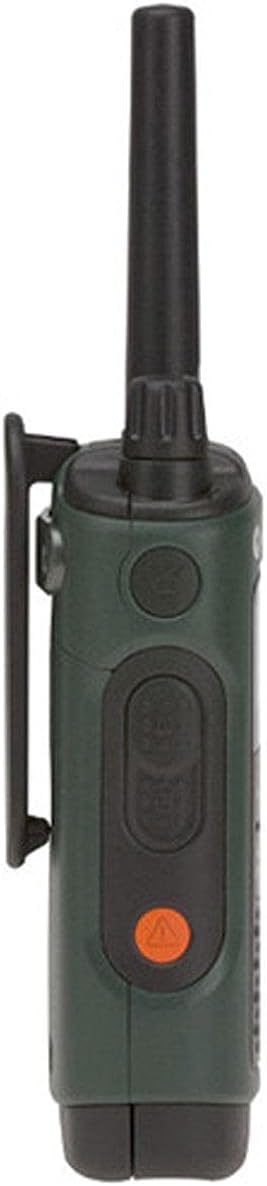
4.3 ബെൽറ്റ് ക്ലിപ്പ് അറ്റാച്ചുചെയ്യുന്നു
To attach the belt clip, align the clip with the slots on the back of the radio and slide it down until it locks into place.

5. നിങ്ങളുടെ റേഡിയോ പ്രവർത്തിപ്പിക്കുക
5.1 പവർ ഓൺ/ഓഫ്, വോളിയം
- പവർ ഓൺ: ഒരു ക്ലിക്ക് കേൾക്കുകയും ഡിസ്പ്ലേ പ്രകാശിക്കുകയും ചെയ്യുന്നതുവരെ ഓൺ/ഓഫ്/വോളിയം നോബ് ഘടികാരദിശയിൽ തിരിക്കുക.
- പവർ ഓഫ്: Rotate the On/Off/Volume knob counter-clockwise until you hear a click and the display turns off.
- വോളിയം ക്രമീകരിക്കുക: Rotate the On/Off/Volume knob to increase or decrease the listening volume.
5.2 ചാനൽ തിരഞ്ഞെടുക്കൽ
Your T465 radio has 22 channels. To select a channel:
- അമർത്തുക മെനു ചാനൽ നമ്പർ മിന്നുന്നത് വരെ ബട്ടൺ അമർത്തുക.
- ഉപയോഗിക്കുക Up or താഴേക്ക് നിങ്ങൾക്ക് ആവശ്യമുള്ള ചാനൽ തിരഞ്ഞെടുക്കാൻ ബട്ടണുകൾ.
- അമർത്തുക മെനു ബട്ടൺ വീണ്ടും അല്ലെങ്കിൽ പിടി നിങ്ങളുടെ തിരഞ്ഞെടുപ്പ് സ്ഥിരീകരിക്കുന്നതിനുള്ള ബട്ടൺ.
5.3 സ്വകാര്യതാ കോഡുകൾ
Privacy codes help reduce interference by filtering out transmissions from other users on the same channel. Your T465 radios offer 121 privacy codes.
- അമർത്തുക മെനു പ്രൈവസി കോഡ് നമ്പർ മിന്നുന്നത് വരെ രണ്ടുതവണ ബട്ടൺ അമർത്തുക.
- ഉപയോഗിക്കുക Up or താഴേക്ക് നിങ്ങൾക്ക് ആവശ്യമുള്ള സ്വകാര്യതാ കോഡ് തിരഞ്ഞെടുക്കാൻ ബട്ടണുകൾ.
- അമർത്തുക മെനു ബട്ടൺ വീണ്ടും അല്ലെങ്കിൽ പിടി സ്ഥിരീകരിക്കാനുള്ള ബട്ടൺ. കുറിപ്പ്: ആശയവിനിമയം നടത്താൻ രണ്ട് റേഡിയോകളും ഒരേ ചാനലിലും സ്വകാര്യതാ കോഡിലുമായിരിക്കണം.
5.4 പുഷ്-ടു-ടോക്ക് (PTT) ബട്ടൺ
The PTT button is located on the side of the radio. It has two power settings:
- ഉയർന്ന ശക്തി: Press the upper part of the PTT button for maximum range. This consumes more battery.
- കുറഞ്ഞ പവർ: Press the lower part of the PTT button for shorter range, conserving battery life.
To transmit, press and hold the PTT button, speak clearly into the microphone, and release the button to listen.
5.5 Call/Page Tone
To send a call tone to alert other radios in your group, briefly press the Call button (often a musical note icon) on the front of the radio.
5.6 കീപാഡ് ലോക്ക്
To prevent accidental changes to your settings, press and hold the മെനു button until the lock icon appears on the display. Repeat to unlock.

6. വിപുലമായ സവിശേഷതകൾ
6.1 NOAA Weather Radio and Alerts
Your T465 radio can receive NOAA Weather Radio broadcasts, providing real-time weather information and alerts.
- അമർത്തുക മോഡ് button until the weather channel icon appears.
- ഉപയോഗിക്കുക Up or താഴേക്ക് ഒരു കാലാവസ്ഥാ ചാനൽ തിരഞ്ഞെടുക്കാൻ ബട്ടണുകൾ.
- The radio can be set to automatically alert you to severe weather conditions. Consult the full user guide for detailed setup of weather alerts.
6.2 Emergency Alert Button
The T465 features an orange Emergency Alert button on the side. Pressing and holding this button will activate an audible alert on your radio and other compatible Motorola radios within range, set them to maximum volume, and enable hands-free transmission (VOX) for a period, allowing you to speak without holding the PTT button.
6.3 ബിൽറ്റ്-ഇൻ ഫ്ലാഷ്ലൈറ്റ്
The radio includes a built-in LED flashlight for convenience in low-light conditions. To activate, press the dedicated flashlight button (often located on the top or side). Press again to turn off.
6.4 VibraCall™ Alert
For discreet communication, the VibraCall™ feature provides a silent vibrating alert instead of an audible tone. This is useful in quiet environments or when you need to avoid startling game during hunting.
7. പരിപാലനം
Proper care ensures the longevity and performance of your T465 radios.
- വൃത്തിയാക്കൽ: ഒരു സോഫ്റ്റ് ഉപയോഗിക്കുക, ഡിamp cloth to clean the radio's exterior. Do not use abrasive cleaners or solvents.
- ബാറ്ററി കെയർ: Store batteries in a cool, dry place. If not using the radios for an extended period, remove alkaline batteries to prevent leakage. Recharge NiMH batteries periodically to maintain their capacity.
- ജല പ്രതിരോധം: The T465 is rated IP44 waterproof, meaning it is protected against splashing water from any direction. Ensure all ports and battery covers are securely closed to maintain water resistance. Do not submerge the radio.
8. പ്രശ്നപരിഹാരം
If you encounter issues with your T465 radios, try the following:
- ശക്തിയില്ല: Check battery installation and charge level. Replace alkaline batteries if depleted.
- മോശം ശ്രേണി/ഇടപെടൽ: Ensure both radios are on the same channel and privacy code. Move to an area with fewer obstructions (e.g., buildings, dense foliage). Range can be significantly reduced by terrain and conditions.
- Cannot Hear Other Radios: Verify volume is up. Check that privacy codes match. Ensure radios are within range.
- റേഡിയോ ചാർജ് ചെയ്യുന്നില്ല: Check USB cable connection and wall adapter. Ensure battery pack is correctly inserted.
9 സ്പെസിഫിക്കേഷനുകൾ
| ഫീച്ചർ | വിശദാംശങ്ങൾ |
|---|---|
| ബ്രാൻഡ് | മോട്ടറോള സൊല്യൂഷൻസ് |
| മോഡൽ നമ്പർ | T465 |
| നിറം | പച്ച |
| ചാനലുകളുടെ എണ്ണം | 22 |
| കണക്റ്റിവിറ്റി പ്രോട്ടോക്കോൾ | ജി.എം.ആർ.എസ് |
| ട്യൂണർ തരം | UHF |
| പരമാവധി സംസാര ശ്രേണി | 35 Miles (actual range varies by terrain and conditions) |
| ജല പ്രതിരോധ നില | വാട്ടർപ്രൂഫ് (IP44) |
| പവർ ഉറവിടം | Rechargeable NiMH Battery Pack (included) or 3 AA batteries (not included) |
| ബാറ്ററി ശരാശരി ആയുസ്സ് | 8.5 മണിക്കൂർ |
| ഉൽപ്പന്ന അളവുകൾ | 1.37"D x 2.26"W x 7.54"H |
| ഇനത്തിൻ്റെ ഭാരം | 1.9 പൗണ്ട് |
10. വാറൻ്റിയും പിന്തുണയും
10.1 വാറൻ്റി വിവരങ്ങൾ
The Motorola Talkabout T465 Two-Way Radio Bundle comes with a 1 വർഷത്തെ പരിമിത വാറൻ്റി from the date of purchase. This warranty covers defects in materials and workmanship under normal use. For full terms and conditions, please refer to the warranty card included in your package or visit the Motorola Solutions webസൈറ്റ്.
10.2 ഉപഭോക്തൃ പിന്തുണ
For technical assistance, troubleshooting not covered in this manual, or warranty claims, please contact Motorola Solutions customer support. Contact information can typically be found on the Motorola Solutions website or on the accessory sheet included with your product.
11. ഉൽപ്പന്ന വീഡിയോകൾ
Motorola Talkabout T465 Product Overview
ഈ വീഡിയോ ഒരു പൊതു വിശദീകരണം നൽകുന്നുview of the Motorola Talkabout T465 Two-Way Radio Bundle, highlighting its rugged design, features for outdoor use, and various applications like hunting, camping, and emergencies. It showcases the IP54 weatherproofing, VibraCall™ alert, PTT power boost, dual power options, NOAA weather channels, emergency alert button, and built-in flashlight.
Motorola T4XX Series User Instructions - How To Guide
This instructional video demonstrates how to operate Motorola T4XX series radios, including powering on, adjusting volume, selecting channels, using privacy codes, and understanding the various buttons and features. It also covers battery installation and charging options, providing a practical guide for new users.