
1. ആമുഖം
The Yamaha TF3 is a 24-channel digital mixing console designed for a wide range of audio applications. It combines ample input capacity with intuitive hands-on control, making it suitable for both experienced sound engineers and those new to digital mixing. This manual provides essential information for setting up, operating, and maintaining your TF3 console.

ചിത്രം 1: മുൻഭാഗം view of the Yamaha TF3 Digital Mixing Console. This image displays the console's layout with faders, buttons, and the central touchscreen interface.
2. സജ്ജീകരണം
2.1 അൺപാക്കിംഗും പ്ലേസ്മെന്റും
Carefully remove the TF3 console from its packaging. Place the console on a stable, flat surface, ensuring adequate ventilation around the unit. Avoid placing it near heat sources or in direct sunlight.
2.2 പവർ കണക്ഷൻ
Connect the supplied power cord to the AC IN port on the rear panel of the console and then to a suitable power outlet. Ensure the power switch is in the OFF position before connecting to power.
2.3 ഇൻപുട്ട്, ഔട്ട്പുട്ട് കണക്ഷനുകൾ
The TF3 offers various input and output options:
- അനലോഗ് ഇൻപുട്ടുകൾ: Connect microphones and line-level devices to the XLR/TRS combo jacks (channels 1-24) and stereo line inputs (RCA pins).
- അനലോഗ് ഔട്ട്പുട്ടുകൾ: Use the XLR outputs for main stereo mix, auxiliary sends, and other assignments.
- USB കണക്റ്റിവിറ്റി: The "TO HOST" USB port allows connection to a computer for multi-track recording/playback and control.
- വൈഫൈ: The console supports Wi-Fi connectivity for remote control via dedicated applications.
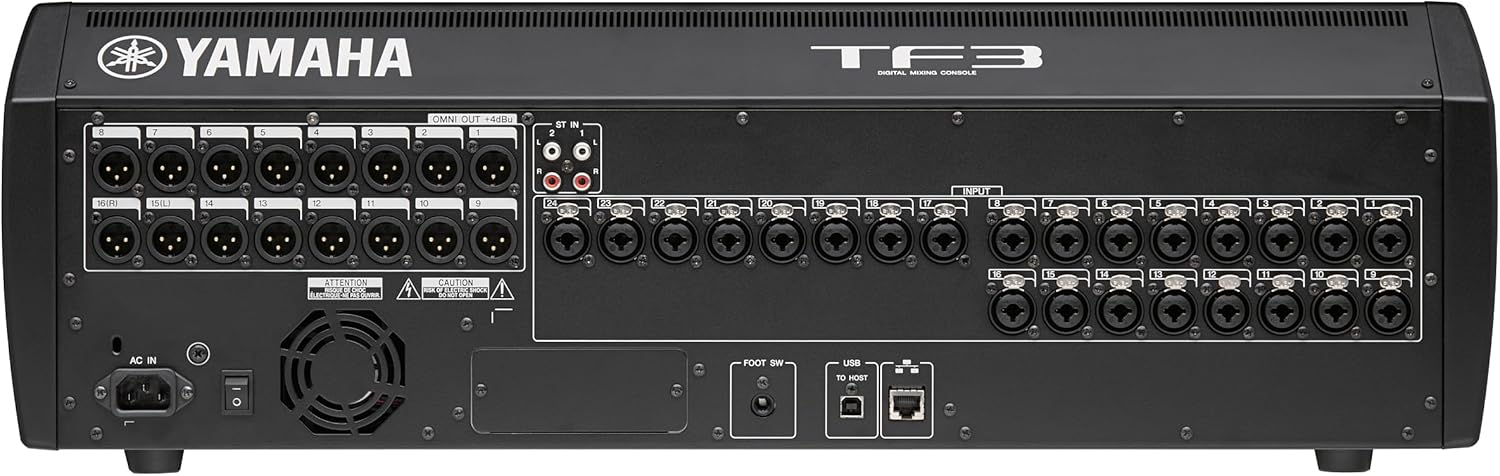
Figure 2: Rear panel of the Yamaha TF3, showing various input and output connectors including XLR, RCA, USB, and the power input.
3. പ്രവർത്തന നിർദ്ദേശങ്ങൾ
3.1 പവർ ഓണും പ്രാരംഭ സജ്ജീകരണവും
After connecting all cables, flip the power switch to the ON position. The console will boot up, displaying the Yamaha logo on the LCD touchscreen. Follow any on-screen prompts for initial setup or calibration.
3.2 ടച്ച്സ്ക്രീൻ ഇന്റർഫേസ് നാവിഗേറ്റ് ചെയ്യൽ
The TF3 features an intuitive touchscreen interface for controlling various parameters. Tap on elements to select them, and use drag gestures to adjust values or scroll through menus. The screen provides visual feedback for EQ, dynamics, and routing.

ചിത്രം 3: ഒരു ക്ലോസ്-അപ്പ് view of the TF3's touchscreen, demonstrating the intuitive graphical interface for adjusting equalization parameters.
3.3 Fader and Channel Control
The console is equipped with 25 motor faders (24 channels + 1 master). Each channel strip includes dedicated buttons for SEL (select), ON (mute/unmute), and ക്യൂ (listen). Adjust faders to control channel levels. The ഫേഡർ ബാങ്ക് buttons allow switching between different layers of channels.
3.4 Using Presets and Scenes
The TF3 allows you to save and recall scenes, which store all console settings. This is useful for quick setup changes between different performances or configurations. Utilize the practical presets for various instruments and vocal types to achieve a good starting sound quickly.

Figure 4: An individual preparing a microphone, highlighting the initial steps before utilizing the console's practical presets and scene functions for optimal sound.
3.5 Digital Audio Workstation (DAW) Integration
Connect the TF3 to a computer via USB to use it as an audio interface for multi-track recording and playback with your preferred DAW. This allows for recording practice sessions with effects and saving scenes for live performances.
4 പ്രധാന സവിശേഷതകൾ
- 25 Motor Faders: Including 24 channel faders and 1 master fader for precise control.
- 48 Input Mixing Channels: Comprising 40 mono, 2 stereo, and 2 return channels.
- 20 Aux Buses: (8 mono + 6 stereo) plus Stereo and Sub buses for flexible routing.
- 8 DCA Groups with Roll-out: For efficient group control of multiple channels.
- അനലോഗ് ഇൻപുട്ടുകൾ: 24 XLR/TRS combo mic/line inputs and 2 RCA pin stereo line inputs.
- അവബോധജന്യമായ ടച്ച്സ്ക്രീൻ: For easy navigation and parameter adjustment.
- USB and Wi-Fi Connectivity: For recording, playback, and remote control.
- QuickPro Presets™: Optimized settings for various microphones and output equipment.
- സീൻ മെമ്മറി: Ability to save and recall complete console settings.
5. പരിപാലനം
5.1 വൃത്തിയാക്കൽ
മൃദുവായതും ഉണങ്ങിയതുമായ തുണി ഉപയോഗിച്ച് കൺസോളിന്റെ ഉപരിതലം പതിവായി തുടയ്ക്കുക. കഠിനമായ അഴുക്കിന്, അല്പം d ഉപയോഗിക്കുക.amp cloth with a mild, non-abrasive cleaner. Avoid using harsh chemicals, solvents, or abrasive materials, as these can damage the finish and electronic components. Keep the touchscreen clean using a microfiber cloth.
5.2 വെന്റിലേഷൻ
Ensure that the ventilation openings on the console are not blocked. Proper airflow is crucial to prevent overheating and ensure the longevity of the internal components.
5.3 സോഫ്റ്റ്വെയർ അപ്ഡേറ്റുകൾ
Periodically check the Yamaha website for firmware updates. Keeping your console's software up-to-date ensures optimal performance, new features, and bug fixes.
6. പ്രശ്നപരിഹാരം
6.1 വൈദ്യുതിയില്ല
- Check if the power cord is securely connected to both the console and the power outlet.
- മറ്റൊരു ഉപകരണം പ്ലഗ് ഇൻ ചെയ്ത് പവർ ഔട്ട്ലെറ്റ് പ്രവർത്തിക്കുന്നുണ്ടെന്ന് ഉറപ്പാക്കുക.
- Ensure the power switch on the console is in the ON position.
6.2 ശബ്ദ ഔട്ട്പുട്ട് ഇല്ല
- Confirm that the master fader is raised and not muted.
- Check individual channel faders and ensure they are not muted or at minimum level.
- Verify that input sources are connected correctly and are active.
- Inspect output cables and connections to ampലൈഫറുകൾ അല്ലെങ്കിൽ പവർ സ്പീക്കറുകൾ.
- Ensure correct routing in the console's software interface.
6.3 ടച്ച്സ്ക്രീൻ പ്രതികരിക്കുന്നില്ല
- Try restarting the console.
- സ്ക്രീൻ വൃത്തിയുള്ളതും അവശിഷ്ടങ്ങൾ ഇല്ലാത്തതുമാണെന്ന് ഉറപ്പാക്കുക.
- If the issue persists, contact Yamaha support.
7 സ്പെസിഫിക്കേഷനുകൾ
| ഫീച്ചർ | വിശദാംശങ്ങൾ |
|---|---|
| ബ്രാൻഡ് | യമഹ |
| മോഡൽ നമ്പർ | TF3 |
| ചാനലുകളുടെ എണ്ണം | 24 (physical inputs), 48 (mixing channels) |
| ഉൽപ്പന്ന അളവുകൾ (D x W x H) | 23.6"D x 28.2"W x 8.9"H |
| ഇനത്തിൻ്റെ ഭാരം | 17 കിലോഗ്രാം |
| കണക്റ്റിവിറ്റി ടെക്നോളജി | USB, Wi-Fi |
| പവർ ഉറവിടം | കോർഡഡ് ഇലക്ട്രിക് |
| ഔട്ട്പുട്ട് കണക്റ്റർ തരം | XLR |
| ഓഡിയോ ഇൻപുട്ട് | XLR/TRS combo, stereo line (RCA) |
| യു.പി.സി | 086792992891 |
8. വാറൻ്റിയും പിന്തുണയും
8.1 നിർമ്മാതാവിന്റെ വാറന്റി
The Yamaha TF3 Digital Mixing Console comes with a 1 വർഷത്തെ നിർമ്മാതാവിൻ്റെ വാറൻ്റി from Yamaha Corporation of America. This warranty applies only to products purchased from an authorized Yamaha retailer within the fifty United States (including the District of Columbia) and used within this area. For complete details and terms, please refer to the official Yamaha limited warranty statement available on the Yamaha webസൈറ്റ്.
8.2 ഉപഭോക്തൃ പിന്തുണ
For technical assistance, troubleshooting, or warranty claims, please contact Yamaha customer support. You can find contact information and additional resources on the official Yamaha webസൈറ്റ് (www.yamaha.com).