
ProForm PFTL99715
ProForm Power 995i Exercise Treadmill User Manual
Model: PFTL99715
ആമുഖം
The ProForm Power 995i Exercise Treadmill is designed to provide an effective and engaging fitness experience. This manual provides essential information for the safe and proper setup, operation, maintenance, and troubleshooting of your treadmill. Please read this manual thoroughly before using the product.
The Power 995i features a robust drive system, a spacious running belt, advanced cushioning, and iFit compatibility for interactive workouts. Its space-saver design allows for convenient storage when not in use.
പ്രധാനപ്പെട്ട സുരക്ഷാ വിവരങ്ങൾ
- ഏതെങ്കിലും വ്യായാമ പരിപാടി ആരംഭിക്കുന്നതിന് മുമ്പ് എല്ലായ്പ്പോഴും ഒരു ഡോക്ടറുമായി കൂടിയാലോചിക്കുക.
- ട്രെഡ്മിൽ ഉപയോഗിക്കുന്നതിന് മുമ്പ് ഈ മാനുവലിലെ എല്ലാ നിർദ്ദേശങ്ങളും വായിക്കുക.
- കുട്ടികളെയും വളർത്തുമൃഗങ്ങളെയും എപ്പോഴും ട്രെഡ്മില്ലിൽ നിന്ന് അകറ്റി നിർത്തുക.
- Place the treadmill on a level surface with at least 6 feet of clear space behind it and 2 feet on each side.
- ഉചിതമായ വ്യായാമ വസ്ത്രങ്ങളും അത്ലറ്റിക് ഷൂകളും ധരിക്കുക.
- ട്രെഡ്മില്ലിൽ കേടുപാടുകളുണ്ടെങ്കിൽ, അല്ലെങ്കിൽ അത് ശരിയായി പ്രവർത്തിക്കുന്നില്ലെങ്കിൽ, അത് പ്രവർത്തിപ്പിക്കരുത്.
- Always hold the handrails when starting or stopping the treadmill.
- Use the safety key clip. Attach the clip to your clothing before beginning a workout. If the clip is pulled from the console, the treadmill will stop.
- പരമാവധി ഉപയോക്തൃ ഭാരം ശേഷി 350 പൗണ്ട് (159 കിലോഗ്രാം) കവിയരുത്.
- Unplug the treadmill from the power outlet before cleaning, performing maintenance, or moving it.
സജ്ജീകരണവും അസംബ്ലിയും
Assembly of the ProForm Power 995i Treadmill requires two people and basic tools. Follow the instructions provided in the separate assembly guide for detailed steps. Ensure all parts are present and undamaged before beginning assembly.
അൺപാക്കിംഗും പ്ലേസ്മെന്റും
- പാക്കേജിംഗിൽ നിന്ന് എല്ലാ ഘടകങ്ങളും ശ്രദ്ധാപൂർവ്വം നീക്കം ചെയ്യുക.
- Place the treadmill in a suitable location, ensuring adequate clearance around the unit.
- Inspect all parts for any shipping damage. Contact customer support immediately if any parts are damaged or missing.
അസംബ്ലി കഴിഞ്ഞുview
The main assembly steps typically involve attaching the uprights, console, and handrails to the base unit. Ensure all bolts and nuts are securely tightened as per the assembly guide to prevent instability during use.

Figure 1: Fully assembled ProForm Power 995i Treadmill.
പ്രവർത്തന നിർദ്ദേശങ്ങൾ
കൺസോൾ സവിശേഷതകൾ

Figure 2: Treadmill console with tablet holder and display.
The 7-inch backlit iFit display provides essential workout metrics. The console includes quick speed and incline controls, an EKG grip pulse sensor, and an iPod compatible audio system with 2-inch speakers.
ഒരു വർക്ക്ഔട്ട് ആരംഭിക്കുന്നു
- ട്രെഡ്മിൽ ഒരു ഗ്രൗണ്ടഡ് ഔട്ട്ലെറ്റിൽ പ്ലഗ് ചെയ്തിട്ടുണ്ടെന്ന് ഉറപ്പാക്കുക.
- Attach the safety key clip to your clothing and insert the safety key into the console.
- Step onto the treadmill belt, placing your feet on the side rails.
- അമർത്തുക ആരംഭിക്കുക button or one of the quick speed buttons (e.g., 2 MPH, 4 MPH) to begin.
- Adjust speed using the വേഗത + or - buttons, or the quick speed buttons (0-12 MPH).
- Adjust incline using the ഇൻക്ലൈൻ + or - buttons, or the quick incline buttons (0-15%).
Using iFit and Preset Workouts
The treadmill is iFit enabled, allowing access to iFit workout apps and Google Maps routes via Bluetooth connectivity. Connect your compatible device (e.g., tablet) to the console to utilize these features. The treadmill offers 30 preset workout apps for varied training.

Figure 3: User engaging in a workout on the treadmill.
ഒരു വ്യായാമം നിർത്തുന്നു
വ്യായാമം നിർത്താൻ, അമർത്തുക നിർത്തുക button. The belt will gradually slow down and come to a complete stop. Alternatively, pulling the safety key from the console will immediately stop the treadmill.
മെയിൻ്റനൻസ്
Regular maintenance ensures the longevity and optimal performance of your ProForm Power 995i Treadmill. Always unplug the treadmill before performing any maintenance.
വൃത്തിയാക്കൽ
- കൺസോളിലും മറ്റ് പ്രതലങ്ങളിലും പരസ്യം ഉപയോഗിച്ച് തുടയ്ക്കുക.amp ഓരോ ഉപയോഗത്തിനു ശേഷവും വിയർപ്പും പൊടിയും നീക്കം ചെയ്യാൻ തുണി ഉപയോഗിക്കുക.
- മോട്ടോർ ഏരിയയിൽ പൊടിയും അവശിഷ്ടങ്ങളും അടിഞ്ഞുകൂടുന്നത് തടയാൻ ട്രെഡ്മില്ലിനടിയിൽ ഇടയ്ക്കിടെ വാക്വം ക്ലീനർ ഉപയോഗിക്കുക.
ബെൽറ്റ് ലൂബ്രിക്കേഷൻ
The treadmill belt is pre-lubricated at the factory. Refer to your specific assembly guide or contact customer support for information on when and how to re-lubricate the belt, if necessary.
ബെൽറ്റ് അഡ്ജസ്റ്റ്മെൻ്റ്
If the walking belt begins to slip or drift to one side, it may need adjustment. Consult the detailed instructions in your assembly guide for proper belt tensioning and centering procedures. Incorrect adjustment can damage the belt or motor.
Space Saver Design
The treadmill features a Space Saver design with Easy Lift Assist for convenient folding and storage. To fold, lift the walking platform until it locks into the upright position. To unfold, gently push the latch and lower the platform to the floor.

Figure 4: Folding the treadmill for storage.
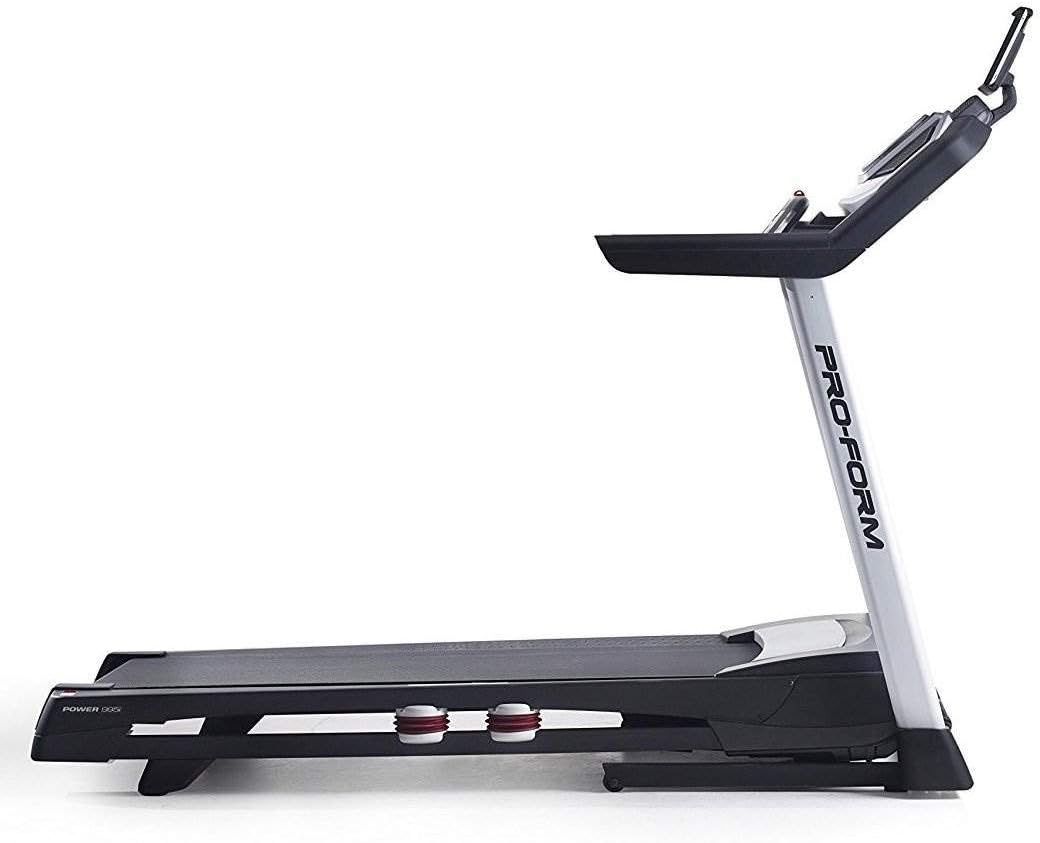
Figure 5: Treadmill in folded position.
ട്രബിൾഷൂട്ടിംഗ്
If you encounter issues with your ProForm Power 995i Treadmill, refer to the common problems and solutions below. For more complex issues, contact customer support.
| പ്രശ്നം | സാധ്യമായ കാരണം | പരിഹാരം |
|---|---|---|
| ട്രെഡ്മിൽ പവർ ഓൺ ആകുന്നില്ല. | പവർ കോർഡ് പ്ലഗ് ഇൻ ചെയ്തിട്ടില്ല; സർക്യൂട്ട് ബ്രേക്കർ ട്രിപ്പ് ചെയ്തു; സുരക്ഷാ കീ ചേർത്തിട്ടില്ല. | Ensure power cord is securely plugged in. Check household circuit breaker. Insert safety key fully into the console. |
| Walking belt slips. | Belt tension too loose. | Adjust the walking belt tension as per the assembly guide. |
| Walking belt drifts to one side. | ബെൽറ്റ് മധ്യത്തിലല്ല. | Adjust the walking belt centering as per the assembly guide. |
| പ്രവർത്തന സമയത്ത് അസാധാരണമായ ശബ്ദം. | Loose components; motor cover rubbing; worn parts. | Check all assembly bolts for tightness. Ensure motor cover is secure. If noise persists, contact customer support. |
| iFit connectivity issues. | Bluetooth not enabled; app not updated; device incompatibility. | Ensure Bluetooth is enabled on your device and the treadmill. Update the iFit app to the latest version. Verify device compatibility with iFit Bluetooth features. |
സ്പെസിഫിക്കേഷനുകൾ
- മോഡൽ: PFTL99715
- ഡ്രൈവ് സിസ്റ്റം: 3.0 CHP* drive System
- റണ്ണിംഗ് ബെൽറ്റ്: 20 inches x 60 inches non-stretch 1-ply commercial belt
- കുഷ്യനിംഗ്: ProShox cushioning
- റോളറുകൾ: 2.5 inches precision Machined and balanced non-flex roller
- ഡിസ്പ്ലേ: 7 inches backlit iFit display
- വേഗത പരിധി: 0-12 MPH (Digital Quick Speed Control)
- ചരിവ് പരിധി: 0-15% (Digital Quick Incline Control)
- വ്യായാമ പരിപാടികൾ: 30 preset workout Apps
- ഓഡിയോ: iPod Compatible audio (2-2 inches speakers)
- ഹൃദയമിടിപ്പ് നിരീക്ഷണം: EKG grip Pulse
- തണുപ്പിക്കൽ: CoolAire workout Fan
- ഉപയോക്തൃ ശേഷി: 350 പൗണ്ട് (159 കി.ഗ്രാം)
- അളവുകൾ (LxWxH): 87.5 x 32 x 59.5 inches (approximate, based on package dimensions and general treadmill size)
- മടക്കിയ വലുപ്പം: Space Saver design with Easy Lift Assist
- ഇനത്തിൻ്റെ ഭാരം: 225 പൗണ്ട്
- ഊർജ്ജ സ്രോതസ്സ്: കോർഡഡ് ഇലക്ട്രിക്
- കണക്റ്റിവിറ്റി: ബ്ലൂടൂത്ത്
*Continuous Horsepower ("CHP") is a term used in the treadmill industry for consumer comparison purposes. The CHP rating is measured in laboratory testing using a dynamometer, which measures the mechanical power of the motor. The CHP rating does not denote the operational horsepower of the treadmill in ordinary household use. In ordinary household use, the motor does not operate at the horsepower shown.
വാറൻ്റിയും പിന്തുണയും
വാറൻ്റി വിവരങ്ങൾ
The ProForm Power 995i Treadmill comes with the following warranty:
- Frame and Motor: ആജീവനാന്ത വാറൻ്റി
- ഭാഗങ്ങൾ: 3 വർഷത്തെ വാറൻ്റി
- തൊഴിൽ: 1 വർഷത്തെ വാറൻ്റി
വാറന്റി ക്ലെയിമുകൾക്കായി നിങ്ങളുടെ വാങ്ങലിന്റെ തെളിവ് സൂക്ഷിക്കുക. സാധാരണ ഉപയോഗത്തിൽ മെറ്റീരിയലുകളിലും വർക്ക്മാൻഷിപ്പിലും ഉണ്ടാകുന്ന തകരാറുകൾ വാറന്റി ഉൾക്കൊള്ളുന്നു. ദുരുപയോഗം, അപകടം അല്ലെങ്കിൽ അനധികൃത പരിഷ്കാരങ്ങൾ എന്നിവയിൽ നിന്നുള്ള നാശനഷ്ടങ്ങൾക്ക് ഇത് പരിരക്ഷ നൽകുന്നില്ല.
ഉപഭോക്തൃ പിന്തുണ
For technical assistance, parts replacement, or warranty inquiries, please contact ProForm customer support. Refer to the contact information provided with your product packaging or visit the official ProForm webഏറ്റവും പുതിയ പിന്തുണ വിശദാംശങ്ങൾക്കായുള്ള സൈറ്റ്.
നിങ്ങൾക്ക് ഔദ്യോഗിക വിലാസവും റഫർ ചെയ്യാം. ഉപയോക്തൃ ഗൈഡ് (PDF) കൂടുതൽ വിവരങ്ങൾക്ക്.
Ask a question about this manual
Ask about setup, troubleshooting, compatibility, parts, safety, or missing instructions. Manuals+ will review the question and use this page’s manual context to help answer it.