
1. ആമുഖം
This manual provides detailed instructions for the proper installation, operation, and maintenance of your CRT Mike CB Radio. Please read this manual thoroughly before using the device to ensure optimal performance and safety. Keep this manual for future reference.
2. പാക്കേജ് ഉള്ളടക്കം
താഴെ ലിസ്റ്റ് ചെയ്തിരിക്കുന്ന എല്ലാ ഇനങ്ങളും നിങ്ങളുടെ പാക്കേജിൽ ഉൾപ്പെടുത്തിയിട്ടുണ്ടെന്ന് ഉറപ്പാക്കുക. ഏതെങ്കിലും ഇനങ്ങൾ നഷ്ടപ്പെട്ടിട്ടുണ്ടെങ്കിലോ കേടായിട്ടുണ്ടെങ്കിലോ, ദയവായി നിങ്ങളുടെ റീട്ടെയിലറെ ബന്ധപ്പെടുക.
- CB Radio Unit
- CB Radio Microphone
- Microphone Clip Holder
- Support Station Mount
- പവർ കോർഡ്
3. ഉൽപ്പന്നം കഴിഞ്ഞുview
Familiarize yourself with the components of your CRT Mike CB Radio.

ചിത്രം 3.1: The CRT Mike CB Radio unit connected to its microphone. The radio unit is compact, designed for mobile or desktop use, and the microphone features an integrated display and controls.

ചിത്രം 3.2: ഫ്രണ്ട് view of the CRT Mike microphone, showing the display screen and primary control buttons such as MEM, FRQ, VOL-, VOL+, SC/M3, AF/M4, EMG/M1, DW/M2, and MT/SET.
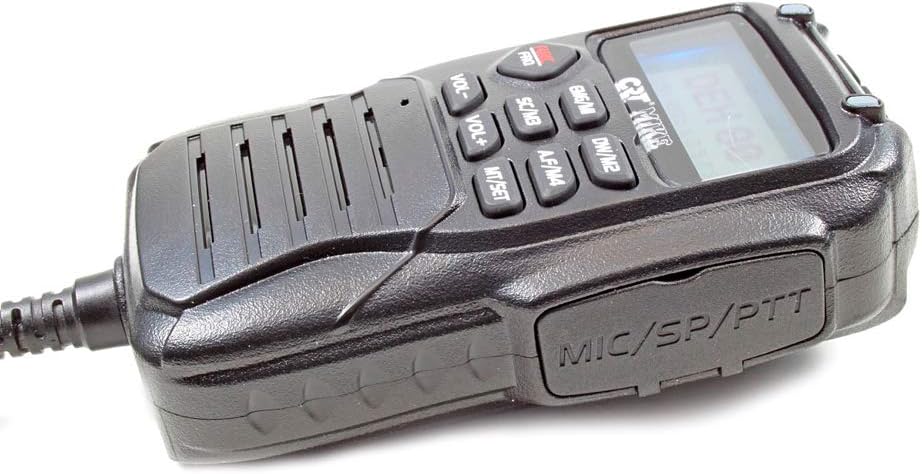
ചിത്രം 3.3: വശം view of the CRT Mike microphone, highlighting the speaker grille and the MIC/SP/PTT port for external connections and the Push-To-Talk button.

ചിത്രം 3.4: മുകളിൽ view of the CRT Mike microphone, displaying the UP, POW (Power), and DN (Down) buttons for channel selection and power control.
4. സജ്ജീകരണം
Follow these steps to set up your CRT Mike CB Radio for first use.
- പവർ കണക്ഷൻ: Connect the provided power cord to the 12V power supply input on the CB radio unit. Ensure the power source is a stable 12V DC supply.
- ആന്റിന കണക്ഷൻ: Connect a suitable CB antenna (not included) to the antenna port on the rear of the CB radio unit. Ensure a good quality coaxial cable is used.
- മൈക്രോഫോൺ കണക്ഷൻ: Plug the microphone cable securely into the designated microphone port on the CB radio unit.
- മൗണ്ടിംഗ്: Use the provided support station mount to secure the CB radio unit in a stable location. The microphone clip holder can be used to conveniently store the microphone when not in use.
5. പ്രവർത്തന നിർദ്ദേശങ്ങൾ
This section details the basic and advanced functions of your CB radio.
5.1 അടിസ്ഥാന പ്രവർത്തനം
- പവർ ഓൺ/ഓഫ്: Press the 'POW' button on the top of the microphone to turn the unit on or off.
- വോളിയം ക്രമീകരണം: Use the 'VOL+' and 'VOL-' buttons on the microphone to adjust the speaker volume.
- ചാനൽ തിരഞ്ഞെടുക്കൽ: Use the 'UP' and 'DN' buttons on the top of the microphone to change channels.
- AM/FM Band Type: Press the 'AF/M4' button to switch between AM and FM broadcast bands.
- ട്രാൻസ്മിറ്റ് (PTT): Press and hold the Push-To-Talk (PTT) button on the side of the microphone to transmit. Release to receive.
5.2 പ്രത്യേക സവിശേഷതകൾ
- ASQ - Automatic Squelch: This feature automatically adjusts the squelch level to suppress background noise. Activate or deactivate via the menu or dedicated button if available.
- ഇരട്ട വാച്ച്: Allows monitoring of two channels simultaneously. Press 'DW/M2' to activate and select the second channel.
- ചാനൽ സ്കാനിംഗ്: Automatically scans through active channels. Press 'SC/M3' to initiate channel scanning.
- RF നേട്ടം: Adjusts the receiver sensitivity to optimize signal reception, especially in areas with strong or weak signals.
- കീബോർഡ് ലോക്ക്: Prevents accidental changes to settings. Activate via the menu or a dedicated button.
- NB Noise Blanker and ANL (Automatic Noise Limiter): These features reduce impulse noise (e.g., from vehicle ignition systems) and continuous background noise for clearer reception.
- മൾട്ടി-കളർ ഡിസ്പ്ലേ: The display can show information in blue, purple, or orange. Use the 'COLOR' button on the microphone to cycle through display colors.
- Emergency Channel Button (9/19): Quickly switches to emergency channels 9 (for roadside assistance) or 19 (for highway information).
- മെമ്മറി ചാനലുകൾ: The unit supports 4 memory channels. Use the 'MEM' button to store and recall frequently used channels.
6. പരിപാലനം
Proper care and maintenance will extend the life of your CB radio.
- വൃത്തിയാക്കൽ: Use a soft, dry cloth to clean the exterior of the unit and microphone. Do not use abrasive cleaners or solvents.
- സംഭരണം: ദീർഘനേരം ഉപയോഗിക്കാത്തപ്പോൾ, നേരിട്ടുള്ള സൂര്യപ്രകാശത്തിൽ നിന്നും കടുത്ത താപനിലയിൽ നിന്നും മാറി തണുത്തതും വരണ്ടതുമായ സ്ഥലത്ത് റേഡിയോ സൂക്ഷിക്കുക.
- കണക്ഷനുകൾ: എല്ലാ കേബിൾ കണക്ഷനുകളും (പവർ, ആന്റിന, മൈക്രോഫോൺ) സുരക്ഷിതമാണെന്നും തുരുമ്പെടുക്കാത്തതാണെന്നും ഉറപ്പാക്കാൻ ഇടയ്ക്കിടെ പരിശോധിക്കുക.
7. പ്രശ്നപരിഹാരം
If you encounter issues with your CRT Mike CB Radio, refer to the following common problems and solutions.
- ശക്തിയില്ല:
- Check the power cord connection to the unit and the 12V power source.
- Ensure the power source is active and providing 12V DC.
- Verify the 'POW' button on the microphone has been pressed.
- No Reception/Poor Signal:
- Check the antenna connection. Ensure it is properly installed and tuned.
- Adjust the RF Gain control.
- വോളിയം കൂട്ടുക.
- Adjust the squelch (ASQ) level. If squelch is set too high, it may block weak signals.
- വികലമായ ഓഡിയോ:
- മൈക്രോഫോൺ കണക്ഷൻ പരിശോധിക്കുക.
- Adjust volume to an appropriate level.
- Ensure NB and ANL features are correctly set for your environment.
- ബട്ടണുകൾ പ്രതികരിക്കുന്നില്ല:
- Check if the Keypad Lock feature is active. Deactivate it if necessary.
- Power cycle the unit (turn off and on again).
8 സ്പെസിഫിക്കേഷനുകൾ
Detailed technical specifications for the CRT Mike CB Radio.
| ഫീച്ചർ | സ്പെസിഫിക്കേഷൻ |
|---|---|
| ഫ്രീക്വൻസി റേഞ്ച് | 26.965 - 27.405 മെഗാഹെട്സ് |
| Broadcast Band Type | എഎം-എഫ്എം |
| ചാനലുകൾ | 40 |
| വൈദ്യുതി വിതരണം | 12 V DC |
| എമിഷൻ പവർ | 4W |
| സ്പീക്കർ പവർ | 2W |
| Max Absorbed Current | 1.3എ |
| Station Dimensions (L x H x D) | 110 x 140 x 29 മിമി |
| Microphone Dimensions (L x H x D) | 405 x 63 x 30 മിമി |
| ഇനത്തിൻ്റെ ഭാരം | 880 ഗ്രാം |
| ഡിസ്പ്ലേ തരം | Multi-color (blue / purple / orange) |
| പ്രത്യേക സവിശേഷതകൾ | Dual Watch, Channel Scanning, RF Gain, ASQ, Keypad Lock, NB Noise Blanker, ANL, Emergency Channel 9/19, 4 Channel Memory |
| മെറ്റീരിയൽ തരം | മിശ്രിത വസ്തുക്കൾ |
9. വാറൻ്റിയും പിന്തുണയും
Your CRT Mike CB Radio is covered by a manufacturer's warranty.
- വാറൻ്റി കാലയളവ്: This product comes with a 2-year warranty from the date of purchase. Please retain your proof of purchase for warranty claims.
- പിന്തുണ: For technical assistance, troubleshooting beyond this manual, or warranty service, please contact your authorized CRT dealer or the manufacturer's customer support. Refer to the product packaging or CRT's official webബന്ധപ്പെടാനുള്ള വിവരങ്ങൾക്കുള്ള സൈറ്റ്.