
XUNZEL INLI150RU
XUNZEL 150W Power Inverter with USB User Manual
ബ്രാൻഡ്: XUNZEL | മോഡൽ: INLI150RU
1. ആമുഖം
വാങ്ങിയതിന് നന്ദി.asing the XUNZEL 150W Power Inverter with USB. This device converts 12V DC power from your vehicle's battery into 230V AC power at 50Hz, allowing you to power various electronic devices on the go. It is designed to be compact, lightweight, and easy to install, featuring both an AC outlet and a USB port for versatile use.
പ്രധാനപ്പെട്ട സുരക്ഷാ വിവരങ്ങൾ
- Read all instructions before operating the inverter.
- മഴ, ഈർപ്പം, അല്ലെങ്കിൽ തീവ്രമായ താപനില എന്നിവയിൽ ഇൻവെർട്ടർ തുറന്നുകാട്ടരുത്.
- അമിതമായി ചൂടാകുന്നത് തടയാൻ ഇൻവെർട്ടറിന്റെ പ്രവർത്തന സമയത്ത് ചുറ്റും ശരിയായ വായുസഞ്ചാരം ഉറപ്പാക്കുക.
- ഇൻവെർട്ടർ എസി ഡിസ്ട്രിബ്യൂഷൻ വയറിംഗുമായി ബന്ധിപ്പിക്കരുത്.
- കുട്ടികൾക്ക് ലഭ്യമാകാതെ സൂക്ഷിക്കുക.
- Always disconnect the inverter from the power source when not in use or before cleaning.
- This inverter is designed for 12V DC input only. Do not attempt to connect it to a 24V system or higher.
2. ഉൽപ്പന്നം കഴിഞ്ഞുview
The XUNZEL 150W Power Inverter is a compact and efficient solution for powering your devices. It features a modified sine wave output and includes essential safety protections.
പ്രധാന സവിശേഷതകൾ:
- 150W continuous power output, 300W peak power.
- Converts 12V DC to 230V AC (modified sine wave).
- Integrated AC outlet with child protection.
- Built-in USB charging port.
- High-quality DC cables with cigarette lighter plug for easy use.
- Comprehensive protection against overvoltagഇ, അണ്ടർവോൾtagഇ, കൂടാതെ ഓവർലോഡ്.
- Compact and round design for portability.
ഉൽപ്പന്ന ഡയഗ്രം
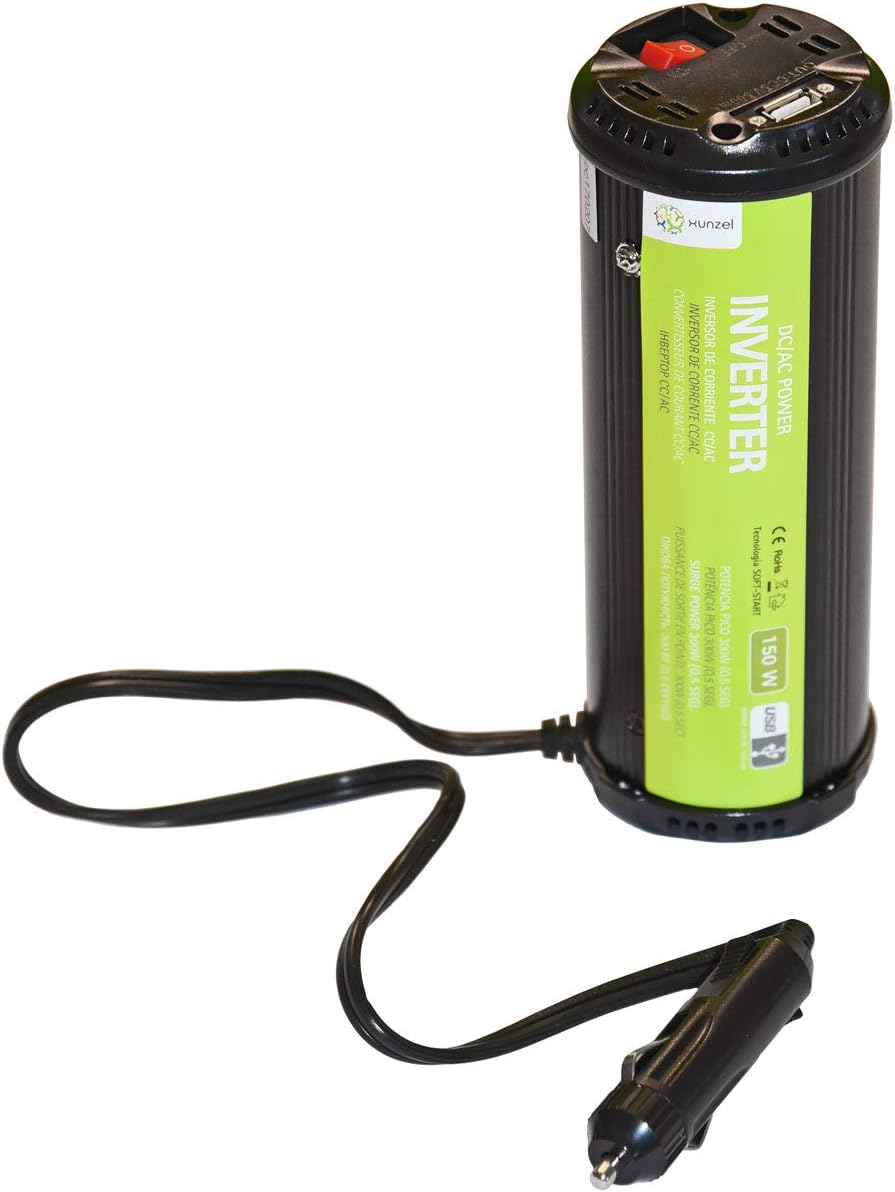
Figure 2.1: XUNZEL 150W Power Inverter. This image displays the XUNZEL 150W Power Inverter. The cylindrical black unit features a green label indicating 'DC/AC POWER INVERTER 150W USB'. The top of the unit has a red power switch, an AC outlet, and a USB port. A cable with a cigarette lighter plug extends from the base of the inverter.
3. സജ്ജീകരണവും ഇൻസ്റ്റാളേഷനും
- വാഹന അനുയോജ്യത: Ensure your vehicle has a 12V DC cigarette lighter socket. This inverter is not compatible with 24V systems.
- പ്ലേസ്മെൻ്റ്: Place the inverter on a stable, flat surface in a well-ventilated area. Avoid placing it near heat sources, flammable materials, or in direct sunlight.
- കണക്ഷൻ: Insert the cigarette lighter plug of the inverter firmly into your vehicle's 12V accessory socket. Ensure a secure connection.
- പവർ ഓൺ: Once connected, press the red power switch on the inverter to turn it on. The LED indicator will illuminate, signifying that the inverter is ready for use.
- ഉപകരണ കണക്ഷൻ: You can now plug your AC-powered devices (up to 150W continuous) into the AC outlet or your USB-powered devices into the USB port.
കുറിപ്പ്: For optimal performance and safety, ensure the total power consumption of your connected devices does not exceed the inverter's continuous power rating of 150W.
4. പ്രവർത്തന നിർദ്ദേശങ്ങൾ
ഓൺ/ഓഫ് ചെയ്യുന്നു
- To turn on the inverter, press the red power switch. The LED indicator will light up.
- To turn off the inverter, press the red power switch again. The LED indicator will turn off.
Using the AC Outlet
- Ensure the inverter is turned on.
- Plug your AC-powered device into the 230V AC outlet on the inverter.
- Verify that the device's power consumption does not exceed 150W. For devices with motors or compressors, consider their startup (peak) power requirements, which should not exceed 300W.
യുഎസ്ബി പോർട്ട് ഉപയോഗിക്കുന്നു
- Ensure the inverter is turned on.
- Connect your USB-powered device (e.g., smartphone, tablet) to the USB port using a compatible USB cable.
- The USB port provides standard 5V DC output for charging.
പ്രധാനപ്പെട്ടത്: Some sensitive electronic devices may not operate correctly with a modified sine wave inverter. If your device malfunctions, discontinue use.
5. പരിപാലനവും പരിചരണവും
- വൃത്തിയാക്കൽ: Disconnect the inverter from all power sources before cleaning. Use a soft, dry cloth to wipe the exterior. Do not use liquid cleaners or solvents.
- വെൻ്റിലേഷൻ: Regularly check that the ventilation openings are clear of dust and debris to ensure proper airflow and prevent overheating.
- സംഭരണം: ഉപയോഗത്തിലില്ലാത്തപ്പോൾ, ഇൻവെർട്ടർ നേരിട്ട് സൂര്യപ്രകാശം ഏൽക്കാത്തതും ഈർപ്പമില്ലാത്തതുമായ ഒരു തണുത്ത സ്ഥലത്ത് സൂക്ഷിക്കുക.
- കേബിൾ പരിശോധന: Periodically inspect the power cable and plug for any signs of damage. Do not use the inverter if the cable or plug is damaged.
6. പ്രശ്നപരിഹാരം
If you experience issues with your XUNZEL Power Inverter, refer to the following common problems and solutions:
| പ്രശ്നം | സാധ്യമായ കാരണം | പരിഹാരം |
|---|---|---|
| പവർ ഔട്ട്പുട്ട് ഇല്ല / ഇൻവെർട്ടർ ഓണാകുന്നില്ല |
|
|
| ഓവർലോഡ് സംരക്ഷണം സജീവമാക്കി (ഇൻവെർട്ടർ ഷട്ട് ഡൗൺ ചെയ്യുന്നു) |
|
|
| Device not working correctly with inverter |
|
|
7 സാങ്കേതിക സവിശേഷതകൾ
| പരാമീറ്റർ | മൂല്യം |
|---|---|
| മോഡൽ നമ്പർ | INLI150RU |
| ഇൻപുട്ട് വോളിയംtage | DC 12V |
| Putട്ട്പുട്ട് വോളിയംtage | എസി 230 വി |
| ഔട്ട്പുട്ട് ഫ്രീക്വൻസി | 50Hz |
| തുടർച്ചയായ ശക്തി | 150W |
| പീക്ക് പവർ | 300W (0.5 seconds) |
| USB ഔട്ട്പുട്ട് | 5V DC (standard USB) |
| അളവുകൾ (L x W x H) | 7 x 19.2 x 7 സെ.മീ |
| ഭാരം | 550 ഗ്രാം |
| സംരക്ഷണങ്ങൾ | ഓവർ വോൾtagഇ, അണ്ടർവോൾtage, Overload, Short-circuit |
8. വാറൻ്റിയും പിന്തുണയും
This XUNZEL product is designed for reliability and performance. For warranty information, technical support, or service inquiries, please refer to the warranty card included with your purchase or contact your retailer or the manufacturer directly.
ഏതെങ്കിലും വാറന്റി ക്ലെയിമുകൾക്കായി നിങ്ങളുടെ വാങ്ങിയതിന്റെ തെളിവ് സൂക്ഷിക്കുക.
Ask a question about this manual
Ask about setup, troubleshooting, compatibility, parts, safety, or missing instructions. Manuals+ will review the question and use this page’s manual context to help answer it.