
ആമുഖം
The Amcrest 1080P HD-CVI Quadbrid Dome Security Camera is designed for robust outdoor surveillance, offering high-resolution video and reliable performance. This camera is compatible with 1080P DVR systems and features advanced capabilities such as 98ft night vision and IP67 weatherproofing, ensuring durability against various environmental conditions. Its quadbrid technology allows for versatile compatibility with HD-CVI, TVI, AHD, and Analog systems, providing flexibility for integration into existing security setups. This manual provides essential information for the proper setup, operation, and maintenance of your security camera.
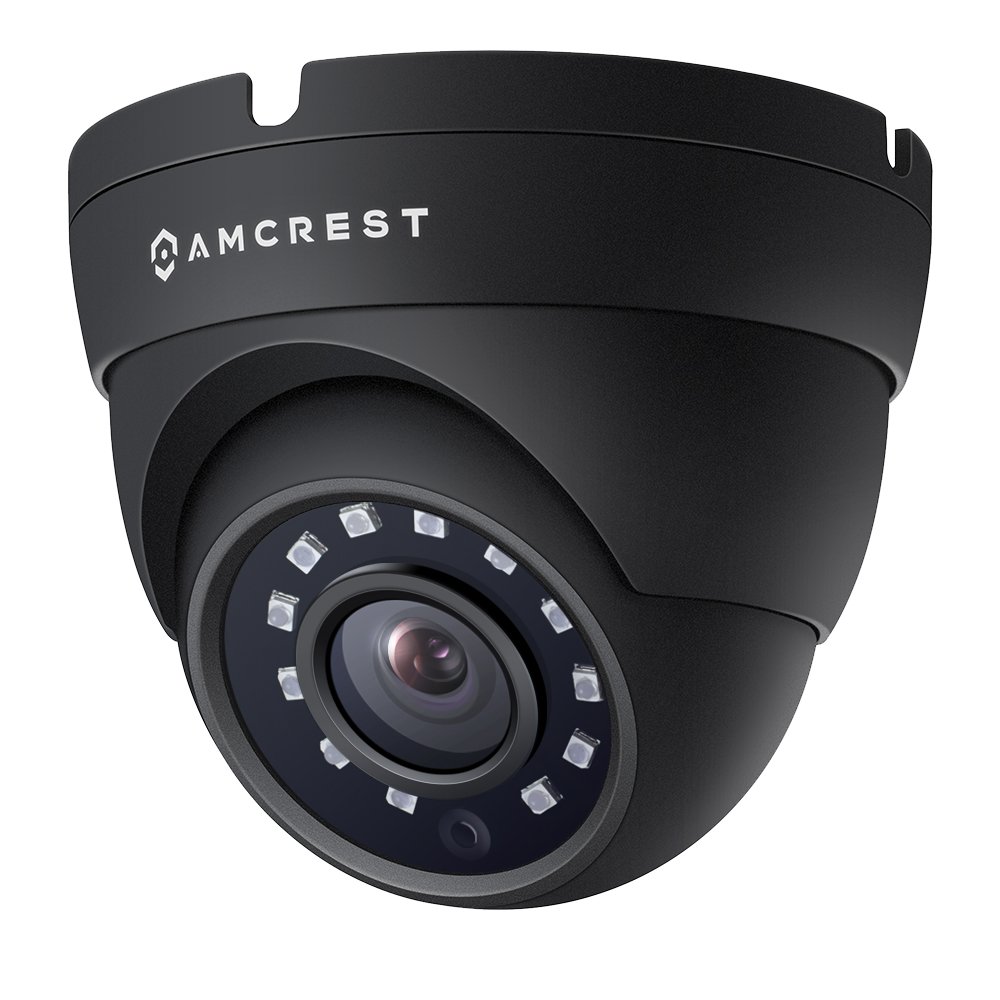
Figure 1: Amcrest 1080P HD-CVI Dome Security Camera highlighting 1080p resolution, 98ft night vision, IP67 weatherproof rating, and DIY installation.
സജ്ജീകരണവും ഇൻസ്റ്റാളേഷനും
ബോക്സിൽ എന്താണുള്ളത്
- 1x 1080P HD-CVI Standalone Dome Camera (Black)
കുറിപ്പ്: Camera power supply and coaxial video cables are not included and must be purchased separately. A DVR is required for operation and is not included.
ക്യാമറ ബന്ധിപ്പിക്കുന്നു
The camera connects point-to-point directly to a DVR via a BNC coaxial cable. This provides a secure, closed network connection. Ensure all connections are secure before powering on the device.

Figure 2: Connection diagram for the Amcrest Quadbrid camera, illustrating the BNC/Coax connection, DIP switch for mode selection, and 12V DC power input. Analog cameras require a coax cable and power adapter.
Quadbrid Mode Switch Setup
Your Amcrest Quadbrid camera is compatible with HD-CVI, HD-TVI, AHD, and Analog systems. The camera features a mode switch to select the appropriate video format for your DVR. Incorrect mode selection will prevent video display.
Refer to the diagram below and the video for proper mode switch configuration:
- HD-CVI: Switch 1 Down, Switch 2 Up
- HD-TVI: Switch 1 Up, Switch 2 Up
- AHD: Switch 1 Up, Switch 2 Down
- അനലോഗ്: Switch 1 Down, Switch 2 Down
Video 1: Amcrest Quadbrid Mode Switch Setup. This video demonstrates how to correctly adjust the mode switch on your Amcrest Quadbrid camera to match your DVR's video format (HD-CVI, HD-TVI, AHD, or Analog).
ക്യാമറ ഘടിപ്പിക്കുന്നു
The camera is designed for wall mounting. Ensure the mounting surface is stable and can support the camera's weight. Use appropriate screws and anchors for secure installation. Adjust the camera's viewing angle (129 degrees FOV) to cover the desired surveillance area.

Figure 3: An Amcrest dome camera mounted on a ceiling, illustrating a typical installation scenario.
പ്രവർത്തന നിർദ്ദേശങ്ങൾ
തത്സമയം View ഒപ്പം റെക്കോർഡിംഗ്
Once connected to a compatible DVR, the camera will provide a live 1080P HD video feed. You can view and record this feed through your DVR system. The camera's 20 powerful IR-LEDs enable clear night vision up to 98 feet, ensuring surveillance even in low-light conditions.
റിമോട്ട് ആക്സസ്
When connected to an Amcrest 1080P HD-CVI Security System, you can view your camera feed remotely from a mobile device or tablet using the Amcrest View app, available on the Apple App Store and Google Play Store. This allows you to monitor your property from anywhere.

Figure 4: An array of Amcrest security products, including cameras and DVRs, emphasizing remote monitoring capabilities.
മെയിൻ്റനൻസ്
ക്യാമറ വൃത്തിയാക്കുന്നു
Regularly clean the camera lens and housing to ensure optimal image clarity. Use a soft, damp പൊടിയും അഴുക്കും തുടയ്ക്കാൻ തുണി ഉപയോഗിക്കുക. ലെൻസിനോ ഫിനിഷിനോ കേടുവരുത്തുന്ന കഠിനമായ രാസവസ്തുക്കളോ ഉരച്ചിലുകളോ ഉള്ള വസ്തുക്കൾ ഉപയോഗിക്കുന്നത് ഒഴിവാക്കുക.
കണക്ഷനുകൾ പരിശോധിക്കുന്നു
Periodically inspect all cable connections for wear, corrosion, or looseness, especially for outdoor installations. Ensure the coaxial cable and power supply connections remain secure to prevent signal loss or power interruptions.
ട്രബിൾഷൂട്ടിംഗ്
No Video Display
- മോഡ് സ്വിച്ച്: Verify that the Quadbrid mode switch on the camera cable is set to the correct video format (HD-CVI, HD-TVI, AHD, or Analog) compatible with your DVR. Refer to the 'Quadbrid Mode Switch Setup' section for details.
- കേബിൾ കണക്ഷൻ: Ensure the coaxial cable is securely connected at both the camera and the DVR. Check for any damage to the cable.
- വൈദ്യുതി വിതരണം: Confirm the camera is receiving adequate power. A flickering image or no image at night can indicate insufficient power, especially with long cable runs. Ensure you are using a dedicated power supply with sufficient amperage (e.g., 1 Amp @ 12V) and appropriate gauge cabling for the distance.
മോശം ഇമേജ് ക്വാളിറ്റി
- ലെൻസ് ശുചിത്വം: മെയിന്റനൻസ് വിഭാഗത്തിൽ വിവരിച്ചിരിക്കുന്നതുപോലെ ക്യാമറ ലെൻസ് വൃത്തിയാക്കുക.
- Cable Quality/Length: Long or low-quality coaxial cables can degrade video signal. Consider using higher quality cables or a video amplifier for very long runs.
- ലൈറ്റിംഗ്: Ensure adequate lighting for optimal daytime performance. For night vision, confirm IR LEDs are functioning correctly.
സ്പെസിഫിക്കേഷനുകൾ
| ഫീച്ചർ | സ്പെസിഫിക്കേഷൻ |
|---|---|
| മോഡൽ നമ്പർ | AMC1080DM36-B |
| വീഡിയോ ക്യാപ്ചർ റെസല്യൂഷൻ | 1080പി (1920x1080) |
| ഫലപ്രദമായ വീഡിയോ റെസല്യൂഷൻ | 1080 പിക്സലുകൾ |
| കണക്റ്റിവിറ്റി ടെക്നോളജി | Wired (BNC Coaxial) |
| അനുയോജ്യമായ ഉപകരണങ്ങൾ | Smartphone, Tablet (via DVR) |
| ഇൻഡോർ/ഔട്ട്ഡോർ ഉപയോഗം | ഇൻഡോർ, ഔട്ട്ഡോർ |
| പവർ ഉറവിടം | Corded Electric (12V DC, 6 watts) |
| നൈറ്റ് വിഷൻ റേഞ്ച് | 98 അടി |
| Viewing ആംഗിൾ | 129 ഡിഗ്രി |
| അന്താരാഷ്ട്ര സംരക്ഷണ റേറ്റിംഗ് | IP67 |
| മെറ്റീരിയൽ | ലോഹം |
| നിറം | കറുപ്പ് |
| ഇനത്തിന്റെ അളവുകൾ (L x W x H) | 5 x 5 x 5 ഇഞ്ച് |
| ഇനത്തിൻ്റെ ഭാരം | 11.5 ഔൺസ് |
| പ്രത്യേക ഫീച്ചർ | മോഷൻ സെൻസർ, നൈറ്റ് വിഷൻ |
വാറൻ്റി വിവരങ്ങൾ
Amcrest products are backed by a 1 വർഷത്തെ യുഎസ് വാറന്റി. This warranty covers defects in materials and workmanship under normal use. For specific terms and conditions, please refer to the official Amcrest warranty policy.

Figure 5: Amcrest's commitment to security, highlighting a 1-year US warranty and lifetime support.
പിന്തുണയും ബന്ധപ്പെടാനുള്ള വിവരങ്ങളും
For technical assistance, product inquiries, or warranty claims, please contact Amcrest support:
- ഇമെയിൽ: support@amcrest.com
- ഫോൺ: 1-888-212-7538
Amcrest also provides lifetime support for its products.