
ആമുഖം
The DEGEN DE28 is a versatile and compact device that combines an AM/FM/Shortwave radio, a fully featured MP3 player, and a voice recorder. Designed for both indoor and outdoor use, it offers excellent sensitivity, selectivity, and sound quality. This manual provides instructions for setup, operation, and maintenance of your DE28 unit.
പാക്കേജ് ഉള്ളടക്കം
പാക്കേജിൽ ഇനിപ്പറയുന്ന ഇനങ്ങൾ ഉണ്ടോ എന്ന് പരിശോധിക്കുക:
- DEGEN DE28 Unit
- റീചാർജ് ചെയ്യാവുന്ന ലി-അയൺ ബാറ്ററി
- യുഎസ്ബി ചാർജിംഗ് കേബിൾ
- ലാനിയാർഡ്
- ഉപയോക്തൃ മാനുവൽ
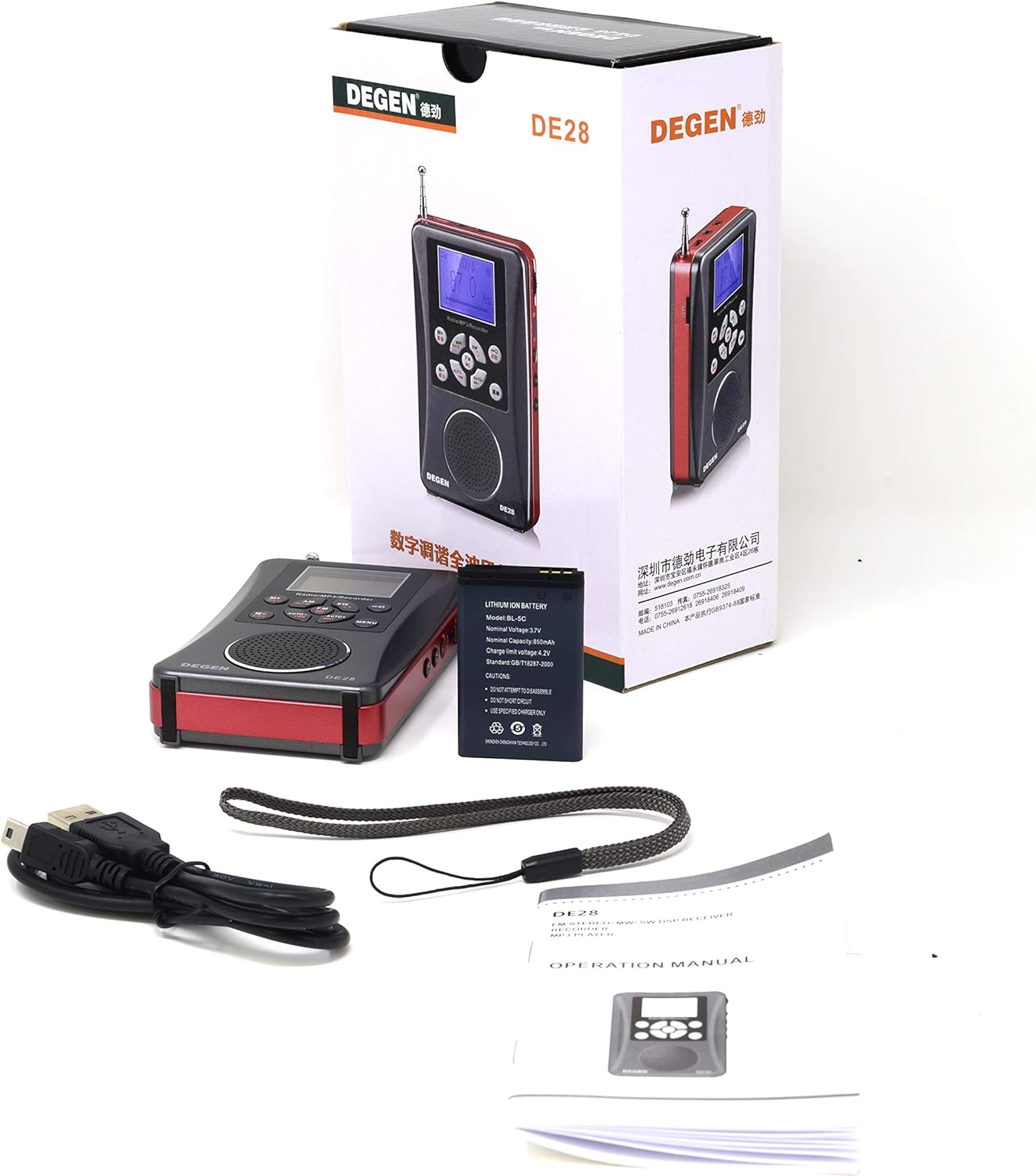
Image: Contents of the DEGEN DE28 package, including the radio, battery, USB cable, lanyard, and manual.
ഉൽപ്പന്ന ലേഔട്ടും നിയന്ത്രണങ്ങളും
Familiarize yourself with the buttons, ports, and features of your DEGEN DE28 unit.
ഫ്രണ്ട് View

ചിത്രം: മുൻഭാഗം view of the DEGEN DE28 radio, showing the LCD display, speaker, and control buttons for AM, FM, SW, M+, M-, AUTO+, AUTO-, MENU, and power.
- LCD ഡിസ്പ്ലേ: Shows frequency, mode, time, and battery status.
- സ്പീക്കർ: ഓഡിയോ ഔട്ട്പുട്ടിനായി.
- AM/FM/SW Buttons: റേഡിയോ ബാൻഡുകൾ തിരഞ്ഞെടുക്കുക.
- M+/REC, M-/DEL Buttons: Save/recall presets, initiate/delete recordings.
- AUTO+/AUTO- Buttons: Automatic station scanning.
- മെനു ബട്ടൺ: ക്രമീകരണങ്ങളും ഓപ്ഷനുകളും ആക്സസ് ചെയ്യുക.
വശം View തുറമുഖങ്ങളും

ചിത്രം: വശം view of the DEGEN DE28 radio, highlighting the volume control wheel, power button, and various input/output ports.
- വൈദ്യുതി സ്വിച്ച്: യൂണിറ്റ് ഓണാക്കാനോ ഓഫാക്കാനോ സ്ലൈഡ് ചെയ്യുക.
- Volume Wheel (V+/V-): ഓഡിയോ വോളിയം ക്രമീകരിക്കുന്നു.
- 3.5 എംഎം ഇയർഫോൺ ജാക്ക്: സ്വകാര്യ ശ്രവണത്തിനായി.
- മൈക്രോ യുഎസ്ബി പോർട്ട്: ബാറ്ററി ചാർജ് ചെയ്യുന്നതിനായി.
- Micro SD/TF Card Slot: Insert memory card for MP3 playback and recording.
ആൻ്റിന

Image: The DEGEN DE28 radio shown with its telescopic antenna fully extended for improved radio reception.
The telescopic antenna is used for FM and Shortwave reception. Extend it fully for best signal quality.
Micro SD/TF Card Slot Detail

ചിത്രം: ഒരു ആംഗിൾ view of the DEGEN DE28 radio, providing a clear look at the Micro SD/TF card slot on its side.
സജ്ജമാക്കുക
1. ബാറ്ററി ഇൻസ്റ്റാളേഷനും ചാർജിംഗും
- യൂണിറ്റിന്റെ പിൻഭാഗത്ത് ബാറ്ററി കമ്പാർട്ട്മെന്റ് കണ്ടെത്തുക.
- Insert the provided Li-ion battery, ensuring correct polarity.
- ബാറ്ററി കമ്പാർട്ട്മെൻ്റ് കവർ അടയ്ക്കുക.
- Connect the supplied USB charging cable to the Micro USB port on the DE28 and to a standard USB power source (e.g., computer USB port, USB wall adapter).
- The charging indicator on the display will show charging status. A full charge typically takes a few hours.
2. Micro SD/TF Card Installation
- Locate the Micro SD/TF card slot on the side of the unit.
- Gently insert a Micro SD/TF card (up to 8GB, not included) into the slot until it clicks into place. Ensure the card is inserted in the correct orientation.
- To remove, gently push the card inward until it clicks, then release, and it will eject.
പ്രവർത്തന നിർദ്ദേശങ്ങൾ
പവർ ഓൺ/ഓഫ്
- Slide the power switch on the side of the unit to the 'ON' position to power on.
- Slide the power switch to the 'OFF' position to power off.
മോഡ് തിരഞ്ഞെടുക്കൽ
- Press the 'MENU' button repeatedly to cycle through available modes: Radio, MP3 Player, Recorder.
Radio Operation (AM/FM/SW)
- Ensure the unit is in Radio mode.
- Press the 'AM', 'FM', or 'SW' button to select the desired radio band.
- യാന്ത്രിക ട്യൂണിംഗ്: Press 'AUTO+' or 'AUTO-' to automatically scan for and stop at the next available station.
- സ്വമേധയാലുള്ള ട്യൂണിംഗ്: Use the 'M+' or 'M-' buttons for fine-tuning the frequency.
- പ്രീസെറ്റുകൾ സംരക്ഷിക്കുന്നു: Tune to a desired station. Press and hold 'M+' or 'M-' to save it to a memory slot. Follow on-screen prompts if any.
- പ്രീസെറ്റുകൾ തിരിച്ചുവിളിക്കുന്നു: Briefly press 'M+' or 'M-' to cycle through saved stations.
- Extend the telescopic antenna for optimal FM and SW reception.
MP3 Player Operation
- Ensure a Micro SD/TF card with MP3, WAV, or WMA audio files ചേർത്തിരിക്കുന്നു.
- Switch the unit to MP3 Player mode.
- The unit will automatically start playing music from the card.
- Use 'M+' to skip to the next track and 'M-' to go to the previous track.
- Adjust volume using the volume wheel on the side.
Voice Recorder Operation
- Ensure a Micro SD/TF card is inserted.
- Switch the unit to Recorder mode.
- Press and hold the 'M+/REC' button to start recording. The display will indicate recording status.
- Press 'M+/REC' again briefly to stop and save the recording.
- To play back recordings, navigate to the recording list in Recorder mode using 'M+' or 'M-'.
- To delete a recording, select it and press and hold the 'M-/DEL' button.
Clock and Sleep Timer
- The DE28 features a back-lit LCD display with a clock. Refer to the on-screen menu for setting the time.
- A sleep timer function is available to automatically turn off the radio after a set period. Access this feature through the 'MENU' options.
Earphone Use
- Plug any standard 3.5mm stereo earphones into the earphone jack for private listening. The speaker will automatically mute.
സ്പെസിഫിക്കേഷനുകൾ
| ഫീച്ചർ | സ്പെസിഫിക്കേഷൻ |
|---|---|
| ബ്രാൻഡ് | DEGEN |
| മോഡൽ നമ്പർ | DE28 |
| എഫ്എം ഫ്രീക്വൻസി റേഞ്ച് | 64.0 മെഗാഹെട്സ് - 108.0 മെഗാഹെട്സ് |
| AM ആവൃത്തി ശ്രേണി | 522 കിലോ ഹെർട്സ് - 1710 കിലോ ഹെർട്സ് |
| സ്പീക്കർ | D40 മില്ലി |
| ഇയർഫോൺ ജാക്ക് | 3.5 എംഎം സ്റ്റീരിയോ |
| പവർ ഉറവിടം | Li-ion battery, 5V DC USB |
| അളവുകൾ (L x W x H) | 4.5” x 2.5” x 0.75” (ഏകദേശം) |
| ഭാരം (ബാറ്ററി ഇല്ലാതെ) | 4.5 Oz (approx. 127g) |
| പിന്തുണയ്ക്കുന്ന ഓഡിയോ ഫോർമാറ്റുകൾ | MP3, WAV, WMA |
| Micro SD/TF Card Support | 8 ജിബി വരെ |
| ഡിസ്പ്ലേ തരം | ബാക്ക്-ലൈറ്റ് എൽസിഡി |
| കണക്റ്റിവിറ്റി ടെക്നോളജി | USB |
| എൻക്ലോഷർ മെറ്റീരിയൽ | പ്ലാസ്റ്റിക് |
ട്രബിൾഷൂട്ടിംഗ്
If you encounter issues with your DEGEN DE28, refer to the following common problems and solutions:
- ശക്തിയില്ല:
- ബാറ്ററി ശരിയായി ഇൻസ്റ്റാൾ ചെയ്തിട്ടുണ്ടെന്നും ചാർജ്ജ് ചെയ്തിട്ടുണ്ടെന്നും ഉറപ്പാക്കുക.
- പവർ സ്വിച്ച് 'ഓൺ' സ്ഥാനത്താണെന്ന് ഉറപ്പാക്കുക.
- ശബ്ദമില്ല:
- Check the volume level using the volume wheel.
- If earphones are plugged in, unplug them to enable the speaker.
- മോശം റേഡിയോ സ്വീകരണം:
- Fully extend the telescopic antenna for FM and SW bands.
- Reposition the radio to a different location, away from electronic interference.
- For AM, try rotating the unit for better signal.
- Micro SD/TF Card Not Recognized:
- കാർഡ് കൃത്യമായും പൂർണ്ണമായും സ്ലോട്ടിൽ ചേർത്തിട്ടുണ്ടെന്ന് ഉറപ്പാക്കുക.
- Check if the card is formatted correctly (FAT32 is generally recommended).
- Try a different Micro SD/TF card (up to 8GB).
- MP3 Files Not Playing:
- ഓഡിയോ പരിശോധിച്ചുറപ്പിക്കുക files are in supported formats (MP3, WAV, WMA).
- Ensure the unit is in MP3 Player mode.
മെയിൻ്റനൻസ്
- വൃത്തിയാക്കൽ: യൂണിറ്റിന്റെ പുറംഭാഗം വൃത്തിയാക്കാൻ മൃദുവായതും ഉണങ്ങിയതുമായ തുണി ഉപയോഗിക്കുക. ലിക്വിഡ് ക്ലീനറുകളോ ഉരച്ചിലുകളുള്ള വസ്തുക്കളോ ഉപയോഗിക്കരുത്.
- ബാറ്ററി കെയർ: For optimal battery life, avoid fully discharging the battery frequently. If storing the unit for an extended period, charge the battery partially (around 50%) and store in a cool, dry place.
- സംഭരണം: Store the DE28 in a dry environment, away from direct sunlight, extreme temperatures, and high humidity.
- വാട്ടർ എക്സ്പോഷർ: This unit is not waterproof. Avoid exposure to water or moisture.
വാറൻ്റിയും പിന്തുണയും
For warranty information, please refer to the documentation provided at the time of purchase or contact your retailer. For technical support or further assistance, please reach out to the manufacturer or the point of purchase.