
ആമുഖം
This manual provides essential information for the safe and efficient installation, operation, and maintenance of your APC Smart-UPS SRT 8kVA Rack Mount Uninterruptible Power Supply (UPS) with a 208V to 120V Step-Down Transformer. Please read this manual thoroughly before installing or operating the equipment.
The APC Smart-UPS SRT 8kVA is designed to provide protected power to electronic equipment from utility power outages, sags, surges, and small utility fluctuations. The integrated step-down transformer converts 208V input to 120V output for compatible equipment.
പ്രധാനപ്പെട്ട സുരക്ഷാ നിർദ്ദേശങ്ങൾ
ഈ നിർദ്ദേശങ്ങൾ സംരക്ഷിക്കുക - This manual contains important instructions that should be followed during installation and maintenance of the UPS and batteries.
- ഈ യുപിഎസ് ഇൻഡോർ ഉപയോഗത്തിന് മാത്രമുള്ളതാണ്.
- നേരിട്ടുള്ള സൂര്യപ്രകാശത്തിലോ ദ്രാവകങ്ങളുമായി സമ്പർക്കത്തിലോ അമിതമായ പൊടിയോ ഈർപ്പമോ ഉള്ളിടത്തോ ഈ യുപിഎസ് പ്രവർത്തിപ്പിക്കരുത്.
- യുപിഎസ് പവർ കേബിൾ നേരിട്ട് ഒരു മതിൽ toട്ട്ലെറ്റിലേക്ക് ബന്ധിപ്പിക്കുക. സർജ് പ്രൊട്ടക്ടറുകളോ എക്സ്റ്റൻഷൻ കോഡുകളോ ഉപയോഗിക്കരുത്.
- ബാറ്ററികളുടെ സേവനവും ബാറ്ററികളെക്കുറിച്ചും ആവശ്യമായ മുൻകരുതലുകളെക്കുറിച്ചും അറിവുള്ള വ്യക്തികൾ നിർവ്വഹിക്കുകയോ മേൽനോട്ടം വഹിക്കുകയോ വേണം. അനധികൃത ഉദ്യോഗസ്ഥരെ ബാറ്ററികളിൽ നിന്ന് അകറ്റി നിർത്തുക.
- ബാറ്ററികൾ മാറ്റിസ്ഥാപിക്കുമ്പോൾ, ഒരേ തരത്തിലുള്ള ബാറ്ററികൾ അല്ലെങ്കിൽ ബാറ്ററി പായ്ക്കുകൾ ഉപയോഗിച്ച് മാറ്റിസ്ഥാപിക്കുക.
- ബാറ്ററികൾ തീയിൽ കളയരുത്. ബാറ്ററികൾ പൊട്ടിത്തെറിച്ചേക്കാം.
- ബാറ്ററികൾ തുറക്കുകയോ വികൃതമാക്കുകയോ ചെയ്യരുത്. പുറത്തുവിടുന്ന ഇലക്ട്രോലൈറ്റ് ചർമ്മത്തിനും കണ്ണുകൾക്കും ഹാനികരമാണ്. ഇത് വിഷാംശമുള്ളതാകാം.
- ഒരു ബാറ്ററിക്ക് വൈദ്യുതാഘാതവും ഉയർന്ന ഷോർട്ട് സർക്യൂട്ട് കറൻ്റും ഉണ്ടാകാം. ബാറ്ററികളിൽ പ്രവർത്തിക്കുമ്പോൾ ഇനിപ്പറയുന്ന മുൻകരുതലുകൾ നിരീക്ഷിക്കണം:
- വാച്ചുകൾ, വളയങ്ങൾ അല്ലെങ്കിൽ മറ്റ് ലോഹ വസ്തുക്കൾ നീക്കം ചെയ്യുക.
- ഇൻസുലേറ്റഡ് ഹാൻഡിലുകളുള്ള ഉപകരണങ്ങൾ ഉപയോഗിക്കുക.
- റബ്ബർ കയ്യുറകളും ബൂട്ടുകളും ധരിക്കുക.
- ബാറ്ററികൾക്ക് മുകളിൽ ഉപകരണങ്ങളോ ലോഹഭാഗങ്ങളോ വയ്ക്കരുത്.
- ബാറ്ററി ടെർമിനലുകൾ ബന്ധിപ്പിക്കുന്നതിനോ വിച്ഛേദിക്കുന്നതിനോ മുമ്പ് ചാർജിംഗ് ഉറവിടം വിച്ഛേദിക്കുക.
പാക്കേജ് ഉള്ളടക്കം
Inspect the package upon receipt. Notify the carrier and dealer if there is any damage. The package contains:
- APC Smart-UPS SRT 8kVA UPS Unit
- 208V to 120V Step-Down Transformer
- റാക്ക് മൗണ്ടിംഗ് ഹാർഡ്വെയർ
- സീരിയൽ ആശയവിനിമയ കേബിൾ
- യുഎസ്ബി ആശയവിനിമയ കേബിൾ
- ഡോക്യുമെൻ്റേഷൻ സി.ഡി
- സുരക്ഷാ നിർദ്ദേശങ്ങൾ
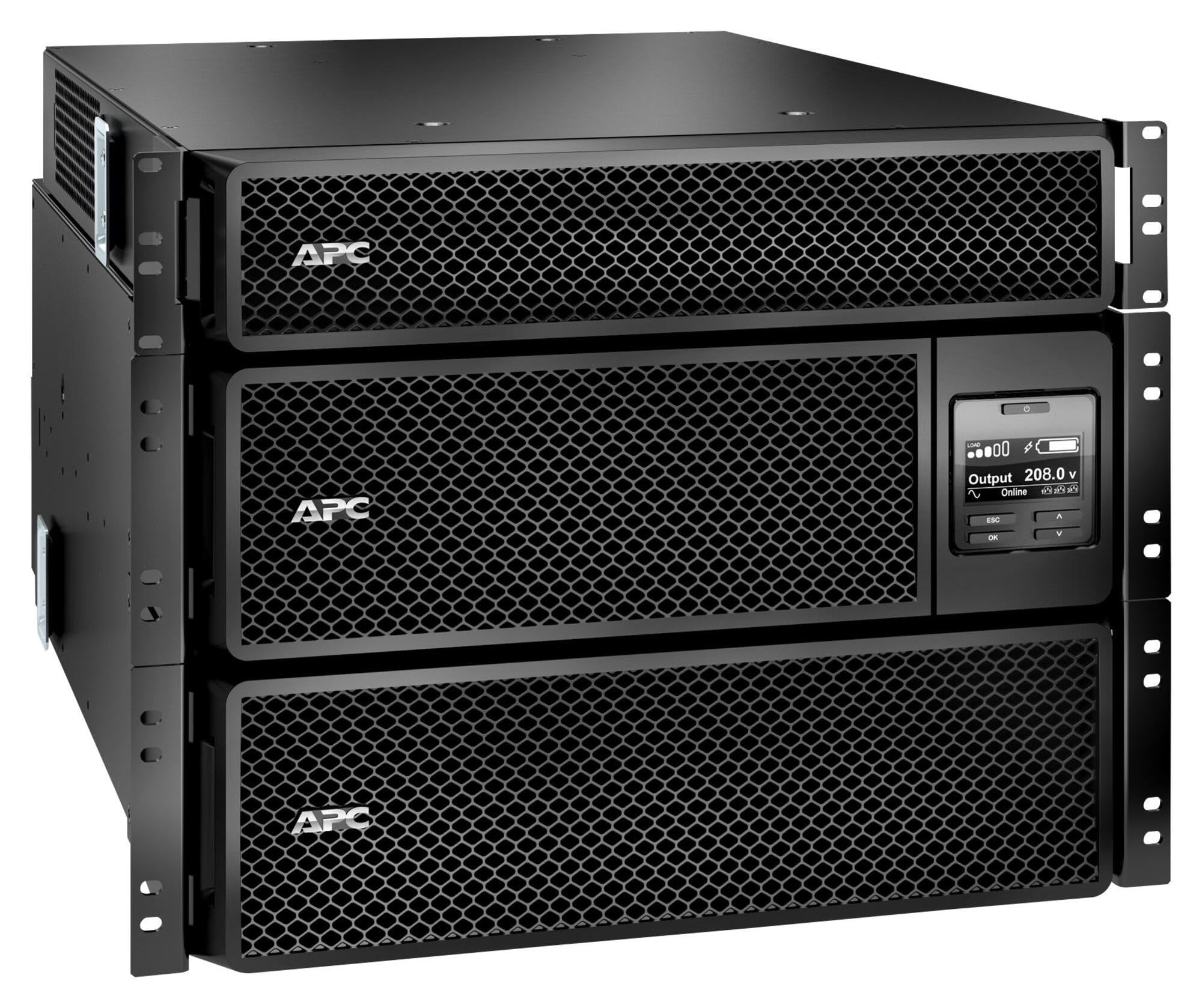
Image: APC Smart-UPS SRT 8kVA Rack Mount UPS with 208V to 120V Step-Down Transformer. This image shows the main UPS unit and the accompanying step-down transformer, typically in a rack-mountable configuration.
സജ്ജമാക്കുക
1. പ്ലേസ്മെന്റ്
The UPS and transformer are heavy. For rack-mount installations, ensure the rack is stable and capable of supporting the combined weight of the UPS, transformer, and any other equipment. For tower installations, place the unit on a flat, stable surface.
- Maintain at least 20 cm (8 inches) of clearance from the front and rear panels for proper ventilation.
- താപ സ്രോതസ്സുകൾക്ക് സമീപമോ നേരിട്ടുള്ള സൂര്യപ്രകാശത്തിലോ യൂണിറ്റ് സ്ഥാപിക്കുന്നത് ഒഴിവാക്കുക.
2 ബാറ്ററി കണക്ഷൻ
The UPS is shipped with the internal batteries disconnected for safety. Follow these steps to connect the batteries:
- Remove the front bezel or access panel to expose the battery compartment.
- Connect the internal battery cables as indicated by the labels or instructions inside the compartment. Ensure a secure connection.
- Replace the front bezel or access panel.
3. പവർ കണക്ഷൻ
Connect the UPS to utility power and your equipment.
- ഇൻപുട്ട് പവർ: Connect the UPS input power cord (NEMA L6-30P) to a dedicated 208V AC outlet. Ensure the outlet is properly grounded and rated for the UPS capacity.
- ട്രാൻസ്ഫോർമർ കണക്ഷൻ: Connect the output of the UPS to the input of the 208V to 120V Step-Down Transformer.
- ഔട്ട്പുട്ട് പവർ: Connect your 120V equipment to the 120V output receptacles on the step-down transformer. Do not overload the transformer or the UPS.
- Communication Cables: Connect the serial or USB communication cable from the UPS to your computer or server for monitoring and management.
4 പ്രാരംഭ സ്റ്റാർട്ടപ്പ്
എല്ലാ കണക്ഷനുകളും ഉണ്ടാക്കിയ ശേഷം:
- Press the power ON button on the UPS front panel. The UPS will perform a self-test.
- Allow the UPS to charge its batteries for at least 24 hours before connecting critical loads to ensure full runtime capacity.
- Verify the UPS display shows normal operation status.
യുപിഎസ് പ്രവർത്തിപ്പിക്കുന്നു
ഫ്രണ്ട് പാനൽ ഡിസ്പ്ലേയും നിയന്ത്രണങ്ങളും
The front panel features an LCD display and control buttons for monitoring and configuring the UPS. Refer to the detailed user manual on the documentation CD for specific menu navigation.
- ഓൺ/ഓഫ് ബട്ടൺ: Powers the UPS on or off.
- Escape/Menu Button: Navigates back or enters the main menu.
- മുകളിലേക്കും താഴേക്കുമുള്ള അമ്പടയാളങ്ങൾ: Scrolls through menu options or adjusts settings.
- ബട്ടൺ നൽകുക: Selects an option or confirms a setting.
- LED സൂചകങ്ങൾ: Provide quick status updates (e.g., On Line, On Battery, Fault).
സാധാരണ പ്രവർത്തനം
During normal operation, the UPS will be in "On Line" mode, providing conditioned power to connected equipment and charging its batteries. The LCD display will show input/output voltagഇ, ലോഡ് ശതമാനംtage, and battery charge level.
ബാറ്ററി മോഡ്
If utility power fails or fluctuates outside acceptable limits, the UPS will automatically switch to battery power. An audible alarm may sound, and the display will indicate "On Battery" mode. The runtime available depends on the load and battery charge level.
ഷട്ട്ഡൗൺ നടപടിക്രമങ്ങൾ
- Graceful Shutdown: Use the PowerChute software (if installed) to gracefully shut down connected equipment before the UPS runs out of battery power.
- മാനുവൽ ഷട്ട്ഡൗൺ: Press and hold the OFF button on the front panel until the UPS powers down. Ensure all connected equipment is safely shut down first.
മെയിൻ്റനൻസ്
ബാറ്ററി മാറ്റിസ്ഥാപിക്കൽ
The batteries in the UPS are user-replaceable hot-swappable battery modules. Refer to the specific battery replacement instructions provided with your replacement battery kit or on the APC website. Always use genuine APC replacement battery cartridges (RBCs).
- Battery life is typically 3-5 years, but can vary based on temperature and discharge cycles.
- Replace batteries when the UPS indicates a "Replace Battery" warning or when runtime significantly decreases.
വൃത്തിയാക്കൽ
Keep the UPS and transformer free of dust and debris. Use a dry cloth to clean the exterior. Do not use liquid cleaners or solvents.
ഫേംവെയർ അപ്ഡേറ്റുകൾ
Periodically check the APC website for available firmware updates for your UPS model. Firmware updates can provide enhanced features, improved performance, or bug fixes. Follow the instructions provided with the firmware update package carefully.
ട്രബിൾഷൂട്ടിംഗ്
This section provides solutions to common issues. For more complex problems, contact APC Technical Support.
| പ്രശ്നം | സാധ്യമായ കാരണം | പരിഹാരം |
|---|---|---|
| യുപിഎസ് ഓണാക്കില്ല. | Battery not connected; No input power; UPS fault. | Ensure battery cables are securely connected. Verify input power cable is plugged into a live outlet. If fault persists, contact support. |
| UPS beeps continuously or frequently. | On battery mode; Overload; Low battery. | Check utility power. Reduce connected load. Allow batteries to charge. |
| "Replace Battery" indicator is lit. | Batteries are at end of life or faulty. | Order and install new APC replacement battery cartridges. |
| Connected equipment not receiving 120V. | Transformer not connected or faulty; UPS output issue. | Verify transformer connections. Check UPS output voltage on display. Ensure equipment is plugged into the 120V outlets of the transformer. |
സ്പെസിഫിക്കേഷനുകൾ
The following table outlines the key specifications for the APC Smart-UPS SRT 8kVA Rack Mount with 208V to 120V Step-Down Transformer (SRT8KRMXLT-5KTF).
| ഫീച്ചർ | വിശദാംശങ്ങൾ |
|---|---|
| ബ്രാൻഡ് | എ.പി.സി |
| മോഡൽ നമ്പർ | SRT8KRMXLT-5KTF |
| ശേഷി (VA/Wats) | 8000 VA / 8000 W |
| ഇൻപുട്ട് വോളിയംtage | 208 V എസി |
| Putട്ട്പുട്ട് വോളിയംtage | 120 V AC (via Step-Down Transformer) |
| ഔട്ട്പുട്ട് കറൻ്റ് | 66.67 Amps |
| ഫ്രീക്വൻസി റേഞ്ച് | 50/60 Hz |
| ബാറ്ററി തരം | ലെഡ് ആസിഡ് |
| ബാറ്ററി ചാർജ് സമയം | 1.5 മണിക്കൂർ |
| Typical Runtime (Full Load) | 5 മിനിറ്റ് |
| ഫോം ഫാക്ടർ | Rack / Tower Mountable (8U) |
| ഉൽപ്പന്ന അളവുകൾ (D x W x H) | 28.2" x 17" x 13.9" (71.6സെ.മീ x 43.2സെ.മീ x 35.3സെ.മീ) |
| ഇനത്തിൻ്റെ ഭാരം | 341 പൗണ്ട് (154.7 കി.ഗ്രാം) |
| ഔട്ട്പുട്ട് കണക്ഷനുകൾ | 1 x NEMA L6-30R, 4 x NEMA 5-20R (via transformer) |
| എൻക്ലോഷർ മെറ്റീരിയൽ | ലോഹം |
| നിറം | കറുപ്പ് |
| സുരക്ഷാ മാനദണ്ഡം | UL 1778 |
വാറൻ്റിയും പിന്തുണയും
For detailed warranty information, please refer to the warranty card included with your product or visit the official APC website. APC offers technical support to assist with installation, troubleshooting, and product inquiries.
- ഓൺലൈൻ പിന്തുണ: APC സന്ദർശിക്കുക webപതിവുചോദ്യങ്ങൾ, ഡോക്യുമെന്റേഷൻ, സോഫ്റ്റ്വെയർ ഡൗൺലോഡുകൾ എന്നിവയ്ക്കുള്ള സൈറ്റ്.
- ടെലിഫോൺ പിന്തുണ: Contact APC Technical Support using the numbers provided on the APC webനിങ്ങളുടെ പ്രദേശത്തിനായുള്ള സൈറ്റ്.
- ഉൽപ്പന്ന രജിസ്ട്രേഷൻ: Register your product online to receive notifications about firmware updates and product information.