
1. ആമുഖം
The Sony SBH54 is a versatile Stereo Bluetooth Headset designed for wireless communication and audio playback. It offers both handset and headset functionalities, allowing you to take and make calls, view messages, listen to music, and tune into FM radio directly from its display. Crafted from premium metal with a splash-proof design, it combines elegance with durability.
Key features include Bluetooth Wireless 3.0, NFC technology for easy pairing, an OLED display, and built-in noise cancellation for clear audio during calls. The headset supports A2DP profile and can connect to two devices simultaneously.
2. ഉൽപ്പന്നം കഴിഞ്ഞുview
The SBH54 features a compact design that fits comfortably in your hand. It includes an OLED display for information at a glance and physical controls for media and call management.
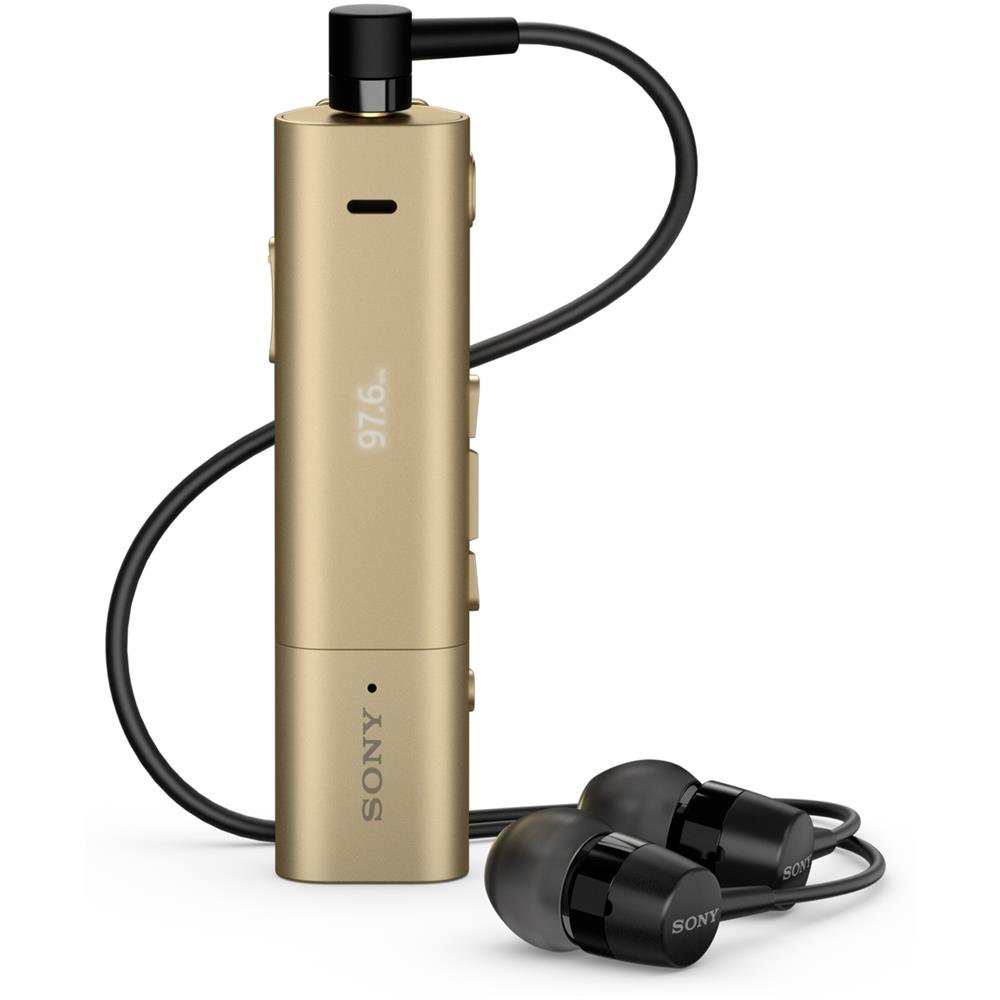
Image: Sony SBH54 Gold Stereo Bluetooth Headset. This image displays the compact, gold-colored headset with its integrated clip and display screen.
നിയന്ത്രണങ്ങളും സൂചകങ്ങളും:
- OLED ഡിസ്പ്ലേ: Shows caller ID, messages, music track information, and FM radio frequency.
- മൾട്ടി-ഫംഗ്ഷൻ ബട്ടൺ: For call answering/ending, play/pause music.
- വോളിയം ബട്ടണുകൾ: ഓഡിയോ വോളിയം ക്രമീകരിക്കുക.
- നാവിഗേഷൻ ബട്ടണുകൾ: For menu navigation and track skipping.
- മൈക്രോഫോൺ: Integrated for voice calls.
- ഹെഡ്ഫോൺ ജാക്ക്: 3.5mm port for connecting the included premium headphones.
- ചാർജിംഗ് പോർട്ട്: ഉപകരണം ചാർജ് ചെയ്യുന്നതിനുള്ള മൈക്രോ യുഎസ്ബി പോർട്ട്.
3. സജ്ജീകരണം
3.1 ഹെഡ്സെറ്റ് ചാർജ് ചെയ്യുന്നു
- Connect the supplied USB cable to the headset's charging port and to a USB power adapter or a computer's USB port.
- ഡിസ്പ്ലേയിലെ ബാറ്ററി ഇൻഡിക്കേറ്റർ ചാർജിംഗ് സ്റ്റാറ്റസ് കാണിക്കും.
- ആദ്യ ഉപയോഗത്തിന് മുമ്പ് ഹെഡ്സെറ്റ് പൂർണ്ണമായും ചാർജ് ചെയ്യുക.
3.2 ഒരു ഉപകരണവുമായി ജോടിയാക്കൽ (ബ്ലൂടൂത്ത്)
- ഹെഡ്സെറ്റ് ചാർജ് ചെയ്തിട്ടുണ്ടെന്നും ഓഫാണെന്നും ഉറപ്പാക്കുക.
- Press and hold the power button until the headset enters pairing mode (indicated by a specific light pattern or message on the display).
- നിങ്ങളുടെ സ്മാർട്ട്ഫോണിലോ മറ്റ് ബ്ലൂടൂത്ത് പ്രവർത്തനക്ഷമമാക്കിയ ഉപകരണത്തിലോ, ബ്ലൂടൂത്ത് പ്രവർത്തനക്ഷമമാക്കി ലഭ്യമായ ഉപകരണങ്ങൾക്കായി തിരയുക.
- കണ്ടെത്തിയ ഉപകരണങ്ങളുടെ പട്ടികയിൽ നിന്ന് "SBH54" തിരഞ്ഞെടുക്കുക.
- If prompted, enter the passcode "0000" (four zeros).
- ജോടിയാക്കിയാൽ, ഹെഡ്സെറ്റ് കണക്ഷൻ വിജയകരമാണെന്ന് സൂചിപ്പിക്കും.
3.3 Pairing with a Device (NFC)
For devices with NFC (Near Field Communication):
- Ensure NFC is enabled on your smartphone and the screen is unlocked.
- Touch the NFC detection area of your smartphone to the NFC detection area on the SBH54 headset.
- ജോടിയാക്കൽ പ്രക്രിയ പൂർത്തിയാക്കാൻ ഏതെങ്കിലും ഓൺ-സ്ക്രീൻ നിർദ്ദേശങ്ങൾ പാലിക്കുക.
4. ഹെഡ്സെറ്റ് പ്രവർത്തിപ്പിക്കൽ
4.1 പവർ ഓൺ/ഓഫ്
- പവർ ഓണാക്കാൻ: ഡിസ്പ്ലേ പ്രകാശിക്കുന്നത് വരെ പവർ ബട്ടൺ അമർത്തിപ്പിടിക്കുക.
- പവർ ഓഫ് ചെയ്യാൻ: ഡിസ്പ്ലേ ഓഫാകുന്നതുവരെ പവർ ബട്ടൺ അമർത്തിപ്പിടിക്കുക.
4.2 കോളുകൾ ചെയ്യലും സ്വീകരിക്കലും
- ഒരു കോളിന് മറുപടി നൽകുന്നു: When a call comes in, press the multi-function button.
- ഒരു കോൾ അവസാനിപ്പിക്കുന്നു: During a call, press the multi-function button.
- ഒരു കോൾ നിരസിക്കുന്നു: Press and hold the multi-function button when a call comes in.
- ഒരു കോൾ ചെയ്യുന്നു: Dial the number on your phone. The call will automatically route to the headset. You can also use voice commands if supported by your phone.
- Handset Function: The compact SBH54 can be used as an unobtrusive handset for calls.
- ശബ്ദം റദ്ദാക്കൽ: The headset features echo, wind, and noise cancellation for clear voice transmission.
- HD ശബ്ദം: Enhances voice clarity for both parties during a call.
4.3 മ്യൂസിക് പ്ലേബാക്ക്
- പ്ലേ/താൽക്കാലികമായി നിർത്തുക: Press the multi-function button.
- അടുത്ത ട്രാക്ക്: Press the forward navigation button.
- മുമ്പത്തെ ട്രാക്ക്: Press the backward navigation button.
- വോളിയം നിയന്ത്രണം: വോളിയം കൂട്ടുക/കുറയ്ക്കുക ബട്ടണുകൾ ഉപയോഗിക്കുക.
4.4 എഫ്എം റേഡിയോ
- എഫ്എം റേഡിയോ സജീവമാക്കുക: Navigate through the headset menu to select the FM Radio function.
- ട്യൂൺ സ്റ്റേഷനുകൾ: Use the navigation buttons to scan or manually tune to FM frequencies.
- പ്രീസെറ്റുകൾ സംരക്ഷിക്കുക: The headset may allow saving favorite stations (refer to on-screen prompts).
5. പരിപാലനം
- വൃത്തിയാക്കൽ: മൃദുവായതും ഉണങ്ങിയതുമായ തുണി ഉപയോഗിച്ച് ഹെഡ്സെറ്റ് തുടയ്ക്കുക. കഠിനമായ രാസവസ്തുക്കളോ ഉരച്ചിലുകളോ ഉള്ള വസ്തുക്കൾ ഉപയോഗിക്കുന്നത് ഒഴിവാക്കുക.
- ജല പ്രതിരോധം: The SBH54 has a splash-proof design. This means it can withstand light splashes of water but should not be submerged or exposed to heavy rain. Ensure the charging port cover is securely closed.
- സംഭരണം: ഹെഡ്സെറ്റ് നേരിട്ട് സൂര്യപ്രകാശം ഏൽക്കാത്തതും ഉയർന്ന താപനില ഏൽക്കാത്തതുമായ ഒരു തണുത്ത വരണ്ട സ്ഥലത്ത് സൂക്ഷിക്കുക.
- ബാറ്ററി കെയർ: ബാറ്ററി ലൈഫ് വർദ്ധിപ്പിക്കാൻ, ബാറ്ററി ഇടയ്ക്കിടെ പൂർണ്ണമായും ഡിസ്ചാർജ് ചെയ്യുന്നത് ഒഴിവാക്കുക. പതിവായി ചാർജ് ചെയ്യുക.
6. പ്രശ്നപരിഹാരം
പൊതുവായ പ്രശ്നങ്ങളും പരിഹാരങ്ങളും:
- ഹെഡ്സെറ്റ് പവർ ഓൺ ചെയ്യുന്നില്ല: ബാറ്ററി ചാർജ്ജ് ചെയ്തിട്ടുണ്ടെന്ന് ഉറപ്പാക്കുക. ഒരു പവർ സ്രോതസ്സിലേക്ക് കണക്റ്റ് ചെയ്ത് വീണ്ടും ശ്രമിക്കുക.
- ഒരു ഉപകരണവുമായി ജോടിയാക്കാൻ കഴിയില്ല:
- ഹെഡ്സെറ്റ് പെയറിംഗ് മോഡിലാണെന്ന് ഉറപ്പാക്കുക.
- നിങ്ങളുടെ ഉപകരണത്തിൽ ബ്ലൂടൂത്ത് പ്രവർത്തനക്ഷമമാക്കിയിട്ടുണ്ടെന്ന് ഉറപ്പാക്കുക.
- നിങ്ങളുടെ ഉപകരണത്തിന് അടുത്തേക്ക് ഹെഡ്സെറ്റ് നീക്കുക.
- ഹെഡ്സെറ്റും നിങ്ങളുടെ ഉപകരണവും പുനരാരംഭിക്കുക.
- നിങ്ങളുടെ ഉപകരണത്തിലെ മുമ്പത്തെ ബ്ലൂടൂത്ത് കണക്ഷനുകൾ മായ്ച്ച ശേഷം വീണ്ടും ജോടിയാക്കാൻ ശ്രമിക്കുക.
- ഓഡിയോ ഇല്ല അല്ലെങ്കിൽ മോശം ഓഡിയോ നിലവാരം:
- ഹെഡ്സെറ്റിലും കണക്റ്റുചെയ്ത ഉപകരണത്തിലും വോളിയം ലെവലുകൾ പരിശോധിക്കുക.
- Ensure the headset is within range of your device.
- ബ്ലൂടൂത്ത് കണക്ഷൻ വിച്ഛേദിച്ച് വീണ്ടും ബന്ധിപ്പിക്കുക.
- Ensure the headphones are properly plugged into the 3.5mm jack.
- എഫ്എം റേഡിയോ പ്രവർത്തിക്കുന്നില്ല: നല്ല എഫ്എം സിഗ്നൽ സ്വീകരണം ഉള്ള ഒരു പ്രദേശത്താണെന്ന് ഉറപ്പാക്കുക.
7 സ്പെസിഫിക്കേഷനുകൾ
| ഫീച്ചർ | വിശദാംശങ്ങൾ |
|---|---|
| ബ്രാൻഡ് | സോണി |
| മോഡൽ നമ്പർ | SBH54GD |
| നിറം | സ്വർണ്ണം |
| ചെവി പ്ലേസ്മെൻ്റ് | ചെവിയിൽ |
| ഫോം ഫാക്ടർ | ചെവിയിൽ |
| ശബ്ദ നിയന്ത്രണം | സജീവ നോയ്സ് റദ്ദാക്കൽ |
| ഇനത്തിൻ്റെ ഭാരം | 0.1 കിലോഗ്രാം |
| ഓഡിയോ ഡ്രൈവർ തരം | ഡൈനാമിക് ഡ്രൈവർ |
| ഫ്രീക്വൻസി റേഞ്ച് | 20 ഹെർട്സ് - 20,000 ഹെർട്സ് |
| എൻക്ലോഷർ മെറ്റീരിയൽ | ലോഹം |
| അനുയോജ്യമായ ഉപകരണങ്ങൾ | Smartphones, Laptops, Tablets, Bluetooth-enabled Devices |
| ജല പ്രതിരോധ നില | Water Resistant (Splash-proof) |
| കണക്റ്റിവിറ്റി ടെക്നോളജി | ബ്ലൂടൂത്ത്, NFC |
| വയർലെസ് ടെക്നോളജി | ബ്ലൂടൂത്ത്, NFC |
| ബ്ലൂടൂത്ത് പതിപ്പ് | 3.0 |
| നിയന്ത്രണ തരം | മീഡിയ നിയന്ത്രണം |
| നിയന്ത്രണ രീതി | റിമോട്ട് |
8. വാറൻ്റിയും പിന്തുണയും
For warranty information and customer support, please refer to the documentation included with your purchase or visit the official Sony support webസൈറ്റ്. പ്രദേശത്തെയും റീട്ടെയിലറെയും ആശ്രയിച്ച് നിർദ്ദിഷ്ട വാറന്റി നിബന്ധനകൾ വ്യത്യാസപ്പെടാം.
ഓൺലൈൻ പിന്തുണ: www.sony.com/electronics/support