
1 BY ONE O0000-0713
1 BY ONE DIAFIELD AZERTY Bluetooth Keyboard with Touchpad User Manual
Model: O0000-0713
ആമുഖം
This manual provides comprehensive instructions for the setup, operation, maintenance, and troubleshooting of your 1 BY ONE DIAFIELD AZERTY Bluetooth Keyboard with Touchpad. Please read this manual carefully before using the product to ensure optimal performance and longevity.
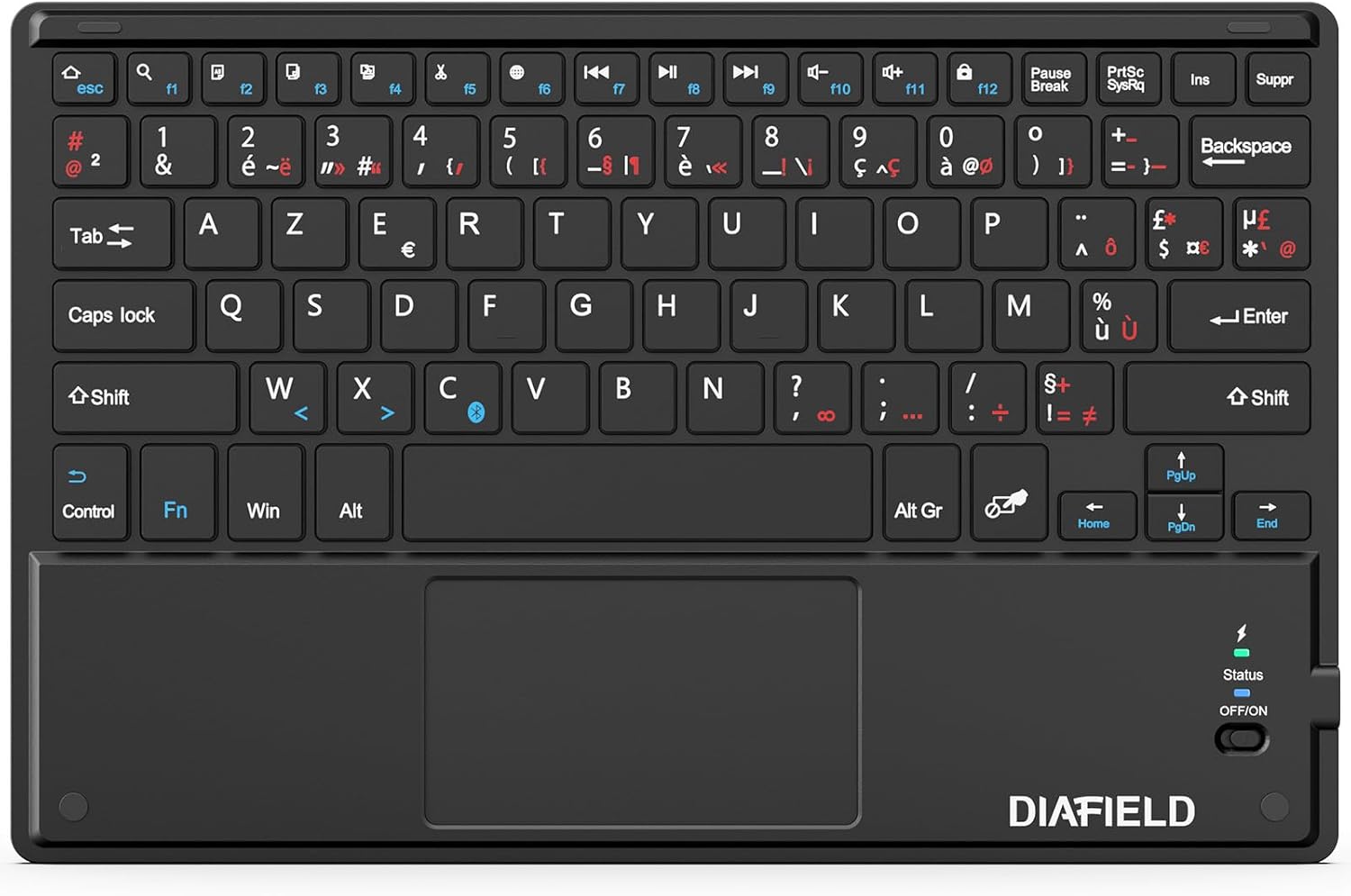
Image: The 1 BY ONE DIAFIELD AZERTY Bluetooth Keyboard, showcasing its full layout and integrated touchpad.
സജ്ജമാക്കുക
1. ബോക്സിൽ എന്താണുള്ളത്?
- 1x 1 BY ONE DIAFIELD AZERTY Bluetooth Keyboard with Touchpad
- 1x യുഎസ്ബി ചാർജിംഗ് കേബിൾ
2. കീബോർഡ് ചാർജ് ചെയ്യുന്നു
Before first use, fully charge the keyboard. Connect the provided USB charging cable to the keyboard's Type-C port and the other end to a USB power source (e.g., computer USB port, USB wall adapter).
- Battery Capacity: 280mAh (Li-ion)
- ചാർജിംഗ് സമയം: ഏകദേശം 4 മണിക്കൂർ
- Continuous Use: Up to 40 hours
- Standby Time: Up to 3 months

Image: Close-up of the keyboard's Type-C charging port with a charging cable connected, illustrating the charging process and battery specifications.
3. ബ്ലൂടൂത്ത് ജോടിയാക്കൽ
- കീബോർഡ് ചാർജ് ചെയ്തിട്ടുണ്ടെന്ന് ഉറപ്പാക്കുക.
- Slide the power switch on the keyboard to the "ON" position. The status indicator light will illuminate.
- On your device (tablet, smartphone, computer), enable Bluetooth.
- ഇതിനായി തിരയുക available Bluetooth devices. The keyboard will appear as "DIAFIELD Keyboard" or similar.
- Select the keyboard from the list to initiate pairing. Your device may prompt you to enter a code displayed on the screen using the keyboard, then press Enter.
- Once paired, the status indicator light will turn off or change color, indicating a successful connection.
അനുയോജ്യത: The keyboard is compatible with Android, Windows, and iOS devices. For iOS devices, the touchpad function requires iOS 13 or later.
ബ്ലൂടൂത്ത് ശ്രേണി: The keyboard utilizes Bluetooth 5.0 technology, providing a stable connection up to 10 meters (33 feet).

Image: A smartphone screen displaying Bluetooth settings, showing the "DIAFIELD Keyboard" ready for pairing, illustrating the connection process.
പ്രവർത്തന നിർദ്ദേശങ്ങൾ
1. Keyboard Layout and Shortcut Keys
The keyboard features an AZERTY layout with dedicated function keys and multimedia shortcuts for enhanced productivity across various operating systems.
- ഫംഗ്ഷൻ കീകൾ (F1-F12): These keys often have dual functions. Press the Fn key simultaneously with the desired F-key to activate its secondary function (e.g., media control, volume adjustment, screen lock).
- സാധാരണ കുറുക്കുവഴികൾ: Supports standard shortcuts like Ctrl+C (Copy), Ctrl+X (Cut), Ctrl+V (Paste), etc., depending on the operating system.

Image: The keyboard with a blue overlay highlighting the function keys and the touchpad area, indicating their multifunctionality.
2. Touchpad Functionality
The integrated touchpad supports multi-gesture controls, allowing for intuitive navigation and interaction with your device.
| ആംഗ്യം | വിവരണം |
|---|---|
| ഒറ്റ വിരൽ ടാപ്പ് | ഇടത് ക്ലിക്ക് |
| രണ്ട് ഫിംഗർ ടാപ്പ് | റൈറ്റ് ക്ലിക്ക് ചെയ്യുക |
| Two Finger Pinch In/Out | സൂം ഇൻ/ഔട്ട് ചെയ്യുക |
| രണ്ട് വിരൽ സ്ക്രോൾ | ലംബമായോ തിരശ്ചീനമായോ സ്ക്രോൾ ചെയ്യുക |
| Three Finger Swipe Up/Down | Switch between applications (Windows/Android) or Mission Control (iOS) |
| മൂന്ന് വിരലുകൊണ്ട് ഇടത്തേക്ക്/വലത്തേക്ക് സ്വൈപ്പ് ചെയ്യുക | Navigate between open applications or desktops |
കുറിപ്പ്: Specific gesture functionality may vary slightly depending on the operating system and application.

Image: A visual guide demonstrating various multi-gesture commands on the touchpad, including left click, right click, zoom, scrolling, and app switching.
മെയിൻ്റനൻസ്
- വൃത്തിയാക്കൽ: Use a soft, dry, lint-free cloth to clean the keyboard and touchpad. For stubborn dirt, slightly dampവെള്ളം അല്ലെങ്കിൽ നേരിയതും ഉരച്ചിലുകൾ ഇല്ലാത്തതുമായ ഒരു ക്ലീനർ ഉപയോഗിച്ച് തുണി തുടയ്ക്കുക. അമിതമായ ഈർപ്പം ഒഴിവാക്കുക.
- സംഭരണം: ദീർഘനേരം ഉപയോഗിക്കാത്തപ്പോൾ, കീബോർഡ് തണുത്തതും വരണ്ടതുമായ സ്ഥലത്ത് സൂക്ഷിക്കുക.
- ബാറ്ററി കെയർ: To preserve battery life, avoid fully discharging the keyboard frequently. If storing for a long time, charge it to about 50% every few months.
- കേടുപാടുകൾ ഒഴിവാക്കുക: Do not expose the keyboard to extreme temperatures, direct sunlight, or liquids. Avoid dropping or applying excessive force to the keys or touchpad.
ട്രബിൾഷൂട്ടിംഗ്
| പ്രശ്നം | സാധ്യമായ കാരണം | പരിഹാരം |
|---|---|---|
| Keyboard does not connect/pair. | Low battery, Bluetooth off on device, out of range, interference, previous pairing issue. | Charge the keyboard. Ensure Bluetooth is enabled on your device. Move closer to the device. Turn off/on keyboard and device Bluetooth. Forget previous pairing and re-pair. |
| Touchpad not responding (iOS). | iOS version is older than 13. | Ensure your iOS device is running iOS 13 or a newer version. The touchpad function is not supported on older iOS versions. |
| Incorrect characters typed (e.g., QWERTY instead of AZERTY on Android). | Device's external keyboard language setting is incorrect. | Go to your Android device's settings (e.g., Language & Input > Physical keyboard) and ensure the correct AZERTY (French) layout is selected for the connected keyboard. |
| കീകൾ ഒട്ടിപ്പിടിക്കുന്നു അല്ലെങ്കിൽ പ്രതികരിക്കുന്നില്ല. | Dirt or debris under keys, physical damage. | Clean the keyboard as per maintenance instructions. If problem persists, contact support. |
| ചെറിയ ബാറ്ററി ലൈഫ്. | Frequent heavy use, aging battery, not fully charged. | Ensure full charge before use. Reduce continuous usage if possible. Battery degradation is normal over time. |
സ്പെസിഫിക്കേഷനുകൾ
| ഫീച്ചർ | വിശദാംശങ്ങൾ |
|---|---|
| മോഡൽ നമ്പർ | O0000-0713 |
| കണക്റ്റിവിറ്റി ടെക്നോളജി | ബ്ലൂടൂത്ത് 5.0 |
| കീബോർഡ് ലേഔട്ട് | അസെർട്ടി (ഫ്രഞ്ച്) |
| ഓപ്പറേറ്റിംഗ് സിസ്റ്റം അനുയോജ്യത | Android, Windows, iOS (Touchpad requires iOS 13+) |
| ബാറ്ററി തരം | ബിൽറ്റ്-ഇൻ 280mAh ലി-അയോൺ |
| അളവുകൾ (L x W x H) | 25.81 x 16.99 x 0.61 സെ.മീ (10.16 x 6.69 x 0.24 ഇഞ്ച്) |
| ഭാരം | 263 ഗ്രാം (0.58 പൗണ്ട്) |
| പ്രത്യേക സവിശേഷതകൾ | Ultra-thin, Lightweight, Silent keys, Integrated Multi-gesture Touchpad |
| ഉൾപ്പെടുത്തിയ ഘടകങ്ങൾ | USB കേബിൾ |

Image: A diagram illustrating the keyboard's slim profile (0.6 cm) and light weight (260g).
വാറൻ്റിയും പിന്തുണയും
For warranty information and technical support, please refer to the product packaging or visit the official 1 BY ONE webസൈറ്റ്. വാറൻ്റി ക്ലെയിമുകൾക്കായി നിങ്ങളുടെ വാങ്ങൽ രസീത് സൂക്ഷിക്കുക.
If you encounter any issues not covered in this manual, please contact 1 BY ONE customer service for assistance.
Ask a question about this manual
Ask about setup, troubleshooting, compatibility, parts, safety, or missing instructions. Manuals+ will review the question and use this page’s manual context to help answer it.