
ആമുഖം
മാക്സ്view Omnisat VuQube Auto II is an advanced portable satellite system designed for automatic satellite acquisition, providing TV and radio reception. This system is ideal for use with recreational vehicles such as caravans and motorhomes, offering ease of use and reliable performance.
പ്രധാന സവിശേഷതകളിൽ ഇവ ഉൾപ്പെടുന്നു:
- Automatic satellite search with a single button press.
- Reception of major European satellites: Astra1, Astra2, Astra3, and Hotbird.
- Versatile design for both portable use and fixed mounting.
- Operates independently of your existing receiver.
സജ്ജമാക്കുക
Proper setup ensures optimal performance of your VuQube Auto II system. Follow these steps for initial installation and connection.
അൺപാക്ക് ചെയ്യലും ഘടക തിരിച്ചറിയലും
Carefully unpack all components and verify that all parts are present. The main components include the VuQube Auto II unit, the control unit, and necessary cables.
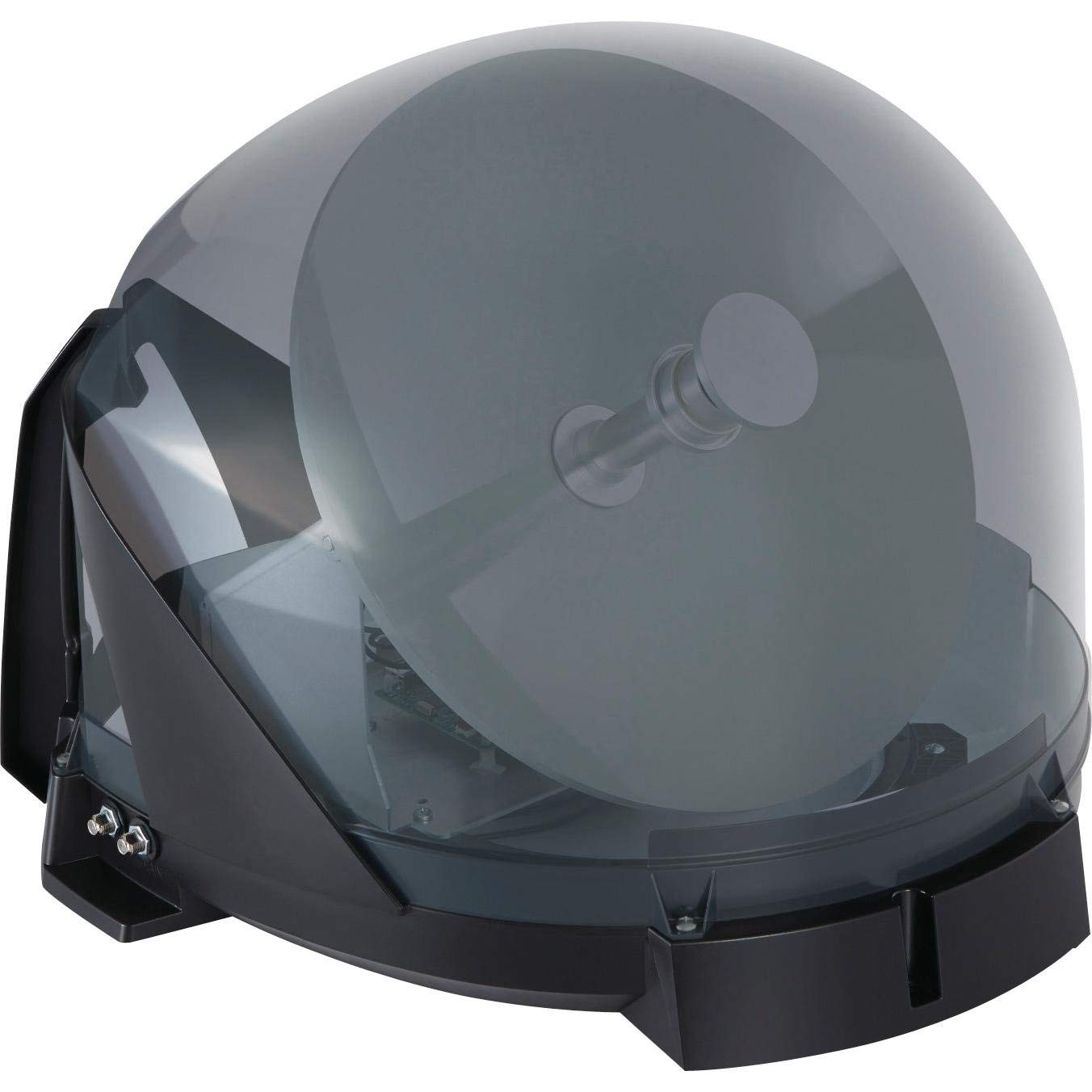
Image 1: The main Maxview Omnisat VuQube Auto II satellite dome unit.

Image 2: The compact control unit for the Maxview Omnisat VuQube Auto II.
പ്ലെയ്സ്മെൻ്റും മൗണ്ടിംഗും
Choose a location for the VuQube unit that has a clear line of sight to the southern sky, free from obstructions like trees or buildings. The unit can be placed on the ground or permanently mounted on a vehicle.
- പോർട്ടബിൾ ഉപയോഗം: Place the unit on a stable, level surface. Ensure cables are not a tripping hazard.
- സ്ഥിരമായ മൗണ്ടിംഗ്: For permanent installation, use the provided mounting brackets and hardware. Securely attach the unit to the roof or rear of your vehicle, ensuring all connections are weatherproof.

Image 3: The VuQube Auto II unit securely mounted on the back of a motorhome.

Image 4: The VuQube Auto II unit positioned on the ground for portable use near a motorhome.
സിസ്റ്റം ബന്ധിപ്പിക്കുന്നു
Connect the VuQube Auto II unit to the control unit, and then connect the control unit to your television or satellite receiver.
- Connect the coaxial cable from the VuQube Auto II unit to the "IN" port on the control unit.
- Connect a coaxial cable from the "OUT1" or "OUT2" port on the control unit to your satellite receiver or TV (if it has an integrated satellite tuner).
- Connect the power cable from the control unit to a 12V DC power source (e.g., a cigarette lighter socket in your vehicle).
പ്രവർത്തന നിർദ്ദേശങ്ങൾ
മാക്സ്view Omnisat VuQube Auto II is designed for simple, one-button operation.
Automatic Satellite Search
- Ensure all cables are securely connected and the control unit is powered on.
- Press the designated search button on the control unit. The VuQube Auto II will automatically begin scanning for available satellites.
- The system will typically lock onto the strongest signal for the pre-programmed satellites (Astra1, Astra2, Astra3, Hotbird).
- Once a satellite is found and locked, the indicator light on the control unit will confirm reception.
- Tune your TV or satellite receiver to the desired channel.

Image 5: Enjoying satellite TV outdoors with the Maxview Omnisat VuQube Auto II system.
Satellite Selection (if applicable)
Some control units may offer options to manually select a specific satellite if multiple are available or if you wish to prioritize a particular one. Refer to your control unit's specific interface for detailed instructions on manual satellite selection.
മെയിൻ്റനൻസ്
To ensure the longevity and optimal performance of your Maxview Omnisat VuQube Auto II, follow these maintenance guidelines:
- വൃത്തിയാക്കൽ: Wipe the exterior of the VuQube unit with a soft, damp തുണി. സി. ഫൈബറിനു കേടുവരുത്തുന്ന അബ്രാസീവ് ക്ലീനറുകളോ ലായകങ്ങളോ ഒഴിവാക്കുക.asing.
- കേബിൾ പരിശോധന: Regularly check all cables for signs of wear, fraying, or damage. Replace any damaged cables immediately to prevent signal loss or electrical issues.
- സംഭരണം: When not in use, especially during off-season, store the portable unit in a dry, protected environment. If permanently mounted, ensure it is clean and free from debris.
- ഫേംവെയർ അപ്ഡേറ്റുകൾ: Periodically check the Maxview website for any available firmware updates for your control unit. Updates can improve performance and add new features.
ട്രബിൾഷൂട്ടിംഗ്
If you encounter issues with your VuQube Auto II, refer to the following common problems and solutions:
| പ്രശ്നം | സാധ്യമായ കാരണം | പരിഹാരം |
|---|---|---|
| സിഗ്നലോ ദുർബലമായ സിഗ്നലോ ഇല്ല. |
|
|
| യൂണിറ്റ് ഓണാക്കുന്നില്ല. |
|
|
| Satellite search fails to complete. |
|
|
സ്പെസിഫിക്കേഷനുകൾ
Detailed technical specifications for the Maxview Omnisat VuQube Auto II system:
| ഫീച്ചർ | വിശദാംശങ്ങൾ |
|---|---|
| മോഡൽ നമ്പർ | MXL023 |
| ഉൽപ്പന്ന അളവുകൾ (L x W x H) | 43 സെ.മീ x 49 സെ.മീ x 34 സെ.മീ |
| ഭാരം | 4 കി.ഗ്രാം |
| ആൻ്റിന തരം | ഉപഗ്രഹം |
| നിറം | ചാരനിറം |
| ചാനലുകളുടെ എണ്ണം | 2 (Output ports) |
| പ്രതിരോധം | 50 ഓം |
| പിന്തുണയ്ക്കുന്ന ഉപഗ്രഹങ്ങൾ | Astra1, Astra2, Astra3, Hotbird |

Image 6: Dimensional diagram of the VuQube Auto II unit.
വാറൻ്റിയും പിന്തുണയും
For warranty information and technical support, please refer to the official Maxview webസൈറ്റിൽ ബന്ധപ്പെടുകയോ അവരുടെ ഉപഭോക്തൃ സേവനവുമായി നേരിട്ട് ബന്ധപ്പെടുകയോ ചെയ്യുക. ഏതെങ്കിലും വാറന്റി ക്ലെയിമുകൾക്കായി നിങ്ങളുടെ വാങ്ങലിന്റെ തെളിവ് സൂക്ഷിക്കുക.
നിർമ്മാതാവ്: പരമാവധിview
Webസൈറ്റ്: www.maxview.co.uk