
1. ആമുഖം
വാങ്ങിയതിന് നന്ദി.asing the Craig Electronics CMA3594-OD Stereo Portable Speaker. This speaker features Bluetooth wireless technology, hands-free phone answering, and decorative color-changing lights. This manual provides essential information for setting up, operating, and maintaining your speaker.
ഉൾപ്പെടുത്തിയ ആക്സസറികൾ:
- 3.5mm Jack Aux-in Cable
- യുഎസ്ബി ചാർജിംഗ് കേബിൾ
2 സുരക്ഷാ വിവരങ്ങൾ
Please read these safety instructions carefully before using your speaker and retain them for future reference. Incorrect use may result in reduced performance, damage to the speaker, or hazards.
- സ്പീക്കറിനെ തീവ്രമായ താപനിലയിലോ, നേരിട്ടുള്ള സൂര്യപ്രകാശത്തിലോ, ഉയർന്ന ആർദ്രതയിലോ തുറന്നുകാട്ടരുത്.
- ഈ ഉൽപ്പന്നം വാട്ടർപ്രൂഫ് അല്ല. Avoid contact with water or other liquids.
- Do not disassemble or modify the speaker. This will void the warranty.
- Use only the provided USB charging cable for charging.
- ശക്തമായ കാന്തികക്ഷേത്രങ്ങളിൽ നിന്ന് സ്പീക്കറെ അകറ്റി നിർത്തുക.
- സ്പീക്കറെ ശക്തമായ ആഘാതങ്ങൾക്ക് വിധേയമാക്കുകയോ താഴെയിടുകയോ ചെയ്യുന്നത് ഒഴിവാക്കുക.
3. ഉൽപ്പന്നം കഴിഞ്ഞുview
സ്പീക്കറിന്റെ ഘടകങ്ങളും നിയന്ത്രണങ്ങളും സ്വയം പരിചയപ്പെടുത്തുക.

ചിത്രം 1: മുൻഭാഗം view of the Craig CMA3594-OD Stereo Portable Speaker, showcasing its cylindrical design and illuminated mesh with color-changing lights.
മികച്ച പാനൽ നിയന്ത്രണങ്ങൾ

Figure 2: Top panel of the speaker showing touch-sensitive controls for power, volume, light modes, and playback.
- പവർ ബട്ടൺ (⏻): സ്പീക്കർ ഓൺ/ഓഫ് ചെയ്യാൻ അമർത്തിപ്പിടിക്കുക.
- Play/Pause/Call Button (▶/‖/📞): Press to play or pause music. Press to answer or end a phone call.
- വോളിയം കുറയ്ക്കൽ / മുമ്പത്തെ ട്രാക്ക് (-): ശബ്ദം കുറയ്ക്കാൻ അമർത്തുക. മുമ്പത്തെ ട്രാക്കിലേക്ക് പോകാൻ അമർത്തിപ്പിടിക്കുക.
- വോളിയം കൂട്ടുക / അടുത്ത ട്രാക്ക് (+): ശബ്ദം കൂട്ടാൻ അമർത്തുക. അടുത്ത ട്രാക്കിലേക്ക് പോകാൻ അമർത്തിപ്പിടിക്കുക.
- ലൈറ്റ് മോഡ് ബട്ടൺ (💡): Press to cycle through different color-changing light modes.
റിയർ പാനൽ പോർട്ടുകൾ
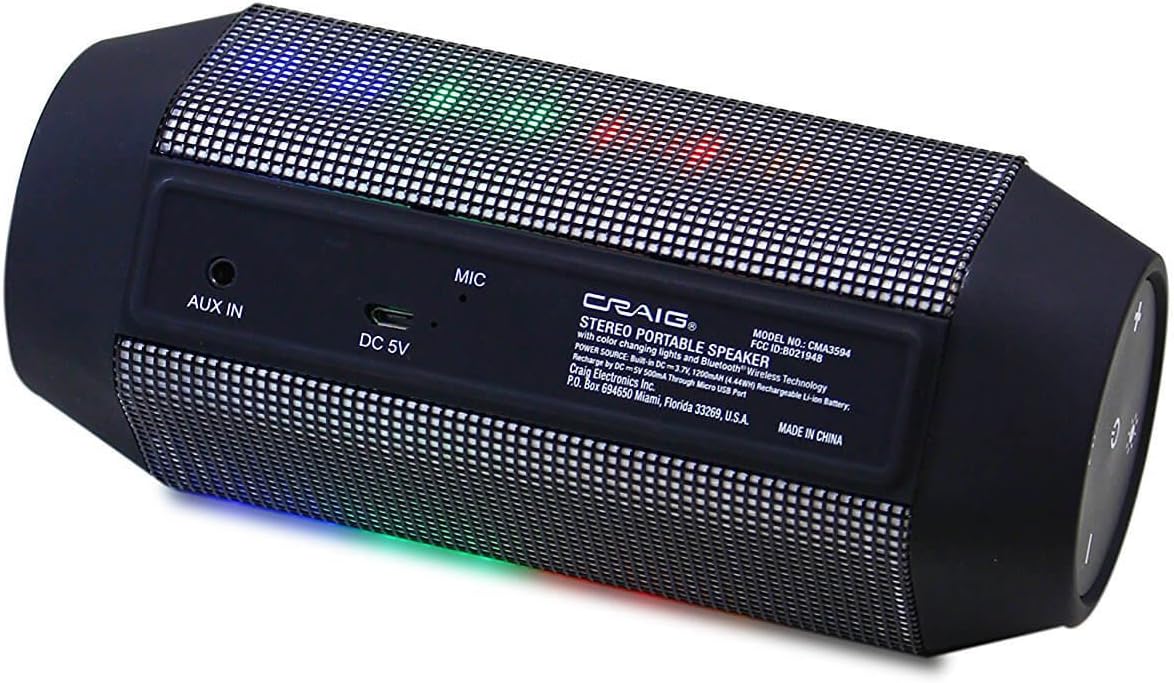
Figure 3: Rear panel of the speaker displaying the AUX IN port, DC 5V charging port, and microphone.
- ഓക്സ് ഇൻ: 3.5mm audio input for connecting external audio devices.
- ഡിസി 5 വി: സ്പീക്കർ ചാർജ് ചെയ്യുന്നതിനുള്ള മൈക്രോ യുഎസ്ബി പോർട്ട്.
- MIC: ഹാൻഡ്സ് ഫ്രീ കോളിംഗിനായി ബിൽറ്റ്-ഇൻ മൈക്രോഫോൺ.
4. സജ്ജീകരണം
4.1 സ്പീക്കർ ചാർജ് ചെയ്യുന്നു
- Connect the small end of the provided USB charging cable to the DC 5V port on the rear of the speaker.
- USB ചാർജിംഗ് കേബിളിന്റെ വലിയ അറ്റം ഒരു USB പവർ അഡാപ്റ്ററുമായി (ഉൾപ്പെടുത്തിയിട്ടില്ല) അല്ലെങ്കിൽ ഒരു കമ്പ്യൂട്ടറിന്റെ USB പോർട്ടുമായി ബന്ധിപ്പിക്കുക.
- The charging indicator light (usually red) will illuminate to show that the speaker is charging.
- Once fully charged, the indicator light will turn off or change color (refer to specific product behavior if different).
The speaker has a built-in rechargeable battery. A full charge typically takes 2-3 hours.
4.2 പവർ ഓൺ/ഓഫ്
- പവർ ഓണാക്കാൻ: പവർ ബട്ടൺ അമർത്തിപ്പിടിക്കുക (⏻) for approximately 3 seconds. You will hear an audible prompt, and the lights will activate.
- പവർ ഓഫ് ചെയ്യാൻ: പവർ ബട്ടൺ അമർത്തിപ്പിടിക്കുക (⏻) for approximately 3 seconds. You will hear an audible prompt, and the lights will turn off.
5. പ്രവർത്തന നിർദ്ദേശങ്ങൾ
5.1 ബ്ലൂടൂത്ത് ജോടിയാക്കൽ
ആദ്യമായി പവർ ഓൺ ചെയ്യുമ്പോഴോ ഒരു ഉപകരണവും കണക്റ്റ് ചെയ്തിട്ടില്ലെങ്കിലോ സ്പീക്കർ സ്വയമേവ ബ്ലൂടൂത്ത് ജോടിയാക്കൽ മോഡിലേക്ക് പ്രവേശിക്കും.

Figure 4: The portable speaker shown wirelessly connected to a smartphone, indicating active Bluetooth pairing.
- Ensure the speaker is powered on and in pairing mode (a blue LED indicator may flash, and you might hear an audible prompt).
- On your Bluetooth-enabled device (smartphone, tablet, laptop, etc.), go to the Bluetooth settings menu.
- ഇതിനായി തിരയുക available devices. The speaker will appear as "CMA3594-OD" or similar.
- ജോടിയാക്കൽ ആരംഭിക്കാൻ ലിസ്റ്റിൽ നിന്ന് സ്പീക്കർ തിരഞ്ഞെടുക്കുക.
- Once successfully paired, you will hear a confirmation tone, and the blue LED indicator will become solid.
- ഇപ്പോൾ നിങ്ങളുടെ ഉപകരണത്തിൽ നിന്ന് സ്പീക്കറിലൂടെ ഓഡിയോ പ്ലേ ചെയ്യാൻ കഴിയും.
Note: The speaker will attempt to reconnect to the last paired device automatically when powered on.
5.2 ഓക്സ്-ഇൻ കണക്ഷൻ
To play audio from devices without Bluetooth capability:
- Connect one end of the provided 3.5mm Aux-in cable to the AUX IN port on the speaker.
- Connect the other end of the 3.5mm Aux-in cable to the headphone jack or audio output of your external audio device.
- സ്പീക്കർ സ്വയമേവ ഓക്സ്-ഇൻ മോഡിലേക്ക് മാറും.
- നിങ്ങളുടെ കണക്റ്റുചെയ്ത ഉപകരണത്തിൽ നിന്ന് പ്ലേബാക്കും വോളിയവും നിയന്ത്രിക്കുക.
5.3 Hands-free Phone Answering
When connected via Bluetooth to a smartphone:
- ഒരു കോളിന് ഉത്തരം നൽകാൻ: Press the Play/Pause/Call Button (📞) ഒരിക്കൽ.
- ഒരു കോൾ അവസാനിപ്പിക്കാൻ: Press the Play/Pause/Call Button (📞) ഒരു കോളിനിടെ ഒരിക്കൽ.
- ഒരു കോൾ നിരസിക്കാൻ: Press and hold the Play/Pause/Call Button (📞) 2 സെക്കൻഡ് നേരത്തേക്ക്.
ബിൽറ്റ്-ഇൻ മൈക്രോഫോൺ വ്യക്തമായ ആശയവിനിമയം അനുവദിക്കുന്നു.
5.4 ലൈറ്റ് മോഡുകൾ
The speaker features decorative color-changing lights.
- Press the Light Mode Button (💡) to cycle through various light patterns and colors.
- Continue pressing to find your preferred light display or to turn the lights off.
5.5 വോളിയം നിയന്ത്രണം
- Press the Volume Up Button (+) to increase the volume.
- Press the Volume Down Button (-) to decrease the volume.
6. പരിപാലനം
Proper care ensures the longevity of your speaker.
- വൃത്തിയാക്കൽ: Use a soft, dry cloth to wipe the exterior of the speaker. Do not use liquid cleaners or abrasive materials.
- സംഭരണം: ദീർഘനേരം ഉപയോഗിക്കാത്തപ്പോൾ, സ്പീക്കർ തണുത്തതും വരണ്ടതുമായ സ്ഥലത്ത് സൂക്ഷിക്കുക, നേരിട്ടുള്ള സൂര്യപ്രകാശത്തിൽ നിന്നും കടുത്ത താപനിലയിൽ നിന്നും അകറ്റി നിർത്തുക.
- ബാറ്ററി കെയർ: To maintain battery life, fully charge the speaker before storing it for long periods and recharge it every few months if not in regular use.
7. പ്രശ്നപരിഹാരം
നിങ്ങളുടെ സ്പീക്കറിൽ പ്രശ്നങ്ങൾ നേരിടുകയാണെങ്കിൽ, ഇനിപ്പറയുന്ന പൊതുവായ പ്രശ്നങ്ങളും പരിഹാരങ്ങളും പരിശോധിക്കുക:
| പ്രശ്നം | പരിഹാരം |
|---|---|
| സ്പീക്കർ ഓണാകില്ല. | Ensure the battery is charged. Connect the USB charging cable and allow it to charge for at least 30 minutes before attempting to power on again. |
| ബ്ലൂടൂത്ത് വഴി ജോടിയാക്കാൻ കഴിയില്ല. | Make sure the speaker is in pairing mode (flashing LED). Ensure Bluetooth is enabled on your device and it is within 32 feet of the speaker. Forget the device from your phone's Bluetooth list and try pairing again. |
| സ്പീക്കറിൽ നിന്ന് ശബ്ദമില്ല. | Check the volume level on both the speaker and your connected device. Ensure the correct input mode (Bluetooth or Aux-in) is selected. If using Aux-in, ensure the cable is fully inserted. |
| ശബ്ദം വികലമാണ്. | Reduce the volume on both the speaker and your connected device. Ensure the speaker is not too far from the Bluetooth device or that there are no obstructions. |
| ലൈറ്റുകൾ പ്രവർത്തിക്കുന്നില്ല. | Press the Light Mode Button (💡) to cycle through modes or turn them on. Ensure the speaker has sufficient battery charge. |
8 സ്പെസിഫിക്കേഷനുകൾ
| ഫീച്ചർ | സ്പെസിഫിക്കേഷൻ |
|---|---|
| മോഡൽ നമ്പർ | CMA3594-OD |
| കണക്റ്റിവിറ്റി ടെക്നോളജി | ബ്ലൂടൂത്ത്, ഓക്സിലറി (3.5mm ജാക്ക്) |
| വയർലെസ് ശ്രേണി | 32 അടി (10 മീറ്റർ) വരെ |
| ഓഡിയോ put ട്ട്പുട്ട് മോഡ് | സ്റ്റീരിയോ (2.0 ചാനൽ) |
| പവർ ഉറവിടം | Battery Powered (Built-in Rechargeable Battery) |
| നിയന്ത്രണ രീതി | ടച്ച് ബട്ടണുകൾ |
| പ്രത്യേക സവിശേഷതകൾ | Portable, Hands-free Phone Answering, Color Changing Lights |
| അനുയോജ്യമായ ഉപകരണങ്ങൾ | ഡെസ്ക്ടോപ്പ്, ലാപ്ടോപ്പ്, എംപി3 പ്ലെയർ, സ്മാർട്ട്ഫോൺ, ടാബ്ലെറ്റ് |
| പ്രതിരോധം | 4 ഓം |
| ഉൽപ്പന്ന അളവുകൾ | 2.5 x 2.5 x 7 ഇഞ്ച് (ഏകദേശം) |
| ഇനത്തിൻ്റെ ഭാരം | 1.05 പൗണ്ട് (ഏകദേശം) |
| വാട്ടർപ്രൂഫ് | ഇല്ല |
9. വാറൻ്റിയും പിന്തുണയും
For warranty information and technical support, please refer to the documentation included with your purchase or visit the official Craig Electronics webസൈറ്റ്. വാറന്റി ക്ലെയിമുകൾക്കായി നിങ്ങളുടെ വാങ്ങലിന്റെ തെളിവ് സൂക്ഷിക്കുക.