
Spider M-BTSP-L802
Spider Waterproof Bluetooth Speaker
Model: M-BTSP-L802
ആമുഖം
Thank you for choosing the Spider Waterproof Bluetooth Speaker. This manual provides detailed instructions for the proper use, maintenance, and troubleshooting of your new speaker. Please read this manual thoroughly before operating the device to ensure optimal performance and longevity.
സുരക്ഷാ വിവരങ്ങൾ
- തീവ്രമായ താപനിലയിലോ നേരിട്ടുള്ള സൂര്യപ്രകാശത്തിലോ സ്പീക്കറിനെ ദീർഘനേരം തുറന്നുകാട്ടരുത്.
- സ്പീക്കറെ ശക്തമായ ആഘാതങ്ങൾക്ക് വിധേയമാക്കുകയോ താഴെയിടുകയോ ചെയ്യുന്നത് ഒഴിവാക്കുക.
- സ്പീക്കർ ഡിസ്അസംബ്ലിംഗ് ചെയ്യാനോ പരിഷ്കരിക്കാനോ ശ്രമിക്കരുത്. ഇത് വാറന്റി അസാധുവാക്കും.
- മെഡിക്കൽ ഉപകരണങ്ങളിൽ നിന്ന് സ്പീക്കറെ അകറ്റി നിർത്തുക.
- Ensure all ports are securely closed when using the speaker near water to maintain its waterproof rating.
പാക്കേജ് ഉള്ളടക്കം
പാക്കേജിൽ ഇനിപ്പറയുന്ന ഇനങ്ങൾ ഉണ്ടോ എന്ന് പരിശോധിക്കുക:
- Spider Waterproof Bluetooth Speaker (M-BTSP-L802)
- USB Charging Cable (USB-A to 3.5mm/USB-B)
- കാരാബിനർ ക്ലിപ്പ്
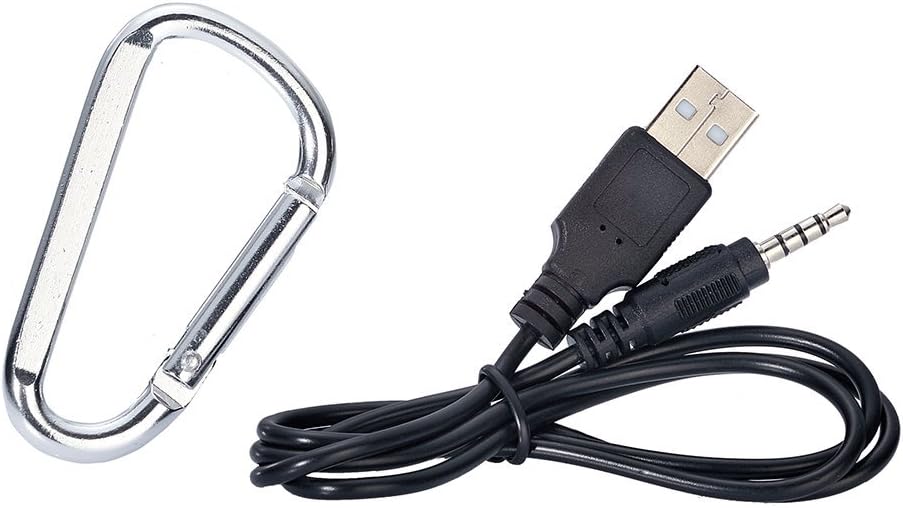
Image: Included USB charging cable and carabiner clip.
ഉൽപ്പന്നം കഴിഞ്ഞുview
നിങ്ങളുടെ സ്പീക്കറിന്റെ വിവിധ ഭാഗങ്ങളും നിയന്ത്രണങ്ങളും പരിചയപ്പെടുക.
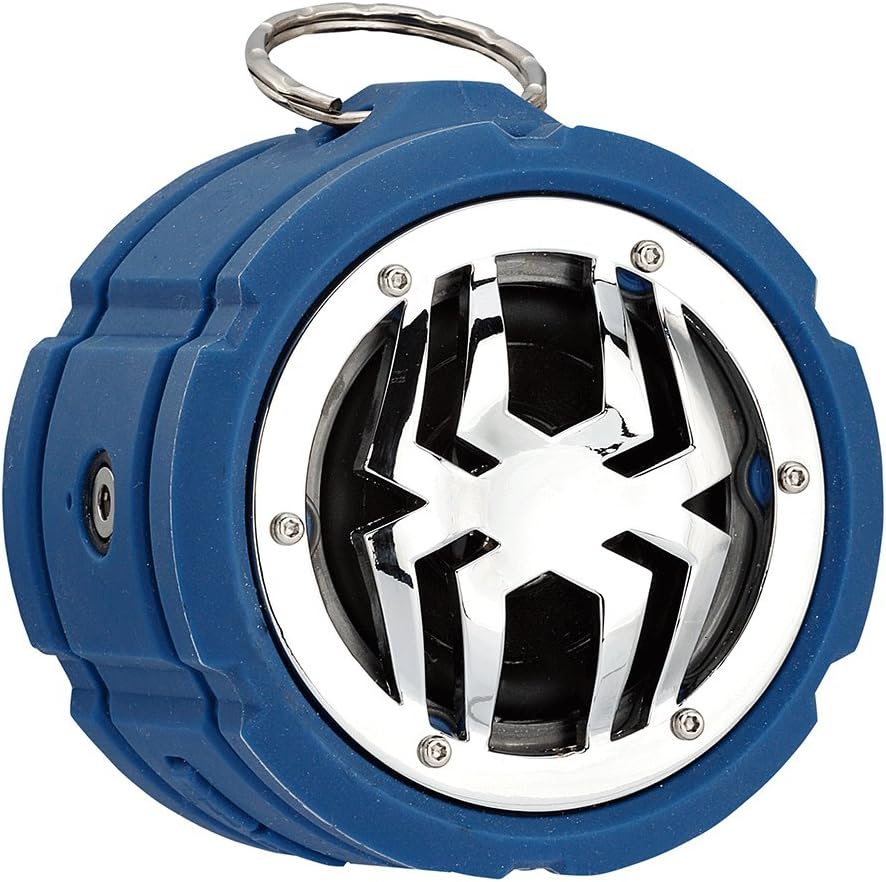
ചിത്രം: മുൻഭാഗം view of the Spider Waterproof Bluetooth Speaker, showing the speaker grille with spider design and the top ring for the carabiner.
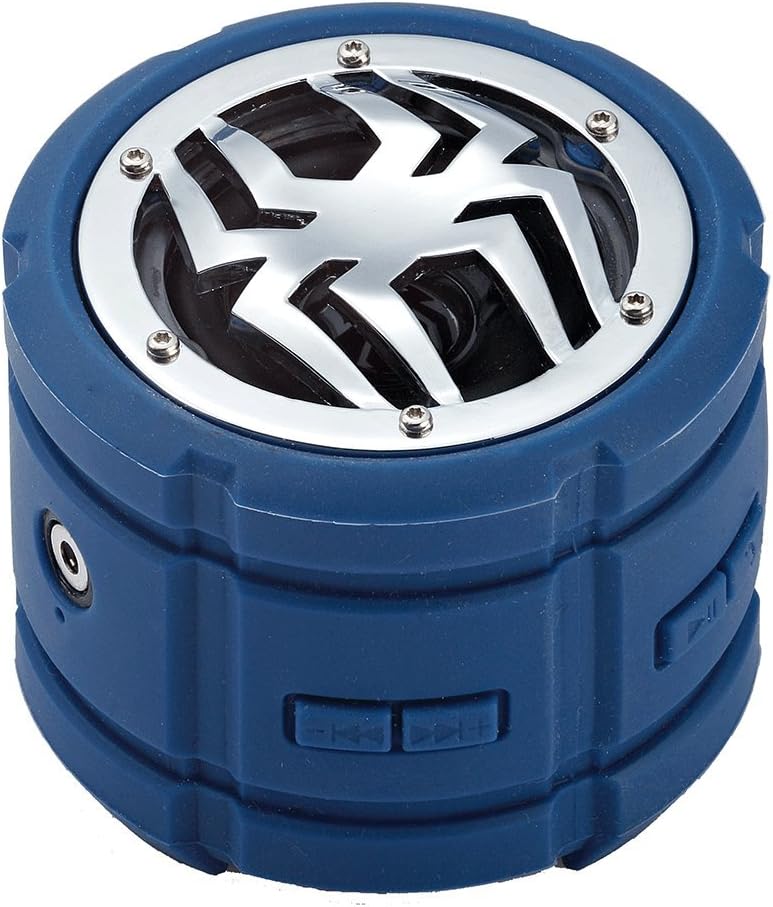
ചിത്രം: വശം view of the speaker, highlighting the control buttons for power, volume, and track navigation.

ചിത്രം: പിൻഭാഗം view of the speaker, showing the covered charging port and audio input jack.
സജ്ജമാക്കുക
1. സ്പീക്കറിൽ നിന്ന് നിരക്ക് ഈടാക്കുന്നു
Before first use, fully charge the speaker. Connect the small end of the USB charging cable to the speaker's charging port (located under the protective flap) and the USB-A end to a USB power adapter (not included) or a computer's USB port. The charging indicator light will illuminate during charging and turn off when fully charged.
2. പവർ ഓൺ/ഓഫ്
- പവർ ഓണാക്കാൻ: Press and hold the Power button (usually indicated by a power symbol) for approximately 3 seconds until you hear an audible prompt or see an indicator light.
- പവർ ഓഫ് ചെയ്യാൻ: Press and hold the Power button again for approximately 3 seconds until you hear an audible prompt or the indicator light turns off.
3. ബ്ലൂടൂത്ത് ജോടിയാക്കൽ
- Ensure the speaker is powered on and in Bluetooth pairing mode (indicated by a flashing LED light). If not, briefly press the Bluetooth button (if available) or power cycle the device.
- നിങ്ങളുടെ മൊബൈൽ ഉപകരണത്തിൽ (സ്മാർട്ട്ഫോൺ, ടാബ്ലെറ്റ്, ലാപ്ടോപ്പ്), ബ്ലൂടൂത്ത് പ്രവർത്തനക്ഷമമാക്കി ലഭ്യമായ ഉപകരണങ്ങൾക്കായി തിരയുക.
- Select "Spider BT802" or similar name from the list of found devices.
- Once paired, the speaker will provide an audible confirmation, and the LED indicator will stop flashing and remain solid.
4. Connecting via Audio Jack (AUX)
For devices without Bluetooth, you can use the 3.5mm audio jack. Connect one end of a 3.5mm audio cable (not included) to the speaker's AUX-in port and the other end to your audio source's headphone jack. The speaker will automatically switch to AUX mode.
പ്രവർത്തിക്കുന്നു
സംഗീത പ്ലേബാക്ക്
- പ്ലേ/താൽക്കാലികമായി നിർത്തുക: Press the Play/Pause button (usually a triangle or two vertical bars).
- അടുത്ത ട്രാക്ക്: Press the 'Next Track' button (usually a double arrow pointing right).
- മുമ്പത്തെ ട്രാക്ക്: Press the 'Previous Track' button (usually a double arrow pointing left).
- വോളിയം കൂട്ടുക: Press the 'Volume Up' button (usually '+').
- വോളിയം താഴേക്ക്: Press the 'Volume Down' button (usually '-').
Call Functions (Built-in Microphone)
The speaker features a built-in microphone, allowing you to answer calls hands-free when connected via Bluetooth.
- മറുപടി കോൾ: ഒരു കോൾ വരുമ്പോൾ പ്ലേ/പോസ് ബട്ടൺ ഒരിക്കൽ അമർത്തുക.
- കോൾ അവസാനിപ്പിക്കുക: ഒരു കോൾ സമയത്ത് പ്ലേ/പോസ് ബട്ടൺ ഒരിക്കൽ അമർത്തുക.
- കോൾ നിരസിക്കുക: Press and hold the Play/Pause button for 2 seconds when a call comes in.
മെയിൻ്റനൻസ്
- വൃത്തിയാക്കൽ: സ്പീക്കർ വൃത്തിയാക്കാൻ മൃദുവായതും ഉണങ്ങിയതുമായ തുണി ഉപയോഗിക്കുക. കഠിനമായ അഴുക്കിന്, അല്പം ഡി.amp തുണി ഉപയോഗിക്കാം. കഠിനമായ രാസവസ്തുക്കളോ അബ്രസീവ് ക്ലീനറുകളോ ഉപയോഗിക്കരുത്.
- സംഭരണം: ദീർഘനേരം ഉപയോഗിക്കാത്തപ്പോൾ നേരിട്ടുള്ള സൂര്യപ്രകാശത്തിൽ നിന്നും കടുത്ത താപനിലയിൽ നിന്നും മാറി തണുത്തതും വരണ്ടതുമായ സ്ഥലത്ത് സ്പീക്കർ സൂക്ഷിക്കുക.
- ബാറ്ററി കെയർ: To prolong battery life, avoid fully discharging the speaker frequently. Charge it regularly, even if not in use.
ട്രബിൾഷൂട്ടിംഗ്
| പ്രശ്നം | സാധ്യമായ കാരണം | പരിഹാരം |
|---|---|---|
| സ്പീക്കർ പവർ ഓൺ ചെയ്യുന്നില്ല. | കുറഞ്ഞ ബാറ്ററി. | സ്പീക്കർ പൂർണ്ണമായും ചാർജ് ചെയ്യുക. |
| ബ്ലൂടൂത്ത് വഴി ജോടിയാക്കാൻ കഴിയില്ല. | സ്പീക്കർ ജോടിയാക്കൽ മോഡിൽ ഇല്ല; ഉപകരണ ബ്ലൂടൂത്ത് ഓഫാണ്; ഉപകരണത്തിൽ നിന്ന് വളരെ അകലെയാണ്. | സ്പീക്കർ പെയറിംഗ് മോഡിലാണെന്ന് ഉറപ്പാക്കുക; നിങ്ങളുടെ ഉപകരണത്തിൽ ബ്ലൂടൂത്ത് ഓണാക്കുക; സ്പീക്കർ ഉപകരണത്തിന് അടുത്തേക്ക് നീക്കുക (10 മീറ്ററിനുള്ളിൽ). |
| ശബ്ദമില്ല. | Volume too low; Incorrect input mode; Device not playing. | Increase speaker and device volume; Ensure correct mode (Bluetooth/AUX); Check if audio is playing on your device. |
| മോശം ശബ്ദ നിലവാരം. | തടസ്സം; ബാറ്ററി കുറവാണ്. | Move away from other electronic devices; Charge the speaker. |
സ്പെസിഫിക്കേഷനുകൾ
| ഫീച്ചർ | വിശദാംശങ്ങൾ |
|---|---|
| മോഡൽ നമ്പർ | M-BTSP-L802 |
| കണക്റ്റിവിറ്റി ടെക്നോളജി | ബ്ലൂടൂത്ത്, 3.5mm ഓഡിയോ ജാക്ക് |
| പ്രത്യേക സവിശേഷതകൾ | Waterproof, Built-in Microphone, Multi-room Audio (if supported by source) |
| ഓഡിയോ put ട്ട്പുട്ട് മോഡ് | സ്റ്റീരിയോ |
| പരമാവധി സ്പീക്കർ പവർ ഔട്ട്പുട്ട് | 80 വാട്ട്സ് |
| സ്റ്റാൻഡ്ബൈ സമയം | 120 മണിക്കൂർ |
| അളവുകൾ (ഏകദേശം) | 11.68 x 9.4 x 7.62 സെ.മീ |
| ഭാരം (ഏകദേശം) | 362.87 ഗ്രാം |
| നിറം | നീല |
വാറൻ്റിയും പിന്തുണയും
This Spider Waterproof Bluetooth Speaker (Model M-BTSP-L802) comes with a 1 വർഷത്തെ നിർമ്മാതാവിൻ്റെ വാറൻ്റി വാങ്ങിയ തീയതി മുതൽ. സാധാരണ ഉപയോഗത്തിലുള്ള മെറ്റീരിയലുകളിലെയും വർക്ക്മാൻഷിപ്പുകളിലെയും വൈകല്യങ്ങൾ ഈ വാറന്റി ഉൾക്കൊള്ളുന്നു.
വാറൻ്റി ഉൾപ്പെടുന്നില്ല:
- അപകടം, ദുരുപയോഗം, ദുരുപയോഗം, വെള്ളപ്പൊക്കം, തീ, ഭൂകമ്പം അല്ലെങ്കിൽ മറ്റ് ബാഹ്യ കാരണങ്ങളാൽ ഉണ്ടാകുന്ന നാശനഷ്ടങ്ങൾ.
- Damage caused by operating the product outside the permitted or intended uses described by Spider.
- Damage caused by service performed by anyone who is not a representative of Spider or an authorized Spider Service Provider.
For warranty claims or technical support, please contact your retailer or the manufacturer directly. Please retain your proof of purchase for warranty validation.
Ask a question about this manual
Ask about setup, troubleshooting, compatibility, parts, safety, or missing instructions. Manuals+ will review the question and use this page’s manual context to help answer it.