
1. ആമുഖം
This manual provides comprehensive instructions for the installation, operation, and maintenance of your Vanxse BX2812 CCTV Mini HD 960H 1000TVL Security Camera. Please read this manual carefully before using the product to ensure proper functionality and safety. Keep this manual for future reference.
2 സുരക്ഷാ വിവരങ്ങൾ
- Ensure the power supply matches the camera's requirements (DC 12V).
- Do not expose the camera to extreme temperatures, humidity, or direct water unless housed in a waterproof enclosure.
- Avoid placing the camera in areas with strong electromagnetic interference.
- വൃത്തിയാക്കുന്നതിനോ അറ്റകുറ്റപ്പണികൾ നടത്തുന്നതിനോ മുമ്പ് വൈദ്യുതി വിച്ഛേദിക്കുക.
- ക്യാമറ വേർപെടുത്താനോ പരിഷ്കരിക്കാനോ ശ്രമിക്കരുത്. എല്ലാ സേവനങ്ങളും യോഗ്യതയുള്ള ഉദ്യോഗസ്ഥരെ ഏൽപ്പിക്കുക.
3. ഉൽപ്പന്നം കഴിഞ്ഞുview
The Vanxse BX2812 is a compact CCTV security camera featuring a 1/3 CCD 960H 1000TVL sensor and a 2.8-12mm varifocal auto-iris lens. It is designed for both indoor and outdoor surveillance applications when used with appropriate housing.
3.1 പാക്കേജ് ഉള്ളടക്കം
- Vanxse BX2812 Security Camera
- ഉപയോക്തൃ മാനുവൽ (ഈ പ്രമാണം)
- Note: Power adapter and video cables are typically sold separately.
3.2 ക്യാമറ ഘടകങ്ങൾ

Figure 1: Camera Components Overview
This image displays the Vanxse BX2812 camera with key components labeled, including the 2.8-12mm F1.4 Auto Iris lens, OSD menu control, BNC video output, Auto Iris port, and DC12V power input.
- Varifocal Lens (2.8-12mm F1.4 Auto Iris): Allows adjustment of focal length and zoom.
- OSD Menu Control: Button for accessing and navigating the On-Screen Display menu.
- BNC Video Output: Connector for analog video signal output to a DVR or monitor.
- Auto Iris Port: Connection for the auto-iris lens control.
- DC12V പവർ ഇൻപുട്ട്: Port for connecting the 12V DC power supply.
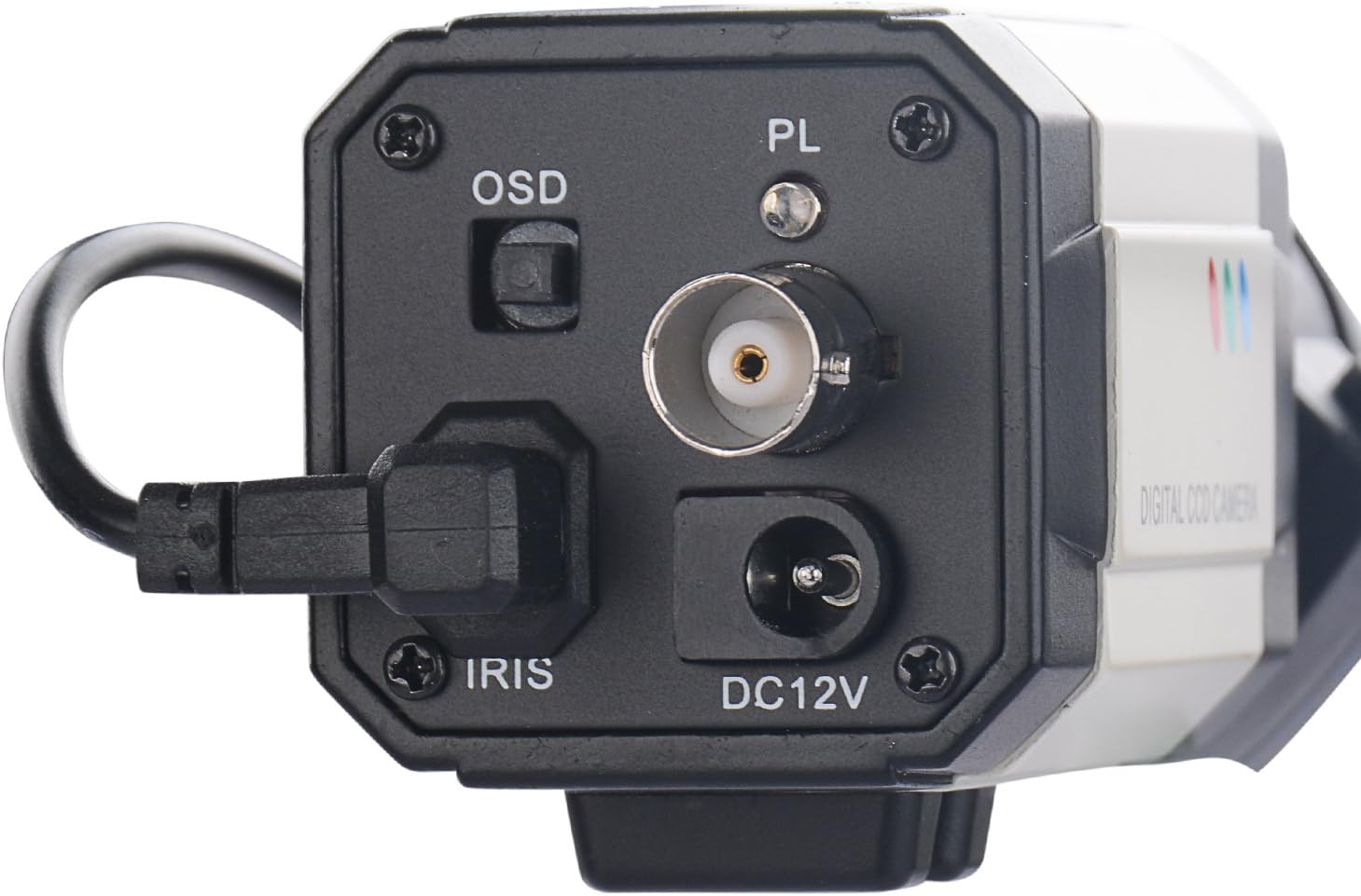
ചിത്രം 2: പിൻ പാനൽ കണക്ഷനുകൾ
ഒരു ക്ലോസപ്പ് view of the camera's rear panel, highlighting the OSD button, BNC video output, Auto Iris connection, and DC12V power input.
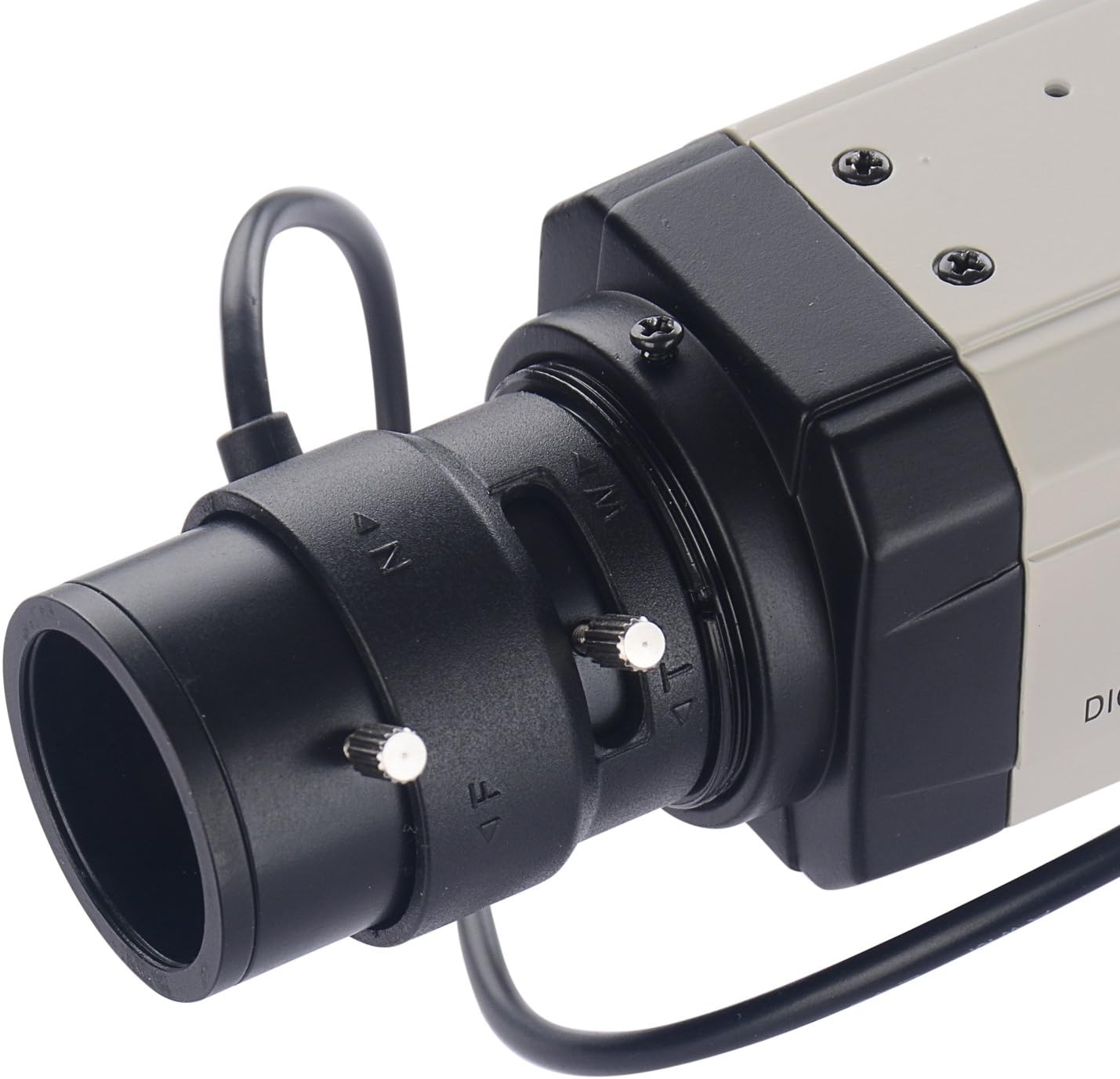
Figure 3: Varifocal Lens Adjustment
This image shows the adjustment screws on the varifocal lens, used for manually setting the zoom and focus.
4. സജ്ജീകരണവും ഇൻസ്റ്റാളേഷനും
4.1 ക്യാമറ മൗണ്ടിംഗ്
The BX2812 camera is designed for wall or ceiling mounting. Ensure the mounting surface is strong enough to support the camera's weight. Use appropriate screws and anchors for secure installation.

ചിത്രം 4: മുൻഭാഗം View ക്യാമറയുടെ
ഒരു വ്യക്തമായ view of the front of the Vanxse BX2812 camera, showing the lens and overall bullet box form factor.
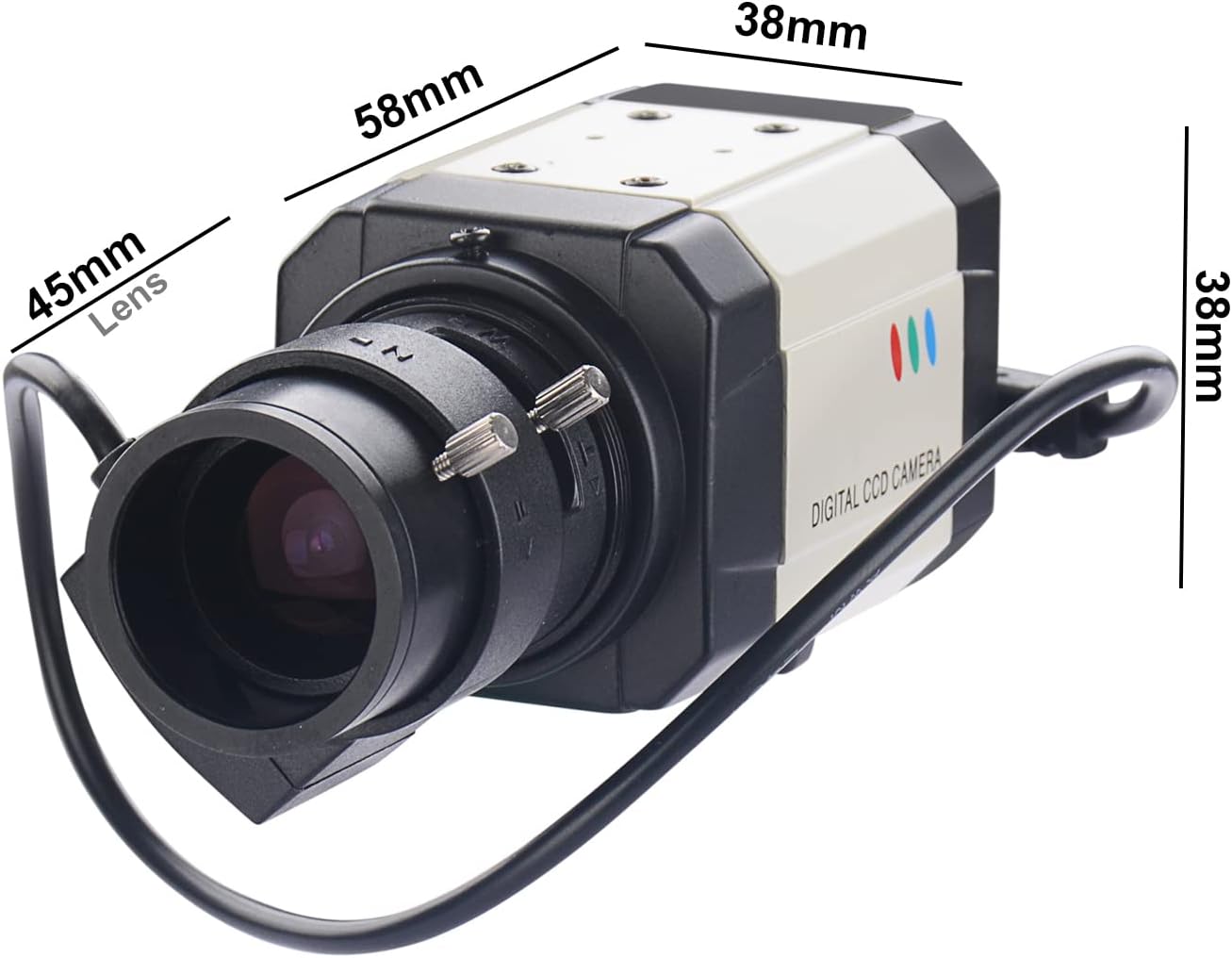
ചിത്രം 5: ക്യാമറ അളവുകൾ
This image provides the physical dimensions of the camera, including length, width, and height, which are useful for planning installation space.
4.2 ക്യാമറ കണക്ട് ചെയ്യുന്നു
- Connect the BNC video output of the camera to a compatible DVR or monitor using a BNC cable.
- Connect the auto-iris cable from the lens to the IRIS port on the camera body.
- Connect a DC 12V power adapter (not included) to the DC12V power input port.
- Ensure all connections are secure before powering on the camera.
Video 1: Unboxing and Connection Guide
This video demonstrates the unboxing process of the Vanxse BX2812 camera and provides a visual guide on how to connect the power and video cables to a monitor for initial setup and testing.
5. ഓപ്പറേഷൻ
5.1 Adjusting the Varifocal Lens
The 2.8-12mm varifocal lens allows you to adjust the field of view and focus. Use the adjustment screws on the lens barrel to achieve the desired zoom and sharpness. It is recommended to perform these adjustments while viewing the camera's output on a monitor.
5.2 OSD (ഓൺ-സ്ക്രീൻ ഡിസ്പ്ലേ) മെനു
The OSD menu provides access to various camera settings, including image adjustments, exposure, white balance, and more. To access the OSD menu, press the OSD button located on the rear panel of the camera. Navigate through the menu using the OSD button or external joystick if available, and confirm selections.
- ഇമേജ് സെൻസർ: 1/3 Color Super HAD CCD Effio-E processor.
- റെസലൂഷൻ: HD 960H 1000TVL.
- പകൽ/രാത്രി മോഡ്: The camera displays in color during the day.
6. പരിപാലനം
- വൃത്തിയാക്കൽ: Use a soft, dry cloth to clean the camera body. For the lens, use a lens cleaning solution and a microfiber cloth to avoid scratches.
- പരിസ്ഥിതി സംരക്ഷണം: If used outdoors, ensure the camera is protected by a suitable waterproof housing to prevent damage from weather elements.
- പതിവ് പരിശോധനകൾ: സുരക്ഷയ്ക്കും തേയ്മാനത്തിനും വേണ്ടി എല്ലാ കേബിൾ കണക്ഷനുകളും ഇടയ്ക്കിടെ പരിശോധിക്കുക.
7. പ്രശ്നപരിഹാരം
| പ്രശ്നം | സാധ്യമായ കാരണം | പരിഹാരം |
|---|---|---|
| വീഡിയോ സിഗ്നൽ ഇല്ല |
|
|
| Poor image quality / Blurry picture |
|
|
| ക്യാമറ ഓണാക്കുന്നില്ല |
|
|
8 സ്പെസിഫിക്കേഷനുകൾ
| ഫീച്ചർ | വിശദാംശങ്ങൾ |
|---|---|
| മോഡൽ നമ്പർ | BX2812 |
| ഇമേജ് സെൻസർ | 1/3 Color Super HAD CCD Effio-E processor |
| വീഡിയോ റെസല്യൂഷൻ | 960H 1000TVL (976(H)x494(V)) |
| ലെൻസ് | 2.8-12mm F1.4 Varifocal Auto Iris Lens |
| വീഡിയോ ഫോർമാറ്റ് | NTSC |
| പവർ ഉറവിടം | കോർഡഡ് ഇലക്ട്രിക് |
| വാല്യംtage | 12 വോൾട്ട് (DC) |
| വാട്ട്tage | 2.5 വാട്ട്സ് |
| കണക്റ്റിവിറ്റി ടെക്നോളജി | വയേർഡ് (BNC) |
| ഇൻഡോർ/ഔട്ട്ഡോർ ഉപയോഗം | Indoor (Outdoor with suitable housing) |
| മെറ്റീരിയൽ | അലുമിനിയം |
| അളവുകൾ (L x W x H) | 11.81 x 7.87 x 3.94 ഇഞ്ച് |
| ഇനത്തിൻ്റെ ഭാരം | 8.8 ഔൺസ് (0.25 കിലോഗ്രാം) |
| യു.പി.സി | 704256528102 |
9. വാറൻ്റിയും പിന്തുണയും
This product is manufactured with care to provide reliable performance. For any issues or technical assistance, please contact Vanxse customer support. The manufacturer offers a 100% satisfaction guarantee and 24/7 online technical support.
For further assistance, please refer to the seller's information or contact them directly:
- വിൽപ്പനക്കാരൻ: Vanxsemall
- ഓൺലൈൻ പിന്തുണ: Available 24/7 (as per product description)
Protection plans may be available for extended coverage. Please check with your retailer for details.