
1. ഓവർview
The HDWR HD-PS6C is a versatile 2-in-1 device that combines the functionality of a wireless barcode reader and a data collector. This integrated solution significantly enhances daily work comfort and convenience, making tasks easier and more efficient. It is designed for various applications requiring efficient 1D barcode scanning and data storage, such as inventory management, retail, and logistics.
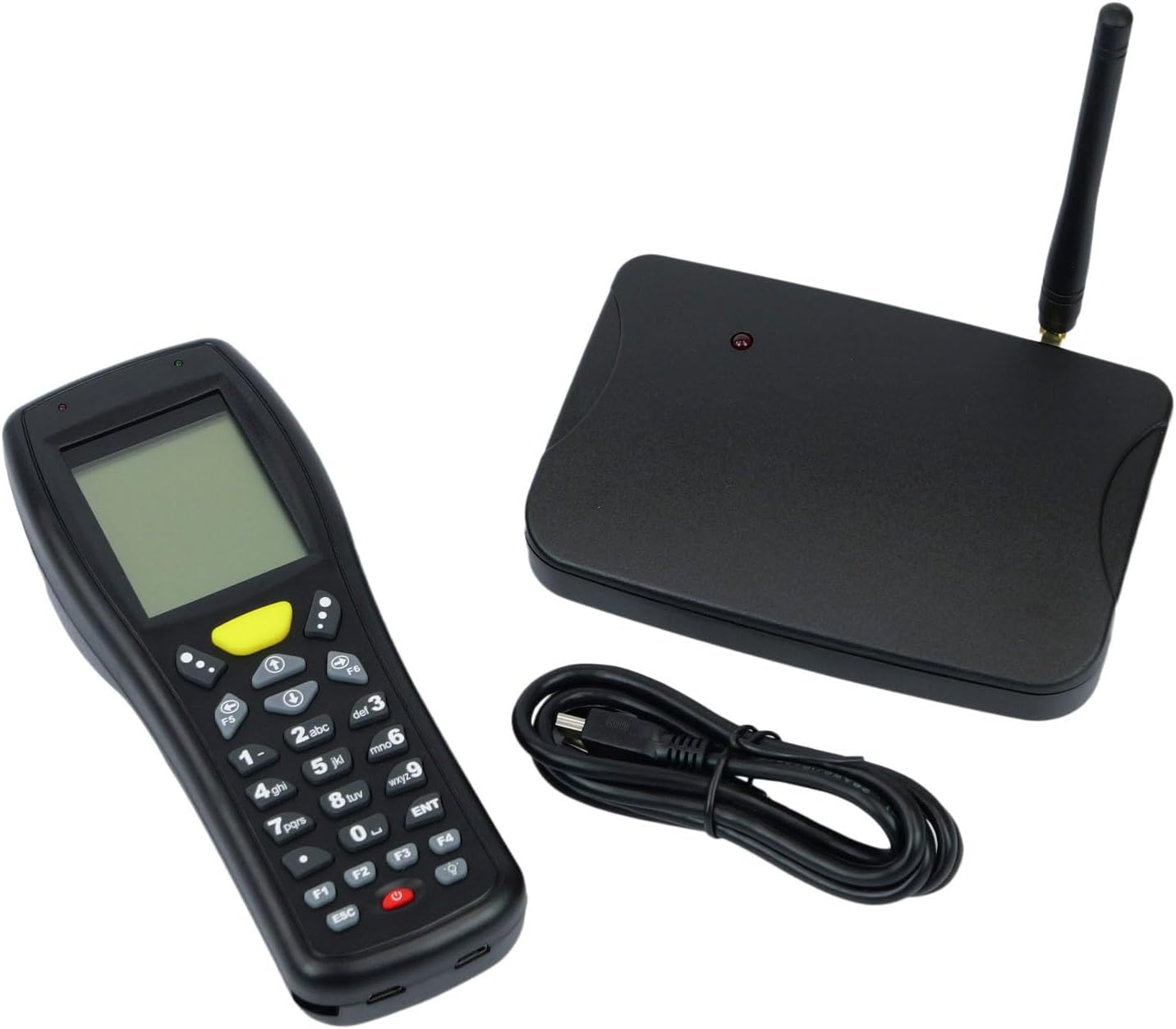
Image: The HDWR HD-PS6C wireless data collector shown with its wireless receiver and USB cable, illustrating the complete package.
2 പ്രധാന സവിശേഷതകൾ
- Two-in-One Functionality: Combines a wireless barcode reader and a data collector in a single device.
- ഉപയോക്തൃ-സൗഹൃദ ഇൻ്റർഫേസ്: Equipped with a clear screen and a practical keyboard for easy navigation and manual data entry, especially for damaged or unclear codes.
- ഇൻവെൻ്ററി മോഡ്: Allows storage of up to 50,000 scanned codes in its integrated memory, ideal for extensive inventory tasks.
- 1D ബാർകോഡ് അനുയോജ്യത: Supports a wide range of 1D barcode types including EAN13, EAN8, Code 39, Code 93, Code 128, Interleaved 2 of 5 (IT25), Codabar, UPCA, UPCE, and more.
- വിശാലമായ OS പിന്തുണ: Compatible with Windows XP/7/8/8.1/10, Android, and iOS operating systems.

Image: The HD-PS6C highlighting its dual functionality as a data collector and barcode scanner.

ചിത്രം: ഒരു ക്ലോസ്-അപ്പ് view of the integrated laser barcode scanner, capable of reading 1D codes.

Image: Visual representation of the wireless USB receiver, 50,000 code internal memory, and the clear screen with keyboard for easy navigation.
3. സജ്ജീകരണ ഗൈഡ്
3.1. പാക്കേജ് ഉള്ളടക്കം
ആരംഭിക്കുന്നതിന് മുമ്പ്, പാക്കേജിൽ എല്ലാ ഇനങ്ങളും ഉണ്ടെന്ന് ഉറപ്പാക്കുക:
- HDWR HD-PS6C Wireless Data Collector
- വയർലെസ് യുഎസ്ബി റിസീവർ
- USB കേബിൾ
- 2 AA ബാറ്ററികൾ (ഉൾപ്പെട്ടിരിക്കുന്നു)
3.2. ബാറ്ററി ഇൻസ്റ്റാളേഷൻ
- Locate the battery compartment on the back of the HD-PS6C device.
- ബാറ്ററി കമ്പാർട്ട്മെൻ്റ് കവർ തുറക്കുക.
- Insert the 2 AA batteries, ensuring correct polarity (+/-).
- ബാറ്ററി കമ്പാർട്ട്മെൻ്റ് കവർ സുരക്ഷിതമായി അടയ്ക്കുക.
3.3. വയർലെസ് റിസീവർ ബന്ധിപ്പിക്കുന്നു
- Plug the wireless USB receiver into an available USB port on your computer or host device.
- The system should automatically detect and install the necessary drivers. If not, refer to the Troubleshooting section.
3.4. പ്രാരംഭ പവർ ഓൺ
- Press and hold the power button (usually red) on the HD-PS6C until the screen illuminates.
- The device will boot up and display the main menu or a default mode.
വീഡിയോ: ഒരു ഓവർview of the HDWR HD-PS6C, showcasing its design, features, and how it sits on its charging/communication base. This video provides a visual introduction to the product.
4. പ്രവർത്തന നിർദ്ദേശങ്ങൾ
4.1. അടിസ്ഥാന നാവിഗേഷൻ
- Use the arrow keys (up, down, left, right) to navigate through menu options on the screen.
- Press the 'ENT' (Enter) key to select an option or confirm an action.
- Press the 'ESC' key to go back to the previous menu or cancel an operation.
- The numeric keypad can be used for manual data input.

ചിത്രം: മുൻഭാഗം view of the HDWR HD-PS6C, clearly showing the screen and the full alphanumeric keypad for navigation and data entry.
4.2. ഇൻവെന്ററി മോഡ്
In Inventory Mode, the device stores scanned barcodes in its internal memory for later transfer.
- From the main menu, select 'Inventory Mode' (or similar option).
- Point the scanner window at a 1D barcode and press the scan button (often a large yellow button or a trigger).
- The scanned code will appear on the screen and be stored in memory.
- Repeat for all items. The device can store up to 50,000 codes.
4.3. ബാർകോഡ് സ്കാനിംഗ്
The HD-PS6C is designed to read various 1D barcodes:
- EAN13, EAN8
- Code 39, Code 93, Code 128
- Interleaved 2 of 5 (IT25)
- കോഡബാർ
- UPCA, UPCE
- And other standard 1D codes.
Ensure the barcode is clean and well-lit for optimal scanning performance.
4.4. Manual Data Entry
If a barcode is damaged or unreadable, you can manually enter the code:
- Navigate to the manual entry option within the device's menu.
- Use the numeric and alphanumeric keys on the keypad to type the barcode.
- Press 'ENT' to confirm and save the entry.
4.5. ഡാറ്റ കൈമാറ്റം
To transfer collected data to your computer:
- Connect the HD-PS6C to your computer using the provided USB cable.
- On the device, select the 'Data Transfer' or 'Upload' option.
- Follow the on-screen prompts or software instructions on your computer to complete the transfer. Data is typically transferred as a text file.
5. പരിപാലനം
5.1. വൃത്തിയാക്കൽ
- മൃദുവായ, ഉണങ്ങിയ തുണി ഉപയോഗിച്ച് ഉപകരണം തുടയ്ക്കുക.
- ദുശ്ശാഠ്യമുള്ള അഴുക്കിന്, ചെറുതായി ഡി ഉപയോഗിക്കുകamp മൃദുവായ സോപ്പ് ഉപയോഗിച്ച് തുണി തുടയ്ക്കുക, എന്നിട്ട് ഉടൻ തന്നെ തുടച്ച് ഉണക്കുക.
- കഠിനമായ രാസവസ്തുക്കളോ, ലായകങ്ങളോ, അബ്രസീവ് ക്ലീനറുകളോ ഉപയോഗിക്കരുത്.
- Keep the scanner window clean and free of dust or smudges for accurate scanning.
5.2. ബാറ്ററി പരിചരണം
- സ്ക്രീനിൽ ബാറ്ററി കുറവാണെന്ന് കാണിക്കുമ്പോൾ ബാറ്ററികൾ മാറ്റി സ്ഥാപിക്കുക.
- ഉപകരണം ദീർഘനേരം ഉപയോഗിക്കുന്നില്ലെങ്കിൽ, ചോർച്ച തടയാൻ ബാറ്ററികൾ നീക്കം ചെയ്യുക.
- ഉപയോഗിച്ച ബാറ്ററികൾ പ്രാദേശിക ചട്ടങ്ങൾക്കനുസൃതമായി നീക്കം ചെയ്യുക.
6. പ്രശ്നപരിഹാരം
| പ്രശ്നം | സാധ്യമായ കാരണം | പരിഹാരം |
|---|---|---|
| ഉപകരണം പവർ ഓണാക്കുന്നില്ല. | കുറഞ്ഞതോ ഡെഡ് ബാറ്ററികളോ; തെറ്റായി ഇൻസ്റ്റാൾ ചെയ്ത ബാറ്ററികൾ. | Replace batteries with new ones; ensure batteries are installed with correct polarity. |
| ബാർകോഡുകൾ സ്കാൻ ചെയ്യാൻ കഴിയില്ല. | Barcode is damaged or unclear; scanner window is dirty; incorrect scanning mode. | Try scanning a different barcode; clean the scanner window; ensure the device is in the correct scanning mode. Use manual entry if necessary. |
| Data transfer fails or device not recognized by PC. | Missing or incorrect drivers; loose USB connection; incompatible OS. | Ensure the wireless receiver is properly connected; try a different USB port or cable. For Windows, check Device Manager for driver issues. If drivers are missing, search for 'HDWR HD-PS6C drivers' online. Verify your OS is supported (Windows XP/7/8/8.1/10, Android, iOS). |
| സ്ക്രീൻ ശൂന്യമാണ് അല്ലെങ്കിൽ പ്രതികരിക്കുന്നില്ല. | Device frozen; low battery. | Try restarting the device by holding the power button. If unresponsive, remove and reinsert batteries. Check battery level. |
7 സാങ്കേതിക സവിശേഷതകൾ
| ഫീച്ചർ | വിശദാംശങ്ങൾ |
|---|---|
| മോഡൽ നമ്പർ | HDPS6C |
| ബ്രാൻഡ് | HDWR |
| കണക്റ്റിവിറ്റി ടെക്നോളജി | USB (Wireless 2.4G via receiver) |
| പവർ ഉറവിടം | ബാറ്ററി പവർ (2 AA ബാറ്ററികൾ ഉൾപ്പെടുന്നു) |
| അനുയോജ്യമായ ഉപകരണങ്ങൾ | ഡെസ്ക്ടോപ്പ് കമ്പ്യൂട്ടർ |
| ഓപ്പറേറ്റിംഗ് വോളിയംtage | 5 വോൾട്ട് |
| പരമാവധി സംഭരണ താപനില | 50 ഡിഗ്രി സെൽഷ്യസ് |
| ഇനത്തിൻ്റെ ഭാരം | 349 ഗ്രാം |
| മാതൃരാജ്യം | ചൈന |
8. വാറൻ്റിയും പിന്തുണയും
The HDWR HD-PS6C comes with a 2 വർഷത്തെ വാറൻ്റി വാങ്ങിയ തീയതി മുതൽ. സാധാരണ ഉപയോഗ സാഹചര്യങ്ങളിൽ നിർമ്മാണ വൈകല്യങ്ങളും തകരാറുകളും ഈ വാറന്റി ഉൾക്കൊള്ളുന്നു.
For technical support, warranty claims, or further assistance, please contact HDWR customer service through your retailer or the official HDWR website. Please have your purchase receipt and product model number (HDPS6C) ready when contacting support.