
1. ആമുഖം
വാങ്ങിയതിന് നന്ദി.asing the GPO Bermuda Classic Turntable USB. This manual provides essential information for the safe and correct operation of your new record player. Please read it thoroughly before use and retain it for future reference.
2. പാക്കേജ് ഉള്ളടക്കം
എല്ലാ ഇനങ്ങളും ശ്രദ്ധാപൂർവ്വം അൺപാക്ക് ചെയ്ത് ഇനിപ്പറയുന്നവ നിങ്ങൾക്ക് ലഭിച്ചുവെന്ന് ഉറപ്പാക്കുക:
- GPO Bermuda Classic Turntable Unit
- Removable Legs (4 pieces)
- 45-RPM Adaptor
- യുഎസ്ബി സ്റ്റിക്ക്
- പവർ അഡാപ്റ്റർ
- ഉപയോക്തൃ മാനുവൽ (ഈ പ്രമാണം)
3. ഉൽപ്പന്ന സവിശേഷതകൾ
The GPO Bermuda Classic Turntable USB combines vintage aesthetics with modern functionality. Key features include:
- ബ്ലൂടൂത്ത് കണക്റ്റിവിറ്റി: Stream music wirelessly from your compatible devices.
- USB റെക്കോർഡിംഗ്: Convert your vinyl records directly to digital MP3 fileയുഎസ്ബി വഴി.
- Multi-Speed Playback: Supports 33, 45, and 78 RPM records.
- ബിൽറ്റ്-ഇൻ സ്റ്റീരിയോ സ്പീക്കറുകൾ: Enjoy audio directly from the unit.
- Auto-Stop / Auto-Return: Automatically stops playback and returns the tone arm at the end of a record.
- നീക്കം ചെയ്യാവുന്ന കാലുകൾ: Allows for versatile placement as a standalone unit or tabletop player.
- ഓക്സ്-ഇൻ ജാക്ക്: ബാഹ്യ ഓഡിയോ ഉറവിടങ്ങൾ ബന്ധിപ്പിക്കുക.
- RCA ലൈൻ ഔട്ട്: ബാഹ്യമായി ബന്ധിപ്പിക്കുക ampലൈഫറുകൾ അല്ലെങ്കിൽ പവർ സ്പീക്കറുകൾ.
- ഹെഡ്ഫോൺ ഔട്ട്പുട്ട്: സ്വകാര്യ ശ്രവണത്തിനായി.
4. സജ്ജീകരണം
4.1 കാലുകൾ ഘടിപ്പിക്കുന്നു
If you wish to use the turntable as a freestanding unit, attach the four removable legs to the designated sockets on the underside of the unit. Ensure they are securely tightened.
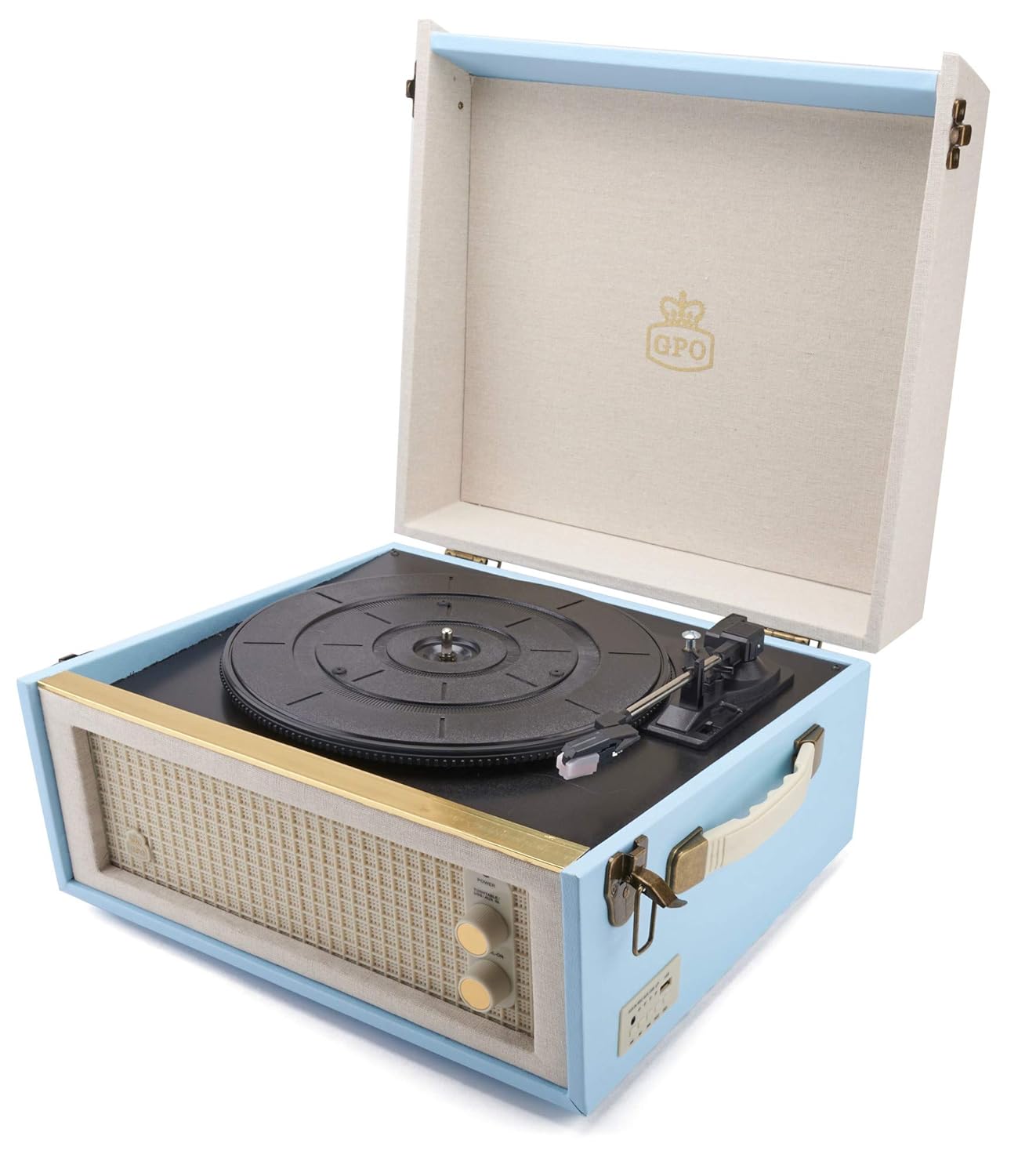
Image: The GPO Bermuda Classic Turntable shown with its four removable legs attached, illustrating the overall dimensions of the unit (34cm width, 38cm depth, 21cm height for the unit, 44cm for the legs, total height 64cm).
4.2 പവർ കണക്ഷൻ
Connect the provided power adaptor to the 9V-DC-IN port on the rear of the turntable and then plug it into a wall outlet. The unit will power on when connected.
4.3 Audio Connections (Optional)
ബാഹ്യ സ്പീക്കറുകൾ: ഒരു ബാഹ്യവുമായി ബന്ധിപ്പിക്കുന്നതിന് amplifier or powered speakers, use RCA cables (not included) to connect the ലൈൻ .ട്ട് ports on the rear of the turntable to the corresponding input on your audio system.
ഹെഡ്ഫോണുകൾ: For private listening, plug 3.5mm headphones into the ഇയർ ഔട്ട് jack on the rear panel.
ചിത്രം: വിശദമായ ഒരു ചിത്രം view of the rear connection panel, showing the 9V-DC-IN power input, LINE OUT (RCA) ports for external audio, and the EAR OUT (headphone) jack.
5. പ്രവർത്തന നിർദ്ദേശങ്ങൾ
5.1 Basic Record Playback
- ടർടേബിളിന്റെ ലിഡ് തുറക്കുക.
- Place a record on the platter. For 7-inch singles with a large center hole, use the 45-RPM adaptor.
- Select the appropriate speed (33, 45, or 78 RPM) using the speed selector switch located near the tone arm base.
- Release the tone arm from its rest by gently pushing the arm locking clip to the side.
- Use the tone arm lever to raise the tone arm.
- Carefully position the stylus over the desired starting groove of the record.
- Lower the tone arm gently onto the record using the tone arm lever. Playback will begin.
- Adjust the volume using the control knob on the front panel.
- At the end of the record, the auto-stop feature will stop the platter rotation. Use the tone arm lever to raise the arm and return it to its rest, then secure it with the arm locking clip.

Image: The GPO Bermuda Classic Turntable with its lid open, revealing the record platter, tone arm, and stylus, ready for record playback.

ചിത്രം: ഒരു ക്ലോസ്-അപ്പ് view of the tone arm mechanism, highlighting the arm locking clip, the tone arm lever for raising and lowering the arm, and the switch for selecting playback speeds (33, 45, 78 RPM).
5.2 ബ്ലൂടൂത്ത് ജോടിയാക്കൽ
- ടർടേബിൾ ഓണാണെന്ന് ഉറപ്പാക്കുക.
- Press the 'BT' button on the control panel to switch to Bluetooth mode. The Bluetooth indicator light will flash.
- നിങ്ങളുടെ ബ്ലൂടൂത്ത് പ്രവർത്തനക്ഷമമാക്കിയ ഉപകരണത്തിൽ (സ്മാർട്ട്ഫോൺ, ടാബ്ലെറ്റ് മുതലായവ), ബ്ലൂടൂത്ത് പ്രവർത്തനക്ഷമമാക്കി ലഭ്യമായ ഉപകരണങ്ങൾക്കായി തിരയുക.
- Select 'GPO Bermuda' from the list of devices.
- Once paired, the Bluetooth indicator light on the turntable will stop flashing and remain solid. You can now stream audio from your device to the turntable's speakers.
5.3 USB റെക്കോർഡിംഗ്
The GPO Bermuda allows you to record your vinyl records directly to a USB stick as MP3 files.
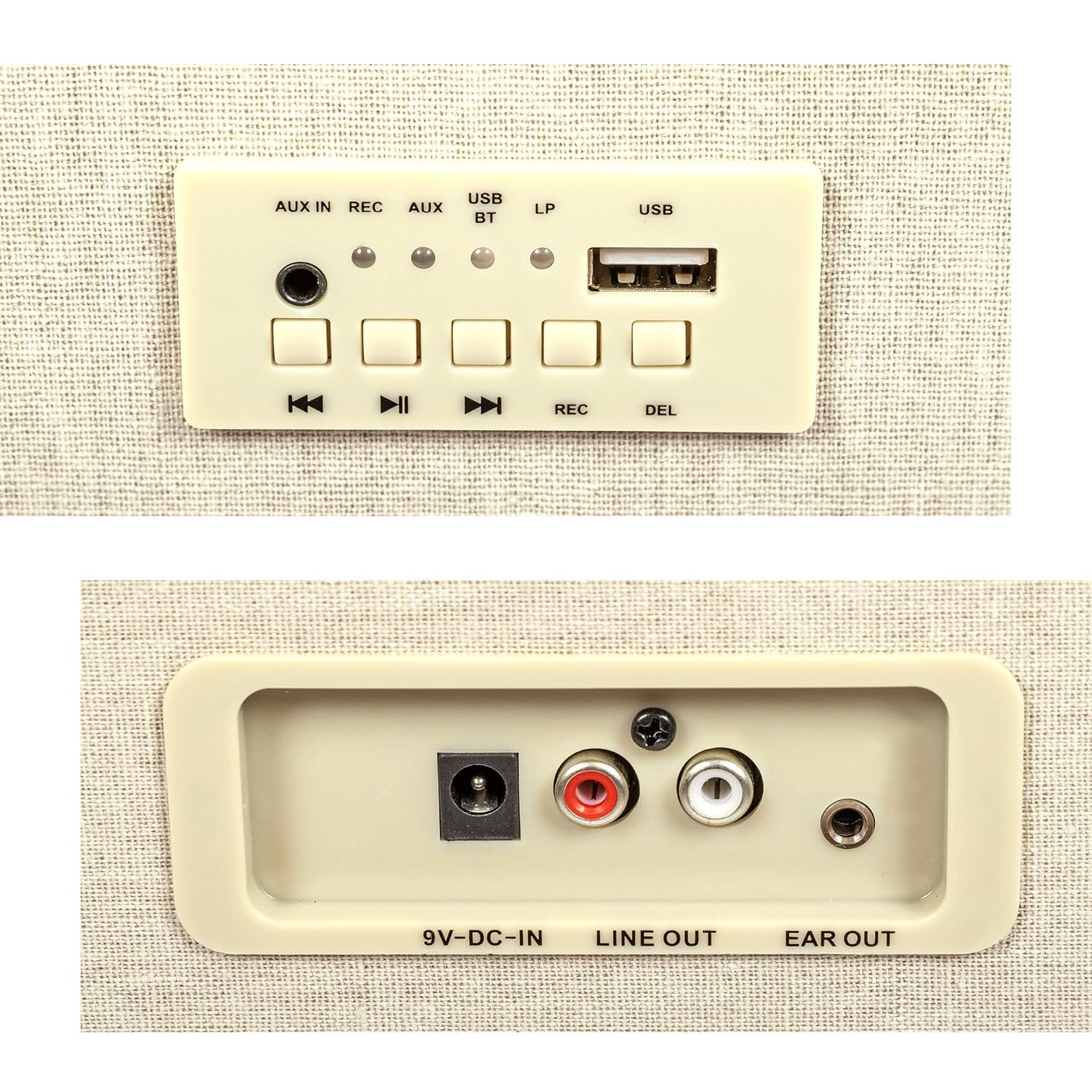
- Insert the provided USB stick into the USB port on the control panel.
- Place a record on the platter and prepare it for playback as described in section 5.1.
- Press the 'REC' button on the control panel. The recording indicator light will illuminate.
- Start playing your record. The turntable will begin recording the audio to the USB stick.
- To stop recording, press the 'REC' button again. The recording indicator light will turn off.
- To delete the last recorded track, press the 'DEL' button.

ചിത്രം: വിശദമായ ഒരു ചിത്രം view of the control panel, featuring the AUX IN jack, REC (record) button, AUX mode button, USB/BT (Bluetooth) indicator lights, LP indicator, USB port, and playback control buttons (previous, play/pause, next, REC, DEL).
5.4 AUX-in Function
ഒരു ബാഹ്യ ഓഡിയോ ഉപകരണം (ഉദാ. MP3 പ്ലെയർ, സ്മാർട്ട്ഫോൺ) ഇതിലേക്ക് ബന്ധിപ്പിക്കുക ഓക്സ് ഇൻ jack on the control panel using a 3.5mm audio cable (not included). Press the 'AUX' button to switch to AUX input mode. Audio from the connected device will play through the turntable's speakers.
6. പരിപാലനം
6.1 യൂണിറ്റ് വൃത്തിയാക്കൽ
Wipe the turntable's exterior with a soft, dry cloth. Do not use abrasive cleaners or solvents, as they may damage the finish.
6.2 സ്റ്റൈലസ് കെയർ
The stylus (needle) is a delicate component. Handle it with care. Clean the stylus periodically using a soft brush designed for stylus cleaning, brushing gently from back to front. A worn or damaged stylus can harm your records and degrade sound quality. Replace the stylus when necessary.

ചിത്രം: ഒരു മാഗ്നിഫൈഡ് view of the turntable's stylus, highlighting its robust construction as it rests on a vinyl record groove.
7. പ്രശ്നപരിഹാരം
If you encounter issues with your GPO Bermuda Classic Turntable, please refer to the following common problems and solutions:
- ശക്തിയില്ല:
- Ensure the power adaptor is securely connected to the unit and a working wall outlet.
- Check if the wall outlet is functioning correctly. - ശബ്ദമില്ല:
- Check the volume level on the turntable and any connected external audio system.
- Ensure the correct input source (Phono, Bluetooth, AUX) is selected.
- If using external speakers, verify connections to the LINE OUT ports.
- Ensure the stylus guard is removed and the stylus is properly seated. - Skipping or Distorted Sound:
- Ensure the record is clean and free of dust or debris.
- Check the stylus for damage or wear; replace if necessary.
- Ensure the turntable is placed on a stable, level surface.
- Clean the stylus gently. - ബ്ലൂടൂത്ത് കണക്റ്റുചെയ്യുന്നില്ല:
- Ensure the turntable is in Bluetooth mode (BT indicator flashing).
- Make sure your device's Bluetooth is enabled and within range.
- Try unpairing and re-pairing the device.
- Ensure no other devices are currently connected to the turntable via Bluetooth. - USB റെക്കോർഡിംഗ് പ്രവർത്തിക്കുന്നില്ല:
- Ensure the USB stick is properly inserted.
- Check if the USB stick has sufficient free space.
- Ensure the 'REC' button was pressed to start recording.
8 സ്പെസിഫിക്കേഷനുകൾ
| മോഡലിൻ്റെ പേര് | Bermuda Classic |
| ഇനം മോഡൽ നമ്പർ | GPO Bermuda Blue |
| ബ്രാൻഡ് | ജി.പി.ഒ |
| ഉൽപ്പന്ന അളവുകൾ | 15.04 x 14.49 x 8.46 ഇഞ്ച് (38.2 x 36.8 x 21.5 സെ.മീ) |
| ഇനത്തിൻ്റെ ഭാരം | 19.84 പൗണ്ട് (9 കിലോഗ്രാം) |
| മെറ്റീരിയൽ | പ്ലാസ്റ്റിക് |
| പ്ലേബാക്ക് വേഗത | 33, 45, 78 ആർപിഎം |
| പ്രത്യേക സവിശേഷതകൾ | Removable Legs, USB Recording, Bluetooth, Auto-Stop / Auto-Return, Built-In Speakers |
| ഉൾപ്പെടുത്തിയ ഘടകങ്ങൾ | 45-RPM adaptor, USB stick |
| മോട്ടോർ തരം | ഡിസി മോട്ടോർ |
| വൈദ്യുതി ഉപഭോഗം | 5 വാട്ട്സ് |