
1. ആമുഖം
This manual provides detailed instructions for the installation, operation, and maintenance of your Planet Audio PNV9650 in-dash navigation touchscreen DVD receiver. Please read this manual thoroughly before using the product to ensure proper operation and to prevent damage.
The PNV9650 is a versatile car entertainment system featuring a 6.5-inch touchscreen, built-in navigation, Bluetooth connectivity for hands-free calling and audio streaming, DVD/CD playback, USB/SD media support, and AM/FM radio.
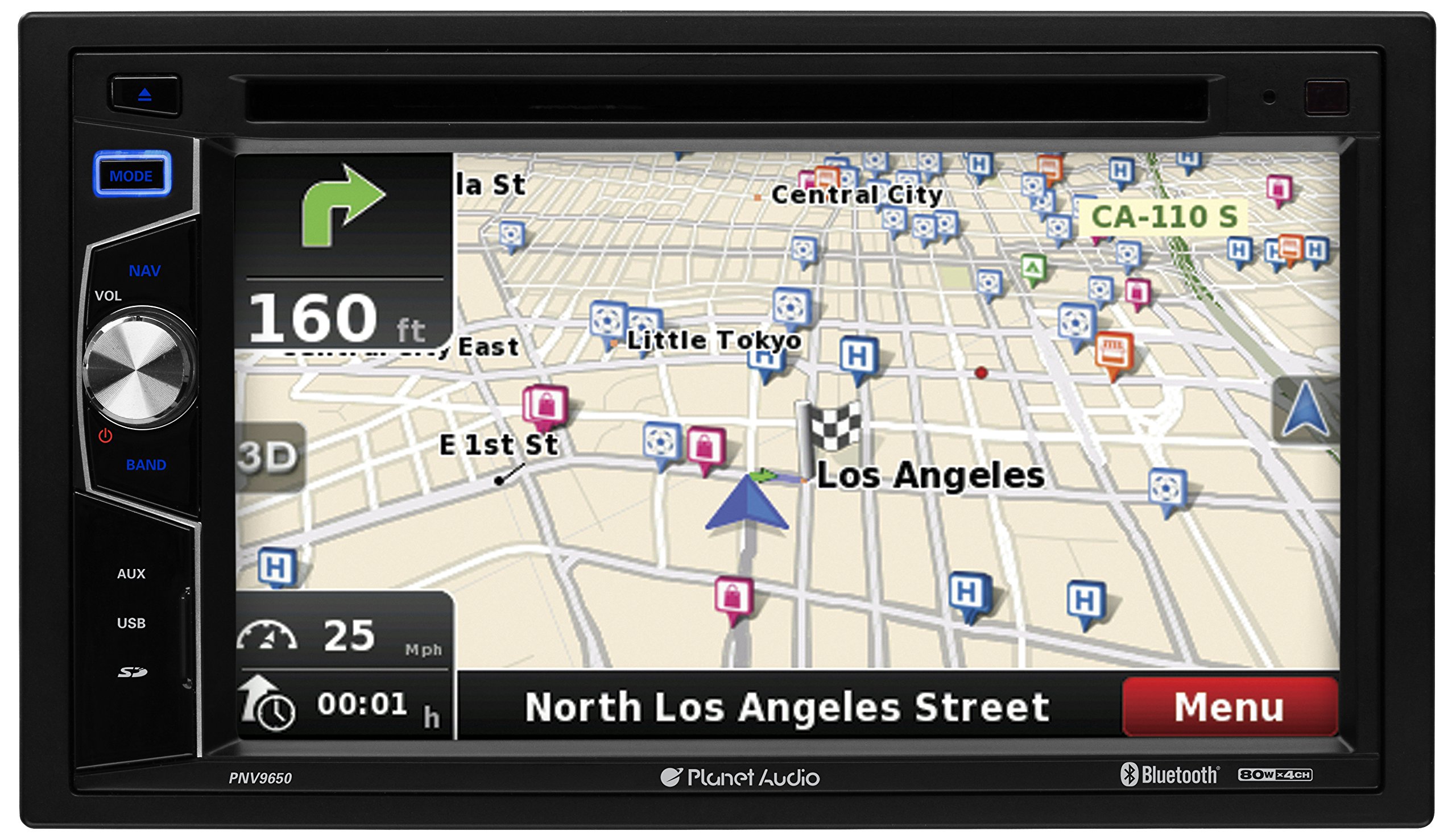
Figure 1.1: Planet Audio PNV9650 Main Unit
ഈ ചിത്രം മുൻവശത്തെ view of the Planet Audio PNV9650 in-dash receiver, showcasing its 6.5-inch touchscreen display, control knobs, and media slots. The screen shows a navigation map interface.
2. സജ്ജീകരണവും ഇൻസ്റ്റാളേഷനും
2.1 പായ്ക്ക് ചെയ്യലും ഉള്ളടക്കവും
Carefully unpack the unit and verify that all items are present. The package should include:
- PNV9650 Main Unit
- വയറിംഗ് ഹാർനെസ്
- ജിപിഎസ് ആൻ്റിന
- റിമോട്ട് കൺട്രോൾ
- മൌണ്ടിംഗ് ഹാർഡ്വെയർ
- ഉപയോക്തൃ മാനുവൽ (ഈ പ്രമാണം)

ചിത്രം 2.1: ഉൾപ്പെടുത്തിയ ആക്സസറികൾ
This image shows the various components included with the PNV9650 unit, such as the GPS antenna, wiring harness, mounting brackets, screws, and a stylus.
2.2 ഇൻസ്റ്റലേഷൻ മാർഗ്ഗനിർദ്ദേശങ്ങൾ
The PNV9650 is a double-DIN unit designed for in-dash installation. Professional installation is highly recommended to ensure correct wiring and functionality. Incorrect installation can lead to damage to the unit or vehicle electrical system.
- ഇൻസ്റ്റാളേഷൻ ആരംഭിക്കുന്നതിന് മുമ്പ് വാഹനത്തിന്റെ ബാറ്ററി വിച്ഛേദിച്ചിട്ടുണ്ടെന്ന് ഉറപ്പാക്കുക.
- Mount the unit securely in the dashboard opening.
- Connect all wiring according to the wiring diagram provided in this section.
- Ensure proper grounding to the vehicle chassis.
2.3 വയറിംഗ് ഡയഗ്രം
Refer to the following image for the wiring connections. Each wire is labeled for its specific function.

ചിത്രം 2.2: പിൻ പാനൽ വയറിംഗ്
This image displays the rear panel of the PNV9650 unit, showing the various input and output ports, including the main wiring harness connector, RCA audio/video jacks, and the GPS antenna input. Each wire in the harness is color-coded and labeled for specific functions like power, ground, speaker outputs, and accessory connections.
കീ കണക്ഷനുകൾ:
- പവർ (മഞ്ഞ): Constant 12V+
- ആക്സസറി (ചുവപ്പ്): Switched 12V+ (Ignition)
- ഗ്രൗണ്ട് (കറുപ്പ്): Connect to vehicle chassis
- സ്പീക്കർ വയറുകൾ: വാഹന സ്പീക്കറുകളുമായി ബന്ധപ്പെട്ടവ ബന്ധിപ്പിക്കുക (ഉദാ: മുൻവശത്തെ ഇടതുവശത്ത് വെള്ള/വെള്ള-കറുപ്പ്, മുൻവശത്തെ വലതുവശത്ത് ചാര/ചാര-കറുപ്പ്, പിൻവശത്തെ ഇടതുവശത്ത് പച്ച/പച്ച-കറുപ്പ്, പിൻവശത്തെ വലതുവശത്ത് പർപ്പിൾ/പർപ്പിൾ-കറുപ്പ്).
- പിൻ ക്യാമറ ഇൻപുട്ട്: Connect to a compatible rear-view ക്യാമറ.
- ജിപിഎസ് ആന്റിന: Connect the provided GPS antenna and mount it in a location with a clear view ആകാശത്തിൻ്റെ.
- സ്റ്റിയറിംഗ് വീൽ നിയന്ത്രണം (SWC): Connect to a compatible steering wheel control interface (sold separately).
2.4 പ്രാരംഭ പവർ ഓൺ
After installation, reconnect the vehicle battery. Press the power button on the unit or remote control to turn on the device. Follow any on-screen prompts for initial setup, such as language selection or time zone settings.
3. പ്രവർത്തന നിർദ്ദേശങ്ങൾ
3.1 അടിസ്ഥാന നിയന്ത്രണങ്ങൾ
The PNV9650 can be controlled via the touchscreen, front panel buttons, or the included wireless remote control.

Figure 3.1: Wireless Remote Control
This image displays the wireless remote control for the PNV9650 unit. It features buttons for power, mute, volume control, mode selection, navigation, audio settings, track/chapter skipping, and a numeric keypad for direct input.
- പവർ ബട്ടൺ: യൂണിറ്റ് ഓൺ/ഓഫ് ചെയ്യാൻ അമർത്തുക.
- Volume Knob/Buttons: ഓഡിയോ ഔട്ട്പുട്ട് ലെവൽ ക്രമീകരിക്കുക.
- മോഡ് ബട്ടൺ: Cycle through available sources (Radio, DVD, USB, SD, Bluetooth, AUX, Navigation).
- മെനു ബട്ടൺ: Access main menu or settings.
- ഇക്യു ബട്ടൺ: ഇക്വലൈസർ ക്രമീകരണങ്ങൾ ആക്സസ് ചെയ്യുക.
3.2 ബ്ലൂടൂത്ത് പ്രവർത്തനം
The PNV9650 supports Bluetooth for hands-free calling and audio streaming.
- ജോടിയാക്കൽ:
- Go to the Bluetooth menu on the PNV9650.
- നിങ്ങളുടെ മൊബൈൽ ഉപകരണത്തിൽ ബ്ലൂടൂത്ത് പ്രവർത്തനക്ഷമമാക്കുകയും ലഭ്യമായ ഉപകരണങ്ങൾക്കായി തിരയുകയും ചെയ്യുക.
- Select "PNV9650" from the list. Enter the PIN (usually "0000") if prompted.
- ജോടിയാക്കിയുകഴിഞ്ഞാൽ, യൂണിറ്റ് ഒരു സ്ഥിരീകരണം പ്രദർശിപ്പിക്കും.
- ഹാൻഡ്സ് ഫ്രീ കോളിംഗ്:
- Use the touchscreen or remote to dial numbers, answer, or end calls.
- Your phonebook may sync automatically after pairing.
- ഓഡിയോ സ്ട്രീമിംഗ് (A2DP):
- Select Bluetooth Audio as the source.
- Play music from your paired device. You can control playback (play/pause, skip tracks) from the PNV9650.
3.3 നാവിഗേഷൻ സിസ്റ്റം
The PNV9650 features built-in navigation with map coverage of all 50 states and pre-loaded points of interest.

Figure 3.2: Navigation Interface
This image shows the PNV9650's display screen featuring its integrated navigation system. A detailed map is visible, indicating current location, route, and points of interest. Speed and estimated time of arrival are also displayed.
- Accessing Navigation: Press the NAV button on the front panel or select Navigation from the main menu.
- ലക്ഷ്യസ്ഥാനങ്ങളിലേക്ക് പ്രവേശിക്കുന്നു: Use the touchscreen keyboard to input addresses, search for points of interest, or select from recent destinations.
- റൂട്ട് മാർഗ്ഗനിർദ്ദേശം: The system provides turn-by-turn voice prompts (Text-to-Speech) and visual guidance.
- മാപ്പ് അപ്ഡേറ്റുകൾ: Map data may require periodic updates. Refer to the manufacturer's website for information on obtaining map updates.
3.4 DVD/CD Playback
Insert a DVD or CD into the disc slot. The unit will automatically switch to DVD/CD mode and begin playback. Use the on-screen controls or remote for playback functions (play, pause, skip, stop).
3.5 USB/SD മീഡിയ പ്ലേബാക്ക്
Insert a USB drive into the USB port or an SD card into the SD card slot. The unit supports MP3 and WMA audio files. Select USB or SD as the source to browse and play media files.
3.6 AM/FM റേഡിയോ
Select Radio as the source. Use the touchscreen or tuning buttons to scan for stations. You can save your favorite stations as presets for quick access.
4. പരിപാലനം
4.1 യൂണിറ്റ് വൃത്തിയാക്കൽ
- Use a soft, dry cloth to clean the unit's exterior.
- For the touchscreen, use a soft, lint-free cloth slightly dampened with water or a screen cleaning solution. Do not use abrasive cleaners or solvents.
- ദ്രാവകങ്ങൾ നേരിട്ട് യൂണിറ്റിലേക്ക് സ്പ്രേ ചെയ്യുന്നത് ഒഴിവാക്കുക.
4.2 പൊതു പരിചരണം
- യൂണിറ്റ് പൊടിയിൽ നിന്നും അവശിഷ്ടങ്ങളിൽ നിന്നും മുക്തമായി സൂക്ഷിക്കുക.
- തീവ്രമായ താപനിലയിലോ നേരിട്ടുള്ള സൂര്യപ്രകാശത്തിലോ യൂണിറ്റ് ദീർഘനേരം തുറന്നുകാട്ടുന്നത് ഒഴിവാക്കുക.
- അമിതമായി ചൂടാക്കുന്നത് തടയാൻ യൂണിറ്റിന് ചുറ്റും ശരിയായ വായുസഞ്ചാരം ഉറപ്പാക്കുക.
5. പ്രശ്നപരിഹാരം
If you encounter problems with your PNV9650, refer to the following common issues and solutions before contacting support.
| പ്രശ്നം | സാധ്യമായ കാരണം | പരിഹാരം |
|---|---|---|
| യൂണിറ്റ് പവർ ഓണാക്കുന്നില്ല. | No power, blown fuse, incorrect wiring. | Check power connections (Yellow, Red, Black wires). Verify vehicle fuse and unit's inline fuse. Ensure proper grounding. |
| ശബ്ദമോ വികലമായ ശബ്ദമോ ഇല്ല. | Incorrect speaker wiring, volume too low, mute activated, EQ settings. | Check all speaker wire connections. Increase volume. Deactivate mute. Adjust EQ settings. |
| Bluetooth not connecting or dropping. | Device out of range, pairing issue, interference. | Ensure device is within range. Delete previous pairing and re-pair. Restart both devices. |
| നാവിഗേഷൻ പ്രവർത്തിക്കുന്നില്ല അല്ലെങ്കിൽ കൃത്യമല്ല. | GPS ആന്റിന ബന്ധിപ്പിച്ചിട്ടില്ല, മോശം ഉപഗ്രഹ സിഗ്നൽ, കാലഹരണപ്പെട്ട മാപ്പുകൾ. | Ensure GPS antenna is securely connected and mounted with a clear view of the sky. Check for map updates. |
| DVD/CD not playing. | Disc dirty or damaged, incorrect disc format, disc inserted incorrectly. | Clean the disc. Ensure disc is inserted correctly. Verify disc format is supported. |
| റിമോട്ട് കൺട്രോൾ പ്രവർത്തിക്കുന്നില്ല. | Dead battery, obstruction, incorrect angle. | Replace remote battery. Ensure no obstruction between remote and unit. Point remote directly at the unit's IR sensor. |
6 സ്പെസിഫിക്കേഷനുകൾ
The following are key technical specifications for the Planet Audio PNV9650:
- ചേസിസ് വലുപ്പം: ഡബിൾ-ഡിൻ
- ഡിസ്പ്ലേ തരം: TFT Touchscreen
- പരമാവധി പവർ put ട്ട്പുട്ട്: 80 വാട്ട്സ് x 4 ചാനലുകൾ
- പ്രീamp വാല്യംtage: 1 വോൾട്ട്
- മീഡിയ പ്ലേബാക്ക്: DVD, CD, USB, SD, MP3, WMA, AM/FM
- ബ്ലൂടൂത്ത്: Hands-Free Calling, Audio Streaming (A2DP)
- നാവിഗേഷൻ: Built-in with map coverage of all 50 states, Pre-Loaded Points of Interest, Text-to-Speech
- ഇൻപുട്ടുകൾ: USB/Video, USB Charging, SD, AUX, Rear Camera, Steering Wheel Control Interface (Interface Sold Separately)
- ഔട്ട്പുട്ടുകൾ: Video, Front, Rear & Subwoofer Preamp ഔട്ട്പുട്ടുകൾ
- ട്യൂണർ: RDS Tuner, Switchable US & Europe Frequencies
- സമനില: Balance/Fader/Bass/Treble and Preset built-in EQ
- ഇനത്തിൻ്റെ ഭാരം: ഏകദേശം 1 പൗണ്ട്
- ഉൽപ്പന്ന അളവുകൾ: Approximately 1 x 1 x 1 inches (Note: Actual dimensions for double-DIN unit will vary, this is a general reference)
7. വാറൻ്റി വിവരങ്ങൾ
The Planet Audio PNV9650 comes with a 3 Year Platinum Online Dealer Warranty. Please retain your proof of purchase for warranty claims. For specific terms and conditions, refer to the warranty card included with your product or visit the Planet Audio official webസൈറ്റ്.
8. പിന്തുണ
For further assistance, technical support, or service inquiries regarding your Planet Audio PNV9650, please contact Planet Audio customer support. Contact information can typically be found on the official Planet Audio webസൈറ്റ് അല്ലെങ്കിൽ നിങ്ങളുടെ ഉൽപ്പന്നത്തിൽ ഉൾപ്പെടുത്തിയിരിക്കുന്ന ഡോക്യുമെന്റേഷനിൽ.
When contacting support, please have your product model number (PNV9650) and proof of purchase readily available.