
ആമുഖം
This manual provides instructions for the safe and effective use of your Clatronic AT 3605 Alcohol Tester. Please read this manual thoroughly before operating the device and keep it for future reference. This device is designed for personal use as a preliminary indicator of alcohol presence and should not be used as a basis for legal decisions or official measurements.
പ്രധാനപ്പെട്ട സുരക്ഷാ വിവരങ്ങൾ
- This device is intended for personal use as a preliminary indicator of alcohol presence. It is not a substitute for official breathalyzer tests or legal evidence.
- Do not operate the device while driving or performing other activities that require full attention.
- കുട്ടികൾക്ക് ലഭ്യമാകാതെ സൂക്ഷിക്കുക.
- ഉപകരണത്തെ തീവ്രമായ താപനിലയിലോ, നേരിട്ടുള്ള സൂര്യപ്രകാശത്തിലോ, ഈർപ്പത്തിലോ തുറന്നുകാട്ടരുത്.
- Use only the specified battery type (2 x AAA).
- പ്രാദേശിക നിയന്ത്രണങ്ങൾ അനുസരിച്ച് ബാറ്ററികളും ഉപകരണവും നശിപ്പിക്കുക.
- Wait at least 20 minutes after consuming alcohol before performing a test to ensure accurate readings.
ഉൽപ്പന്നം കഴിഞ്ഞുview
The Clatronic AT 3605 is a compact alcohol tester designed for personal use. It features a dual LCD display and provides optical warnings at specific alcohol levels.
ഉപകരണ ഘടകങ്ങൾ
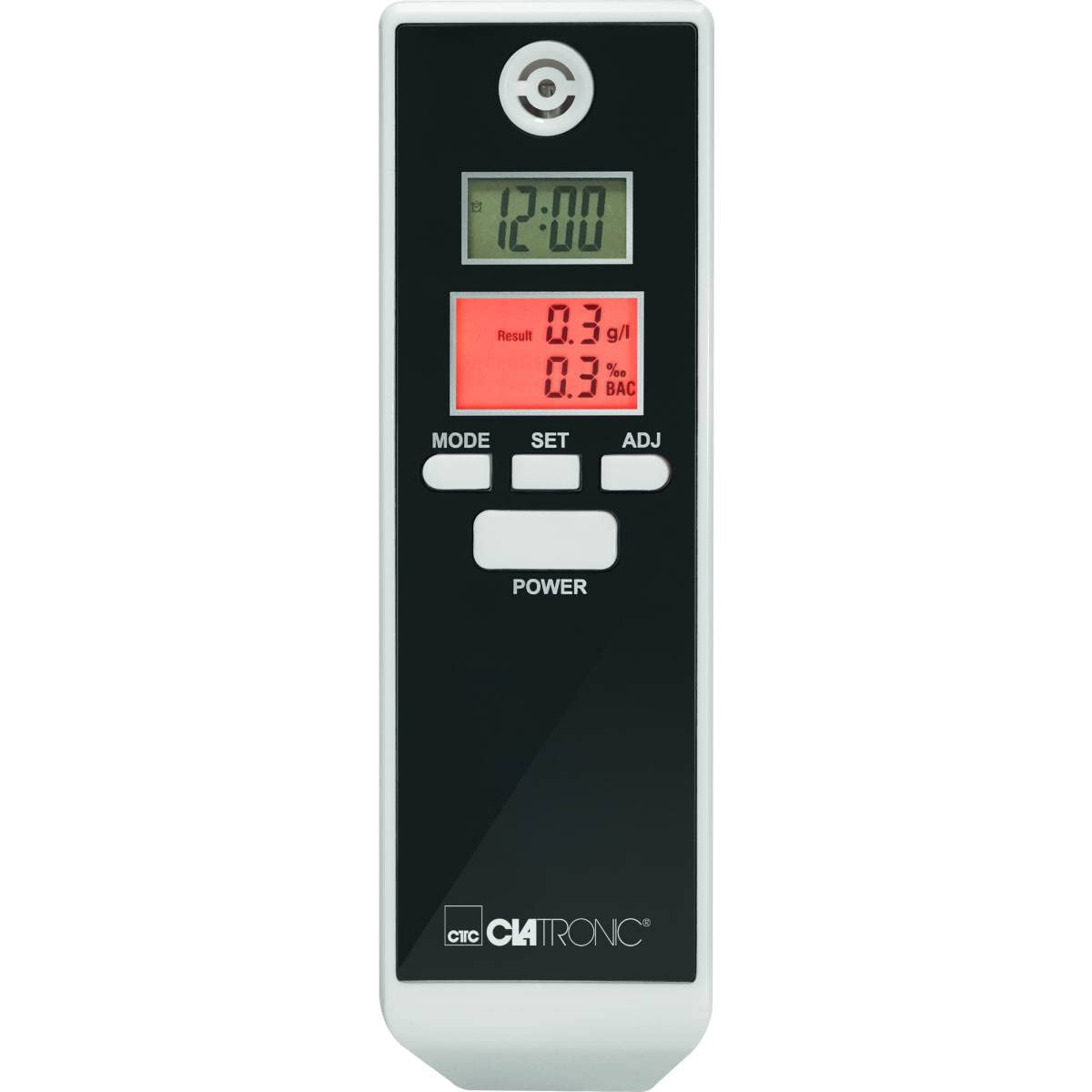
ചിത്രം 1: ഫ്രണ്ട് view of the Clatronic AT 3605 Alcohol Tester. The device features a black face with a white casing. It has two digital LCD screens, one for time (12:00) and another for alcohol test results (e.g., 0.3 g/l and 0.3% BAC). Below the screens are three control buttons: MODE, SET, and ADJ. A larger POWER button is located further down. The Clatronic logo is visible at the bottom.
നിയന്ത്രണങ്ങളും പ്രദർശനവും
- പവർ ബട്ടൺ: ഉപകരണം ഓൺ/ഓഫ് ചെയ്യുന്നു.
- മോഡ് ബട്ടൺ: Switches between different display modes (e.g., time display, alarm setting).
- SET ബട്ടൺ: തിരഞ്ഞെടുപ്പുകൾ സ്ഥിരീകരിക്കുന്നു അല്ലെങ്കിൽ ക്രമീകരണ മോഡുകളിൽ പ്രവേശിക്കുന്നു.
- ADJ ബട്ടൺ: Adjusts values during settings.
- Upper LCD Display: Shows current time (12/24 hour format).
- Lower LCD Display: Shows alcohol test results in g/l and % BAC. Features red backlighting for results and optical warnings.
- Mouthpiece Opening: Located at the top for breath sampലിംഗ്.
സജ്ജമാക്കുക
ബാറ്ററി ഇൻസ്റ്റാളേഷൻ
- ഉപകരണത്തിന്റെ പിൻഭാഗത്ത് ബാറ്ററി കമ്പാർട്ട്മെന്റ് കവർ കണ്ടെത്തുക.
- കവർ സ്ലൈഡ് ചെയ്യുകയോ തുറക്കുകയോ ചെയ്യുക.
- ശരിയായ പോളാരിറ്റി (+/-) ഉറപ്പാക്കിക്കൊണ്ട് 2 AAA ബാറ്ററികൾ ഇടുക.
- ബാറ്ററി കമ്പാർട്ട്മെൻ്റ് കവർ സുരക്ഷിതമായി അടയ്ക്കുക.
കുറിപ്പ്: The device requires 2 AAA batteries. Ensure fresh batteries are used for accurate readings.
പ്രാരംഭ സമയ ക്രമീകരണം
Upon first use or after battery replacement, you may need to set the time. Refer to the 'Operating Instructions' for time adjustment.
പ്രവർത്തന നിർദ്ദേശങ്ങൾ
Performing an Alcohol Test
- അമർത്തുക പവർ button to turn on the device. The device will perform a brief self-check.
- Wait for the device to display "WAIT" or a similar indicator, followed by "BLOW" or a countdown.
- When prompted, take a deep breath and blow steadily into the mouthpiece opening for approximately 5 seconds. Ensure a continuous breath sample.
- The device will process the sample and display the results on the lower LCD screen in g/l and % BAC. The display will be red.
- Optical Warning: The device provides an optical warning at 0.2‰ and 0.5‰. If your result is at or above these levels, the display will flash.
- ബാറ്ററി ലൈഫ് ലാഭിക്കുന്നതിനായി, ഒരു നിശ്ചിത കാലയളവ് പ്രവർത്തനരഹിതമായതിനുശേഷം ഉപകരണം യാന്ത്രികമായി ഓഫാകും.
Setting Time and Alarm (if applicable)
- With the device on, press the മോഡ് button to cycle through display modes until the time setting mode is reached.
- അമർത്തുക സെറ്റ് button to enter the time adjustment. The hour digit will flash.
- ഉപയോഗിക്കുക എ.ഡി.ജെ button to change the hour.
- അമർത്തുക സെറ്റ് again to move to the minute digit and adjust with എ.ഡി.ജെ.
- Continue this process for 12/24 hour format or alarm settings if available.
- അമർത്തുക മോഡ് ക്രമീകരണ മോഡിൽ നിന്ന് പുറത്തുകടക്കാൻ.
മെയിൻ്റനൻസ്
വൃത്തിയാക്കൽ
- Wipe the device exterior with a soft, dry cloth.
- ഉരച്ചിലുകളുള്ള ക്ലീനറുകളോ ലായകങ്ങളോ ഉപയോഗിക്കരുത്.
- ഉപകരണം വെള്ളത്തിലോ മറ്റേതെങ്കിലും ദ്രാവകത്തിലോ മുക്കരുത്.
സംഭരണം
- നേരിട്ട് സൂര്യപ്രകാശത്തിൽ നിന്ന് അകലെ തണുത്തതും വരണ്ടതുമായ സ്ഥലത്ത് ഉപകരണം സൂക്ഷിക്കുക.
- ദീർഘനേരം സൂക്ഷിക്കുകയാണെങ്കിൽ, ചോർച്ച തടയാൻ ബാറ്ററികൾ നീക്കം ചെയ്യുക.
ട്രബിൾഷൂട്ടിംഗ്
| പ്രശ്നം | സാധ്യമായ കാരണം | പരിഹാരം |
|---|---|---|
| ഉപകരണം ഓണാക്കില്ല. | ഡെഡ് അല്ലെങ്കിൽ തെറ്റായി ചേർത്ത ബാറ്ററികൾ. | ബാറ്ററികൾ പുതിയ AAA ബാറ്ററികൾ ഉപയോഗിച്ച് മാറ്റിസ്ഥാപിക്കുക, ശരിയായ പോളാരിറ്റി ഉറപ്പാക്കുക. |
| കൃത്യമല്ലാത്തതോ പൊരുത്തമില്ലാത്തതോ ആയ വായനകൾ. | അപര്യാപ്തമായ ശ്വാസം sample; device not calibrated; recent alcohol consumption. | Ensure a strong, continuous breath sample. Wait at least 20 minutes after consuming alcohol before testing. If issues persist, contact customer support. |
| ഡിസ്പ്ലേ പിശക് സന്ദേശം കാണിക്കുന്നു. | Device malfunction or sensor issue. | ഉപകരണം ഓഫാക്കി വീണ്ടും ഓണാക്കുക. പിശക് നിലനിൽക്കുകയാണെങ്കിൽ, ഉപഭോക്തൃ പിന്തുണയുമായി ബന്ധപ്പെടുക. |
| സമയ പ്രദർശനം തെറ്റാണ്. | Time not set or batteries removed. | Refer to "Setting Time and Alarm" section to adjust the time. |
സ്പെസിഫിക്കേഷനുകൾ
| ഫീച്ചർ | വിശദാംശങ്ങൾ |
|---|---|
| മോഡൽ നമ്പർ | AT 3605 (Article Model: 271704) |
| പവർ ഉറവിടം | 2 x AAA ബാറ്ററികൾ |
| അളക്കൽ ശ്രേണി | 0.0 to 1.9‰ (g/l) / 0.0 to 1.9% BAC |
| പ്രദർശിപ്പിക്കുക | 2 Digital LCDs (one with red backlight for results) |
| പ്രത്യേക സവിശേഷതകൾ | Time display (12/24 hours), Automatic shut-off, Optical warning at 0.2‰ and 0.5‰ |
| അളവുകൾ (L x W x H) | 30L x 40W x 120H മിമി |
| മെറ്റീരിയൽ | പ്ലാസ്റ്റിക് |
| നിറം | കറുപ്പ്/വെളുപ്പ് |
വാറൻ്റിയും പിന്തുണയും
For warranty information or technical support, please refer to the warranty card included with your product or visit the official Clatronic website. Keep your purchase receipt as proof of purchase. Spare parts availability is typically 1 year from purchase date.