
1. ആമുഖം
വാങ്ങിയതിന് നന്ദി.asing the Toshiba Aurex TY-AH1000 Hi-Res CD Radio with Bluetooth. This device is designed to provide high-quality audio playback from various sources, including CDs, AM/FM radio, USB memory, SD cards, and Bluetooth-connected devices. This manual provides essential information for the safe and efficient use of your new audio system. Please read it thoroughly before operation and keep it for future reference.
2 സുരക്ഷാ വിവരങ്ങൾ
സുരക്ഷിതമായ പ്രവർത്തനം ഉറപ്പാക്കുന്നതിനും കേടുപാടുകൾ തടയുന്നതിനും, ദയവായി ഇനിപ്പറയുന്ന മുൻകരുതലുകൾ പാലിക്കുക:
- യൂണിറ്റ് മഴ, ഈർപ്പം, അമിതമായ ചൂട് എന്നിവയിൽ തുറന്നുകാട്ടരുത്.
- ശരിയായ വായുസഞ്ചാരം ഉറപ്പാക്കുക; വായുസഞ്ചാര ദ്വാരങ്ങൾ അടയ്ക്കരുത്.
- Use only the specified power supply (AC100V, 50/60Hz).
- ഭാരമുള്ള വസ്തുക്കൾ യൂണിറ്റിൽ വയ്ക്കുന്നത് ഒഴിവാക്കുക.
- യൂണിറ്റ് ഡിസ്അസംബ്ലിംഗ് ചെയ്യാനോ പരിഷ്ക്കരിക്കാനോ ശ്രമിക്കരുത്. എല്ലാ സേവനങ്ങളും യോഗ്യതയുള്ള ഉദ്യോഗസ്ഥർക്ക് റഫർ ചെയ്യുക.
- ശക്തമായ കാന്തികക്ഷേത്രങ്ങളിൽ നിന്ന് യൂണിറ്റിനെ അകറ്റി നിർത്തുക.
- When cleaning, use a soft, dry cloth. Do not use liquid or aerosol cleaners.
3. പാക്കേജ് ഉള്ളടക്കം
എല്ലാ ഇനങ്ങളും പാക്കേജിൽ ഉൾപ്പെടുത്തിയിട്ടുണ്ടെന്ന് ഉറപ്പാക്കുക:
- Toshiba Aurex TY-AH1000 Main Unit
- പവർ കോർഡ്
- Remote Control (with CR2025 lithium battery)
- എഎം ലൂപ്പ് ആന്റിന
- Instruction Manual (with Warranty Card)
4. ഉൽപ്പന്നം കഴിഞ്ഞുview
Familiarize yourself with the components and controls of your Toshiba Aurex TY-AH1000.
4.1 മുന്നിലും മുകളിലും View
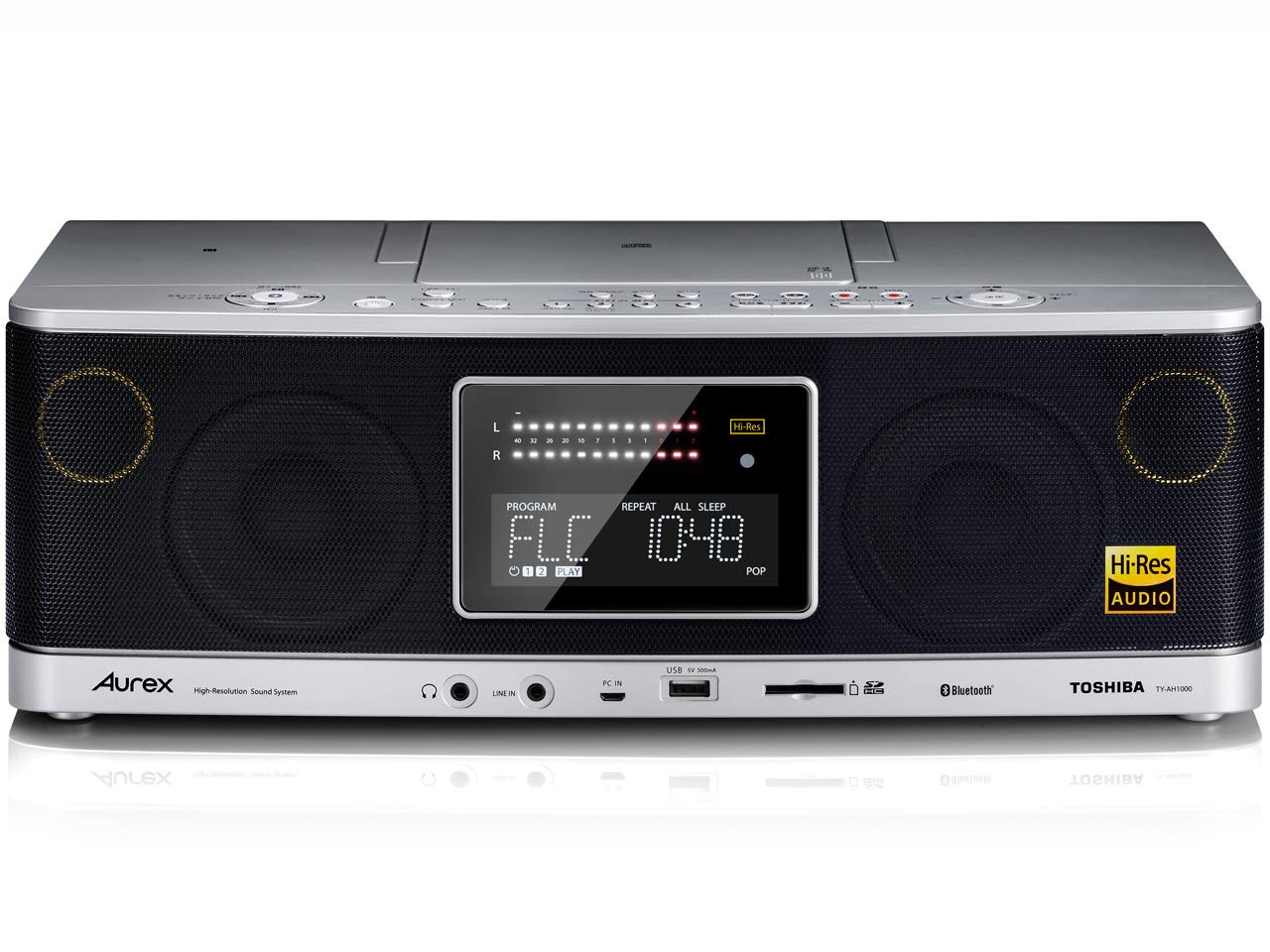
ചിത്രം: മുന്നിലും മുകളിലും view of the Toshiba Aurex TY-AH1000, showing the display, speakers, CD compartment, and main controls.
4.2 മുകളിലെ പാനൽ നിയന്ത്രണങ്ങൾ
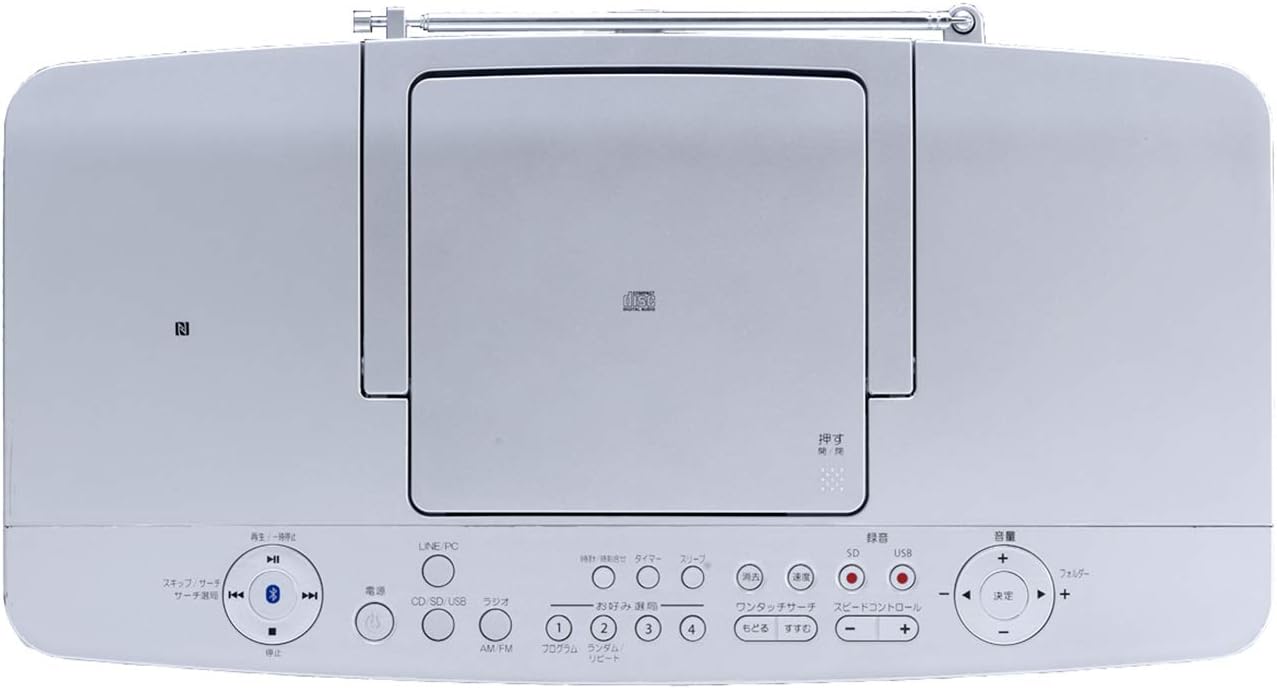
Image: Close-up of the top panel controls, including power, source selection (CD, SD, USB, Radio, Line/PC), playback controls, and volume.
4.3 പിൻ പാനൽ

ചിത്രം: പിൻഭാഗം view of the unit, showing the power input, AM loop antenna terminal, and FM telescopic antenna.
4.4 വിദൂര നിയന്ത്രണം

Image: The remote control for the Toshiba Aurex TY-AH1000, featuring buttons for power, source selection, playback, volume, EQ, sleep, timer, and display.
5. സജ്ജീകരണം
5.1 പവർ കണക്ഷൻ
- യൂണിറ്റ് ഒരു സ്ഥിരതയുള്ളതും പരന്നതുമായ പ്രതലത്തിൽ സ്ഥാപിച്ചിട്ടുണ്ടെന്ന് ഉറപ്പാക്കുക.
- Connect the supplied power cord to the AC IN jack on the rear of the unit.
- Plug the other end of the power cord into a standard AC100V, 50/60Hz wall outlet.
5.2 ആന്റിന കണക്ഷൻ
- For FM Reception: Extend the telescopic FM antenna located on the rear of the unit for optimal reception. Adjust its position for the best signal.
- For AM Reception: Connect the supplied AM loop antenna to the AM antenna terminals on the rear panel. Position the AM loop antenna away from the main unit and other electronic devices to minimize interference. Rotate the antenna for the best AM signal.
6. പ്രവർത്തന നിർദ്ദേശങ്ങൾ
6.1 പവർ ഓൺ/ഓഫ്
- അമർത്തുക പവർ യൂണിറ്റ് ഓണാക്കാനോ ഓഫാക്കാനോ യൂണിറ്റിലെ ബട്ടൺ അല്ലെങ്കിൽ റിമോട്ട് കൺട്രോൾ.
6.2 സിഡി പ്ലേബാക്ക്
- അമർത്തുക CD/SD/USB button repeatedly until "CD" is selected as the source.
- Open the CD compartment cover on the top of the unit.
- ലേബൽ വശം മുകളിലേക്ക് അഭിമുഖീകരിക്കുന്ന തരത്തിൽ ഒരു സിഡി വയ്ക്കുക.
- Close the CD compartment cover. Playback will start automatically or by pressing the പ്ലേ/താൽക്കാലികമായി നിർത്തുക ബട്ടൺ.
- ഉപയോഗിക്കുക ഒഴിവാക്കുക/തിരയുക ട്രാക്കുകൾ നാവിഗേറ്റ് ചെയ്യുന്നതിനുള്ള ബട്ടണുകൾ.
6.3 റേഡിയോ പ്രവർത്തനം (AM/FM)
- അമർത്തുക RADIO AM/FM AM അല്ലെങ്കിൽ FM ബാൻഡ് തിരഞ്ഞെടുക്കാൻ ബട്ടൺ.
- അമർത്തുക ട്യൂണിംഗ് +/- ഒരു സ്റ്റേഷനിലേക്ക് സ്വമേധയാ ട്യൂൺ ചെയ്യാനുള്ള ബട്ടണുകൾ.
- സ്റ്റേഷനുകൾക്കായി യാന്ത്രികമായി സ്കാൻ ചെയ്യാൻ, അമർത്തിപ്പിടിക്കുക ട്യൂണിംഗ് +/- buttons. The unit will stop at the next strong signal.
- For Wide FM reception, ensure your antenna is properly positioned.
6.4 Bluetooth Connection (NFC)
- അമർത്തുക ബ്ലൂടൂത്ത് button on the unit or remote control to select Bluetooth mode. The display will show "PAIRING" or similar.
- For NFC-compatible devices: Enable NFC on your smartphone or tablet. Touch the NFC area of your device to the NFC mark on the top of the TY-AH1000. Follow the on-screen prompts to complete pairing.
- For non-NFC devices: നിങ്ങളുടെ സ്മാർട്ട്ഫോണിലോ ടാബ്ലെറ്റിലോ ബ്ലൂടൂത്ത് പ്രവർത്തനക്ഷമമാക്കുക. ഇതിനായി തിരയുക "TY-AH1000" in the list of available devices and select it to pair.
- Once paired, you can play audio from your connected device through the TY-AH1000.
6.5 യുഎസ്ബി/എസ്ഡി പ്ലേബാക്ക്
- USB പോർട്ടിലേക്ക് ഒരു USB ഫ്ലാഷ് ഡ്രൈവ് അല്ലെങ്കിൽ SD കാർഡ് സ്ലോട്ടിലേക്ക് ഒരു SD കാർഡ് ഇടുക.
- അമർത്തുക CD/SD/USB button repeatedly until "USB" or "SD" is selected as the source.
- യൂണിറ്റ് യാന്ത്രികമായി കണ്ടെത്തി അനുയോജ്യമായ ഓഡിയോ പ്ലേ ചെയ്യാൻ തുടങ്ങും. files.
- ഉപയോഗിക്കുക ഒഴിവാക്കുക/തിരയുക buttons to navigate tracks or folders.
7. പരിപാലനം
- യൂണിറ്റ് വൃത്തിയാക്കൽ: Wipe the exterior of the unit with a soft, dry cloth. For stubborn dirt, slightly dampen the cloth with water and then wipe dry. Do not use abrasive cleaners, benzene, or alcohol.
- സിഡി ലെൻസ് കെയർ: സിഡി ലെൻസിൽ തൊടുന്നത് ഒഴിവാക്കുക. ലെൻസ് വൃത്തികേടാണെങ്കിൽ, വിപണിയിൽ ലഭ്യമായ ഒരു സിഡി ലെൻസ് ക്ലീനർ ഉപയോഗിക്കുക.
- റിമോട്ട് കൺട്രോൾ ബാറ്ററി: Replace the CR2025 lithium battery in the remote control when its operating range decreases.
8. പ്രശ്നപരിഹാരം
If you experience issues with your unit, refer to the following table before contacting support.
| പ്രശ്നം | സാധ്യമായ കാരണം | പരിഹാരം |
|---|---|---|
| ശക്തിയില്ല | പവർ കോർഡ് ശരിയായി ബന്ധിപ്പിച്ചിട്ടില്ല. | യൂണിറ്റിലേക്കും വാൾ ഔട്ട്ലെറ്റിലേക്കും ഉള്ള പവർ കോർഡ് കണക്ഷൻ പരിശോധിക്കുക. |
| ശബ്ദമില്ല | ശബ്ദം വളരെ കുറവാണ് അല്ലെങ്കിൽ മ്യൂട്ടുചെയ്തിരിക്കുന്നു. തെറ്റായ ഉറവിടം തിരഞ്ഞെടുത്തു. | Increase volume. Press the നിശബ്ദമാക്കുക button. Select the correct input source. |
| സിഡി പ്ലേ ചെയ്യുന്നില്ല | സിഡി വൃത്തികെട്ടതോ പോറലുള്ളതോ ആണ്. സിഡി തെറ്റായി ചേർത്തിരിക്കുന്നു. | Clean the CD. Insert the CD with the label side up. |
| മോശം റേഡിയോ സ്വീകരണം | Antenna not extended/positioned correctly. Interference from other devices. | Extend and adjust the FM telescopic antenna. Position the AM loop antenna for best signal. Move unit away from other electronics. |
| ബ്ലൂടൂത്ത് ജോടിയാക്കൽ പരാജയപ്പെടുന്നു | Bluetooth not enabled on device. Device too far from unit. | Ensure Bluetooth is enabled on your device. Move device closer to the unit (within 10m). |
9 സ്പെസിഫിക്കേഷനുകൾ
| ഫീച്ചർ | സ്പെസിഫിക്കേഷൻ |
|---|---|
| ആകെ ഔട്ട്പുട്ട് | 50W |
| Radio Frequencies (AM) | 531kHz - 1,710kHz (9kHz step) |
| Radio Frequencies (FM) | 76MHz - 108MHz (0.1MHz step) |
| USB Flash Memory Support | 32MB - 32GB (sold separately) |
| SD Memory Card Support | SD: 32MB - 2GB / SDHC: 4GB - 32GB (sold separately) |
| CD Channels | 2-ചാനൽ സ്റ്റീരിയോ |
| ബ്ലൂടൂത്ത് പതിപ്പ് | പതിപ്പ് .3.0 |
| അളവുകൾ (W x H x D) | 400 x 135 x 205 mm (excluding protrusions) |
| ഭാരം | ഏകദേശം 3.2 കിലോ |
| വൈദ്യുതി വിതരണം | AC100V, 50 / 60 മ |
| വൈദ്യുതി ഉപഭോഗം | 20W |
10. വാറൻ്റിയും പിന്തുണയും
10.1 വാറൻ്റി വിവരങ്ങൾ
This product comes with a 1-year warranty from the date of delivery. A delivery note or proof of purchase is required for warranty claims. The warranty is limited to use within Japan.
10.2 ഉപഭോക്തൃ പിന്തുണ
For further assistance, technical support, or warranty inquiries, please refer to the contact information provided in the warranty card included with your product. Please have your model number (TY-AH1000) and proof of purchase ready when contacting support.