
1. ആമുഖം
This manual provides essential information for the safe installation, operation, and maintenance of the ABB OT63F3C Disconnect Switch. Please read this manual thoroughly before attempting any installation or operation. Retain this manual for future reference.
2 സുരക്ഷാ വിവരങ്ങൾ
മുന്നറിയിപ്പ്: Electrical shock hazard. Only qualified personnel should install, operate, or service this equipment. Failure to follow these instructions can result in serious injury or death.
- Always disconnect and lock out all power sources before working on the switch or connected equipment.
- Verify that the power is off using a suitable voltagഇ ടെസ്റ്റർ.
- എല്ലാ പ്രാദേശിക, ദേശീയ ഇലക്ട്രിക്കൽ കോഡുകളും സുരക്ഷാ ചട്ടങ്ങളും പാലിക്കുക.
- ഉപകരണങ്ങളുടെ ശരിയായ ഗ്രൗണ്ടിംഗ് ഉറപ്പാക്കുക.
- Do not operate the switch if it appears damaged or has been exposed to moisture.
- ഇൻസുലേറ്റഡ് കയ്യുറകൾ, കണ്ണ് സംരക്ഷണം എന്നിവയുൾപ്പെടെ ഉചിതമായ വ്യക്തിഗത സംരക്ഷണ ഉപകരണങ്ങൾ (പിപിഇ) ധരിക്കുക.
3. ഉൽപ്പന്നം കഴിഞ്ഞുview
The ABB OT63F3C is a 3-pole, non-fusible disconnect switch designed for industrial applications requiring reliable power isolation. It is rated for 600 VAC and 60 A, with a power rating of 22 kW. This switch is suitable for use in motor controller and motor overload protection applications.
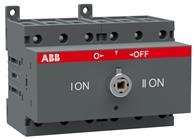
ചിത്രം 1: മുൻഭാഗം view of the ABB OT63F3C Disconnect Switch. This image shows the compact design and terminal connections for the 3-pole switch.
പ്രധാന സവിശേഷതകൾ:
- തരം: Double Throw, Non-Fusible
- ധ്രുവങ്ങൾ: 3
- വാല്യംtagഇ റേറ്റിംഗ്: 600 വി.എ.സി
- Amperage റേറ്റിംഗ്: 60 എ
- പവർ റേറ്റിംഗ്: 22 kW
- എൻക്ലോഷർ തരം: IP20
- മൗണ്ടിംഗ് തരം: Base/DIN-Rail
- ടെർമിനൽ തരം: Clamp
4. സജ്ജീകരണവും ഇൻസ്റ്റാളേഷനും
Installation of the ABB OT63F3C Disconnect Switch must be performed by a qualified electrician in accordance with all applicable electrical codes and safety standards.
ഇൻസ്റ്റലേഷൻ ഘട്ടങ്ങൾ:
- വൈദ്യുതി വിച്ഛേദിക്കൽ: Ensure all power to the installation area is disconnected and locked out. Verify zero voltage.
- മൗണ്ടിംഗ്: Mount the disconnect switch securely using either base mounting or DIN-rail mounting. Ensure the mounting surface is stable and capable of supporting the switch.
- വയറിംഗ്: Connect the incoming and outgoing power cables to the appropriate clamp terminals. Ensure all connections are tight and secure. Refer to the wiring diagram provided with the product packaging for specific terminal assignments.
- ഗ്രൗണ്ടിംഗ്: Connect the equipment grounding conductor to the designated grounding terminal.
- സ്ഥിരീകരണം: Double-check all wiring connections for correctness and tightness. Ensure no loose strands or exposed conductors.
- എൻക്ലോസർ: If installing within an enclosure, ensure the enclosure provides adequate protection (e.g., IP20 or higher as required by application).
- വൈദ്യുതി പുനഃസ്ഥാപിക്കൽ: Once installation is complete and verified, restore power and test the switch operation.
5. പ്രവർത്തന നിർദ്ദേശങ്ങൾ
The ABB OT63F3C Disconnect Switch operates in a simple OFF-NONE-ON mode, providing clear visual indication of its status.
- ഓഫ് സ്ഥാനം: When the switch handle is in the OFF position, the electrical circuit is open, and power is disconnected. This is the safe position for maintenance or installation.
- സ്ഥാനത്ത്: When the switch handle is in the ON position, the electrical circuit is closed, and power is supplied to the connected equipment.
- മാറുന്നു: To change the switch position, firmly move the handle to the desired ON or OFF position. The switch is designed for manual operation.
Always ensure the switch is in the correct position for the intended operation and that all safety procedures are followed before and after switching.
6. പരിപാലനം
Regular maintenance helps ensure the longevity and reliable operation of your ABB OT63F3C Disconnect Switch. Always disconnect power before performing any maintenance.
മെയിൻ്റനൻസ് ഷെഡ്യൂൾ:
- Periodic Inspection (Annually or as required by application):
- Inspect for any signs of physical damage, cracks, or discoloration.
- Check terminal connections for tightness. Loose connections can cause overheating.
- Ensure the operating mechanism moves freely and without obstruction.
- Clean any dust or debris from the switch exterior using a dry, lint-free cloth. Do not use solvents.
- പ്രവർത്തന പരിശോധന: Periodically operate the switch to ensure smooth mechanical action and proper electrical contact.
If any damage or malfunction is observed, replace the switch immediately. Do not attempt to repair damaged components.
7. പ്രശ്നപരിഹാരം
This section provides guidance for common issues. For complex problems, contact a qualified electrician or ABB support.
| പ്രശ്നം | സാധ്യമായ കാരണം | പരിഹാരം |
|---|---|---|
| No power to connected equipment when switch is ON. |
|
|
| Switch handle is stiff or difficult to operate. |
|
|
| Switch feels hot during operation. |
|
|
8 സാങ്കേതിക സവിശേഷതകൾ
| പരാമീറ്റർ | മൂല്യം |
|---|---|
| ബ്രാൻഡ് | എ ബി ബി |
| മോഡൽ | OT63F3C |
| ടൈപ്പ് ചെയ്യുക | Double Throw, Non-Fusible |
| ധ്രുവങ്ങളുടെ എണ്ണം | 3 |
| വാല്യംtagഇ റേറ്റിംഗ് | 600 വി.എ.സി |
| Ampഇറേജ് റേറ്റിംഗ് | 60 എ |
| പവർ റേറ്റിംഗ് | 22 kW |
| ഓപ്പറേഷൻ മോഡ് | ഓഫ്-നൺ-ഓൺ |
| എൻക്ലോഷർ തരം | IP20 |
| മൗണ്ടിംഗ് തരം | Base/DIN-Rail |
| ടെർമിനൽ തരം | Clamp |
| താപനില റേറ്റിംഗ് | 40 ഡിഗ്രി സി |
| അളവുകൾ (H x W x D) | 92 mm x 105 mm x 85 mm |
| Standard/Approvals | UL 508 |
| മെറ്റീരിയൽ | ചെമ്പ് (ആന്തരിക ഘടകങ്ങൾ) |
| ഇനത്തിൻ്റെ ഭാരം | 0.08 പൗണ്ട് |
9. വാറൻ്റിയും പിന്തുണയും
For information regarding the product warranty, please refer to the documentation included with your purchase or visit the official ABB website. ABB provides technical support and resources for its products.
ബന്ധപ്പെടാനുള്ള വിവരങ്ങൾ:
- നിർമ്മാതാവ്: ABB Group
- Webസൈറ്റ്: www.abb.com (Please check for regional support contacts)
When contacting support, please have your product model (OT63F3C) and serial number (if applicable) ready.


