
1. ആമുഖം
This manual provides detailed instructions for the operation and maintenance of your Supersonic SC-1495BT Bluetooth AM/FM Boombox. Please read this manual thoroughly before using the device to ensure proper function and to maximize your listening experience.
2 സുരക്ഷാ വിവരങ്ങൾ
- തീയോ വൈദ്യുതാഘാതമോ തടയാൻ യൂണിറ്റ് മഴയിലോ ഈർപ്പത്തിലോ തുറന്നുകാട്ടരുത്.
- വെന്റിലേഷൻ തുറസ്സുകൾ തടയരുത്. ശരിയായ വായുസഞ്ചാരത്തിനായി യൂണിറ്റിന് ചുറ്റും മതിയായ ഇടം ഉറപ്പാക്കുക.
- റേഡിയേറ്ററുകൾ, ഹീറ്റ് രജിസ്റ്ററുകൾ, സ്റ്റൗകൾ അല്ലെങ്കിൽ മറ്റ് ഉപകരണങ്ങൾ (ഉൾപ്പെടെ) പോലുള്ള താപ സ്രോതസ്സുകൾക്ക് സമീപം യൂണിറ്റ് സ്ഥാപിക്കുന്നത് ഒഴിവാക്കുക. ampലൈഫയറുകൾ) ചൂട് ഉത്പാദിപ്പിക്കുന്നത്.
- നിർമ്മാതാവ് വ്യക്തമാക്കിയ അറ്റാച്ച്മെൻ്റുകൾ/ആക്സസറികൾ മാത്രം ഉപയോഗിക്കുക.
- മിന്നൽ കൊടുങ്കാറ്റുകളുടെ സമയത്തോ ദീർഘനേരം ഉപയോഗിക്കാത്ത സമയത്തോ ഈ ഉപകരണം അൺപ്ലഗ് ചെയ്യുക.
- യോഗ്യതയുള്ള സേവന ഉദ്യോഗസ്ഥർക്ക് എല്ലാ സേവനങ്ങളും റഫർ ചെയ്യുക. ഉപകരണം ഏതെങ്കിലും വിധത്തിൽ കേടുവരുമ്പോൾ സർവീസ് ആവശ്യമാണ്.
3. പാക്കേജ് ഉള്ളടക്കം
അൺപാക്ക് ചെയ്യുമ്പോൾ, താഴെ ലിസ്റ്റ് ചെയ്തിരിക്കുന്ന എല്ലാ ഇനങ്ങളും ഉണ്ടെന്ന് ഉറപ്പാക്കുക:
- Supersonic SC-1495BT Bluetooth AM/FM Boombox
- എസി പവർ കോർഡ്
4. ഉൽപ്പന്ന സവിശേഷതകൾ
The Supersonic SC-1495BT Boombox offers a variety of features for versatile audio playback:
- Bluetooth Version 3.0 for wireless music streaming
- Built-in USB input for media playback
- Built-in SD card and Micro SD card slot for media playback
- 3.5 mm Line-in (AUX) jack for external audio devices
- Four-band radio: AM, FM, SW1, SW2
- Integrated rechargeable battery for portable use
- വ്യക്തമായ LCD ഡിസ്പ്ലേ
- Fast forward and rewind functions for media playback
- 360-degree rod antenna for enhanced radio reception
- റോട്ടറി വോളിയം നിയന്ത്രണം
- സ്വകാര്യമായി കേൾക്കാനുള്ള ഇയർഫോൺ ജാക്ക്
- AC/DC operation for flexible power options
5. നിയന്ത്രണങ്ങളും കണക്ഷനുകളും
Familiarize yourself with the various controls and connection ports on your boombox.
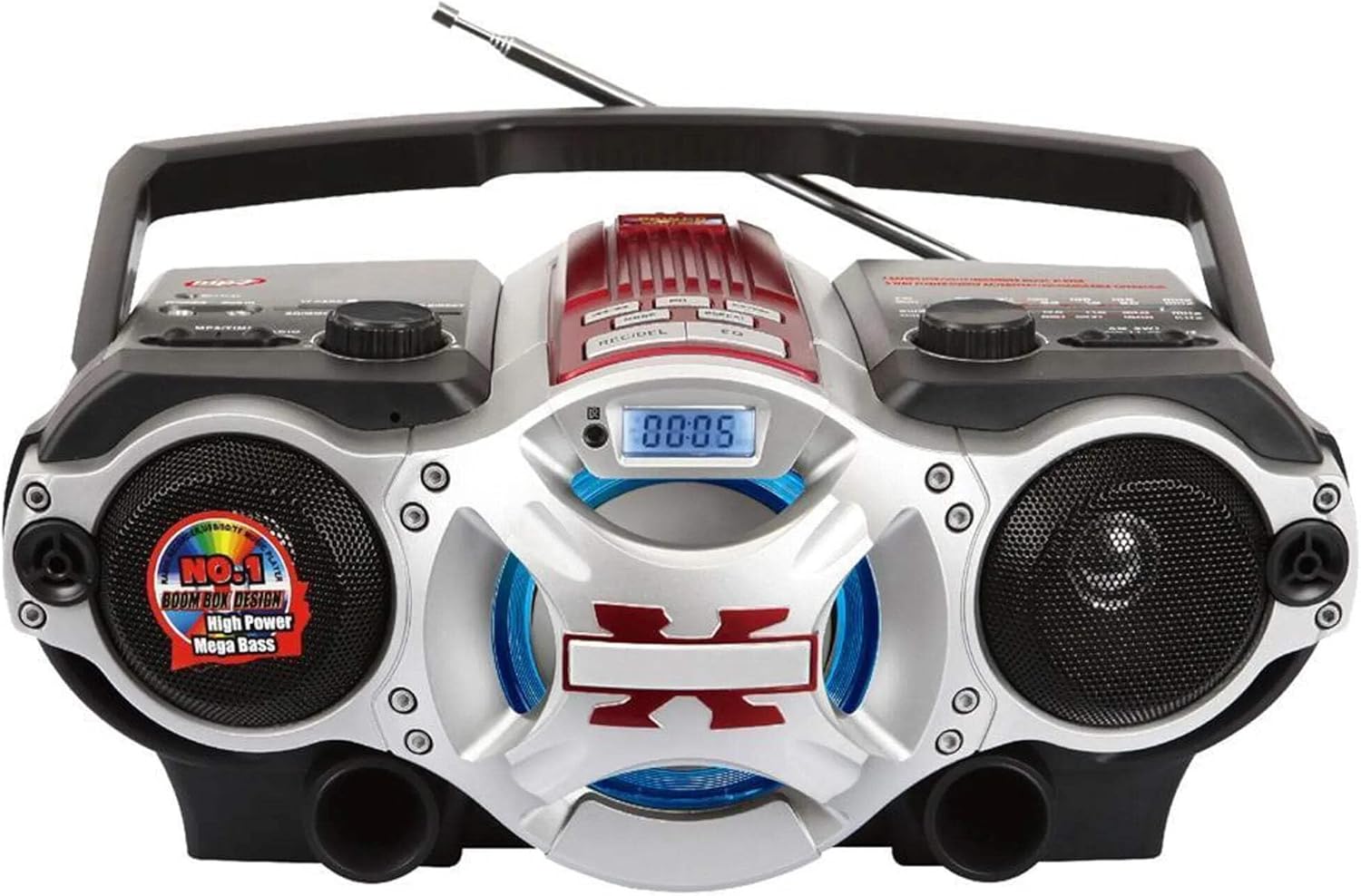
ചിത്രം 1: ഫ്രണ്ട് view of the Supersonic SC-1495BT Boombox, showing the speakers, central display, and main control area.

ചിത്രം 2: Left side controls, including USB input, SD/Micro SD card slot, AUX IN, PHONES jack, BT/MP3/RADIO mode switch, and Rotary Volume control.

ചിത്രം 3: Right side controls, featuring the AM/FM/SW1/SW2 band selector, TUNING knob, and playback control buttons (Play/Pause, Skip, Mode, Clock, EQ).
6. സജ്ജീകരണം
6.1 പവർ കണക്ഷൻ
- എസി പവർ: Connect the included AC power cord to the AC input on the back of the boombox and then plug it into a standard wall outlet. The internal rechargeable battery will begin charging.
- DC Power (Battery): The boombox has a built-in rechargeable battery. Ensure it is charged before portable use. The unit can also operate on DC power from the internal battery when not connected to AC.
6.2 ആന്റിന ക്രമീകരണം
Extend the 360-degree rod antenna for optimal radio reception, especially for FM and SW bands. Adjust its position for the clearest signal.
7. പ്രവർത്തന നിർദ്ദേശങ്ങൾ
7.1 പവർ ഓൺ/ഓഫ്, മോഡ് തിരഞ്ഞെടുക്കൽ
- To power on the unit, slide the BT/MP3/RADIO switch to the desired mode (BT, MP3, or RADIO).
- To power off, slide the switch to the OFF position.
7.2 ബ്ലൂടൂത്ത് പ്രവർത്തനം
- മോഡ് സ്വിച്ച് സ്ലൈഡുചെയ്യുക BT (Bluetooth). The LCD display will indicate Bluetooth mode, and the unit will enter pairing mode.
- നിങ്ങളുടെ ബ്ലൂടൂത്ത് പ്രവർത്തനക്ഷമമാക്കിയ ഉപകരണത്തിൽ (സ്മാർട്ട്ഫോൺ, ടാബ്ലെറ്റ് മുതലായവ), ബ്ലൂടൂത്ത് പ്രവർത്തനക്ഷമമാക്കി ലഭ്യമായ ഉപകരണങ്ങൾക്കായി തിരയുക.
- Select "SC-1495BT" from the list of devices. Once paired, the unit will emit a confirmation sound.
- You can now play audio from your device through the boombox. Use your device or the boombox's playback controls (Play/Pause, Skip) to manage music.
7.3 Radio Operation (AM/FM/SW1/SW2)
- മോഡ് സ്വിച്ച് സ്ലൈഡുചെയ്യുക റേഡിയോ.
- Select the desired band (AM, FM, SW1, or SW2) using the band selector switch.
- Extend and adjust the rod antenna for optimal reception.
- തിരിക്കുക ട്യൂണിംഗ് knob to scan for radio stations. The frequency will be displayed on the LCD.
7.4 യുഎസ്ബി/എസ്ഡി കാർഡ് പ്ലേബാക്ക്
- മോഡ് സ്വിച്ച് സ്ലൈഡുചെയ്യുക MP3.
- Insert a USB flash drive into the USB input or an SD/Micro SD card into the corresponding slot. Ensure the card is inserted correctly.
- The unit will automatically detect and begin playing MP3 audio fileചേർത്ത മീഡിയയിൽ നിന്നുള്ള s.
- Use the playback control buttons (Play/Pause, Skip, Fast Forward, Rewind) to navigate tracks.
7.5 Auxiliary (AUX) Input
- മോഡ് സ്വിച്ച് സ്ലൈഡുചെയ്യുക MP3.
- ഒരു ബാഹ്യ ഓഡിയോ ഉപകരണം (ഉദാ. MP3 പ്ലെയർ, സ്മാർട്ട്ഫോൺ) ഇതിലേക്ക് ബന്ധിപ്പിക്കുക ഓക്സ് ഇൻ jack using a 3.5mm audio cable (not included).
- Play audio from your external device. The sound will be routed through the boombox speakers. Control playback from your external device.
7.6 വോളിയം നിയന്ത്രണം
തിരിക്കുക വോളിയം ശബ്ദം കൂട്ടാൻ ഘടികാരദിശയിലും കുറയ്ക്കാൻ എതിർ ഘടികാരദിശയിലും നോബ് അമർത്തുക.
7.7 ഇയർഫോൺ ജാക്ക്
For private listening, plug standard 3.5mm earphones (not included) into the ഫോണുകൾ jack. The main speakers will be muted.
8. പരിപാലനം
- വൃത്തിയാക്കൽ: യൂണിറ്റിന്റെ പുറംഭാഗം വൃത്തിയാക്കാൻ മൃദുവായതും ഉണങ്ങിയതുമായ തുണി ഉപയോഗിക്കുക. അബ്രസീവ് ക്ലീനറുകളോ ലായകങ്ങളോ ഉപയോഗിക്കരുത്.
- സംഭരണം: When not in use for extended periods, store the boombox in a cool, dry place away from direct sunlight and extreme temperatures.
- ബാറ്ററി കെയർ: To prolong the life of the built-in rechargeable battery, avoid fully discharging it frequently. Charge the unit regularly, even if not in use.
9. പ്രശ്നപരിഹാരം
If you encounter issues with your boombox, refer to the following common problems and solutions:
| പ്രശ്നം | സാധ്യമായ കാരണം | പരിഹാരം |
|---|---|---|
| ശക്തിയില്ല | AC cord not connected; Battery discharged; Power switch off | Ensure AC cord is securely plugged in; Charge the battery; Slide power switch to ON/BT/MP3/RADIO. |
| ശബ്ദമില്ല | Volume too low; Mute activated (if applicable); Incorrect mode selected; Earphones connected | Increase volume; Ensure correct mode (BT, MP3, RADIO) is selected; Disconnect earphones. |
| ബ്ലൂടൂത്ത് ജോടിയാക്കുന്നില്ല | Boombox not in pairing mode; Device Bluetooth off; Too far from boombox | Ensure boombox is in BT mode; Enable Bluetooth on your device; Move device closer (within 30 feet/10 meters); Try re-pairing. |
| മോശം റേഡിയോ സ്വീകരണം | Antenna not extended/adjusted; Weak signal area | Fully extend and adjust the rod antenna; Try moving the unit to a different location. |
| USB/SD കാർഡ് പ്ലേ ചെയ്യുന്നില്ല | തെറ്റാണ് file format; Card/drive not inserted correctly; Corrupted files | ഉറപ്പാക്കുക files are MP3 format; Re-insert card/drive; Try a different USB drive or SD card. |
10 സ്പെസിഫിക്കേഷനുകൾ
- മോഡൽ: SC-1495BT
- ബ്രാൻഡ്: സൂപ്പർസോണിക്
- കണക്റ്റിവിറ്റി: Bluetooth (Ver. 3.0), USB, SD/Micro SD, 3.5mm AUX
- റേഡിയോ ബാൻഡുകൾ: AM, FM, SW1, SW2
- പിന്തുണയ്ക്കുന്ന ഓഡിയോ ഫോർമാറ്റുകൾ: MP3
- ഊർജ്ജ സ്രോതസ്സ്: AC 110-220V, Built-in Rechargeable Battery
- സ്പീക്കറുകൾ: 2 (സ്റ്റീരിയോ)
- അളവുകൾ (L x W x H): 15 x 10 x 12 ഇഞ്ച്
- ഭാരം: 4.3 പൗണ്ട്
- നിർമ്മാതാവ്: Capitol Sales Company
- UPC: 639131814950
11. വാറൻ്റി
This product comes with a 1-year limited warranty. Please retain your proof of purchase for warranty claims. For specific warranty terms and conditions, refer to the documentation included with your purchase or contact Supersonic customer support.
12. പിന്തുണ
For further assistance, technical support, or inquiries regarding your Supersonic SC-1495BT Boombox, please visit the official Supersonic webസൈറ്റിൽ ബന്ധപ്പെടുക അല്ലെങ്കിൽ അവരുടെ ഉപഭോക്തൃ സേവന വിഭാഗവുമായി ബന്ധപ്പെടുക. കോൺടാക്റ്റ് വിവരങ്ങൾ സാധാരണയായി നിർമ്മാതാവിന്റെ വെബ്സൈറ്റിൽ കാണാം. webസൈറ്റ് അല്ലെങ്കിൽ ഉൽപ്പന്ന പാക്കേജിംഗ്.