
1. ആമുഖം
വാങ്ങിയതിന് നന്ദി.asing the Silverlit Xion FPV Camera Drone 84765. This drone is designed for outdoor use and offers an exciting First-Person View (FPV) flying experience with its integrated camera. Please read this manual thoroughly before operating the drone to ensure safe and optimal performance. Keep this manual for future reference.

Image 1.1: The Silverlit Xion FPV Camera Drone 84765.
2 സുരക്ഷാ വിവരങ്ങൾ
മുന്നറിയിപ്പ്: ഈ നിർദ്ദേശങ്ങൾ പാലിക്കുന്നതിൽ പരാജയപ്പെടുന്നത് ഉൽപ്പന്നത്തിന് പരിക്കോ കേടുപാടുകളോ ഉണ്ടാക്കാം.
- ആളുകൾ, മൃഗങ്ങൾ, കെട്ടിടങ്ങൾ, വൈദ്യുതി ലൈനുകൾ എന്നിവയിൽ നിന്ന് അകന്ന്, തുറന്നതും വ്യക്തവുമായ സ്ഥലങ്ങളിൽ എപ്പോഴും ഡ്രോൺ പ്രവർത്തിപ്പിക്കുക.
- ശക്തമായ കാറ്റിലോ പ്രതികൂല കാലാവസ്ഥയിലോ പറക്കരുത്.
- Keep hands, face, and loose clothing away from rotating propellers.
- Ensure the drone battery and remote control batteries are fully charged before each flight.
- ചാർജ് ചെയ്യുന്ന ബാറ്ററികൾ ഒരിക്കലും ശ്രദ്ധിക്കാതെ വിടരുത്.
- This product is intended for children. Adult supervision is recommended.
- ഡ്രോണിലോ അതിന്റെ ഘടകങ്ങളിലോ മാറ്റം വരുത്തുകയോ ഡിസ്അസംബ്ലിംഗ് ചെയ്യുകയോ ചെയ്യരുത്.
- Always turn off the drone and remote control when not in use.
3. പാക്കേജ് ഉള്ളടക്കം
പാക്കേജിൽ എല്ലാ ഇനങ്ങളും ഉണ്ടെന്ന് ഉറപ്പാക്കുക:
- Silverlit Xion FPV Camera Drone 84765
- റിമോട്ട് കൺട്രോൾ
- FPV ഗോഗിൾസ്
- Rechargeable Drone Battery
- USB Charging Cable (for drone battery)
- സ്പെയർ പ്രൊപ്പല്ലറുകൾ
- ഉപയോക്തൃ മാനുവൽ

Image 3.1: The Silverlit Xion FPV Drone product box, showing the drone and FPV goggles.
4. സജ്ജീകരണം
4.1. റിമോട്ട് കൺട്രോൾ ബാറ്ററി ഇൻസ്റ്റാളേഷൻ
- റിമോട്ട് കൺട്രോളിൻ്റെ പിൻഭാഗത്തുള്ള ബാറ്ററി കമ്പാർട്ട്മെൻ്റ് തുറക്കുക.
- Insert the required batteries (not included) according to the polarity indicators.
- ബാറ്ററി കമ്പാർട്ട്മെൻ്റ് സുരക്ഷിതമായി അടയ്ക്കുക.
4.2. Drone Battery Installation
- ഡ്രോൺ ഓഫ് ചെയ്തിട്ടുണ്ടെന്ന് ഉറപ്പാക്കുക.
- ഡ്രോണിലെ ബാറ്ററി കമ്പാർട്ട്മെന്റ് കണ്ടെത്തുക.
- Carefully insert the charged drone battery, ensuring it is properly seated and connected.
- ബാറ്ററി കമ്പാർട്ട്മെൻ്റ് കവർ അടയ്ക്കുക.
4.3. പ്രൊപ്പല്ലർ ഇൻസ്റ്റാളേഷൻ (ആവശ്യമെങ്കിൽ)
If propellers are not pre-installed, attach them according to the markings (e.g., A and B) on the propellers and motor shafts. Ensure they are securely fastened.
4.4. Remote Control and Drone Pairing
- ഡ്രോൺ പരന്നതും ലെവൽ ഉപരിതലത്തിൽ വയ്ക്കുക.
- Turn on the drone. The indicator lights will flash.
- വിദൂര നിയന്ത്രണം ഓണാക്കുക.
- Move the left joystick (throttle) fully up, then fully down. The drone's indicator lights will become solid, indicating successful pairing.
4.5. FPV Goggle Setup
Connect the FPV goggles to your smartphone (if applicable) or power them on as per their specific instructions. Ensure a stable connection for live video feed.

Image 4.1: The remote control and FPV goggles for the Silverlit Xion Drone.
5. ഡ്രോൺ ബാറ്ററി ചാർജ് ചെയ്യുന്നു
The drone's battery requires charging before use. A USB charging cable is included, but a compatible USB power adapter (not included) is required.
- യുഎസ്ബി ചാർജിംഗ് കേബിൾ ഡ്രോൺ ബാറ്ററിയുമായി ബന്ധിപ്പിക്കുക.
- Plug the other end of the USB cable into a suitable USB power adapter (e.g., a smartphone charger or computer USB port).
- The charging indicator light will show the charging status (refer to the cable's specific instructions for light behavior).
- Charging typically takes 80-100 minutes for a full charge.
- After a flight, allow the battery to cool down for 10-15 minutes before recharging to prolong battery life.
Note: A fully charged battery provides approximately 4-5 minutes of flight time.
6. ഡ്രോൺ പ്രവർത്തിപ്പിക്കൽ
6.1. പ്രീ-ഫ്ലൈറ്റ് ചെക്ക്ലിസ്റ്റ്
- ഡ്രോണിന്റെയും റിമോട്ട് കൺട്രോളിന്റെയും ബാറ്ററികൾ പൂർണ്ണമായും ചാർജ് ചെയ്തിട്ടുണ്ടെന്ന് ഉറപ്പാക്കുക.
- പ്രൊപ്പല്ലറുകൾ സുരക്ഷിതമായി ഘടിപ്പിച്ചിട്ടുണ്ടെന്നും കേടുപാടുകൾ സംഭവിച്ചിട്ടില്ലെന്നും പരിശോധിക്കുക.
- Verify the flight area is clear of obstacles, people, and animals.
- Confirm successful pairing between the drone and remote control.
6.2. ടേക്ക് ഓഫും ലാൻഡിങ്ങും
- ഡ്രോൺ പരന്നതും ലെവൽ ഉപരിതലത്തിൽ വയ്ക്കുക.
- Slowly push the left joystick (throttle) upwards to make the drone ascend.
- To land, slowly pull the left joystick (throttle) downwards until the drone gently touches the ground.
6.3. അടിസ്ഥാന ഫ്ലൈറ്റ് നിയന്ത്രണങ്ങൾ
- ഇടത് ജോയ്സ്റ്റിക്ക് (ത്രോട്ടിൽ): Up/Down for altitude control.
- Left Joystick (Yaw): Left/Right for rotating the drone horizontally.
- വലത് ജോയ്സ്റ്റിക്ക് (പിച്ച്/റോൾ): Up/Down for moving forward/backward; Left/Right for moving left/right (sideways).
6.4. Camera Operation and FPV
The drone features a 1080p video recording capability and 0.3 MP effective still resolution. Refer to the remote control diagram for specific camera buttons.
- വീഡിയോ റെക്കോർഡിംഗ്: Press the designated video button on the remote control to start/stop recording.
- ഫോട്ടോ ക്യാപ്ചർ: Press the designated photo button to take a still image.
- FPV Live Feed: Once the FPV goggles are set up and connected, you will see the live video feed from the drone's camera, enhancing your flying experience.
7. പരിപാലനം
- വൃത്തിയാക്കൽ: ഡ്രോണും റിമോട്ട് കൺട്രോളും വൃത്തിയാക്കാൻ മൃദുവായതും ഉണങ്ങിയതുമായ തുണി ഉപയോഗിക്കുക. കഠിനമായ രാസവസ്തുക്കളോ ലായകങ്ങളോ ഉപയോഗിക്കരുത്.
- പ്രൊപ്പല്ലർ പരിശോധന: Regularly check propellers for cracks, bends, or damage. Replace any damaged propellers with spare parts provided.
- സംഭരണം: Store the drone and its components in a cool, dry place, away from direct sunlight and extreme temperatures. Remove batteries from the remote control if storing for extended periods.
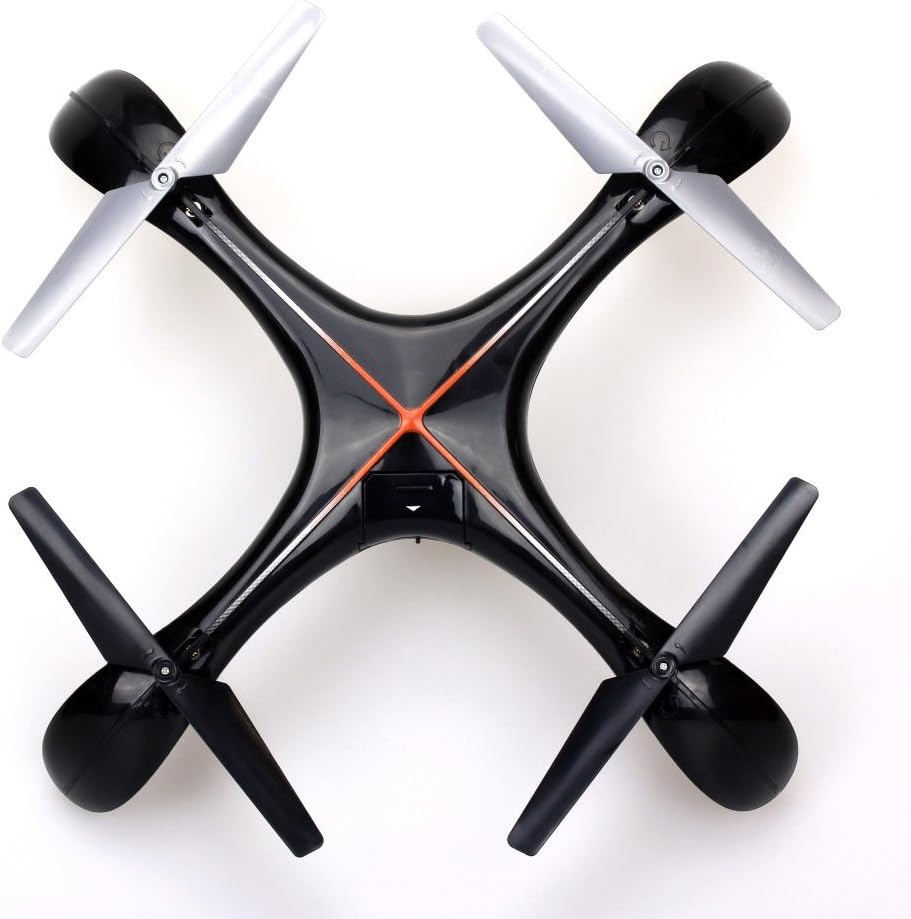
ചിത്രം 7.1: മുകളിൽ view of the Silverlit Xion FPV Drone, showing propeller orientation.
8. പ്രശ്നപരിഹാരം
| പ്രശ്നം | സാധ്യമായ കാരണം | പരിഹാരം |
|---|---|---|
| ഡ്രോൺ റിമോട്ട് കൺട്രോളിനോട് പ്രതികരിക്കുന്നില്ല. | ഡ്രോണിലോ റിമോട്ടിലോ ബാറ്ററി കുറവാണ്; ശരിയായി ജോടിയാക്കിയിട്ടില്ല. | Charge drone battery, replace remote control batteries, re-attempt pairing process. |
| ഡ്രോൺ ക്രമരഹിതമായി പറക്കുന്നു അല്ലെങ്കിൽ ഒഴുകുന്നു. | Drone not calibrated on a flat surface; damaged propeller. | Ensure drone is placed on a level surface during pairing/initialization. Check and replace damaged propellers. Refer to manual for calibration steps if available. |
| Poor video quality or no FPV feed. | Weak signal; FPV goggles not connected properly. | Ensure drone is within range. Check FPV goggle connection and battery. |
| ചെറിയ ഫ്ലൈറ്റ് സമയം. | ബാറ്ററി പൂർണ്ണമായും ചാർജ് ചെയ്തിട്ടില്ല; പഴയ ബാറ്ററി. | Ensure battery is fully charged (80-100 minutes). Consider replacing the battery if it's old and performance has degraded. |
9 സ്പെസിഫിക്കേഷനുകൾ
- ബ്രാൻഡ്: സിൽവർലൈറ്റ്
- മോഡലിൻ്റെ പേര്: 84765
- പ്രായപരിധി: കുട്ടി
- വീഡിയോ റെക്കോർഡിംഗ് മിഴിവ്: 1080p
- ഫലപ്രദമായ സ്റ്റിൽ റെസലൂഷൻ: 0.3 എം.പി
- നൈപുണ്യ ശേഷി: Professional (Note: This may refer to advanced features, but basic operation is suitable for children with supervision)
- നിയന്ത്രണ തരം: റിമോട്ട് കൺട്രോൾ
- ബാറ്ററികൾ ഉൾപ്പെടുന്നു: No (for remote control)
- റിമോട്ട് കൺട്രോൾ ഉൾപ്പെടുന്നു: അതെ
- ഉൽപ്പന്ന ഭാരം: 1.5 കിലോഗ്രാം
10. വാറൻ്റിയും പിന്തുണയും
For warranty information or technical support, please refer to the documentation provided with your purchase or contact Silverlit customer service. Keep your proof of purchase for any warranty claims.