
Pioneer DJ DM40
Pioneer DJ DM-40 Active Monitor Speakers User Manual
Model: DM40 | Brand: Pioneer DJ
ആമുഖം
The Pioneer DJ DM-40 desktop monitors are designed to bring excellent audio quality to your home setup. These compact 4-inch active monitor speakers incorporate advanced technology from Pioneer DJ's professional S-DJX series and Pro Audio speakers, ensuring a rich, tight bass response and a wide sweet spot. They are ideal for DJing, music production, and general music enjoyment, offering a balanced sound experience across all frequencies.
ബോക്സിൽ എന്താണുള്ളത്
- DM-40 Active Monitor Speakers (Pair)
- പവർ കോർഡ്
- 2 m Speaker Cable (for left/right channel connection)
- Audio Converter Cable (3.5 mm stereo mini plug to RCA)
- Bottom Cushion x 8
- പ്രവർത്തന നിർദ്ദേശങ്ങൾ
പ്രധാന സവിശേഷതകൾ
High-Quality Audio Components
The DM-40 speakers inherit audio components from Pioneer DJ's professional S-DJX series, ensuring superior sound reproduction. This includes 4-inch fiberglass woofers for tight, punchy bass and ¾-inch soft dome tweeters.

ഫ്രണ്ട് view of the Pioneer DJ DM-40 active monitor speakers, showcasinഅവയുടെ ഒതുക്കമുള്ള ഡിസൈൻ.
Front-Loaded Bass Reflex System
A front-loaded bass reflex system with grooved ducts reduces air friction, delivering clear and powerful bass even when the speakers are placed close to a wall. This design ensures a robust low-end response without unwanted resonance.

വിശദമായി view of the grooved bass reflex port, designed to optimize bass response.
DECO Convex Diffusers for Wide Sweet Spot
Pioneer DJ's DECO (Diffusion Effectual Convexity by Olson) technology is integrated into the tweeters. These convex diffusers channel high frequencies left, right, and up, creating a wider sweet spot and a 3D stereo sound experience, ensuring optimal sound quality regardless of your listening position.
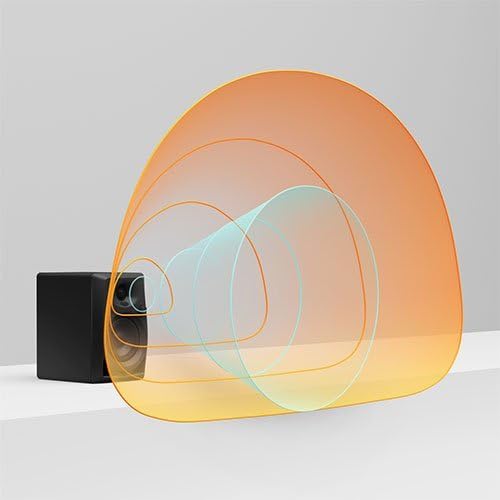
Visual representation of sound dispersion created by DECO convex diffusers.
Balanced Sound and Reduced Resonance
The tweeter and woofer positions are carefully aligned to eliminate crossover and ensure a balanced sound across all frequencies. Curved front edges of the cabinet further reduce resonance, contributing to a clean and clear audio output.

കോണാകൃതിയിലുള്ളത് view highlighting the speaker design and curved edges.
ഔദ്യോഗിക ഉൽപ്പന്നം അവസാനിച്ചുview
ഈ വീഡിയോയിൽ ഒരു ഔദ്യോഗിക ഓവർ നൽകിയിരിക്കുന്നുview of the Pioneer DJ DM-40 Active Monitor Speakers, detailing their features and benefits for DJing and music production.
സജ്ജീകരണ ഗൈഡ്
Follow these steps to set up your Pioneer DJ DM-40 active monitor speakers:
- പ്ലേസ്മെൻ്റ്: Place the speakers on a stable, flat surface. For optimal sound, position them at ear level and equidistant from your listening position. Use the included bottom cushions to minimize vibrations.
- സ്പീക്കറുകൾ ബന്ധിപ്പിക്കുക: The DM-40 comes as a pair, with one active (left) speaker and one passive (right) speaker. Use the provided 2m speaker cable to connect the 'OUTPUT TO RIGHT SPEAKER' terminals on the active (LEFT) speaker to the input terminals on the passive (RIGHT) speaker. Ensure correct polarity (red to red, black to black).
- ഓഡിയോ ഉറവിടം ബന്ധിപ്പിക്കുക: Connect your audio source (e.g., DJ controller, computer, smartphone) to the active (LEFT) speaker using either the RCA inputs or the 3.5mm stereo mini-jack input. An audio converter cable (3.5mm stereo mini plug to RCA) is included for convenience.
- പവർ കണക്ഷൻ: Connect the power cord to the active (LEFT) speaker's 'AC IN' port, then plug it into a suitable power outlet.
- പവർ ഓൺ: Locate the 'POWER' switch on the rear of the active (LEFT) speaker and switch it to the 'ON' position. The power indicator LED on the front of the active speaker will illuminate.

Rear panel of the DM-40 speakers, illustrating the various input and output connections.
പ്രവർത്തന നിർദ്ദേശങ്ങൾ
- വോളിയം നിയന്ത്രണം: Adjust the overall volume using the volume control dial located on the front of the active (LEFT) speaker. Turn clockwise to increase volume and counter-clockwise to decrease.
- ഹെഡ്ഫോൺ ഔട്ട്പുട്ട്: For private listening, plug your headphones into the 3.5mm HEADPHONE MONITOR output jack located on the front of the active (LEFT) speaker. Plugging in headphones will mute the speaker output.
- യാന്ത്രിക സ്റ്റാൻഡ്ബൈ: The DM-40 speakers feature an auto-standby function. If no audio signal is detected for a certain period, the speakers will automatically enter standby mode to conserve power. They will automatically resume operation when an audio signal is detected again.
മെയിൻ്റനൻസ്
To ensure the longevity and optimal performance of your DM-40 speakers, follow these maintenance guidelines:
- വൃത്തിയാക്കൽ: Regularly wipe the speaker cabinets with a soft, dry cloth. Avoid using abrasive cleaners, waxes, or solvents as they may damage the finish.
- വെൻ്റിലേഷൻ: Ensure that the speakers have adequate ventilation. Do not block any ventilation openings.
- പരിസ്ഥിതി: Avoid exposing the speakers to extreme temperatures, humidity, direct sunlight, or excessive dust.
- കൈകാര്യം ചെയ്യൽ: സ്പീക്കറുകൾ ശ്രദ്ധയോടെ കൈകാര്യം ചെയ്യുക. അവ താഴെയിടുകയോ ശക്തമായ ആഘാതങ്ങൾക്ക് വിധേയമാക്കുകയോ ചെയ്യരുത്.
ട്രബിൾഷൂട്ടിംഗ്
If you encounter issues with your DM-40 speakers, refer to the following common troubleshooting tips:
| പ്രശ്നം | സാധ്യമായ കാരണം | പരിഹാരം |
|---|---|---|
| സ്പീക്കറുകളിൽ നിന്ന് ശബ്ദമില്ല |
|
|
| വികലമായ അല്ലെങ്കിൽ വ്യക്തമല്ലാത്ത ശബ്ദം |
|
|
| Only one speaker producing sound |
|
|
സ്പെസിഫിക്കേഷനുകൾ
| ഫീച്ചർ | വിശദാംശങ്ങൾ |
|---|---|
| മോഡലിൻ്റെ പേര് | DM-40 Desktop Monitor Speakers |
| സ്പീക്കർ തരം | 2-way bass reflex, active monitor speakers |
| വൂഫർ | 4-inch Fiberglass |
| ട്വീറ്റർ | ¾-inch Soft Dome |
| Ampലൈഫ്ഫയർ putട്ട്പുട്ട് | ക്ലാസ് എ/ബി amp: 2 x 21 W / 4 Ω |
| ഫ്രീക്വൻസി റേഞ്ച് | 70 - 30000 ഹെർട്സ് |
| പ്രതിരോധം | 10 കി |
| ഇൻപുട്ടുകൾ | 1 LINE (RCA), 1 LINE (Mini-jack) |
| ഔട്ട്പുട്ടുകൾ | 1 HEADPHONE MONITOR (Mini-jack) |
| Dimensions (Left Ch) | 146 x 227 x 223 മിമി (5.7 x 8.9 x 8.7 ഇഞ്ച്) |
| Dimensions (Right Ch) | 146 x 227 x 210 മിമി (5.7 x 8.9 x 8.3 ഇഞ്ച്) |
| Weight (Left Ch) | 2.7 കിലോഗ്രാം (6 പൗണ്ട്.) |
| Weight (Right Ch) | 2.2 കിലോഗ്രാം (4.8 പൗണ്ട്.) |
| നിറം | കറുപ്പ് |
വാറൻ്റിയും പിന്തുണയും
The Pioneer DJ DM-40 Active Monitor Speakers come with a Limited Warranty. For detailed information regarding warranty terms, conditions, and duration, please refer to the official User Guide PDF provided with your product or visit the Pioneer DJ official webസൈറ്റ്.
For further assistance, technical support, or service inquiries, please contact Pioneer DJ customer support or visit their official support channels.
You can access the official User Guide PDF ഇവിടെ.
Ask a question about this manual
Ask about setup, troubleshooting, compatibility, parts, safety, or missing instructions. Manuals+ will review the question and use this page’s manual context to help answer it.