
1. ആമുഖം
This manual provides comprehensive instructions for the Xerox Color C60 Press Digital Laser Production Printer. It covers essential information regarding the setup, operation, maintenance, and technical specifications of this high-volume digital press, which offers print, copy, and scan functionalities. Designed for commercial printing, in-house printing, and publishing environments, the Xerox Color C60 is engineered to enhance output capabilities, color quality, and overall efficiency.
നിങ്ങളുടെ ഉപകരണത്തിന്റെ ശരിയായ ഉപയോഗം ഉറപ്പാക്കുന്നതിനും അതിന്റെ പ്രകടനവും ദീർഘായുസ്സും പരമാവധിയാക്കുന്നതിനും ദയവായി ഈ മാനുവൽ നന്നായി വായിക്കുക.
2. ഉൽപ്പന്നം കഴിഞ്ഞുview

ചിത്രം 1: ഫ്രണ്ട് view of the Xerox Color C60 Press Digital Laser Production Printer. This image displays the main unit with its integrated control panel on the left, multiple paper input trays at the bottom, and the output tray at the top.
The Xerox Color C60 is a versatile digital production printer designed for demanding print environments. It integrates multiple functions including printing, copying, and scanning, and comes standard with a 5PB Integrated Fiery Color Server for advanced color management.
പ്രധാന സവിശേഷതകൾ:
- Print, Copy, Scan functionality
- Up to 65 pages per minute (ppm) print speed
- High print resolution of up to 2400 x 2400 dpi
- Multiple paper trays for a total standard capacity of 3,260 sheets
- Supports various paper sizes up to 13" x 19" (SRA3+)
- Integrated Fiery Color Server for professional color output
- ഓട്ടോമാറ്റിക് ഡ്യുപ്ലെക്സ് പ്രിൻ്റിംഗ്
3. സജ്ജീകരണ നിർദ്ദേശങ്ങൾ
3.1 അൺപാക്കിംഗും പ്ലേസ്മെന്റും
- Ensure the printer is placed on a stable, level surface capable of supporting its weight (approximately 604 pounds).
- Remove all packaging materials, including any internal shipping restraints. Refer to the packing list for all included components: the Xerox Color C60 unit, power cord, and any initial consumables.
- യൂണിറ്റിന് ചുറ്റും മതിയായ വായുസഞ്ചാരം ഉറപ്പാക്കുക.
3.2 പവർ കണക്ഷൻ
- Connect the provided power cord to the printer's power inlet.
- Plug the other end of the power cord into a grounded electrical outlet. The printer requires 110-127 VAC, 50/60 Hz.
- പ്രിന്ററിന്റെ പവർ ആവശ്യകതകൾക്ക് അനുസൃതമായി റേറ്റുചെയ്തിട്ടില്ലെങ്കിൽ എക്സ്റ്റൻഷൻ കോഡുകളോ പവർ സ്ട്രിപ്പുകളോ ഉപയോഗിക്കരുത്.
3.3 Network and Driver Installation
- Connect the printer to your network using an Ethernet cable. The printer supports Ethernet connectivity.
- For driver installation, visit the official Xerox support website. Drivers are downloadable from the manufacturer's webസൈറ്റ്.
- Follow the on-screen instructions provided by the driver installer for your operating system.
4. പ്രവർത്തന നിർദ്ദേശങ്ങൾ
4.1 പേപ്പർ ലോഡ് ചെയ്യുന്നു
The Xerox Color C60 features multiple paper trays and a bypass tray.
- Main Trays (2 x 500 sheets): Open the designated tray, fan the paper stack, and load it with the print side facing down (or as indicated by the tray guide). Adjust the paper guides to fit the paper size.
- Tandem Tray (840 sheets + 1140 sheets): For higher capacity, load paper into the tandem trays following the same procedure as the main trays.
- Bypass Tray (250 sheets): Use for special media, envelopes, or smaller quantities of paper. Load paper face up, adjusting guides.
The printer supports paper sizes from 5.5" x 7.2" up to 13" x 19" (A3+/SRA3/A3/A4/A5).
4.2 അടിസ്ഥാന പ്രിന്റിംഗ്
- നിങ്ങളുടെ കമ്പ്യൂട്ടറിൽ നിന്ന്, നിങ്ങൾ പ്രിന്റ് ചെയ്യാൻ ആഗ്രഹിക്കുന്ന പ്രമാണം തുറക്കുക.
- തിരഞ്ഞെടുക്കുക അച്ചടിക്കുക ആപ്ലിക്കേഷന്റെ മെനുവിൽ നിന്ന്.
- Choose the "Xerox Color C60" printer from the list of available printers.
- പ്രവേശനം പ്രിൻ്റർ പ്രോപ്പർട്ടികൾ or മുൻഗണനകൾ to configure print settings such as:
- Paper Size and Type
- Color or Black & White
- Single-sided or Duplex (two-sided) printing
- കോപ്പികളുടെ എണ്ണം
- Output tray selection
- ക്ലിക്ക് ചെയ്യുക അച്ചടിക്കുക to send the job to the printer.
4.3 പ്രമാണങ്ങൾ പകർത്തൽ
- Place your original document face down on the scanner glass or face up in the automatic document feeder (ADF).
- പ്രിന്ററിന്റെ നിയന്ത്രണ പാനലിൽ, തിരഞ്ഞെടുക്കുക പകർത്തുക പ്രവർത്തനം.
- Adjust settings such as:
- കോപ്പികളുടെ എണ്ണം
- Color or Black & White
- വലുതാക്കൽ/കുറയ്ക്കൽ
- Two-sided copying
- ചിത്രത്തിന്റെ ഗുണനിലവാര ക്രമീകരണങ്ങൾ
- അമർത്തുക ആരംഭിക്കുക പകർത്തൽ ആരംഭിക്കുന്നതിനുള്ള ബട്ടൺ.
4.4 പ്രമാണങ്ങൾ സ്കാൻ ചെയ്യുന്നു
The Xerox Color C60 features a flatbed scanner.
- നിങ്ങളുടെ യഥാർത്ഥ പ്രമാണം സ്കാനർ ഗ്ലാസിലോ ADF-ലോ വയ്ക്കുക.
- പ്രിന്ററിന്റെ നിയന്ത്രണ പാനലിൽ, തിരഞ്ഞെടുക്കുക സ്കാൻ ചെയ്യുക പ്രവർത്തനം.
- നിങ്ങൾക്ക് ആവശ്യമുള്ള സ്കാൻ ഡെസ്റ്റിനേഷൻ തിരഞ്ഞെടുക്കുക (ഉദാ: ഇമെയിൽ വഴി സ്കാൻ ചെയ്യുക, ഫോൾഡറിലേക്ക് സ്കാൻ ചെയ്യുക, യുഎസ്ബിയിലേക്ക് സ്കാൻ ചെയ്യുക).
- Configure scan settings such as:
- റെസലൂഷൻ
- Color Mode (Color, Grayscale, Black & White)
- File Format (e.g., PDF, JPEG, TIFF)
- Two-sided scanning
- അമർത്തുക ആരംഭിക്കുക സ്കാനിംഗ് ആരംഭിക്കാൻ ബട്ടൺ.
5. പരിപാലനം
5.1 ഉപഭോഗവസ്തുക്കൾ
The Xerox Color C60 uses four toner cartridges: Black, Cyan, Magenta, and Yellow. Monitor toner levels through the control panel or printer software. Replace cartridges when indicated by the printer.
Note: This pre-owned unit typically includes consumables at an average of 30% capacity.
5.2 വൃത്തിയാക്കൽ
- പുറം: ഒരു മൃദുവായ, ഡി ഉപയോഗിച്ച് ബാഹ്യ പ്രതലങ്ങൾ തുടയ്ക്കുകamp, ലിന്റ് രഹിത തുണി. അബ്രാസീവ് ക്ലീനറുകളോ ലായകങ്ങളോ ഉപയോഗിക്കരുത്.
- സ്കാനർ ഗ്ലാസ്: Gently clean the scanner glass with a soft cloth moistened with glass cleaner. Ensure no residue is left behind.
- Automatic Document Feeder (ADF) Rollers: Periodically clean the ADF rollers to prevent paper feed issues. Refer to the printer's on-screen instructions or the full service manual for detailed steps.
5.3 ഫേംവെയർ അപ്ഡേറ്റുകൾ
Periodically check the Xerox support website for firmware updates. Keeping the printer's firmware up-to-date ensures optimal performance and access to the latest features and security enhancements.
6. പ്രശ്നപരിഹാരം
This section provides solutions to common issues. For more complex problems, refer to the comprehensive service manual or contact technical support.
- പേപ്പർ ജാമുകൾ: Follow the on-screen instructions displayed on the printer's control panel to locate and clear paper jams. Always power off the printer before attempting to clear jams in hard-to-reach areas.
- പ്രിന്റ് ഗുണനിലവാര പ്രശ്നങ്ങൾ:
- ടോണർ ലെവലുകൾ പരിശോധിച്ച് കുറഞ്ഞ കാട്രിഡ്ജുകൾ മാറ്റിസ്ഥാപിക്കുക.
- പ്രിന്ററിന്റെ മെയിന്റനൻസ് മെനുവിൽ നിന്ന് ഒരു പ്രിന്റ് ഹെഡ് ക്ലീനിംഗ് അല്ലെങ്കിൽ കാലിബ്രേഷൻ നടത്തുക.
- നിങ്ങളുടെ പ്രിന്റ് ജോലിക്ക് ഉചിതമായ പേപ്പർ തരങ്ങൾ ഉപയോഗിക്കുന്നുണ്ടെന്ന് ഉറപ്പാക്കുക.
- കണക്റ്റിവിറ്റി പ്രശ്നങ്ങൾ:
- Verify that the Ethernet cable is securely connected to both the printer and the network port.
- Restart the printer and your network router/switch.
- പ്രിന്ററിന്റെ നിയന്ത്രണ പാനലിലെ നെറ്റ്വർക്ക് ക്രമീകരണങ്ങൾ പരിശോധിക്കുക.
- പിശക് കോഡുകൾ: If an error code appears on the control panel, note the code and consult the Xerox support website or the full service manual for specific troubleshooting steps.
7 സ്പെസിഫിക്കേഷനുകൾ
| ഫീച്ചർ | വിശദാംശങ്ങൾ |
|---|---|
| മോഡലിൻ്റെ പേര് | Xerox Color C60 |
| പ്രവർത്തനങ്ങൾ | Printer, Copier, Scanner |
| Print Speed (Color/Mono) | 65 ppm വരെ |
| പ്രിൻ്റ് റെസല്യൂഷൻ | 2400 x 2400 dpi വരെ |
| പ്രതിമാസ ഡ്യൂട്ടി സൈക്കിൾ | 300,000 പേജുകൾ വരെ |
| ശരാശരി പ്രതിമാസ പ്രിന്റ് വോളിയം | 10,000 മുതൽ 50,000 വരെ പേജുകൾ |
| പേപ്പർ വലുപ്പങ്ങൾ പിന്തുണയ്ക്കുന്നു | 13" x 19", 12" x 18", 11" x 17", 8.5" x 11", 8.5" x 14", 5.5" x 7.2" (A3+/SRA3/A3/A4/A5) |
| സ്റ്റാൻഡേർഡ് പേപ്പർ ശേഷി | 3,260 sheets (2 x 500-sheet main trays, 840-sheet + 1140-sheet tandem tray, 250-sheet bypass tray) |
| പരമാവധി പേപ്പർ ശേഷി | 7,260 ഷീറ്റുകൾ (ഓപ്ഷണൽ ട്രേകൾ ഉൾപ്പെടെ) |
| ഡ്യൂപ്ലക്സ് പ്രിൻ്റിംഗ് | ഓട്ടോമാറ്റിക് |
| സ്കാനർ തരം | ഫ്ലാറ്റ്ബെഡ് |
| കണക്റ്റിവിറ്റി | Ethernet, USB (for local connection/Fiery server) |
| ഇലക്ട്രിക്കൽ ആവശ്യകതകൾ | 110-127 VAC, 50/60 Hz |
| അളവുകൾ (W x D x H) | 31 x 55 x 62 ഇഞ്ച് |
| ഇനത്തിൻ്റെ ഭാരം | 604 പൗണ്ട് |
| ഉൾപ്പെടുത്തിയ ഘടകങ്ങൾ | Xerox Color C60 unit, Power cord, Average 30% consumables |
ഓപ്ഷണൽ ആക്സസറികൾ:
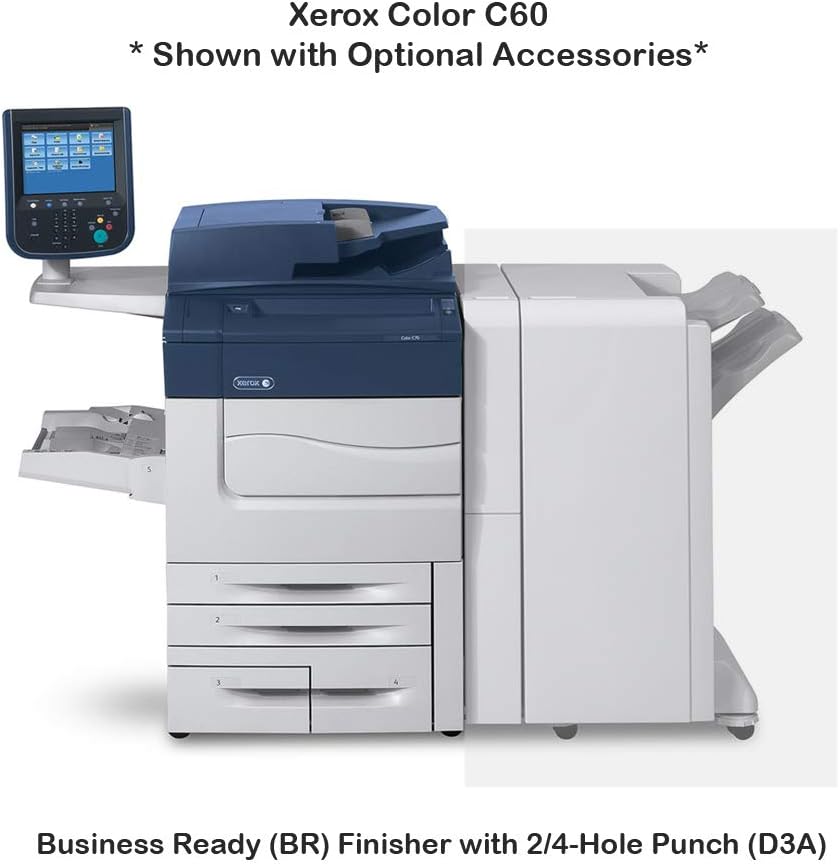
ചിത്രം 2: Xerox Color C60 with optional Business Ready (BR) Finisher with 2/4-Hole Punch (D3A). This image illustrates how the finisher unit integrates with the main printer, providing stapling and hole-punching capabilities.

ചിത്രം 3: Xerox Color C60 with optional One Tray Oversize High Capacity Feeder with Cabinet (XY9) and Booklet Maker Finisher with 2/4-Hole Punch (D4A). This configuration shows additional paper input capacity and advanced finishing options for booklet creation.
The Xerox Color C60 supports various optional accessories, including feeders and finishers, to expand its capabilities. These options can increase paper capacity and provide advanced finishing functions like stapling, hole-punching, and booklet making.
8. വാറൻ്റിയും പിന്തുണയും
8.1 വാറൻ്റി വിവരങ്ങൾ
This Xerox Color C60 unit comes with a 30 ദിവസത്തെ പാർട്സ് വാറന്റി. Please retain your purchase documentation for warranty claims.
8.2 സാങ്കേതിക പിന്തുണ
For technical assistance, driver downloads, or further documentation, please visit the official Xerox support website. For support related to your purchase, contact ABD Office Solutions.