
1. ഉൽപ്പന്നം കഴിഞ്ഞുview
The Guest U-3606 Control Panel is designed for marine applications, providing intuitive control over spotlight and floodlight functions, including direction. This panel is a robust solution for managing your vessel's lighting needs.
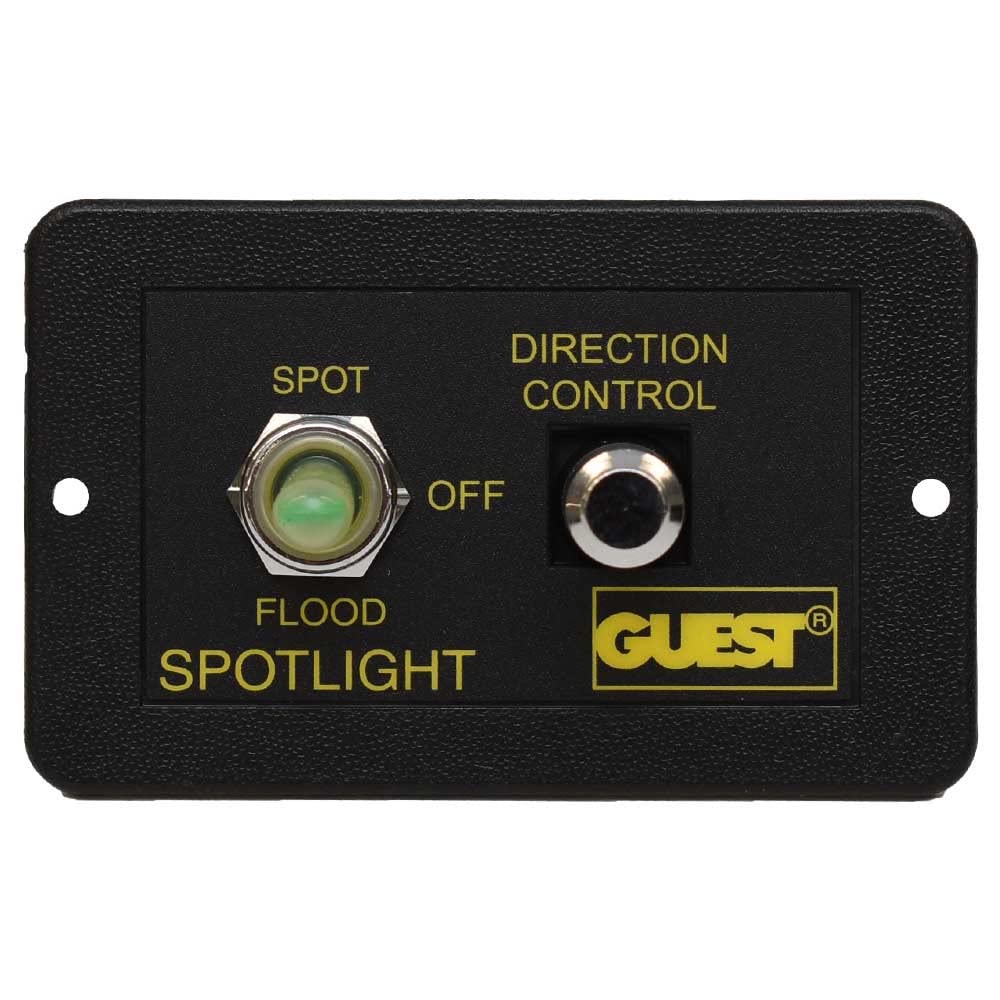
The panel features a three-position toggle switch for selecting between SPOT, OFF, and FLOOD lighting modes, and a separate button for directional control of compatible lights. It comes pre-wired for ease of installation.
2. സജ്ജീകരണവും ഇൻസ്റ്റാളേഷനും
2.1 നിയന്ത്രണ പാനൽ മൌണ്ട് ചെയ്യുന്നു
- ലൊക്കേഷൻ തിരഞ്ഞെടുക്കുക: Choose a flat, secure surface on your vessel for mounting the control panel. Ensure the location allows for easy access and visibility during operation.
- തുറക്കൽ തയ്യാറാക്കുക: Based on the panel dimensions (refer to Figure 3), cut an appropriate opening for flush mounting.
- സുരക്ഷിത പാനൽ: Use the provided mounting screws (refer to Figure 4) to secure the control panel firmly in place.


2.2 വയറിംഗ് കണക്ഷനുകൾ
The control panel comes with a pre-wired harness. Refer to the wiring diagram (if available in your product packaging) and the following general guidelines for connection:

- പവർ ഇൻപുട്ട്: Connect the main power wires (typically red for positive, black for negative) to a fused 12V DC power source. Ensure the fuse rating matches the requirements of your spotlight/floodlight system.
- ലൈറ്റ് ഔട്ട്പുട്ട്: Connect the output wires from the panel to your spotlight and floodlight units. Specific wire colors will correspond to SPOT, FLOOD, and common ground connections.
- ദിശാ നിയന്ത്രണം: Connect the directional control wires to the corresponding inputs on your compatible directional spotlight.
- സുരക്ഷിത കണക്ഷനുകൾ: Ensure all connections are tight, insulated, and protected from moisture to prevent corrosion and electrical shorts.
3. പ്രവർത്തന നിർദ്ദേശങ്ങൾ
The Guest U-3606 Control Panel offers straightforward operation for your marine lighting.
3.1 Spotlight/Floodlight Selection
- സ്പോട്ട് മോഡ്: Flip the left toggle switch to the 'SPOT' position to activate the spotlight function.
- ഓഫ് മോഡ്: Flip the left toggle switch to the 'OFF' (center) position to turn off all lighting.
- FLOOD Mode: Flip the left toggle switch to the 'FLOOD' position to activate the floodlight function.
3.2 ദിശ നിയന്ത്രണം
- Activate Directional Control: While in SPOT or FLOOD mode, use the 'DIRECTION CONTROL' button (right side of the panel) to adjust the direction of your compatible spotlight.
- പ്രസ്ഥാനം: Press and hold the button to move the light. Release to stop. The specific movement (e.g., up/down, left/right) depends on the connected spotlight's capabilities and wiring.
4. പരിപാലനം
പതിവ് അറ്റകുറ്റപ്പണികൾ നിങ്ങളുടെ നിയന്ത്രണ പാനലിന്റെ ദീർഘായുസ്സും വിശ്വസനീയമായ പ്രവർത്തനവും ഉറപ്പാക്കുന്നു.
- വൃത്തിയാക്കൽ: Periodically wipe the control panel surface with a soft, damp cloth to remove salt spray, dirt, and grime. Avoid abrasive cleaners or solvents.
- കണക്ഷൻ പരിശോധന: Annually inspect all wiring connections for corrosion, looseness, or damage. Tighten any loose connections and replace corroded terminals.
- ഈർപ്പം സംരക്ഷണം: Ensure the panel remains sealed and protected from excessive moisture ingress, especially in harsh marine environments.
5. പ്രശ്നപരിഹാരം
If you encounter issues with your Guest U-3606 Control Panel, refer to the following common problems and solutions:
- പാനലിലേക്ക് വൈദ്യുതിയില്ല:
- Check the main power supply to the panel.
- Verify the fuse in the power circuit is intact and not blown.
- Inspect all power connections for looseness or corrosion.
- Lights Not Activating:
- Ensure the correct mode (SPOT or FLOOD) is selected on the toggle switch.
- Check the wiring connections from the panel to the light fixtures.
- Verify the light bulbs or LEDs themselves are functional.
- Direction Control Not Responding:
- Confirm the light is in an active mode (SPOT or FLOOD).
- Check the wiring connections for the directional control to the spotlight.
- Ensure your spotlight is compatible with external directional control and is functioning correctly.
If problems persist, consult a qualified marine electrician or contact Guest customer support.
6 സ്പെസിഫിക്കേഷനുകൾ
| ഫീച്ചർ | സ്പെസിഫിക്കേഷൻ |
|---|---|
| ബ്രാൻഡ് | അതിഥി |
| മോഡൽ നമ്പർ | U-3606 |
| അനുയോജ്യമായ മോഡലുകൾ | 298-57, 503-1 |
| ഭാരം | 0.44 പൗണ്ട് (ഏകദേശം 140.61 ഗ്രാം) |
| കഷണങ്ങളുടെ എണ്ണം | 1 (Control Panel) |
| പാക്കേജ് അളവുകൾ | 15.24 x 11.68 x 6.6 സെ.മീ |
| ആദ്യ തീയതി ലഭ്യമാണ് | 24 ഫെബ്രുവരി 2021 |
7. വാറൻ്റിയും പിന്തുണയും
For warranty information and technical support, please refer to the documentation included with your original purchase or visit the official Guest Marine webസൈറ്റ്. വാറന്റി ക്ലെയിമുകൾക്കായി നിങ്ങളുടെ വാങ്ങലിന്റെ തെളിവ് സൂക്ഷിക്കുക.
If you require further assistance, please contact Guest customer service directly. Contact details are typically available on the manufacturer's webസൈറ്റ് അല്ലെങ്കിൽ ഉൽപ്പന്ന പാക്കേജിംഗ്.