
RF Explorer Digital Handheld Spectrum Analyzer
Model: WSUB1G (240 - 960 MHz)
ഉപയോക്തൃ നിർദ്ദേശ മാനുവൽ
1. ആമുഖം
The RF Explorer WSUB1G is a compact, lightweight, and highly integrated digital handheld spectrum analyzer designed for working with popular sub-1GHz ISM bands. It provides essential functionality for analyzing radio frequency environments, making it suitable for both outdoor and indoor applications. This device offers various spectrum analysis modes and can be connected to a PC for enhanced functionality.
2. പാക്കേജ് ഉള്ളടക്കം
താഴെ കൊടുത്തിരിക്കുന്ന എല്ലാ ഇനങ്ങളും നിങ്ങളുടെ പാക്കേജിൽ ഉണ്ടെന്ന് ഉറപ്പാക്കുക:
- RF Explorer model WSUB1G unit
- Nagoya NA-773 wideband telescopic antenna
3. സജ്ജീകരണം
3.1. പ്രാരംഭ ചാർജിംഗ്
The RF Explorer WSUB1G is equipped with a high-capacity Lithium-Ion battery, providing over 16 hours of continuous operation. Before first use, or if the battery is depleted, charge the device using a standard mini-USB 2.0 cable (not included). Connect the mini-USB end to the device and the other end to a compatible USB power source.
3.2. ആന്റിന അറ്റാച്ച്മെന്റ്
To begin using the spectrum analyzer, attach the provided Nagoya NA-773 wideband telescopic antenna to the RF 50Ω connector on the device. Ensure the connection is secure but do not overtighten.

ചിത്രം: പിൻഭാഗം view of the RF Explorer showing the RF 50Ω antenna connector and the mini-USB port.

Image: RF Explorer with the telescopic antenna fully extended and attached to the device.
3.3. പവർ ഓൺ/ഓഫ്
Locate the ON/OFF switch on the top right side of the device. Slide the switch to the 'ON' position to power on the unit. Slide it to 'OFF' to power down.
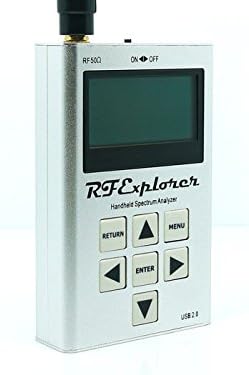
ചിത്രം: മുൻഭാഗം view of the RF Explorer, highlighting the display, control buttons, and the ON/OFF switch at the top right.
4. പ്രവർത്തന നിർദ്ദേശങ്ങൾ
4.1. അടിസ്ഥാന നാവിഗേഷൻ
The RF Explorer features a simple button interface for navigation and control:
- മെനു: Access the main menu and settings.
- നൽകുക: Confirm selections or enter sub-menus.
- മടക്കം: മുമ്പത്തെ സ്ക്രീനിലേക്കോ മെനുവിലേക്കോ മടങ്ങുക.
- അമ്പടയാള ബട്ടണുകൾ (മുകളിലേക്ക്, താഴേക്ക്, ഇടത്, വലത്): Navigate through menu options and adjust parameters.

Image: Front panel of the RF Explorer, clearly showing the display and the arrangement of the MENU, RETURN, ENTER, and arrow buttons.
4.2. Spectrum Analyzer Modes
The device supports several spectrum analyzer modes to suit different analysis needs:
- Peak Max and Hold: Displays the maximum signal strength detected over time.
- സാധാരണ: Provides real-time spectrum analysis.
- തിരുത്തിയെഴുതുക: Continuously updates the display with new sweep data.
- ശരാശരി: Smooths out the signal display by averaging multiple sweeps.
These modes can be selected via the device's menu system.
4.3. Frequency Range and Span
The RF Explorer WSUB1G covers a wide frequency range from 240 MHz to 960 MHz. This includes popular ISM bands such as 315MHz, 433MHz, 868MHz, and 915MHz, as well as UHF TV, 70cm and 33cm HAM radio, and GSM frequencies.
The frequency span can be adjusted from 112 KHz up to 100 MHz, allowing for detailed analysis of specific frequency segments or broader overviews.
4.4. PC Client Software
For advanced analysis, data logging, and visualization, the RF Explorer can be connected to a Windows PC using a standard mini-USB 2.0 cable. The open-source PC client software provides additional functionality beyond the device's built-in display. Refer to the official RF Explorer website for software downloads and detailed instructions on its use.
5. പരിപാലനം
5.1. ഫേംവെയർ അപ്ഗ്രേഡുകൾ
Lifetime free firmware upgrades are available for the RF Explorer WSUB1G. Regularly check the official RF Explorer website for the latest firmware versions. Firmware updates often include new features, performance improvements, and bug fixes. Instructions for performing firmware upgrades are typically provided with the firmware download.
5.2. ബാറ്ററി പരിചരണം
ബാറ്ററി ലൈഫും പ്രകടനവും പരമാവധിയാക്കാൻ:
- ബാറ്ററി ഇടയ്ക്കിടെ പൂർണ്ണമായും ഡിസ്ചാർജ് ചെയ്യുന്നത് ഒഴിവാക്കുക.
- ദീർഘനേരം ഉപയോഗിക്കാത്തപ്പോൾ ഉപകരണം തണുത്തതും വരണ്ടതുമായ സ്ഥലത്ത് സൂക്ഷിക്കുക.
- ബാറ്ററി ദീർഘനേരം സൂക്ഷിച്ചിട്ടുണ്ടെങ്കിൽ, ആഴത്തിലുള്ള ഡിസ്ചാർജ് തടയാൻ ഇടയ്ക്കിടെ റീചാർജ് ചെയ്യുക.
6. പ്രശ്നപരിഹാരം
6.1. ഉപകരണം ഓണാക്കുന്നില്ല
- ഓൺ/ഓഫ് സ്വിച്ച് 'ഓൺ' സ്ഥാനത്താണെന്ന് ഉറപ്പാക്കുക.
- Connect the device to a USB power source using a mini-USB cable to check if the battery requires charging.
6.2. No Signal Detected / Incorrect Readings
- Verify that the antenna is securely attached to the RF 50Ω connector.
- Ensure the selected frequency range and span are appropriate for the signals you intend to analyze.
- Check for potential external interference sources if readings appear erratic.
6.3. PC Client Connectivity Issues
- Confirm that the mini-USB cable is properly connected to both the RF Explorer and the PC.
- Ensure the necessary drivers for the RF Explorer are installed on your Windows PC. These are typically available on the official RF Explorer webസൈറ്റ്.
- Try a different mini-USB cable, as some cables may be for charging only and lack data transfer capabilities.
7 സാങ്കേതിക സവിശേഷതകൾ
| ഫീച്ചർ | സ്പെസിഫിക്കേഷൻ |
|---|---|
| ഫ്രീക്വൻസി ബാൻഡ് | 240 - 960 മെഗാഹെട്സ് |
| ഫ്രീക്വൻസി സ്പാൻ | 112 KHz - 100 MHz |
| Ampലിറ്റ്യൂഡ് റെസല്യൂഷൻ | 0.5 ഡിബിഎം |
| ഡൈനാമിക് റേഞ്ച് | -115 dBm മുതൽ 0 dBm വരെ |
| Absolute Max Input Power | +5 dBm |
| Average Noise Level (typical) | -110 ഡിബിഎം |
| Frequency Stability and Accuracy (typical) | ± 10 ppm |
| Amplitude Stability and Accuracy (typical) | ±3 dBm |
| ഫ്രീക്വൻസി റെസല്യൂഷൻ | 1 KHz |
| Resolution Bandwidth (RBW) | Automatic 2.6 KHz to 600 KHz |
| അളവുകൾ (LxWxH) | 6.7 x 4.5 x 1.2 ഇഞ്ച് (170 x 114 x 30 മിമി) |
| ഭാരം | 9.8 ഔൺസ് (278 ഗ്രാം) |
| ബാറ്ററി | Lithium Ion (16+ hours continuous run) |
| പ്രോസസ്സർ | 1 GHz Tegra (ARM) |
| കണക്റ്റിവിറ്റി | മിനി-യുഎസ്ബി 2.0 |
| കേസ് മെറ്റീരിയൽ | Solid Aluminum Metal |
8. പിന്തുണയും വാറണ്ടിയും
For technical support, additional resources, and the latest firmware updates, please visit the official seeed studio website or the RF Explorer product page. The manufacturer provides lifetime free firmware upgrades to enhance the device's functionality and performance.
Information regarding specific warranty terms and conditions can typically be found on the product packaging or the manufacturer's official webസൈറ്റ്. വാറന്റി ക്ലെയിമുകൾക്കായി നിങ്ങളുടെ വാങ്ങലിന്റെ തെളിവ് സൂക്ഷിക്കുക.