
1. ആമുഖം
വാങ്ങിയതിന് നന്ദി.asing the Forever BS600 Bluetooth Speaker. This portable wireless speaker combines powerful audio with versatile playback options, including Bluetooth, FM radio, USB, and SD card support. It also features a built-in microphone for hands-free calling. Please read this manual carefully to ensure proper use and maintenance of your device.
ഉൾപ്പെടുത്തിയ ഘടകങ്ങൾ:
- Forever BS600 Bluetooth Speaker
- 3.5 എംഎം ജാക്ക് കേബിൾ
- യുഎസ്ബി ചാർജിംഗ് കേബിൾ
- Lithium Battery (pre-installed)

Image 1.1: Forever BS600 speaker with its accompanying 3.5mm audio cable and USB charging cable.
2 സുരക്ഷാ വിവരങ്ങൾ
To ensure safe and optimal operation, please observe the following precautions:
- ഉപകരണത്തെ തീവ്രമായ താപനിലയിലോ, നേരിട്ടുള്ള സൂര്യപ്രകാശത്തിലോ, ഉയർന്ന ആർദ്രതയിലോ തുറന്നുകാട്ടരുത്.
- സ്പീക്കറെ ശക്തമായ ആഘാതങ്ങൾക്ക് വിധേയമാക്കുകയോ താഴെയിടുകയോ ചെയ്യുന്നത് ഒഴിവാക്കുക.
- ഉപകരണം സ്വയം ഡിസ്അസംബ്ലിംഗ് ചെയ്യുകയോ നന്നാക്കുകയോ പരിഷ്കരിക്കുകയോ ചെയ്യരുത്. എല്ലാ സേവനങ്ങളും യോഗ്യതയുള്ള ഉദ്യോഗസ്ഥരെ ഏൽപ്പിക്കുക.
- Keep the speaker away from water and other liquids. It is not waterproof.
- Use only the provided or approved charging cables.
- Dispose of batteries according to local regulations. Do not expose batteries to excessive heat.
3. ഉൽപ്പന്നം കഴിഞ്ഞുview
സ്പീക്കറിന്റെ നിയന്ത്രണങ്ങളും പോർട്ടുകളും പരിചയപ്പെടുക:
നിയന്ത്രണ ബട്ടണുകൾ:
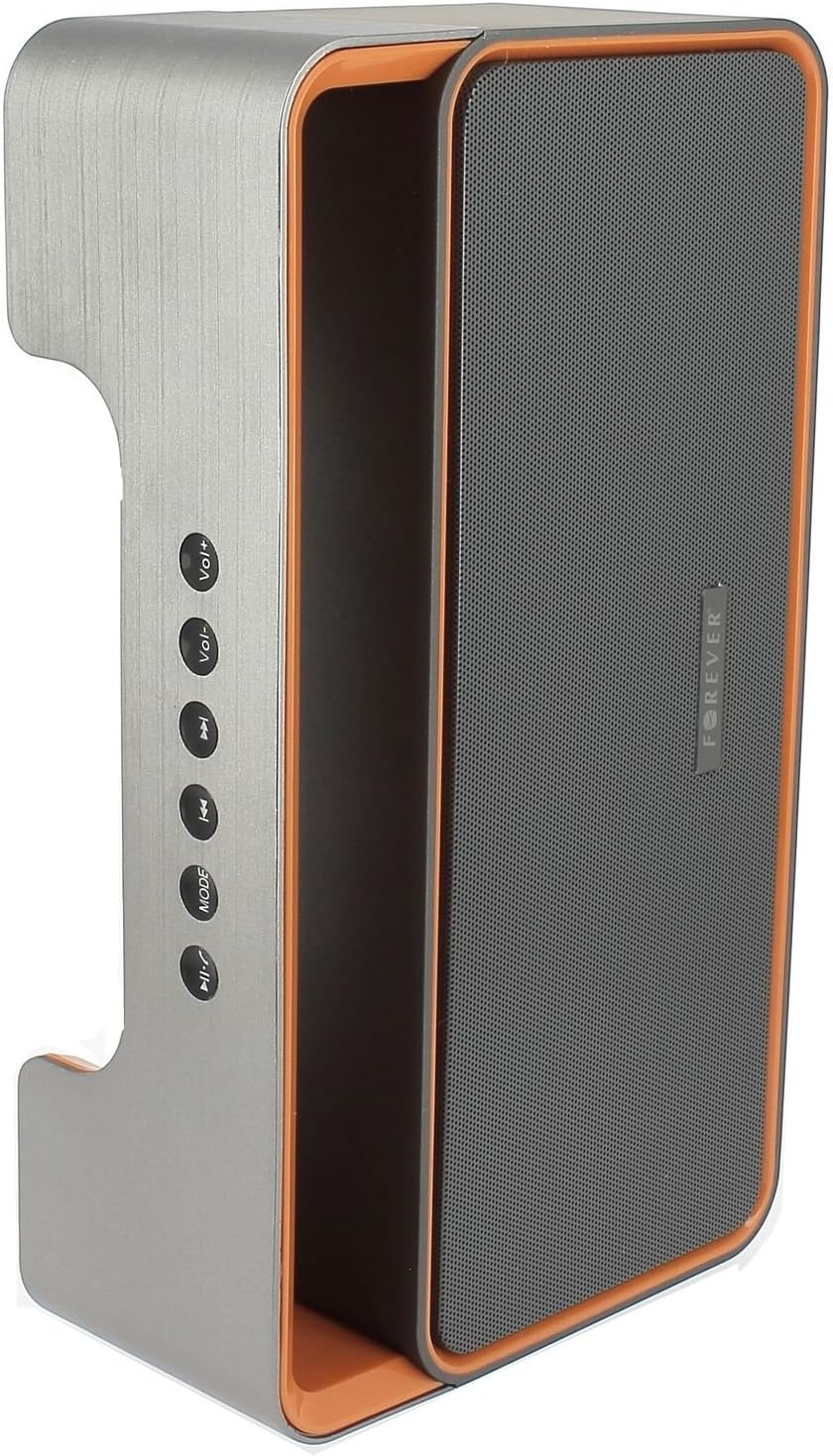
Image 3.1: Side panel with control buttons.
- Vol+ / Vol-: Adjust volume.
- മുമ്പത്തെ ട്രാക്ക് / അടുത്ത ട്രാക്ക്: Navigate between tracks in playback modes or stations in FM mode.
- മോഡ്: Switch between Bluetooth, FM Radio, USB, SD Card, and AUX modes.
- പ്ലേ/താൽക്കാലികമായി നിർത്തുക: Play or pause audio. Answer or end calls.
തുറമുഖങ്ങളും കണക്ടറുകളും:

Image 3.2: Rear panel with ports and power switch.
- AUX ഇൻപുട്ട്: For connecting external audio devices via 3.5mm cable.
- മൈക്രോ എസ്ഡി കാർഡ് സ്ലോട്ട്: For playing music from a Micro SD card.
- USB പോർട്ട്: For playing music from a USB flash drive.
- മൈക്രോ യുഎസ്ബി ചാർജിംഗ് പോർട്ട്: സ്പീക്കറിന്റെ ആന്തരിക ബാറ്ററി ചാർജ് ചെയ്യുന്നതിന്.
- ഓൺ/ഓഫ് സ്വിച്ച്: To power the speaker on or off.
4. സജ്ജീകരണം
4.1 സ്പീക്കർ ചാർജ് ചെയ്യുന്നു
- Connect the small end of the USB charging cable to the Micro USB port on the back of the speaker.
- USB കേബിളിന്റെ വലിയ അറ്റം ഒരു USB പവർ അഡാപ്റ്ററുമായി (ഉൾപ്പെടുത്തിയിട്ടില്ല) അല്ലെങ്കിൽ ഒരു കമ്പ്യൂട്ടറിന്റെ USB പോർട്ടുമായി ബന്ധിപ്പിക്കുക.
- സ്പീക്കർ ചാർജ് ചെയ്യുന്നുണ്ടെന്ന് കാണിക്കാൻ ചാർജിംഗ് ഇൻഡിക്കേറ്റർ ലൈറ്റ് പ്രകാശിക്കും (നിറം വ്യത്യാസപ്പെടാം).
- പൂർണ്ണമായി ചാർജ് ചെയ്തുകഴിഞ്ഞാൽ, ഇൻഡിക്കേറ്റർ ലൈറ്റ് മാറുകയോ ഓഫാകുകയോ ചെയ്യും. ചാർജിംഗ് കേബിൾ വിച്ഛേദിക്കുക.
Note: For first-time use, fully charge the speaker for approximately 3-4 hours.
4.2 പവർ ഓൺ/ഓഫ്
- To power on, slide the ON/OFF switch on the rear panel to the 'ON' position. You will hear an audible prompt.
- പവർ ഓഫ് ചെയ്യാൻ, ഓൺ/ഓഫ് സ്വിച്ച് 'ഓഫ്' സ്ഥാനത്തേക്ക് സ്ലൈഡ് ചെയ്യുക.
5. പ്രവർത്തന നിർദ്ദേശങ്ങൾ
5.1 മോഡ് തിരഞ്ഞെടുക്കൽ
അമർത്തുക മോഡ് button repeatedly to cycle through the available modes: Bluetooth, FM Radio, USB, SD Card, and AUX.
5.2 ബ്ലൂടൂത്ത് ജോടിയാക്കൽ
- Power on the speaker. It will automatically enter Bluetooth pairing mode, indicated by a flashing LED light and an audible prompt.
- നിങ്ങളുടെ മൊബൈൽ ഉപകരണത്തിൽ (സ്മാർട്ട്ഫോൺ, ടാബ്ലെറ്റ്, കമ്പ്യൂട്ടർ) ബ്ലൂടൂത്ത് പ്രവർത്തനക്ഷമമാക്കുക.
- ഇതിനായി തിരയുക available Bluetooth devices. You should find "BS600" in the list.
- Select "BS600" to connect. Once paired, the LED light will stop flashing, and you will hear a confirmation sound.
- ഇപ്പോൾ നിങ്ങളുടെ ഉപകരണത്തിൽ നിന്ന് സ്പീക്കറിലൂടെ ഓഡിയോ പ്ലേ ചെയ്യാൻ കഴിയും.
5.3 എഫ്എം റേഡിയോ മോഡ്
- Switch the speaker to FM Radio mode using the മോഡ് ബട്ടൺ.
- അമർത്തിപ്പിടിക്കുക പ്ലേ/താൽക്കാലികമായി നിർത്തുക button to initiate an automatic scan for FM stations. The speaker will save all found stations.
- ഉപയോഗിക്കുക മുമ്പത്തെ ട്രാക്ക് ഒപ്പം അടുത്ത ട്രാക്ക് സംരക്ഷിച്ച സ്റ്റേഷനുകൾക്കിടയിൽ നാവിഗേറ്റ് ചെയ്യാനുള്ള ബട്ടണുകൾ.
5.4 യുഎസ്ബി/എസ്ഡി കാർഡ് പ്ലേബാക്ക്
- ഒരു യുഎസ്ബി ഫ്ലാഷ് ഡ്രൈവ് അല്ലെങ്കിൽ ഒരു മൈക്രോ എസ്ഡി കാർഡ് (MP3 ഓഡിയോ ഉള്ള) ഇടുക files) into the corresponding port on the rear panel.
- The speaker will automatically switch to USB or SD card mode and begin playing music. If not, press the മോഡ് ശരിയായ മോഡ് തിരഞ്ഞെടുക്കാൻ ബട്ടൺ.
- ഉപയോഗിക്കുക മുമ്പത്തെ ട്രാക്ക്, അടുത്ത ട്രാക്ക്, ഒപ്പം പ്ലേ/താൽക്കാലികമായി നിർത്തുക പ്ലേബാക്ക് നിയന്ത്രിക്കുന്നതിനുള്ള ബട്ടണുകൾ.
5.5 AUX മോഡ്
- Connect one end of the 3.5mm audio cable to the AUX input port on the speaker.
- Connect the other end of the cable to the headphone jack of your external audio device.
- ഉപയോഗിച്ച് സ്പീക്കർ AUX മോഡിലേക്ക് മാറ്റുക മോഡ് ബട്ടൺ.
- നിങ്ങളുടെ ബാഹ്യ ഓഡിയോ ഉപകരണത്തിൽ നിന്ന് പ്ലേബാക്ക് നിയന്ത്രിക്കുക.
5.6 Call Handling (Bluetooth Mode)
- കോളിന് ഉത്തരം നൽകുക: When a call comes in during Bluetooth mode, press the പ്ലേ/താൽക്കാലികമായി നിർത്തുക button once to answer.
- കോൾ അവസാനിപ്പിക്കുക: During a call, press the പ്ലേ/താൽക്കാലികമായി നിർത്തുക button once to end the call.
- കോൾ നിരസിക്കുക: When a call comes in, press and hold the പ്ലേ/താൽക്കാലികമായി നിർത്തുക കോൾ നിരസിക്കാനുള്ള ബട്ടൺ.
5.7 വോളിയം നിയന്ത്രണം
അമർത്തുക വാല്യം+ വോളിയം വർദ്ധിപ്പിക്കുന്നതിനുള്ള ബട്ടൺ കൂടാതെ വോളിയം- ശബ്ദം കുറയ്ക്കുന്നതിനുള്ള ബട്ടൺ.
6. പരിപാലനം
6.1 വൃത്തിയാക്കൽ
- വൃത്തിയാക്കുന്നതിന് മുമ്പ് സ്പീക്കർ ഓഫ് ചെയ്തിട്ടുണ്ടെന്നും ഏതെങ്കിലും പവർ സ്രോതസ്സിൽ നിന്ന് വിച്ഛേദിക്കപ്പെട്ടിട്ടുണ്ടെന്നും ഉറപ്പാക്കുക.
- Use a soft, dry, lint-free cloth to wipe the exterior surfaces of the speaker.
- അബ്രാസീവ് ക്ലീനറുകളോ, ലായകങ്ങളോ, കെമിക്കൽ സ്പ്രേകളോ ഉപയോഗിക്കരുത്, കാരണം ഇവ ഫിനിഷിനോ ആന്തരിക ഘടകങ്ങൾക്കോ കേടുവരുത്തും.
6.2 സംഭരണം
- ദീർഘനേരം ഉപയോഗിക്കാത്തപ്പോൾ, സ്പീക്കർ തണുത്തതും വരണ്ടതുമായ സ്ഥലത്ത് സൂക്ഷിക്കുക, നേരിട്ടുള്ള സൂര്യപ്രകാശത്തിൽ നിന്നും കടുത്ത താപനിലയിൽ നിന്നും അകറ്റി നിർത്തുക.
- It is recommended to charge the battery at least once every three months to maintain its lifespan.
7. പ്രശ്നപരിഹാരം
| പ്രശ്നം | സാധ്യമായ കാരണം | പരിഹാരം |
|---|---|---|
| സ്പീക്കർ പവർ ഓൺ ചെയ്യുന്നില്ല. | ബാറ്ററി തീർന്നു. | യുഎസ്ബി കേബിൾ ഉപയോഗിച്ച് സ്പീക്കർ ചാർജ് ചെയ്യുക. |
| ശബ്ദമില്ല. | Volume is too low; incorrect mode selected; device not connected. | Increase volume; press MODE button to select correct source; ensure Bluetooth/AUX connection is active. |
| ബ്ലൂടൂത്ത് ജോടിയാക്കൽ പരാജയപ്പെട്ടു. | Speaker not in pairing mode; device too far; Bluetooth not enabled on source. | Ensure speaker is in Bluetooth mode and flashing; move device closer; enable Bluetooth on your device. |
| മോശം എഫ്എം റേഡിയോ സ്വീകരണം. | ദുർബലമായ സിഗ്നൽ; പരിസ്ഥിതി ഇടപെടൽ. | മികച്ച സ്വീകരണമുള്ള ഒരു സ്ഥലത്തേക്ക് സ്പീക്കർ മാറ്റിസ്ഥാപിക്കുക. |
| USB/SD കാർഡ് പ്ലേ ചെയ്യുന്നില്ല. | തെറ്റാണ് file ഫോർമാറ്റ്; കാർഡ്/ഡ്രൈവ് ശരിയായി ചേർത്തിട്ടില്ല; കേടായ മീഡിയ. | ഉറപ്പാക്കുക files are MP3 format; reinsert media; try a different USB drive/SD card. |
8 സ്പെസിഫിക്കേഷനുകൾ
| മോഡലിൻ്റെ പേര് | BS600 |
| ബ്രാൻഡ് | എന്നേക്കും |
| കണക്റ്റിവിറ്റി ടെക്നോളജി | ബ്ലൂടൂത്ത്, ഓക്സിലറി, യുഎസ്ബി |
| സ്പീക്കർ തരം | പോർട്ടബിൾ ബ്ലൂടൂത്ത് സ്പീക്കർ |
| പ്രത്യേക സവിശേഷതകൾ | FM Radio, USB Reader, SD Card Reader |
| പരമാവധി ഔട്ട്പുട്ട് പവർ | 10 വാട്ട്സ് (2 x 5W) |
| ഓഡിയോ put ട്ട്പുട്ട് മോഡ് | മോണോ |
| പവർ ഉറവിടം | ബാറ്ററി പവർ (ലിഥിയം-അയൺ) |
| നിയന്ത്രണ രീതി | ടാക്റ്റൈൽ ബട്ടണുകൾ |
| അളവുകൾ (ഏകദേശം) | Height: 13 cm, Width: 24 cm |
| നിറം | Grey / Orange |
| വാട്ടർപ്രൂഫ് | ഇല്ല |
9. വാറൻ്റി വിവരങ്ങൾ
The Forever BS600 Bluetooth Speaker comes with a limited warranty. Please refer to the warranty card included with your purchase or contact your retailer for specific terms and conditions. This warranty typically covers manufacturing defects but does not cover damage caused by misuse, accidents, unauthorized modifications, or normal wear and tear.
10. പിന്തുണ
If you encounter any issues not covered in the troubleshooting section or require further assistance, please contact the retailer where you purchased the product or visit the official Forever website for support resources. Please have your product model (BS600) and purchase details ready when seeking support.